desktop apps
12 Topics
personal account authentication in Azure Active directory
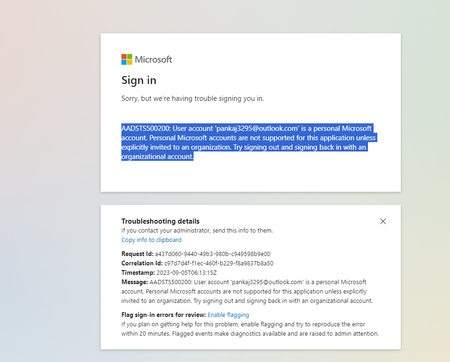
AADSTS500200: User account 'email address removed for privacy reasons' is a personal Microsoft account. Personal Microsoft accounts are not supported for this application unless explicitly invited to an organization. Try signing out and signing back in with an organizational account. i checked the signInAudience: "AzureADandPersonalMicrosoftAccount" in manifest but it also give the same error2.5KViews0likes3CommentsUsing Claude Opus 4.6 in Github Copilot
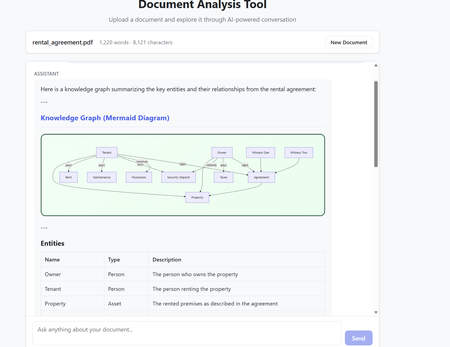
The model selection in Github Copilot got richer with the addition of Claude Opus 4.6. The Model capability along with the addition of agents makes it a powerful combination to build complex code which requires many hours or days. Claude Opus 4.6 is better in coding skills as compared to the previous models. It also plans more carefully, performs more reliably in larger codebases, and has better code review as well as debugging skills to catch its own mistakes. In my current experiment, I used it multiple times to review its own code and while it took time (understandably) to get familiar with the code base. After that initial effort on the evaluation, the suggestions for fixes/improvements were on dot and often even better than a human reviewer (me in this case). Opus 4.6 also can run agentic tasks for longer. Following the release of the model, Anthropic published a paper on using Opus 4.6 to build C Compiler with a team of parallel Claudes. The compiler was built by 16 agents from scratch to get a Rust-based C compiler which was capable of compiling the Linux kernel. This is an interesting paper (shared in resources). Using Claude Opus 4.6 in Agentic Mode In less than an hour, I built a document analyzer to analyse the content, extract insights, build knowledge graphs and summarize elements. The code was built using Claude Opus 4.6 alongwith Claude Agents in Visual Studio Code. The initial prompt built the code and in the next hour after a few more interactions - unit tests were added and the UI worked as expected specifically for rendering the graphs. In the second phase, I converted the capabilities into Agents with tools and skills making the codebase Agentic. All this was done in Visual Studio using Github Copilot. Adding the complexity of Agentic execution was staggered across phases but the coding agent may well have built it right in the first instance with detailed specifications and instructions. The Agent could also fix UI requirements and problems in graph rendering from the snapshot shared in the chat window. That along with the logging was sufficient to quickly get to an application which worked as expected. The final graph rendering used mermaid diagrams in javascript while the backend was in python. Knowledge Graph rendering using mermaid What are Agents? Agents perform complete coding tasks end-to-end. They understand your project, make changes across multiple files, run commands, and adapt based on the results. An agent runs in the local, background, cloud, or third-party mode. An agent takes a high-level task and it breaks the task down into steps. It executes those steps with tools and self-corrects on errors. Multiple agent sessions can run in parallel, each focused on a different task. On creating a new agent session, the previous session remains active and can be accessed between tasks via the agent sessions list. The Chat window in Visual Studio Code allows for changing the model and also the Agent Mode. The Agent mode can be local for Local Agents or run in the background or on Cloud. Additionally, Third Party Agents are also available for coding. In the snapshot below, the Claude Agent (Third Party Agent) is used. In this project Azure GPT 4.1 was used in the code to perform the document analysis but this can be changed to any model of choice. I also used the ‘Ask before edits” mode to track the command runs. Alternatively, the other option was to let the Agent run autonomously. Visual Studio Code - Models and Agent Mode The local Agentic mode was also a good option and I used it a few times specifically as it is not constrained by network connectivity. But when the local compute does not suffice, the cloud mode is the next best option. Background agents are CLI-based agents, such as Copilot CLI running in the background on your local machine. They operate autonomously in the editor and Background agents use Git worktrees to work in an isolated environment from your main workspace to prevent conflicts with your active work. How to get the model? The model is accessible to GitHub Copilot Pro/Pro+, business, and enterprise users. Opus 4.6 operates more reliably in large codebases, offering improved code review and debugging skills. The Fast mode for Claude Opus 4.6, rolled out in research preview, provides a high-speed option with output token delivery speeds up to 2.5 times faster while maintaining comparable capabilities to Opus 4.6. Resources https://www.anthropic.com/news/claude-opus-4-6 https://www.anthropic.com/engineering/building-c-compiler https://github.blog/changelog/2026-02-05-claude-opus-4-6-is-now-generally-available-for-github-copilot https://code.visualstudio.com/docs/copilot/agents/overview5.1KViews1like2Comments
Printing from RDP session not working on macOS Sequoia 15.4
Hi, I just wanted to let you know that printing from a Microsoft Remote Desktop Beta session using a redirected printer does not appear to work on macOS Sequoia. The issue has been present since version 15.1.1 and continues in the latest 15.4 update. I’ve tested several versions of Microsoft Remote Desktop Beta, including 10.9.3, 10.7.5, 10.6.8, and others. In all of them, the printer appears inside the RDP session, and the print job briefly enters the queue before disappearing without printing. Additionally, in the new Windows App, as well as in Microsoft Remote Desktop Beta starting with version 10.9.4 (2160), no printers appear at all inside the RDP session — printer redirection seems to be completely absent. For comparison, on a MacBook Pro 13" (2017) running macOS Ventura 13.7.2 with Microsoft Remote Desktop 10.9.10 (2327), everything works as expected. Please let me know if this is a known issue or if a workaround is available.516Views0likes1CommentIt's time to 🍂 #FallForIntelligentApps 🍂
Today, we kick off the Fall season with content and activities to skill you up on all things Intelligent Apps or AI Apps on Azure with content, events, and community interactions. It is time to combine the power of AI, cloud-native application development, and, cloud-scale data to create highly differentiated digital experiences by building and modernizing intelligent applications with Azure for your users. Check out the blog below for some learning resources: https://techcommunity.microsoft.com/t5/apps-on-azure-blog/it-s-time-to-fallforintelligentapps/ba-p/3931266 What new skills or technologies are you focused on learning this fall?539Views1like0CommentsAzure App Service Limits blog series - performance issue tips/tricks?
Have you checked out the recent series of blogs about Azure App Service Limits? Azure App Service Limit (1) - Remote Storage (Windows) Azure App Service Limit (2) - Temp File Usage (Windows) Azure App Service Limit (3) - Connection Limit (TCP Connection, SNAT and TLS Version) Azure App Service Limit (4) - CPU (Windows) Azure App Service Limit (5) - Memory (Windows) What's your favorite tip or trick for resolving performance issues within Azure App Services?567Views1like0CommentsMicrosoft Build 2023
Microsoft Build just wrapped but you can still experience it on demand. The event was packed with sessions covering the latest tools, development principles, strategies, and best practices. Check out some of the sessions from the event to help you get started. Find out how to modernize your apps with cloud services, explore ways to add AI into your apps and your dev workflow, learn about new tools, and more. https://techcommunity.microsoft.com/t5/apps-on-azure-blog/explore-sessions-from-microsoft-build-2023/ba-p/3741549 What was your favorite Build session? What are you looking to learn about currently?994Views0likes0Comments5G Modern Connected Apps
Get answers to your questions about 5G, Private MEC, and Modern Connected Applications. We will have a diverse group of product experts, business specialists, and engineers available to cover topics related to private 5G networks and edge computing. They will be standing by in these -- chats -- to offer guidance, discuss strategies and tactics, and answer any specific questions you may have. Upcoming office hours: March 23, 2023 - 9am Pacific April 13, 2023 - 9am Pacific May 4, 2023 - 9am Pacific How to join: Go to https://aka.ms/5gOfficeHours during office hour to join us live. No registration required. What applications are you building that require 5G, and how have you incorporated it?691Views0likes0CommentsOpenAI + Power Platform
Over the past few weeks, social-media feeds and newsletters have been filled with stories and conversations about artificial intelligence (AI). ChatGPT and OpenAI were often center of these conversations. Take a look at an exciting OpenAI and Power Platform scenario, discussing how developers can leverage OpenAI's APIs to build next-gen application using Microsoft Power Apps. This scenario uses DALL·E 2 (a new AI system model) to create realistic images and art from a text description in natural language. https://techcommunity.microsoft.com/t5/apps-on-azure-blog/build-next-gen-apps-with-openai-and-microsoft-power-platform/ba-p/3742289 Have you incorporated OpenAI into your apps? What are some of your use cases or planned future scenarios?1.5KViews0likes0Comments
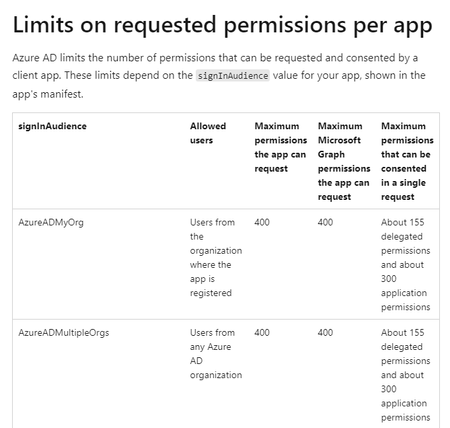
How to increase the limits of permissions requested per application - Azure AD signInAudience
I am currently developing an app that allows different operations with Microsoft SharePoint, I am using Microsoft Graph and I have registered the App in Azure AD, and it works fine. But my wish is that the App is public and thousands of people can use it, using their Microsoft account. But reading the documentation of Microsoft Graph I find an article that says that it has Limits of permissions requested by application. The limit indicated by the documentation is a maximum of 400 for a signInAudience= AzureADMultipleOrgs but I want and aspire to have more users, perhaps thousands of users. What do you recommend I do in this case? I want thousands of users to access the app with their Microsoft account and be able to do different activities. In the app when a user logs in, the app requests permission to access API Graph and performs the desired query, this process has to do with "Limits on requested permissions per app"??? For more information https://docs.microsoft.com/en-us/graph/permissions-reference816Views0likes0Comments
best-practise to secure a spring boot ressource api with aad?
What ist the best-practise to secure a spring boot ressource api with aad? I would like to implement it with spring-boot-starter-webflux for a reactive api. It seems like there are two possible ways. Can webflux be used with any of the two aproaches? 1. Using azure spring cloud dependencies: You could install the Maven dependency: <dependency> <groupId>com.azure.spring</groupId> <artifactId>spring-cloud-azure-starter-active-directory</artifactId> <version>4.1.0</version> </dependency> <dependency> <groupId>org.springframework.boot</groupId> <artifactId>spring-boot-starter-oauth2-resource-server</artifactId> </dependency> <dependency> <groupId>org.springframework.boot</groupId> <artifactId>spring-boot-starter-web</artifactId> <exclusions> <exclusion> <groupId>org.springframework.boot</groupId> <artifactId>spring-boot-starter-tomcat</artifactId> </exclusion> </exclusions> </dependency> And configure the properties like: spring: cloud: azure: active-directory: app-id-uri: api://<client_id> credential: client-id: <client_id> enabled: true Then you just need to setup the WebSecurityAdapter and everything just works: @EnableWebSecurity @EnableGlobalMethodSecurity(prePostEnabled = true) public class WebSecurityConfig extends AadResourceServerWebSecurityConfigurerAdapter { @Override protected void configure(HttpSecurity http) throws Exception { super.configure(http); http.cors().and() .csrf().disable().authorizeRequests() .and() .authorizeRequests().antMatchers( "/actuator/health/**" ).permitAll() .anyRequest().authenticated(); } } 2. Do it the Spring way This repository "https://github.com/Azure-Samples/azure-spring-boot-samples/tree/spring-cloud-azure_v4.2.0/aad/spring-security/servlet/oauth2/client-access-resource-server/resource-server" seems to just use the Spring Security properties like: spring: security: oauth2: resourceserver: jwt: jwk-set-uri: https://login.microsoftonline.com/${TENANT_ID}/discovery/v2.0/keys issuer-uri: https://login.microsoftonline.com/${TENANT_ID}/v2.0 audience: ${RESOURCE_SERVER_1_CLIENT_ID}2.1KViews0likes1Comment