azure functions
43 Topics
Azure App Service secure hostname
Hey Everyone, I see a new change in app service deployment related to the secure hostname. Is it now mandatory to have a secure hostname, because I don't see the option to toggle between the secure hostname and just the format for appservicename.azurewebsites.net ? I wasn't able to find any update notification to verify this change.1.3KViews0likes5Comments
Help wanted: Refresh articles in Azure Architecture Center (AAC)
I’m the Project Manager for architecture review boards (ARBs) in the Azure Architecture Center (AAC). We’re looking for subject matter experts to help us improve the freshness of the AAC, Cloud Adoption Framework (CAF), and Well-Architected Framework (WAF) repos. This opportunity is currently limited to Microsoft employees only. As an ARB member, your main focus is to review, update, and maintain content to meet quarterly freshness targets. Your involvement directly impacts the quality, relevance, and direction of Azure Patterns & Practices content across AAC, CAF, and WAF. The content in these repos reaches almost 900,000 unique readers per month, so your time investment has a big, global impact. The expected commitment is 4-6 hours per month, including attendance at weekly or bi-weekly sync meetings. Become an ARB member to gain: Increased visibility and credibility as a subject‑matter expert by contributing to Microsoft‑authored guidance used by customers and partners worldwide. Broader internal reach and networking without changing roles or teams. Attribution on Microsoft Learn articles that you own. Opportunity to take on expanded roles over time (for example, owning a set of articles, mentoring contributors, or helping shape ARB direction). We’re recruiting new members across several ARBs. Our highest needs are in the Web ARB, Containers ARB, and Data & Analytics ARB: The Web ARB focuses on modern web application architecture on Azure—App Service and PaaS web apps, APIs and API Management, ingress and networking (Application Gateway, Front Door, DNS), security and identity, and designing for reliability, scalability, and disaster recovery. The Containers ARB focuses on containerized and Kubernetes‑based architectures—AKS design and operations, networking and ingress, security and identity, scalability, and reliability for production container platforms. The Data & Analytics ARB focuses on data platform and analytics architectures—data ingestion and integration, analytics and reporting, streaming and real‑time scenarios, data security and governance, and designing scalable, reliable data solutions on Azure. We’re also looking for people to take ownership of other articles across AAC, CAF, and WAF. These articles span many areas, including application and solution architectures, containers and compute, networking and security, governance and observability, data and integration, and reliability and operational best practices. You don’t need to know everything—deep expertise in one or two areas and an interest in keeping Azure architecture guidance accurate and current is what matters most. Please reply to this post if you’re interested in becoming an ARB member, and I’ll follow up with next steps. If you prefer, you can email me at v-jodimartis@microsoft.com. Thanks! 🙂146Views0likes0Comments
Using Claude Opus 4.6 in Github Copilot
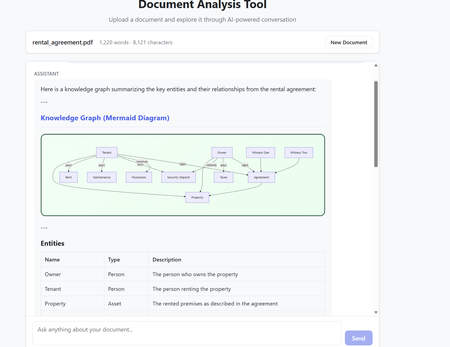
The model selection in Github Copilot got richer with the addition of Claude Opus 4.6. The Model capability along with the addition of agents makes it a powerful combination to build complex code which requires many hours or days. Claude Opus 4.6 is better in coding skills as compared to the previous models. It also plans more carefully, performs more reliably in larger codebases, and has better code review as well as debugging skills to catch its own mistakes. In my current experiment, I used it multiple times to review its own code and while it took time (understandably) to get familiar with the code base. After that initial effort on the evaluation, the suggestions for fixes/improvements were on dot and often even better than a human reviewer (me in this case). Opus 4.6 also can run agentic tasks for longer. Following the release of the model, Anthropic published a paper on using Opus 4.6 to build C Compiler with a team of parallel Claudes. The compiler was built by 16 agents from scratch to get a Rust-based C compiler which was capable of compiling the Linux kernel. This is an interesting paper (shared in resources). Using Claude Opus 4.6 in Agentic Mode In less than an hour, I built a document analyzer to analyse the content, extract insights, build knowledge graphs and summarize elements. The code was built using Claude Opus 4.6 alongwith Claude Agents in Visual Studio Code. The initial prompt built the code and in the next hour after a few more interactions - unit tests were added and the UI worked as expected specifically for rendering the graphs. In the second phase, I converted the capabilities into Agents with tools and skills making the codebase Agentic. All this was done in Visual Studio using Github Copilot. Adding the complexity of Agentic execution was staggered across phases but the coding agent may well have built it right in the first instance with detailed specifications and instructions. The Agent could also fix UI requirements and problems in graph rendering from the snapshot shared in the chat window. That along with the logging was sufficient to quickly get to an application which worked as expected. The final graph rendering used mermaid diagrams in javascript while the backend was in python. Knowledge Graph rendering using mermaid What are Agents? Agents perform complete coding tasks end-to-end. They understand your project, make changes across multiple files, run commands, and adapt based on the results. An agent runs in the local, background, cloud, or third-party mode. An agent takes a high-level task and it breaks the task down into steps. It executes those steps with tools and self-corrects on errors. Multiple agent sessions can run in parallel, each focused on a different task. On creating a new agent session, the previous session remains active and can be accessed between tasks via the agent sessions list. The Chat window in Visual Studio Code allows for changing the model and also the Agent Mode. The Agent mode can be local for Local Agents or run in the background or on Cloud. Additionally, Third Party Agents are also available for coding. In the snapshot below, the Claude Agent (Third Party Agent) is used. In this project Azure GPT 4.1 was used in the code to perform the document analysis but this can be changed to any model of choice. I also used the ‘Ask before edits” mode to track the command runs. Alternatively, the other option was to let the Agent run autonomously. Visual Studio Code - Models and Agent Mode The local Agentic mode was also a good option and I used it a few times specifically as it is not constrained by network connectivity. But when the local compute does not suffice, the cloud mode is the next best option. Background agents are CLI-based agents, such as Copilot CLI running in the background on your local machine. They operate autonomously in the editor and Background agents use Git worktrees to work in an isolated environment from your main workspace to prevent conflicts with your active work. How to get the model? The model is accessible to GitHub Copilot Pro/Pro+, business, and enterprise users. Opus 4.6 operates more reliably in large codebases, offering improved code review and debugging skills. The Fast mode for Claude Opus 4.6, rolled out in research preview, provides a high-speed option with output token delivery speeds up to 2.5 times faster while maintaining comparable capabilities to Opus 4.6. Resources https://www.anthropic.com/news/claude-opus-4-6 https://www.anthropic.com/engineering/building-c-compiler https://github.blog/changelog/2026-02-05-claude-opus-4-6-is-now-generally-available-for-github-copilot https://code.visualstudio.com/docs/copilot/agents/overview5.3KViews1like2Comments
What's the secret sauce for getting Functions API to work with static web site?
I'm brand new, got my first Azure static web site up and running so that's good! Now I need to create some images in code and that's fighting me tooth and nail. The code to generate the image looks like this: using Microsoft.Azure.Functions.Worker; using Microsoft.Azure.Functions.Worker.Http; using Microsoft.Extensions.Logging; using SkiaSharp; using System.Diagnostics; using System.IO; using System.Net; namespace Api { public class GenerateImage { private readonly ILogger _logger; public GenerateImage(ILoggerFactory loggerFactory) { Debug.WriteLine($"GenerateImage.GenerateImage()"); _logger = loggerFactory.CreateLogger<GenerateImage>(); } // http://localhost:7071/api/image/124 works [Function("GenerateImage")] public HttpResponseData Run( [HttpTrigger(AuthorizationLevel.Anonymous, "get", Route = "image/{id}")] HttpRequestData req, string id) { int width = 200, height = 100; Debug.WriteLine($"GenerateImage.Run() [id={id}]"); using var bitmap = new SKBitmap(width, height); using var canvas = new SKCanvas(bitmap); canvas.Clear(SKColors.LightBlue); var paint = new SKPaint { Color = SKColors.Black, TextSize = 24, IsAntialias = true }; canvas.DrawText($"ID: {id}", 10, 50, paint); using var ms = new MemoryStream(); bitmap.Encode(ms, SKEncodedImageFormat.Png, 100); ms.Position = 0; var response = req.CreateResponse(HttpStatusCode.OK); response.Headers.Add("Content-Type", "image/png"); response.Headers.Add("Cache-Control", "public, max-age=86400"); // 1 day // response.Body = ms; ms.CopyTo(response.Body); return response; } } } and if I navigate to http://localhost:7071/api/image/124 (for example) it happily generates an image with the number 124 in it. But if I add the HTML tag <img src="/api/image/123" alt="Generated Image"> to one of my other web pages, it says there's no such page. Apparently this is because my web pages are coming from my web site and it's at https://localhost:7154 and it doesn't know how to contact the Functions API. My staticwebapp.config.json looks like this: { "routes": [ { "route": "/api/*", "allowedRoles": [ "anonymous" ] } ], "navigationFallback": { "rewrite": "/index.html", "exclude": [ "/api/*" ] } } What am I missing?271Views0likes1CommentCan't access http context user claims in Azure Function
Background: Create an Azure Function (.NET Core & C#) that will be consumed in a SPO App. We created an Entra App Registration for the Azure Function and added App Roles for this App Registration where the App Role is using “Users/Group”, but not “Application”. Issue: In the SPO App (deployed in SPO Page), we can see the user claim and App Registration’s - App Role in the context of the user that’s hitting the SPO Page (thru Authorization header), however, in the Azure Function code the req.HttpContext.User.Claims object is empty. So what is required or missing from a configuration perspective either in the Azure Function or App Registration to make this work?403Views0likes1CommentAzure Function App Http Javascript render simple html file to replicate jsrsasign sign certificate
Good day, Please Help. 1. In PowerBI im trying to render the javascript sign certificate of jsrsasign, i only got it working via an html file. So im trying to read the html file, simple hello to start of with. Am i better going directly to do the jsrsasign? 2. Locally on VS i got the simple function to return Hello Azure, but trying to read the simple html file executes no error but if i copy in postman i just get a 401 no content found, im not sure how further to debug as in VS i get Ok status, Nothing in Console? Anybody have an example or links plz? const { app } = require('@azure/functions'); const fs = require('fs'); const path = require('path'); app.http('IC5', { methods: ['GET', 'POST'], authLevel: 'anonymous', handler: async (request, context) => { context.log(`Http function processed request for url "${request.url}"`); // const name = request.query.get('name') || await request.text() || 'world'; // return { body: `Hello, ${name}!` }; //var res = { //body: "", //headers: { //"Content-Type": "text/html" //} //}; // readFile = require('../SharedCode/readFile.js'); //filepath = __dirname + '/test3.html'; //fs = require('fs'); //await fs.readFile(filepath,function(error,content){ fs.readFile(path.resolve('./test3.html'), 'UTF-8', (err, htmlContent) => { context.res = { status: 200, headers: { 'Content-Type': 'text/html' }, body: htmlContent } }) // if (request.query.name || (request.body && request.body.name)) { // res.body = "<h1>Hello " + (request.query.name || request.body.name) + "</h1>"; //} else { //fs.readFile(path.resolve(__dirname,'test3.html'), 'UTF-8', (err, htmlContent) => { //res.body= htmlContent; //context.res = res; //}); // } } }); //TEST IN POSTMAN: http://localhost:7071/api/IC5?name=hurry506Views0likes1Comment
Unable to trigger function app while using managed identity for the storage account connection
I am trying to create an Azure Function of BlobTrigger type, which needs to be triggered on dropping files in the storage account say filessa. Due to policy restriction the storage account cannot use shared access key. I am unable to trigger the function app dropping a file into a container. I see intermittently an error in the function app logs No valid combination of account information found. assembly : Azure.Storage.Blobs, Version=12.23.0.0, Culture=neutral, PublicKeyToken=9279e12e44c8 method : Azure.Storage.StorageConnectionString+<>c.<Parse>b__67_0 outerType : Microsoft.Azure.WebJobs.Host.Indexers.FunctionIndexingException outerMessage: Error indexing method 'Functions.SPAREventGridBlobTrigger' innermostMessage: No valid combination of account information found. I am referring to Configuring Azure Blob Trigger Identity Based Connection and have created the environment settings and assigned required roles to storage accounts (function App's storage account, say fnsa and the storage account which is used to upload the file to trigger the function app, filessa) as mentioned in this article. This is my simple code [Function(nameof(SPAREventGridBlobTrigger))] public async Task Run([BlobTrigger("samples-workitems/{name}", Source = BlobTriggerSource.EventGrid, Connection = "filessa_STORAGE")] Stream stream, string name) { using var blobStreamReader = new StreamReader(stream); var content = await blobStreamReader.ReadToEndAsync(); Console.WriteLine("Hello from Jey Jey Jey"); _logger.LogInformation($"C# Blob Trigger (using Event Grid) processed blob\n Name: {name} \n Data: {content}"); } I have assigned roles to the storage account filessa Storage Blob Data Owner and Storage Queue Data Contributor for the Azure Function identity. and assigned roles to the storage account fnsa Storage Blob Data Contributor for the Azure Function identity. (Actually I ended up adding many other roles like Storage Account Contributor, Storage Blob Data Reader and similar too to both storage accounts) Please advice me to on the items to be added in the environment settings. 1. the name and value of the connection of the storage account, filessa 2. the name and value of the connection of the storage account, fnsa 3. other items that needs to be mandatorily added to make it work I have tried added items like AzureWebJobsStorage, AzureWebJobsStorage__accountName, AzureWebJobsStorage__blobServiceUri, ..., AzureWebJobsfilessa_STORAGE, filessa_STORAGE. I have also referred to this microsoft documentation https://learn.microsoft.com/en-us/azure/azure-functions/functions-event-grid-blob-trigger?pivots=programming-language-csharp ; tried adding the EventSubscription in the storage account filessa. The webhook https://FA-SPAREG-FA.azurewebsites.net/runtime/webhooks/blobs?functionName=Host.Functions.SPAREventGridBlobTrigger&code=_MPRFuo9sdEg== in Postman with POST returned back error Please help me with all the required environment settings to be added in the function app in Azure and any other suggestion or steps I have missed here to make this work.412Views0likes1CommentRetrieving Azure App Service Deployment Center Events - Monitoring
Hello Team, I would like to know how to retrieve Azure App Service Deployment Center events. Specifically, I’m looking to integrate a webhook to capture trigger and deployment events from the Deployment Center. Thanks, Vinoth_Azure282Views0likes2Comments
Getting error message "Invoking Azure function failed with HttpStatusCode - Unauthorized"
I have a synapse pipeline which contains a single component, an azure function activity component. The objective is to send a test JSON payload to a private endpoint using POST call. The azure function activity is configured to use the POST method and an azure function linked service has also been specified in the activity. We have a function app in premium plan, the linked service is pointing to the function app. Inside the function app, we have function which contains the main python code that makes the request. Function app stack is python and the function created inside is an HTTP trigger using V2 programming model and the authorization level selected is Function. When I debug the pipeline I am getting the error message Invoking Azure function failed with HttpStatusCode - Unauthorized. Please support in resolving this. Thanks597Views0likes1CommentEnabling and disabling forwarding rule
Hello, We need to turn on a mail forwarding rule on a single mailbox, within 365. We looked at using a Azure Function App and copilot got us most of the way there but need some help with a 400 error. Failed to enable rule: The remote server returned an error: (400) Bad Request. The API authenticates and has the Mail.ReadWrite and Mail.Send and seems to be happy there. Is there a reason why this is giving a 400 error as all the details (I thought) were in order. # Azure AD App details $clientId = "your-client-id" $clientSecret = "your-client-secret" $tenantId = "your-tenant-id" # Function parameters $mailbox = "email address removed for privacy reasons" $ruleId = "086b4cfe-b18a-4ca0-b8a6-c0cc13ab963e3208025663109857281" # Provided rule ID without backslash # Get OAuth token $body = @{ client_id = $clientId client_secret = $clientSecret scope = "https://graph.microsoft.com/.default" grant_type = "client_credentials" } try { $response = Invoke-RestMethod -Uri "https://login.microsoftonline.com/$tenantId/oauth2/v2.0/token" -Method Post -ContentType "application/x-www-form-urlencoded" -Body $body $token = $response.access_token Write-Output "Token acquired successfully." } catch { Write-Error "Failed to get OAuth token: $_" return } # Enable the existing rule $headers = @{ Authorization = "Bearer $token" ContentType = "application/json" } $body = @{ isEnabled = $true } try { $jsonBody = $body | ConvertTo-Json Write-Output "JSON Body: $jsonBody" $response = Invoke-RestMethod -Uri "https://graph.microsoft.com/v1.0/users/$mailbox/mailFolders/inbox/messageRules/$ruleId" -Method Patch -Headers $headers -Body $jsonBody Write-Output "Rule enabled successfully: $($response | ConvertTo-Json)" } catch { Write-Error "Failed to enable rule: $_" Write-Output "Response Status Code: $($_.Exception.Response.StatusCode)" Write-Output "Response Status Description: $($_.Exception.Response.StatusDescription)" if ($_.Exception.Response -ne $null) { $responseContent = $_.Exception.Response.Content.ReadAsStringAsync().Result Write-Output "Response Content: $responseContent" } else { Write-Output "No response content available." } } # Return response Write-Output "Script completed."Solved228Views1like3Comments