azure functions
398 TopicsMeet the Hosted Skills Canvas: Build, Run, and Debug in GitHub Copilot
Build, run, and debug event-driven AI apps right inside GitHub Copilot. The new Azure Functions Hosted Skills canvas brings instructions, triggers, and live results into one workspace—so you can spend less time switching tools and more time building. 477Views1like0Comments
Bring Azure Logic Apps connectors into your .NET applications with the Azure Connectors SDK
Modern business applications rarely work in isolation. An order exception might need an email, a support case might need a Teams notification, and a completed document might need to be stored in SharePoint. Developers can build each integration directly against a service API, but that also means owning different authentication models, request and response shapes, pagination rules, and error handling for every service. The Azure Connectors SDK brings the typed experience of a .NET client library to Connector Namespace, which makes the Logic Apps and Power Platform connector runtime available to developers as a programmable integration layer. Your application can call connector operations through generated clients and models while Azure manages the connection to the external service. In this post, we will build a small Azure function app that reacts to a new email through a Connector trigger and sends a formatted review email through the Office 365 Outlook connector. The same pattern can then be extended to many other business systems. Preview: Azure Connectors SDK is currently in preview. Preview features are provided without a service-level agreement and are not recommended for production workloads. APIs and setup steps can change before general availability. Why this matters Integration code often starts with one HTTP call and grows into a collection of service-specific concerns. The Azure Connectors SDK gives .NET developers: Typed clients, request models, and response models generated from connector contracts Async operations with cancellation-token support Azure credential integration for authenticating the calling application Consistent connector exceptions and diagnostics Built-in retry support for transient failures Pagination, binary payload, and dynamic-schema support where connectors expose them OpenTelemetry integration for tracing connector calls Access to a broad connector ecosystem that includes Microsoft 365, Azure services, data platforms, storage, messaging, and SaaS applications The SDK does not put external-service credentials in your application. Instead, your code authenticates to a Connector Namespace connection. That connection holds the authorization for Office 365 Outlook or another target service. Scenario: notify operations about an order exception Imagine an order service that flags transactions for manual review by sending an email to an Office 365 mailbox. The subject identifies the order and the body briefly explains the exception: To: orders@contoso.com Subject: Order exception: SO-10482 Body: Customer requested a delivery-address change after payment. Connector Namespace polls the mailbox for new messages matching the subject filter and calls an Azure function app's Connector trigger. The function reads the typed email payload and sends a formatted review email to a separate operations inbox. Unlike an HTTP-triggered function, there is no application endpoint or 202 Accepted response to invoke. Prerequisites You need: An Azure subscription in which Connector Namespace is available Permission to create Connector Namespace resources and connections .NET 10 SDK Azure Functions Core Tools v4 Azure CLI Azure Developer CLI ( azd ) for deployment, or an existing .NET 10 isolated-worker function app An Office 365 account that can authorize the connection and send email At the time of writing, Connector Namespace is available in a limited set of preview regions. Confirm current region availability before creating the resource. 1. Create an Office 365 connection First sign in and select the subscription that will own the Connector Namespace: az login az account set --subscription "<subscription-id>" $subscriptionId = "<subscription-id>" $resourceGroup = "<resource-group>" $namespaceName = "<connector-namespace-name>" $connectionName = "office365-orders" $location = "<supported-azure-region>" $apiVersion = "2026-05-01-preview" $nsId = "/subscriptions/$subscriptionId/resourceGroups/$resourceGroup/providers/Microsoft.Web/connectorGateways/$namespaceName" Create a Connector Namespace with a system-assigned managed identity: $namespace = @{ location = $location identity = @{ type = "SystemAssigned" } properties = @{} } | ConvertTo-Json -Depth 5 -Compress $tempFile = Join-Path $env:TEMP "connector-namespace.json" [System.IO.File]::WriteAllText($tempFile, $namespace) az rest --method PUT ` --uri "https://management.azure.com${nsId}?api-version=$apiVersion" ` --body "@$tempFile" ` --headers "Content-Type=application/json" ` --output none Remove-Item $tempFile Create the Office 365 connection: $connection = @{ properties = @{ connectorName = "office365" } } | ConvertTo-Json -Depth 5 -Compress $tempFile = Join-Path $env:TEMP "connector-connection.json" [System.IO.File]::WriteAllText($tempFile, $connection) az rest --method PUT ` --uri "https://management.azure.com${nsId}/connections/${connectionName}?api-version=$apiVersion" ` --body "@$tempFile" ` --headers "Content-Type=application/json" ` --output none Remove-Item $tempFile The new connection is not authorized yet. Request an OAuth consent link and open it in your browser: $consentRequest = @{ parameters = @( @{ redirectUrl = "https://portal.azure.com" parameterName = "token" } ) } | ConvertTo-Json -Depth 5 -Compress $tempFile = Join-Path $env:TEMP "connector-consent.json" [System.IO.File]::WriteAllText($tempFile, $consentRequest) $consent = az rest --method POST ` --uri "https://management.azure.com${nsId}/connections/${connectionName}/listConsentLinks?api-version=$apiVersion" ` --body "@$tempFile" ` --headers "Content-Type=application/json" ` --output json | ConvertFrom-Json Remove-Item $tempFile Start-Process $consent.value[0].link Complete the sign-in and consent flow. Then verify that the connection reports Connected : az rest --method GET ` --uri "https://management.azure.com${nsId}/connections/${connectionName}?api-version=$apiVersion" ` --output json | ConvertFrom-Json | Select-Object -ExpandProperty properties | Select-Object -ExpandProperty statuses 2. Allow your local identity to call the connection OAuth consent authorizes the connection to call Office 365. A separate access policy authorizes your application to call the connection. This distinction is important: without the policy, the runtime call fails with HTTP 403 and a missing connection ACL message. Add an access policy for the identity currently signed in to Azure CLI: $userObjectId = az ad signed-in-user show --query id --output tsv $tenantId = az account show --query tenantId --output tsv $policy = @{ properties = @{ principal = @{ type = "ActiveDirectory" identity = @{ objectId = $userObjectId tenantId = $tenantId } } } } | ConvertTo-Json -Depth 6 -Compress $tempFile = Join-Path $env:TEMP "connector-policy.json" [System.IO.File]::WriteAllText($tempFile, $policy) az rest --method PUT ` --uri "https://management.azure.com${nsId}/connections/${connectionName}/accessPolicies/local-dev?api-version=$apiVersion" ` --body "@$tempFile" ` --headers "Content-Type=application/json" ` --output none Remove-Item $tempFile Access-policy changes can take a few minutes to reach the connector runtime. Finally, retrieve the connection runtime URL. Treat this value as application configuration rather than source code: $connection = az rest --method GET ` --uri "https://management.azure.com${nsId}/connections/${connectionName}?api-version=$apiVersion" ` --output json | ConvertFrom-Json $connectionRuntimeUrl = $connection.properties.connectionRuntimeUrl 3. Create the Azure function app Create an isolated-worker function app with the current Core Tools template. Some Core Tools v4 versions do not offer net10.0 as a func init --target-framework option; use the .NET 9 template, then change the generated project's TargetFramework to net10.0 before building: func init ConnectorsSdkOrderAlerts --worker-runtime dotnet-isolated --target-framework net9.0 Set-Location ConnectorsSdkOrderAlerts In ConnectorsSdkOrderAlerts.csproj , set: <TargetFramework>net10.0</TargetFramework> Add the connector packages: dotnet add package Azure.Connectors.Sdk --version 0.13.0-preview.1 dotnet add package Azure.Identity dotnet add package Microsoft.Azure.Functions.Worker.Extensions.Connector --version 0.2.0-alpha Register an Azure credential and only the connector client this function needs. DefaultAzureCredential can use your Azure CLI identity locally and the function app's managed identity in Azure: using Azure.Connectors.Sdk; using Azure.Core; using Azure.Identity; using Microsoft.Extensions.Configuration; using Microsoft.Extensions.DependencyInjection; using Microsoft.Extensions.Hosting; var host = new HostBuilder() .ConfigureFunctionsWorkerDefaults() .ConfigureServices((hostContext, services) => { services.AddSingleton<TokenCredential>(new DefaultAzureCredential()); services.AddOffice365Client( hostContext.Configuration.GetSection("Connectors:Office365")); }) .Build(); host.Run(); Add the function. The Connector trigger binds the OnNewEmailV3 callback to a typed payload. Filter the subject again in code, HTML-encode untrusted email fields, and send the review message through the generated SendEmailInput model: using System.Text.Encodings.Web; using Azure.Connectors.Sdk.Office365; using Azure.Connectors.Sdk.Office365.Models; using Microsoft.Azure.Functions.Worker; using Microsoft.Azure.Functions.Worker.Extensions.Connector; public sealed class OperationalAlertFunctions { private const string SubjectPrefix = "Order exception:"; private readonly Office365Client _office365Client; public OperationalAlertFunctions(Office365Client office365Client) { this._office365Client = office365Client; } [Function("OnOrderExceptionEmail")] public async Task OnOrderExceptionEmailAsync( [ConnectorTrigger] Office365OnNewEmailTriggerPayload payload, CancellationToken cancellationToken) { foreach (var message in payload.Body?.Value ?? []) { if (message?.Subject?.StartsWith( OperationalAlertFunctions.SubjectPrefix, StringComparison.OrdinalIgnoreCase) != true) { continue; } var orderId = message.Subject[OperationalAlertFunctions.SubjectPrefix.Length..].Trim(); if (string.IsNullOrWhiteSpace(orderId)) { continue; } var email = new SendEmailInput { To = "operations@contoso.com", Subject = $"Order {orderId} requires review", Body = "<h2>Order review required</h2>" + $"<p><strong>Order:</strong> {HtmlEncoder.Default.Encode(orderId)}</p>" + $"<p><strong>From:</strong> {HtmlEncoder.Default.Encode(message.From ?? string.Empty)}</p>" + $"<p><strong>Reason:</strong> {HtmlEncoder.Default.Encode(message.BodyPreview ?? string.Empty)}</p>" }; await this._office365Client.SendEmailAsync(email, cancellationToken); } } } Use a monitored mailbox or folder separate from the operations inbox. Keep the outgoing subject different from the trigger's subject filter so the notification cannot trigger itself. For production workloads, account for repeated callbacks and partial failures within a batch before performing non-idempotent actions such as sending mail. 4. Deploy and register the Connector trigger Keep the runtime URL out of source control. Set it for local development, then deploy the function app with a system-assigned managed identity and the same setting in its application configuration: $env:Connectors__Office365__ConnectionRuntimeUrl = $connectionRuntimeUrl The public Office 365 connector-trigger sample is a downloadable .NET 10 function app with deployment infrastructure, an OnNewEmail binding, and post-deploy trigger registration. Use its azd up workflow or deploy this function app through your existing pipeline. A locally running Functions host is not reachable by the Connector Namespace polling callback unless you provide a secure public callback endpoint. Once the function app is deployed, add its managed identity to the connection's access policies, just as you added your CLI identity for local development. For a system-assigned identity, get its principal ID and use it in the access policy from step 2 instead of $userObjectId : $functionAppName = "<function-app-name>" $functionObjectId = az functionapp identity show ` --resource-group $resourceGroup --name $functionAppName ` --query principalId --output tsv $policy = @{ properties = @{ principal = @{ type = "ActiveDirectory" identity = @{ objectId = $functionObjectId tenantId = $tenantId } } } } | ConvertTo-Json -Depth 6 -Compress $tempFile = [System.IO.Path]::GetTempFileName() try { [System.IO.File]::WriteAllText($tempFile, $policy) az rest --method PUT ` --uri "https://management.azure.com${nsId}/connections/${connectionName}/accessPolicies/order-alert-function?api-version=$apiVersion" ` --body "@$tempFile" ` --headers "Content-Type=application/json" ` --output none } finally { Remove-Item $tempFile } Obtain the Connector extension's system key and the function app's actual default hostname, then construct the callback URL for the deployed function. Do not assume that the hostname is <function-app-name>.azurewebsites.net ; the default hostname format can vary: $connectorExtensionKey = az functionapp keys list ` --resource-group $resourceGroup --name $functionAppName ` --query "systemKeys.connector_extension" --output tsv $functionAppHostname = az functionapp show ` --resource-group $resourceGroup --name $functionAppName ` --query "defaultHostName" --output tsv $callbackUrl = "https://$functionAppHostname/runtime/webhooks/connector?functionName=OnOrderExceptionEmail&code=$connectorExtensionKey" The system key is a secret. Do not log, publish, or commit the callback URL. Create the Office 365 polling trigger config using the same connection and a subject filter matching the incoming order messages: $triggerConfig = @{ properties = @{ operationName = "OnNewEmailV3" connectionDetails = @{ connectorName = "office365" connectionName = $connectionName } notificationDetails = @{ callbackUrl = $callbackUrl httpMethod = "Post" } parameters = @( @{ name = "folderPath"; value = "Inbox" } @{ name = "subjectFilter"; value = "Order exception:" } ) metadata = @{ destinationType = "functionApp" functionAppName = $functionAppName functionAppResourceGroup = $resourceGroup functionAppSubscriptionId = $subscriptionId functionName = "OnOrderExceptionEmail" recurrenceFrequency = "Minute" recurrenceInterval = "5" } } } | ConvertTo-Json -Depth 6 -Compress $tempFile = [System.IO.Path]::GetTempFileName() try { [System.IO.File]::WriteAllText($tempFile, $triggerConfig) az rest --method PUT ` --uri "https://management.azure.com${nsId}/triggerConfigs/order-exception-email?api-version=$apiVersion" ` --body "@$tempFile" ` --headers "Content-Type=application/json" ` --output none } finally { Remove-Item $tempFile } Confirm that the trigger config reports Enabled . Send a test email to the monitored mailbox, and allow for the polling interval before checking the function logs and the operations inbox: az rest --method GET ` --uri "https://management.azure.com${nsId}/triggerConfigs/order-exception-email?api-version=$apiVersion" ` --query "properties.{operation:operationName,state:state}" ` --output table Confirm all three outcomes before considering the test complete: The trigger config is Enabled and the function logs show the invocation. The operations inbox receives a review email with the expected order ID and reason. Unrelated messages do not produce review emails. From local development to Azure For a deployed function app, use its managed identity instead of a developer identity: Enable a system-assigned or user-assigned managed identity on the function app. Add that identity as an access policy on the Connector Namespace connection. Register DefaultAzureCredential or ManagedIdentityCredential as the TokenCredential . Store the connection runtime URL in function app configuration. Protect the Connector trigger callback with the Connector extension system key; use a stronger authorization model for production as appropriate. The external-service credential remains in the connector connection. The function app presents its Azure identity when it calls the runtime URL. The Connector Namespace uses the callback URL and its system key to invoke the function. Go beyond email The order-alert example is intentionally small, but the programming model supports much broader integration scenarios: Microsoft 365: work with Outlook, SharePoint, Teams, OneDrive, Excel, Planner, Forms, and Microsoft Entra ID-backed operations. Azure services: connect to Blob Storage, queues, tables, Event Grid, Event Hubs, Service Bus, Key Vault, Azure Monitor Logs, and Azure Data Factory. Business applications: integrate with Salesforce, Dynamics 365, Jira, ServiceNow-style workflows, DocuSign, Zendesk, and other SaaS systems represented in the connector catalog. Event-driven applications: register polling triggers that call back to an Azure function app when connector events occur. Data-rich APIs: consume paginated operations, binary content, and operations whose input or output schema is resolved dynamically. Observable integrations: capture connector activity in distributed traces with OpenTelemetry. Because connector clients are typed, developers can discover operations through IntelliSense and keep connector calls alongside the rest of their application code. The connection layer handles authorization to the external system, while Azure identity and access policies govern which application may use that connection. Troubleshooting The call returns 403 with “missing connection ACL.” The external OAuth connection may be healthy, but the calling Azure identity is not authorized. Add an access policy for the Azure CLI user during local development or the workload managed identity after deployment. Allow time for the policy to propagate. The connection remains in an error state. Complete the OAuth consent flow and query the connection again. Make sure the account used for consent has access to the target service. The client fails during startup because the runtime URL is missing. Make sure Connectors__Office365__ConnectionRuntimeUrl is present in the process environment. In a larger application, register only the connector clients whose configuration is available. Authentication works locally but fails in Azure. The local Azure CLI user and the function app managed identity are different principals. Add a separate connection access policy for the function app identity and use a managed-identity-capable credential in the deployed host. The email trigger does not fire. Verify the trigger config is Enabled , its operation is OnNewEmailV3 , its folderPath and subjectFilter match the test email, and its callback uses the deployed function's OnOrderExceptionEmail name and Connector extension system key. Polling is not instantaneous. Get started Explore the Azure Connectors SDK repository, try the samples, and tell us which connectors and application patterns would be most useful for your team. Azure Connectors SDK for .NET Azure Connectors SDK samples Downloadable Office 365 connector-trigger function app Azure Logic Apps connectors overview Azure Identity client library for .NET401Views0likes0CommentsBulletproof agents with the durable task extension for Microsoft Agent Framework
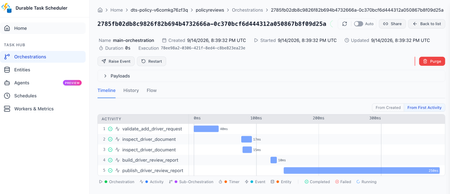
Today, we're thrilled to announce the public preview of the durable task extension for Microsoft Agent Framework. This extension transforms how you build production-ready, resilient and scalable AI agents by bringing the proven durable execution (survives crashes and restarts) and distributed execution (runs across multiple instances) capabilities of Azure Durable Functions directly into the Microsoft Agent Framework. Now you can deploy stateful, resilient AI agents to Azure that automatically handle session management, failure recovery, and scaling, freeing you to focus entirely on your agent logic. Whether you're building customer service agents that maintain context across multi-day conversations, content pipelines with human-in-the-loop approval workflows, or fully automated multi-agent systems coordinating specialized AI models, the durable task extension gives you production-grade reliability, scalability and coordination with serverless simplicity. Key features of the durable task extension include: Serverless Hosting: Deploy agents on Azure Functions with auto-scaling from thousands of instances to zero, while retaining full control in a serverless architecture. Automatic Session Management: Agents maintain persistent sessions with full conversation context that survives process crashes, restarts, and distributed execution across instances Deterministic Multi-Agent Orchestrations: Coordinate specialized durable agents with predictable, repeatable, code-driven execution patterns Human-in-the-Loop with Serverless Cost Savings: Pause for human input without consuming compute resources or incurring costs Built-in Observability with Durable Task Scheduler: Deep visibility into agent operations and orchestrations through the Durable Task Scheduler UI dashboard Click here to create and run a durable agent # Python endpoint = os.getenv("AZURE_OPENAI_ENDPOINT") deployment_name = os.getenv("AZURE_OPENAI_DEPLOYMENT_NAME", "gpt-4o-mini") # Create an AI agent following the standard Microsoft Agent Framework pattern agent = AzureOpenAIChatClient( endpoint=endpoint, deployment_name=deployment_name, credential=AzureCliCredential() ).create_agent( instructions="""You are a professional content writer who creates engaging, well-structured documents for any given topic. When given a topic, you will: 1. Research the topic using the web search tool 2. Generate an outline for the document 3. Write a compelling document with proper formatting 4. Include relevant examples and citations""", name="DocumentPublisher", tools=[ AIFunctionFactory.Create(search_web), AIFunctionFactory.Create(generate_outline) ] ) # Configure the function app to host the agent with durable session management app = AgentFunctionApp(agents=[agent]) app.run() // C# var endpoint = Environment.GetEnvironmentVariable("AZURE_OPENAI_ENDPOINT"); var deploymentName = Environment.GetEnvironmentVariable("AZURE_OPENAI_DEPLOYMENT") ?? "gpt-4o-mini"; // Create an AI agent following the standard Microsoft Agent Framework pattern AIAgent agent = new AzureOpenAIClient(new Uri(endpoint), new DefaultAzureCredential()) .GetChatClient(deploymentName) .CreateAIAgent( instructions: """You are a professional content writer who creates engaging, well-structured documents for any given topic. When given a topic, you will: 1. Research the topic using the web search tool 2. Generate an outline for the document 3. Write a compelling document with proper formatting 4. Include relevant examples and citations""", name: "DocumentPublisher", tools: [ AIFunctionFactory.Create(SearchWeb), AIFunctionFactory.Create(GenerateOutline) ]); // Configure the function app to host the agent with durable thread management // This automatically creates HTTP endpoints and manages state persistence using IHost app = FunctionsApplication .CreateBuilder(args) .ConfigureFunctionsWebApplication() .ConfigureDurableAgents(options => options.AddAIAgent(agent) ) .Build(); app.Run(); Why the durable task extension? As AI agents evolve from simple chatbots to sophisticated systems handling complex, long-running tasks, new challenges emerge: Conversations span multiple days and weeks, requiring persistent state across process restarts, crashes, and disruptions. Tool calls might take longer than typical timeouts allow, needing automatic checkpointing and recovery. High-volume workloads require elastic scaling across distributed instances to handle thousands of concurrent agent conversations. Multiple specialized agents need coordination with predictable, repeatable execution for reliable business processes. Agents sometimes must wait for human approval before proceeding, ideally without consuming resources. The Durable Extension addresses these challenges by extending Microsoft Agent Framework with capabilities from Azure Durable Functions, enabling you to build AI agents that survive failures, scale elastically, and execute predictably through durable and distributed execution. The extension is built on four foundational value pillars, which we refer to as the 4D’s: Durability Every agent state change (messages, tool calls, decisions) is durably checkpointed automatically. Agents survive and automatically resume from infrastructure updates, crashes, and can be unloaded from memory during long waiting periods without losing context. This is essential for agents that orchestrate long-running operations or wait for external events. Distributed Agent execution is accessible across all instances, enabling elastic scaling and automatic failover. Healthy nodes seamlessly take over work from failed instances, ensuring continuous operation. This distributed execution model allows thousands of stateful agents to scale up and run in parallel. Deterministic Agent orchestrations execute predictably using imperative logic written as ordinary code. Define the execution path, enabling automated testing, verifiable guardrails, and business-critical workflows that stakeholders can trust. This complements agent-directed workflows by providing explicit control flow when needed. Debuggability Use familiar development tools (IDEs, debuggers, breakpoints, stack traces, and unit tests) and programming languages to develop and debug. Your agent and agent orchestrations are expressed as code, making them easily testable, debuggable, and maintainable. Features in action Serverless hosting Deploy agents to Azure Functions (with expansion to other Azure computes soon) with automatic scaling to thousands of instances or down to zero when not in use. Pay only for the compute resources you consume. This code-first deployment approach gives you full control over the compute environment while maintaining the benefits of a serverless architecture. # Python endpoint = os.getenv("AZURE_OPENAI_ENDPOINT") deployment_name = os.getenv("AZURE_OPENAI_DEPLOYMENT_NAME", "gpt-4o-mini") # Create an AI agent following the standard Microsoft Agent Framework pattern agent = AzureOpenAIChatClient( endpoint=endpoint, deployment_name=deployment_name, credential=AzureCliCredential() ).create_agent( instructions="""You are a professional content writer who creates engaging, well-structured documents for any given topic. When given a topic, you will: 1. Research the topic using the web search tool 2. Generate an outline for the document 3. Write a compelling document with proper formatting 4. Include relevant examples and citations""", name="DocumentPublisher", tools=[ AIFunctionFactory.Create(search_web), AIFunctionFactory.Create(generate_outline) ] ) # Configure the function app to host the agent with durable session management app = AgentFunctionApp(agents=[agent]) app.run() Automatic session management Agent sessions are automatically checkpointed in durable storage that you configure in your function app, enabling durable and distributed execution across multiple instances. Any instance can resume an agent's execution after interruptions or process failures, ensuring continuous operation. Under the hood, agents are implemented as durable entities. These are stateful objects that maintain their state across executions. This architecture enables each agent session to function as a reliable, long-lived entity with preserved conversation history and context. Example scenario: A customer service agent handling a complex support case over multiple days and weeks. The conversation history, context, and progress are preserved even if the agent is redeployed or moves to a different instance. # First interaction - start a new thread to create a document curl -X POST https://your-function-app.azurewebsites.net/api/agents/DocumentPublisher/threads \ -H "Content-Type: application/json" \ -d '{"message": "Create a document about the benefits of Azure Functions"}' # Response includes thread ID and initial document outline/draft # {"threadId": "doc789", "response": "I'll create a comprehensive document about Azure Functions benefits. Let me search for the latest information... [Document Draft] # Benefits of Azure Functions\n\n## Introduction\nAzure Functions is a serverless compute service that enables you to run event-driven code without managing infrastructure...\n\n## Cost Efficiency\n- Pay only for execution time\n- No charges for idle resources\n- Automatic scaling reduces over-provisioning...\n\n## Developer Productivity\n- Multiple language support (C#, Python, JavaScript, Java)\n- Integrated development tools and CI/CD...\n\n## Scalability\n- Automatic scaling based on demand\n- Handle millions of requests seamlessly...\n\nReferences: [Azure documentation, serverless computing studies]"} # Second interaction - continue the same thread to refine the document curl -X POST https://your-function-app.azurewebsites.net/api/agents/DocumentPublisher/threads/doc789 \ -H "Content-Type: application/json" \ -d '{"message": "Can you add a section about integration with other Azure services?"}' # Agent remembers the Azure Functions document context and adds the requested section # {"threadId": "doc789", "response": "I've added a comprehensive integration section to your Azure Functions document:\n\n## Integration with Azure Services\n\n### Azure Storage\nSeamless triggers and bindings for Blob Storage, Queue Storage, and Table Storage enable event-driven architectures...\n\n### Azure Event Grid & Event Hubs\nProcess real-time event streams and implement publish-subscribe patterns at scale...\n\n### Azure Cosmos DB\nBuilt-in bindings for document database operations with automatic change feed processing...\n\n### Azure Service Bus\nReliable message processing with enterprise messaging features...\n\n### Azure AI Services\nEasily integrate OpenAI, Cognitive Services, and AI Search for intelligent applications...\n\nThe document now includes this section after the Scalability section. Would you like me to add use cases or deployment best practices?"} Deterministic multi-agent orchestrations Coordinate multiple specialized durable agents using imperative code where you define the control flow. This differs from agent-directed workflows where the agent decides the next steps. Deterministic Orchestrations provide predictable, repeatable execution patterns with automatic checkpointing and recovery. Example scenario: An email processing system that uses a spam detection agent, then conditionally routes to different specialized agents based on the classification. The orchestration automatically recovers if any step fails and completed agent calls are not re-executed. # Python app.orchestration_trigger(context_name="context") def document_publishing_orchestration(context: DurableOrchestrationContext): """Deterministic orchestration coordinating multiple specialized agents.""" doc_request = context.get_input() # Get specialized agents from the orchestration context research_agent = context.get_agent("ResearchAgent") writer_agent = context.get_agent("DocumentPublisherAgent") # Step 1: Research the topic using web search research_result = yield research_agent.run( messages=f"Research the following topic and gather key information: {doc_request.topic}", response_schema=ResearchResult ) # Step 2: Generate outline based on research findings outline = yield context.call_activity("generate_outline", { "topic": doc_request.topic, "research_data": research_result.findings }) # Step 3: Write the document with the research and outline document = yield writer_agent.run( messages=f"""Create a comprehensive document about {doc_request.topic}. Research findings: {research_result.findings} Outline: {outline} Write a well-structured, engaging document with proper formatting and citations.""", response_schema=DocumentResponse ) # Step 4: Save and publish the generated document return yield context.call_activity("publish_document", { "title": doc_request.topic, "content": document.text, "citations": document.citations }) Human-in-the-loop Orchestrations and agents can pause for human input, approval, or review without consuming compute resources. Durable execution enables orchestrations to wait for days or even weeks while waiting for human responses, even if the app crashes or restarts. When combined with serverless hosting, all compute resources are spun down during the wait period, eliminating compute costs until the human provides their input. Example scenario: A content publishing agent that generates drafts, sends them to human reviewers, and waits days for approval without running (or paying for) compute resources during the review period. When the human response arrives, the orchestration automatically resumes with full conversation context and execution state intact. # Python app.orchestration_trigger(context_name="context") def content_approval_workflow(context: DurableOrchestrationContext): """Human-in-the-loop workflow with zero-cost waiting.""" topic = context.get_input() # Step 1: Generate content using an agent content_agent = context.get_agent("ContentGenerationAgent") draft_content = yield content_agent.run(f"Write an article about {topic}") # Step 2: Send for human review yield context.call_activity("notify_reviewer", draft_content) # Step 3: Wait for approval - no compute resources consumed while waiting approval_event = context.wait_for_external_event("ApprovalDecision") timeout_task = context.create_timer(context.current_utc_datetime + timedelta(hours=24)) winner = yield context.task_any([approval_event, timeout_task]) if winner == approval_event: timeout_task.cancel() approved = approval_event.result if approved: result = yield context.call_activity("publish_content", draft_content) return result else: return "Content rejected" else: # Timeout - escalate for review result = yield context.call_activity("escalate_for_review", draft_content) return result Built-in agent observability Configure your Function App with the Durable Task Scheduler as the durable backend (what persists agents and orchestration state). The Durable Task Scheduler is the recommended durable backend for your durable agents, offering the best throughput performance, fully managed infrastructure, and built-in observability through a UI dashboard. The Durable Task Scheduler dashboard provides deep visibility into your agent operations: Conversation history: View complete conversation threads for each agent session, including all messages, tool calls, and conversation context at any point in time Multi-agent visualization: See the execution flow when calling multiple specialized agents with visual representation of agent handoffs, parallel executions, and conditional branching Performance metrics: Monitor agent response times, token usage, and orchestration duration Execution history: Access detailed execution logs with full replay capability for debugging Demo Video Language support The Durable Extension supports: C# (.NET 8.0+) with Azure Functions Python (3.10+) with Azure Functions Support for additional computes coming soon. Get started today Click here to create and run a durable agent Learn more Overview documentation C# Samples Python Samples8.9KViews3likes8CommentsConnect Azure Functions to more services with managed connectors
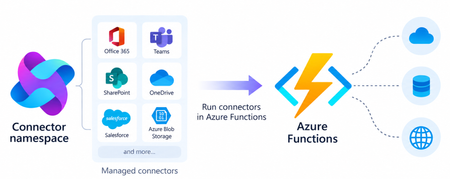
Azure Functions can already connect to many Azure services through triggers and bindings. With managed connectors, your functions can access about 1,700 connectors across services such as Microsoft 365, Microsoft Teams, Dataverse, SharePoint, OneDrive, and third-party systems. Connector triggers deliver events from these services to your function, while typed connector clients let your code take actions against them. You get this broader integration surface without writing the webhook registration code or managing the OAuth tokens required to connect to each service. Focus on your function's business logic and let Azure Connector Namespace handles the connection. Azure Functions integration with Connector Namespace is currently in public preview. It supports .NET isolated, Python, and Node.js. Review the managed connectors overview for current language, hosting plan, and regional availability. To demonstrate how connector triggers and actions work together, this article follows a .NET sample that automates RFP intake across SharePoint, Azure Content Understanding, and Teams. From an uploaded RFP to Teams notification Consider an organization that receives requests for proposals (RFPs) in a shared SharePoint document library. Someone must read each document, identify the requested capabilities, determine which subject-matter experts should respond, and notify the right team. The automated RFP intake sample turns that process into an event-driven workflow: A customer uploads an RFP to a SharePoint document library. A SharePoint connector trigger invokes an Azure Function when the file is created. The function uses a typed SharePoint connector client to retrieve the file contents. Azure Content Understanding extracts the document’s text and layout. The function applies deterministic rules to identify the customer, required capabilities, and recommended subject-matter experts. The function uses a typed Teams connector client to post the results as an Adaptive Card in a channel. Connector Namespace manages the SharePoint and Teams connections. The function controls file processing, document analysis, routing rules, error handling, and notification content How the sample works The .NET sample demonstrates both parts of the connector programming model: a connector trigger receives an event from SharePoint, and typed connector clients provided by the Connector SDKs to perform actions against SharePoint and Teams. The function starts when the SharePoint When a file is created trigger detects a new RFP. It declares the trigger using the ConnectorTrigger attribute and receives a typed payload containing the file’s properties: [Function("OnNewFile")] public async Task OnNewFile( [ConnectorTrigger] SharePointOnlineOnNewFileItemsTriggerPayload payload, CancellationToken cancellationToken) { // Process the newly uploaded file. } Because the trigger provides file properties rather than its contents, the function uses a typed SharePoint client to retrieve the document: byte[] response = await _sharePoint.GetFileContentAsync( Uri.EscapeDataString(siteAddress), fileIdentifier, cancellationToken: cancellationToken); byte[] document = SharePointFileContent.Decode(response); The SharePoint and Teams clients are registered through dependency injection. Each client uses the runtime URL of its Connector Namespace connection and authenticates with DefaultAzureCredential: services.AddSingleton( new SharePointOnlineClient( new Uri(sharePointRuntimeUrl), credential)); services.AddSingleton( new TeamsClient( new Uri(teamsRuntimeUrl), credential)); The function sends the document to Content Understanding’s prebuilt-layout analyzer, which extracts its text and structure. It then applies deterministic C# rules to identify the customer and required capabilities and map those capabilities to predefined subject-matter expert roles. Finally, the function creates an Adaptive Card containing the results and posts it to the configured Teams channel with the typed Teams client: await _teams.PostCardToConversationAsync( postAs, postIn, request, cancellationToken); Connector Namespace handles the SharePoint and Teams connections, while the function controls the document analysis, routing logic, error handling, and notification content. Try the sample The RFP intake sample includes the function code, Bicep infrastructure, Azure Developer CLI configuration, and supporting scripts. Its README explains how to test the workflow locally and deploy it to Azure. Common connector patterns Managed connectors are useful when a function must react to events or perform operations in external systems. Common patterns include: Event to action: React to an event in one service and take an action in another. Event to enrich to action: Retrieve additional information related to an event before acting. Event to document analysis to action: Extract text and structure from a document, apply application rules, and send the result through another connector. Event to AI to action: Analyze event data with an AI service and write the result back through a connector. Extend an existing function app: Add connector-based integrations alongside HTTP, timer, queue, Service Bus, Event Grid, or Durable Functions workloads. The RFP sample combines several of these patterns. A SharePoint event starts the workflow, a SharePoint action retrieves the document, Content Understanding extracts its contents, application code enriches the result, and a Teams action sends the notification. Closing thoughts Managed connectors extend the external systems that can trigger your functions and the services your function code can act on. This brings services such as SharePoint, Teams, Microsoft 365, and many third-party systems into the Azure Functions programming model without requiring you to build the underlying webhook and OAuth infrastructure. Choose Azure Functions with managed connectors when you want this broader integration surface in a code-first application and need custom branching, application libraries and SDKs, other Functions bindings, document or AI processing, or application-specific logic between the trigger and action. If the workload primarily orchestrates connector operations, involves little custom code, and would benefit from a visual designer, Azure Logic Apps is usually the simpler choice. Resources Documentations Overview of managed connectors in Azure Functions Azure Functions connector samples Azure Connector Namespace overview Content Understanding prebuilt-layout analyzer Connector SDK GitHub repos .NET SDK Python SDK Node.js SDK316Views0likes0CommentsEnable Dynamic Workflows in Azure Functions hosted skills
Azure Functions already gives you a familiar way to build event-driven apps. A queue message, HTTP request, timer, or event triggers the code that handles the work. Azure Functions hosted skills (formerly Serverless Agents) add AI reasoning to that model. A hosted skill can read a request, use the regular tools you give it to inspect context, and choose the next step, while your triggers, tools, and business logic stay in place. When the work needs to keep going Consider an insurance policy servicing request. A hosted skill can use its regular tools to understand the requested change, look up the policy, and inspect the submitted documents. If the information is ready and the request can finish now, the normal tool loop, where the model calls a tool, reads the result, and decides the next step, is a good fit. That changes when the work must continue after the initial request. An insurance policy servicing request may need to inspect several documents in parallel, wait for a configured delay before checking again for missing information, and build a review packet after the checks it depends on complete. In a normal tool loop, each result returns to the model before the skill can decide what happens next. The application must keep the job alive, save its progress, and deliver the final result. At that point, the work needs to keep running independently of the original interaction instead of relying on the model and application to coordinate every step. For a queue or other non-HTTP trigger, the final result also needs to be written or sent somewhere useful because there is no response channel. Introducing Dynamic Workflows Dynamic Workflows brings a programmatic tool-calling pattern to Azure Functions hosted skills. Instead of sending every tool result back to the model so it can decide the next call, the model creates a structured, validated workflow plan once. Durable Functions then executes the allowed workflow-safe tool calls, waits, and subagent tasks, passing intermediate results through the workflow instead of the model context. This can reduce model turns and token use for multi-step work while making the work durable. That separation addresses the limits of the normal tool loop: the workflow store keeps state and intermediate results out of the model's context, independent checks can run in parallel, and durable timers resume waits without holding a worker open. Because a Durable Functions orchestration handles execution, the work can continue after the original request or a Functions worker restart. To test the difference, we ran the same structured multi-step task with the regular tool loop and with Dynamic Workflows, using a Foundry gpt-5.4-mini deployment. We ran it with inputs for one service and then ten services. In the Dynamic Workflows version, the model made the plan once, while the runtime kept intermediate tool results in the workflow store instead of sending them back to the model after every tool call. Dynamic Workflows used 56% fewer total model tokens for the one-service run and 93% fewer for the ten-service run, while producing the same final reports. Results will vary by workload and model, and small jobs can have planning overhead. The savings are largest when intermediate tool results would otherwise return to the model after every tool call. How it works Enable workflows in the hosted skill's Markdown front matter. The runtime then adds the management tools: start_workflow, get_workflow_status, list_workflows, cancel_workflow, and terminate_workflow. You do not implement those tools. You choose the workflow-safe tools and subagents that a plan can use. At run time, the AI model uses the hosted skill's instructions to generate a structured plan, limited to the workflow-safe tools and subagents you explicitly allow. The hosted skill calls start_workflow with that plan; the runtime validates it, starts a Durable Functions orchestration, and returns a workflow ID right away. --- name: Add Driver Review description: Prepares an add-driver document review for an insurance representative. workflows: enabled: true trigger: type: queue_trigger args: queue_name: policy-service-requests connection: AzureWebJobsStorage --- Put workflow-safe handlers under tools/ and decorate them for use in a workflow. Each handler must run synchronously, accept one dict argument, return JSON-serializable data, and be idempotent. A worker failure can cause a handler to run more than once, which is why that last point matters. Ordinary tools retain their existing behavior unless you explicitly make them available to a workflow. workflow_tool( description=( "Inspect one document from an add-driver request. Args: " "{document: <document>, position: int}. Returns the document and evidence state." ) ) def inspect_driver_document(args: dict[str, Any]) -> dict[str, Any]: document = args["document"] evidence_state = { "received": "present", "missing": "missing", "expired": "needs_current_copy", }[document["status"]] return { "position": args["position"], "document_id": document["document_id"], "type": document["type"], "file_name": document["file_name"], "evidence_state": evidence_state, } Dynamic Workflows runs on Durable Functions. You can configure Durable Task Scheduler in host.json and use its dashboard to see per-instance task state, retry history, and controls for work that is still running. Durable timers let a workflow wait without keeping a worker busy, then resume the steps that are ready. The workflow stays visible and durable instead of depending on an open request or a best-effort background task. Get started Build your first Azure Functions hosted skill dynamic workflow with the quickstart, then use the overview and sample to go deeper: Follow the Dynamic Workflows quickstart. Read the Dynamic Workflows overview. Browse the insurance policy review sample for an end-to-end implementation.365Views0likes0CommentsSSL/TLS certificates and end-to-end encryption for Azure Functions Flex Consumption
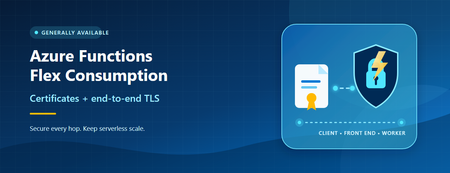
Azure Functions Flex Consumption now supports site-scoped TLS certificates and end-to-end TLS encryption. Learn how to secure custom domains, certificate-based scenarios, and traffic through the function worker.358Views0likes0Comments
Making Azure AI Foundry Agents Explainable — Knowledge Graphs + Source Attribution
90% of Azure AI demos work on stage — most never ship. The gap is architecture, not the model. I wrote up a field guide on taking Azure AI Foundry agents from POC to production, with knowledge graphs (GraphRAG) doing the grounding and source attribution. What the post covers Grounding with a knowledge graph — multi-hop retrieval + inline citations so every answer is traceable to a source (critical for regulated/medical use cases). Externalized state — keeping agent memory and session state outside the model. Identity at the boundary — Entra ID / RBAC instead of trusting the prompt. Observability & compliance — tracing, evaluation, and auditability. The stack — Azure AI Foundry + Model Context Protocol (MCP) + Azure Functions (Flex Consumption) + Azure OpenAI, from a real build (VeritasGraph medical MCP server). 📖 Full write-up: https://bibinprathap.com/blog/azure-ai-proof-of-concept-to-production ▶️ 6-min walkthrough: https://youtu.be/z-CPS5WUvyw?si=fmpo1RN28Bh9KbIb Questions for the community How are you grounding Foundry agents today — vector RAG, GraphRAG, or hybrid? Anyone combining knowledge graphs with MCP tools in Foundry? What worked / broke? For regulated domains, how are you handling source attribution and audit trails? Curious to compare notes — happy to share more detail on the GraphRAG retrieval design if useful.271Views0likes0Comments
Add AI to the workflows you already have using Serverless Agents in Azure Functions
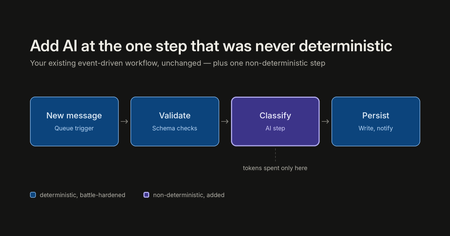
There are a lot of ways to build with AI right now: chat frontends, copilots, greenfield agent apps, orchestration frameworks. All of them have their place, and some customers are building entirely new applications this way. But across customer engagements, a consistent pattern has emerged: the most successful and most cost-effective AI projects are not rewrites. They are existing, deterministic, event-driven business workflows (queue processing, message handling, scheduled jobs) with AI added at exactly the one step that was never deterministic to begin with. This enables the parts that are battle hardened to remain as before, adding AI where non-deterministic smarts are needed. This creates a more robust application along with spending costs for tokens only where beneficial. That pattern has a natural home in Azure Function and Serverless Agents runtime now support non-Http triggers. This post walks through the pattern in three layers: the app you already have, what it takes to add AI processing onto it yourself, and what it looks like with Serverless Agents. Learn and try it here: Build serverless agents using Azure Functions | Microsoft Learn The scenario: expense processing Picture an expense approval pipeline. Expense and purchase-order requests arrive as messages on a queue: some as quick notes, some as forwarded emails, some as key-value text or JSON from intake tools. Most of the piping around the decision is deterministic and should stay that way: queueing, retries, policy storage, output queues, identity, and the audit trail. You do not want a language model reimplementing any of that. But one step in the middle has always resisted automation: understanding the request, choosing the policy that governs it, and applying a natural-language rulebook. "Booked a $450 round-trip flight to Denver for the customer onsite next week. — Albert" Turning that into a structured decision (amount, currency, vendor, category, policy applied, destination queue, reason) is exactly the kind of fuzzy, judgment-shaped work that used to mean either a human in the loop or a brittle pile of regexes and keyword lists. That one step is the AI part of the equation. Everything else stays as code. Layer 1: the app you already have If you're running message-based workloads on Azure Functions today, your expense processor looks something like this, using the standard Python v2 programming model with a queue trigger: import json import azure.functions as func app = func.FunctionApp() @app.queue_trigger(arg_name="msg", queue_name="expense-requests", connection="AzureWebJobsStorage") def process_expense(msg: func.QueueMessage): expense = json.loads(msg.get_body()) validate_expense(expense) if is_duplicate(expense): return decision = apply_expense_policy(expense) route_decision(decision) write_audit_record(expense, decision) This is good architecture, and nothing in this post asks you to change it. You get scale-out per message, retries with a poison queue after repeated failures, and scale to zero between messages. On the Flex Consumption plan you pay for execution, not for idle. The queue itself is doing real architectural work: it buffers spikes, absorbs backpressure, and decouples producers from processing. The limitation is only that process_expense can read only the schema for which it was written. Free text, email-shaped messages, and inconsistent key-value input require a parser before the deterministic policy code can use them, and selecting among category-specific policy documents means encoding more rules in code. Layer 2: the do-it-yourself middle step The obvious next move is to call a model from inside the function. The first version is deceptively short: # Sketch of the DIY approach: this is the version that grows client = get_model_client() # SDK setup, endpoint, credential prompt = build_prompt(expense) # prompt template you now maintain response = client.complete(prompt) # plus retry/backoff for 429s decision = parse_or_die(response) # LLM output isn't always valid JSON The problem isn't the first version. It's everything the first version turns into. Model SDK and auth wiring. Prompt templates living in Python strings. Retry and backoff logic for rate limits, on top of the queue's own retry semantics. Output parsing and re-prompting when the model returns almost-JSON. Then the requests start arriving: "can it look up the current policy documents?" (now you are building tool-calling), "can it run a calculation?" (now you need somewhere safe to execute generated code), "why did it say that?" (now you are building telemetry for model and tool activity). None of this is your expense pipeline. All of it becomes your code to own, patch, and secure. This is the middle step where a lot of AI-in-the-workflow projects stall, not because the idea was wrong, but because the glue outgrew the feature. Layer 3: the same trigger, with the Serverless Agents runtime The Serverless Agents runtime, collapses that middle layer. An agent is a markdown file, with instructions in the body and the trigger in YAML front matter, and it runs on the same Azure Functions triggers you already use. Here is the complete agent from the expense processor sample, expense_processor.agent.md: --- name: Expense Processor description: Reads one expense or purchase-order request that arrives on a queue in any format — free text, email, key-value, or JSON — chooses the spending policy that fits the expense category from a set of policy documents, applies it, and routes the decision. trigger: type: queue_trigger args: queue_name: expense-requests connection: AzureWebJobsStorage data_type: string --- You are an expense-approval agent. Each queue message is **one** expense or purchase-order request as raw text — it might be a quick note, an email, `key: value` lines, or JSON. Finance keeps several policy documents in storage: a general policy plus category-specific ones (travel, meals & entertainment, equipment & software). Your job is to understand the request, pick the policy that governs it, and route the decision. For each message: 1. **Extract** the details, whatever the format: `amount` (strip symbols, separators, and words — `$1,250`, `1.250,00`, and `twelve hundred dollars` are all numbers), `currency` (default `USD`), `vendor`, `category`, and an `expenseId` (use the one in the message, else generate `EXP-<6 hex>`). 2. **Select the policy.** Call `list_expense_policies` to see each policy and what it covers, then choose the one whose scope matches the expense. Use the general policy when nothing else fits. 3. **Fetch it.** Call `get_expense_policy` with that document's exact name, and apply what it says. 4. **Decide.** Work the policy's rules top to bottom; the first rule that matches wins. The amount is the backbone — for an ordinary in-scope USD expense the policy's amount thresholds decide the outcome, applied exactly at the boundaries. Never guess an exchange rate for a non-USD amount. The result is one of three queues: `expense-approved`, `expense-review`, or `expense-flagged`. 5. **Route** by calling `route_expense_decision` **once** with the destination queue and the decision JSON. If it errors, carry on — still return the decision. 6. **Respond** with the decision JSON so the outcome shows up in the logs: ```json { "expenseId": "EXP-1001", "vendor": "United Airlines", "category": "travel", "amount": 450.0, "currency": "USD", "policyApplied": "travel-policy.md", "decision": "approve", "routedTo": "expense-approved", "reason": "Travel expense of 450 USD is at or below the travel policy's 1,000 auto-approve threshold." } ``` Base every decision only on the policy you just fetched — never on rules remembered from an earlier message. Keep `reason` to one sentence, and always set `policyApplied` to the document you used. Note what the front matter is: the same queue_trigger configuration you would pass to the Functions decorator: queue name, connection setting, and string data type. If you know Azure Functions triggers, you already know how to trigger an agent. The entire function_app.py is bootstrap: from azure_functions_agents import create_function_app app = create_function_app() And app-wide defaults live in agents.config.yaml: # App-wide defaults for every agent in this function app. # # `model` is intentionally NOT set here so the runtime resolves it per provider: # - deployed (foundry provider): FOUNDRY_MODEL app setting (e.g. gpt-5.4) # - local (azure_openai provider): AZURE_OPENAI_DEPLOYMENT setting (e.g. gpt-5.4-mini) # Set AZURE_FUNCTIONS_AGENTS_MODEL to override in any environment. timeout: 900 When a message lands on expense-requests, the runtime invokes the agent once for that one item. The trigger's data_type: string and the host's messageEncoding: "none" keep the raw text human-readable, while the runtime serializes the queue message body and metadata before adding them to the agent prompt. The agent's instructions do fuzzy work; the results show up in your Function App logs and Application Insights like any other execution. For the expense scenario, the pattern points directly at the intake queue: the agent extracts the amount, currency, vendor, category, and expense ID; calls list_expense_policies and get_expense_policy to choose and read the current policy from Blob Storage; applies the rules; and calls route_expense_decision to send the result to expense-approved, expense-review, or expense-flagged. Queueing, policy storage, identity, and routing stay deterministic; the agent gets responsibility for the part that needs judgment. What changed between layer 2 and layer 3 Concern DIY (layer 2) Serverless Agents (layer 3) Trigger & scaling Yours (Functions) Yours (Functions, unchanged) Model client, auth, provider config Your code Runtime (Foundry, Azure OpenAI, or OpenAI) Prompt & instructions Python strings Markdown agent file Trigger payload handling Manual parsing Raw queue payload and metadata injected by the runtime Tool calling Build it yourself MCP servers, connectors, plain-Python @tool functions Safe code execution Build it yourself Sandboxed via Azure Container Apps dynamic sessions Model/tool telemetry Build it yourself Built-in, flows to Application Insights Retries & poison handling Queue semantics + your model retries Queue semantics, with dequeue_count right in the payload The economics follow from the architecture. On Flex Consumption, the app scales to zero between messages, so you pay when expense requests arrive, and the AI spend is confined to the single step that needs a model, instead of being architected into every request the way a chat-first design tends to force. This is a large part of why the augment-don't-rewrite engagements are the cost-effective ones: the deterministic 90% of the workload keeps running at deterministic-workload prices. Use all Event Driven triggers Queue Trigger is one row in a much longer table. The runtime supports the breadth of the Functions trigger model in .agent.md front matter: Service Bus queues and topics, Event Hubs, Event Grid, Blob Storage, Cosmos DB, Azure SQL, Kafka, timers, Dapr bindings, and connector triggers, alongside HTTP when you do want a chat endpoint. Wherever your events are already flowing, an agent can meet them there. Try it The sample deploys with the Azure Developer CLI: git clone https://github.com/Azure-Samples/serverless-agents-expense-processor.git cd serverless-agents-expense-processor azd up Then send one of the bundled requests to the provisioned expense-requests queue and read the decision queues: uv run scripts/send_expense.py --file samples/travel.txt --cloud uv run scripts/read_decision.py --queue all --peek --cloud The travel request is a $450 flight. Swap samples/travel.txt for samples/client-dinner.txt or samples/equipment.txt to see the same amount, select a different policy and route differently. The sample's README also covers running locally with Azurite and Core Tools. We are working on many more features to make it really easy for you to take your existing apps and make them intelligent, including Hybrid AI apps (your code + AI markdown binding), dynamic workflows and so on.713Views0likes0Comments