
Forum Widgets
Latest Discussions

New Outlook: Copying text & images into a blank email often only pastes the text (images disappear)
We've reproduced this on multiple devices with multiple users - it seems to be specific to the New Outlook. Here's my version as an example: Microsoft Outlook Version: 1.2026.105.100 Client Version: 20260116004.02 WebView2 Version: 144.0.3719.82 (Stable) The best way to see this is if you go to your sent items, find an email you've sent that has an embedded image (for example, I used my signature which has an image). Drag to select, like this: Then press CTRL+C to copy, and then try to paste that in a new email. In many cases when I do this, only the text will appear - regardless of my Copy/paste settings in New Outlook, whether I choose to keep source formatting, or not. To copy the images reliably, I need to right-click each image, click "Copy image", then "Paste" manually into a New Outlook new e-mail window. However, my colleague figured out that if you press Reply All or Forward on the same email, and THEN copy the range of text and images, then... when you try to paste that content into a New Outlook e-mail, the text AND images will be pasted correctly. It's almost like the "read-only" view of an email doesn't load embedded content fully, preventing the copy from actually copying images. Try it out. It doesn't always appear to be an issue. I've encountered this more often when trying to copy my own signature - but it also happens in other cases when the embedded image is in the body. In all cases I've seen, it's been with JPGs.mrefghicrcJan 22, 2026Occasional Reader79Views0likes0Comments
Teams meeting email invites do not display "Add to Calendar" header when there's an attachment.
Trying to solve an issue when someone sends out Teams meeting invites that include attachments. The header that typically appears directly above the body of the email showing the time and date of the meeting and the option to add the meeting to your calendar does not appear, this issue is consistent across outlook and gmail inboxes of the recipients. The attachment takes over the space that the 'Add to Calendar' would appear, I have been able to replicate this issue consistently. Removing attachments rectifies the issue but is not really satisfactory as they want to include relevant files to the meeting in the invitations that are sent out. Thanks, LltggtlJan 21, 2026Copper Contributor13Views0likes0CommentsHow to change order of accounts on Android (with many accounts) ?
I'm using Outlook for Android with more than 10 accounts (needed for personal, office, associations, ...) When I add a new account it's added at the end of the list. If I try to edit the list and change the order, the list need more that one screen to display everything. And I can't scroll down ! I can change the order by holding the double line on the left and moving up or down. But only for the accounts displayed on the screen (upper part of my account lists). I can't move the screen to the bottom of the list. If I put my finger on the name of the account (middle of each line), it's like holding the double line on the right. And only possible to reorder these first accounts. I've tried to use "My mobile app" on my computer and accessing the screen of my phone (expecting, that with my mouse I'll be able to scroll down) but not working ! And also trying to connect a USB mouse, but no more chance to scroll down. How can I access to the bottom ? Hope there is a trick to reorder instead of disconnecting all accounts and adding them again in the correct order 🤞Laurent73Jan 19, 2026Copper Contributor27Views0likes0Comments
Migrating Outlook folders from old to new laptop Windows 11
Hi, How do I get my old Outlook folders of emails from my previous laptop onto my new laptop? December 2025 I have bought a new DELL 16 laptop Windows 11 and MS Office Personal 2021. Old laptop is a 2019 DELL Inspiron Windows 11 Microsoft Office Personal Plus 16.0. (Storage full, battery lasts 10 minutes, fan makes an odd noise - hence new Laptop bought) The new laptop has Outlook working perfectly for new emails etc. How do I transfer my old Outlook folders (which are stored on the old laptop) onto the new laptop? I want to use my new laptop for everything. At the moment, my old email folders all the way back to 2014 or something are on my old laptop, which seems a bit mad. How do I migrate the old laptop folders and emails onto the new laptop? Many thanksRobertW1971Jan 17, 2026Copper Contributor2Views0likes0Comments'Ghost' To Do Task Visible in Counter of 'All' - But Nowhere Else - Unable to View 'All'
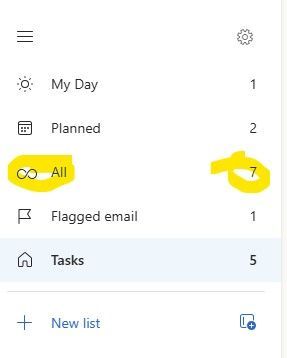
I have an interesting case in Classic Outlook (Version 2511). There is an extra item in the 'All' counter in To Do that is only visible in one instance of Outlook. If I use Outlook on the web or the To Do app itself - all tasks and counts are accurate. Even the Planner app in Teams shows the correct tasks and number of them. In my Outlook Classic at home it works properly and displays the number of tasks correctly. But not in my Outlook Classic at work. In fact - if you try to click on the 'All' itself - the display simply blanks out and you have to close and re-open Outlook to get To Do to open again. I've tried the obvious already. Thinking because it only happens in Outlook Classic at work - I've already completely wiped my ost file and rebuilt it from scratch. I've started outlook with various 'clean' flags. None of them have been able to clear the phantom count that will crash To Do from within classic Outlook. What is being overlooked? As you can see below - the number of 'All' is always one more than what it should be.eherbergJan 15, 2026Copper Contributor18Views0likes0Comments
Avatars for People (Contacts) in Outlook for Mac
I'm trying to change the avatar for a contact stored in my hotmail.com account in Outlook on the Mac. I right click on the listing on the People (contact) page and check "Edit." The avatar that appears on the contact card is not the same as the avatar that appears on the People listing page. No matter how I edit the Avatar in the card listing, it does not change the avatar that is displayed in the listing. Any so solution for this?ortnpalmsJan 04, 2026Copper Contributor21Views0likes0Comments
Outlook calendar not able to sign in Teams
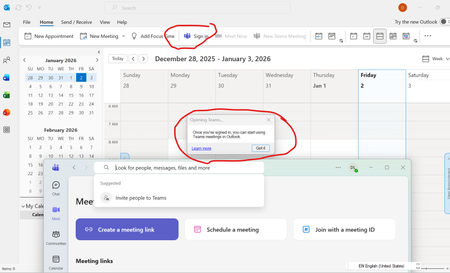
Outlook calendar cannot view Teams. It always asks for 'Sign in'. If I click it, it opens up Microsoft Teams windows. Both app are using the same account. I have already re-installed Teams; add-in on outlook is also done. I am using 365 personal account. What else I can do?danldanlJan 02, 2026Copper Contributor41Views0likes0CommentsCannot add Yahoo email account to Outlook
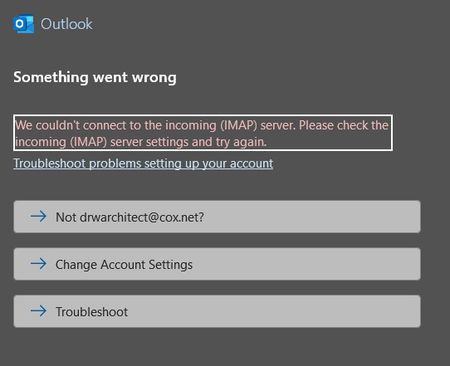
My Classic Outlook for Microsoft 365 stopped connecting to my Cox.net mail account (run through Yahoo.com) about two months ago. The account disappeared from the account list and will not reconnect as a new account. I and Yahoo tech support tried all the standard fixes including double checking the server settings, using the app password, and turning off Windows firewall. Yahoo tech support said it was "an Outlook problem." Any advice would be appreciated.drwarchDec 31, 2025Copper Contributor22Views0likes0Comments
Suspicious calendar invite
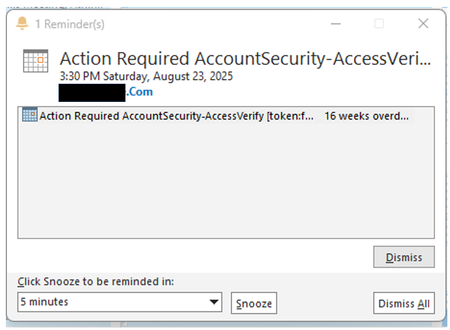
Hi, Today, when I open my Outlook, I got a 16-week overdue calendar invite reminder pop-up (screenshot attached). The calendar event is dated 23 Aug 2025. From admin email trace, I found out that the email was sent 19-Dec (today). Suspected of phishing or scam activity, I attempted to open the calendar event to view the content and the sender's email address. After I double click on the calendar invite, the email kind of hang/loading. I immediately go to Windows Task Manager > End Task, afraid that there is some malware running/executed. Since I did not manage to open the email, without clicking on any URL links or Attachments, will there be any possibility of any infection (malware/spyware...) by just opening the calendar invite? Thanks.clleeDec 19, 2025Brass Contributor50Views0likes0CommentsI can't log in to my Microsoft account
This is incredibly frustrating, to put it mildly. Over 48 hours ago, I changed the passwords for my three email accounts. Once I made the change, I could log into Hotmail and see my emails and everything. Now, when I try to access them through my mobile phone, it says the password I'm entering is incorrect (obviously, I'm entering it correctly for each account). I also had access on my PC. Just in case, I thought, "Okay, I'll change it again," and when I try to change it through my mobile phone, it says "Not available at the moment, please try again later." I thought it was just a one-off... A while passes, I try again, and it still says the same thing. On one of the accounts, after trying several times with the code they sent me, it locked the account. They told me to wait 24 hours and it wasn't fixed. Then they told me to wait a week because after so many attempts to remove the "block" (you can check if it's blocked by entering it in the help section)... Are we crazy or what? This afternoon I spoke with Spanish support, and the woman who helped me really tried. We tried to log in and change the password through a VPN, but this time I didn't receive the code, so she opened a ticket and escalated it to a higher level, telling me to wait 3 to 5 business days. I know what that smells like: wait and then the same thing again. The real surprise was that I couldn't access my other two accounts for 48 hours, so I thought, "Okay, I'll check." I entered the password correctly, but it still said it was incorrect (even though it was correct), and I tried mobile verification, but it wasn't available... even using a VPN. I checked the status of both accounts in the help section, and they said there were no problems with them. Why am I never going to be able to access my three Hotmail accounts again? What's the solution? It doesn't matter if I use a VPN, if the account is blocked, or if it's unblocked. It's always the same. It doesn't accept the correct password -> you try to reset it -> you don't receive a code -> if you try again, it blocks you. Can someone tell me WHAT I NEED TO DO TO FIX THIS ATROCITY? Because waiting is clearly pointless, since the other accounts aren't blocked and I can't log in or reset my password. Furthermore, the account I blocked for trying to access it was unblocked after 24 hours, but it was still the same until it was blocked again. The other two accounts have gone 48 hours without me trying to log in, and I'm still stuck. MICROSOFT, do you plan to offer any solution other than "waiting"? I'm sorry if my English isn't very clear, I'm Spanish and I use a translatorBlackyDec 18, 2025Copper Contributor71Views0likes0Comments

Resources
Tags
- outlook for windows1,278 Topics
- office 365696 Topics
- outlook on the web488 Topics
- outlook for mac304 Topics
- exchange274 Topics
- outlook for ios162 Topics
- outlook for android153 Topics
- Outlook Customer Manager63 Topics
- groups57 Topics
- community38 Topics