Recent Discussions

Getting rid of unwanted shares
Hello everyone. On my company computers there is a name listed under "People" and this individual has shared a file with me (by mistake I assume). Through a lot of digging I finally found out he is an attorney and it was paperwork from some case he had worked on. I don't know him and whatever the docs are have nothing to do with me. The secretary I talked to didn't seem to care and said, "I don't believe it's confidential. Just ignore it." I don't want to ignore it! Every time I log on there it is. It's intrusive! And before you all say just hide it, No, There should be a way to not automatically accept unwanted shares.7Views0likes0Comments
Temp Files Flagged As Viruses By Norton - Windows 11
My Norton anti-virus software keeps quarantining temp files from my onedrive setup folder as containing viruses. This happens every few minutes. Any thoughts on what this might be from? All files seem to be synced and I am just doing normal browsing and Word processing.31Views0likes0Comments
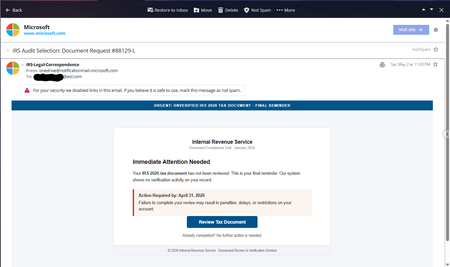
Serious Abuse of Microsoft/OneDrive Email Infrastructure for IRS Phishing Scam
I want to report a very serious phishing/security concern involving what appears to be Microsoft/OneDrive email infrastructure. On Sat, May 2, 2026 at 11:03 PM, I received a phishing/scam email pretending to be an IRS tax notice. Today is May 17, 2026, and I am posting this because this issue is extremely concerning and could easily fool many users. The alarming part is that the email was sent from: email address removed for privacy reasons The email contained fake IRS-related warnings such as: “URGENT: UNVERIFIED IRS 2026 TAX DOCUMENT” “Final Reminder” “Immediate Attention Needed” “Review Tax Document” It attempted to pressure users into clicking a fake “Review Tax Document” button. What is deeply concerning is: The sender appears to come from an official Microsoft domain (notificationmail.microsoft.com) The branding and formatting look legitimate Non-technical users could easily trust and click this AOL itself displayed a security warning and disabled the links My questions to Microsoft are: How is it possible for phishing emails to originate from or appear to originate from notificationmail.microsoft.com? Is Microsoft infrastructure being abused? Were compromised Microsoft/OneDrive accounts used? Why are such emails passing authentication checks strongly enough to appear legitimate? This is not a normal spam message. This directly impacts trust in Microsoft notification systems and can lead to credential theft or malware infections. I hope Microsoft investigates this seriously and explains how such abuse is possible from a Microsoft-associated notification domain. Users should: Never click such links Verify tax notices only through official government portals Carefully inspect email headers and domains Report suspicious Microsoft-branded phishing emails immediately Blair Glennon almmicrosoft Microsoftyan68Views0likes0Comments
Search
The Onedrive search is not working properly. I have a file called "Vegetarian moussaka recipe.docx" stored in Onedrive (created 9/4/26). When I search for this word in the Onedrive.com website on my laptop (Windows11), or on my Onedrive phone app it is not found, even though if I look for it manually, by going to the folder on Onedrive.com, it is clearly there. When I do the same search in File Explorer on my laptop it does show the file. An odd thing is that I then created a copy of the file, called: "Vegetarian moussaka recipe copy.docx", this is an exact copy and this one IS found, but not the original. I have contacted Microsoft support about it, and sent recordings, data etc as requested, but they don't know the answer. They have just told me to use a "workaround" which is just to use the copied version of the file instead of the original. Since then I've discovered another file this has happened with, called: "Tuscan chicken with beans.docx, created 9/5/26) this also doesn't show in the search in Onedrive.com but does show in a file explorer search. If I copy the file to my Desktop, without renaming it, it DOES show in the Onedrive.com search. Interestingly, the similarity between this file and the other one (Vegetarian moussaka recipe.docx) is that I created both files on my computer (Windows 11) by copying text from an internet page. (But I tried recreating this just now by creating a test and that file behaves normally).62Views0likes2Comments- 133Views0likes1Comment
Since April 16, 2026, OneDrive no longer syncs any new .lnk files
Hello, I have a strange issue with OneDrive and Windows shortcut files (.lnk). Since April 16, 2026, OneDrive no longer syncs any new .lnk files I create. All .lnk files created before that date still sync normally. Every new .lnk file immediately shows the “–” status (Not syncing). The target file is inside OneDrive, fully synced and available locally. Older .lnk files in the same folder sync correctly. The problem persists after full OneDrive reset, clearing cache databases, full resync of about 200,000 files, Windows 11 reinstall (Home, Pro, Insider), Windows 10 test on another PC, Smart App Control disabled, no third‑party antivirus. The issue is identical on all devices. The problem started exactly on April 16, 2026, right after several Smart App Control warnings that blocked opening documents through newly created shortcuts. Since that date, no new .lnk file has ever synced again, while all older ones still sync. This makes me think that a Defender cloud reputation flag or something similar may have been applied to my account and is now blocking new .lnk files at the server level. Could someone from the OneDrive team please check whether my account has a cloud security flag or reputation rule incorrectly applied, and reset it if needed? This issue has been going on for almost a month and prevents me from using shortcuts in my OneDrive structure. Post‑scriptum: Thanks to Copilot for helping me through multiple Windows resets and reinstallations to rule out every local cause. This message was also written with its assistance to request help from the community.209Views0likes3CommentsMy previous OneDrive post was incorrectly flagged as spam
EN: Hello, My previous post titled “OneDrive no longer syncs new .lnk files since April 16, 2026” was automatically flagged as spam. This is a false positive. Could a moderator please restore it so I can continue the discussion? Thank you. FR : Bonjour, Mon précédent message intitulé « OneDrive no longer syncs new .lnk files since April 16, 2026 » a été automatiquement marqué comme spam. Il s’agit d’un faux positif. Pourriez-vous le restaurer afin que je puisse poursuivre la discussion ? Merci.21Views0likes0Comments
OneDrive newbie
I have resisted using OneDrive for years because way back then it took photos from an amazing vacation off my phone before I was done editing them on my phone. I swear I did not have it set to automatically backup if I was running out of space on my phone, but that's what the customer service person said. And I can't batch download them back to my phone (to my knowledge), just one at a time. Why would a home user want to use OneDrive? Every time I try to open OneDrive to delete files there (just to keep it clean, and yes, not use it) it immediately starts synching to my computer, and if I stop that, I can't see my pictures on OneDrive. It says I have to be connected or something like that. Again, you can tell I'm a newbie because I'm not even sure what to do with it. Any information and advice would be incredibly welcomed. Thank you.81Views0likes2Comments
OneDrive Archival of Unlicensed Users
The change enforcing archival of unlicensed OneDrive users after 93 days was announced in January of last year but seems to be hitting tenants very gradually. https://learn.microsoft.com/en-us/sharepoint/unlicensed-onedrive-accounts?WT.mc_id=365AdminCSH_spo I'm curious what other organizations are doing to tackle this change and how widespread the rollout has been so far. When the change was announced, did your organizations do anything to prepare? For those of you who are already seeing archival in your tenant When did it actually begin? Particularly for very high volumes of unlicensed accounts, how are you handling this? Have you had any luck with Purview content search and export for retrieval of files?212Views0likes1Comment
OneDrive file blue in progress icon meaning?
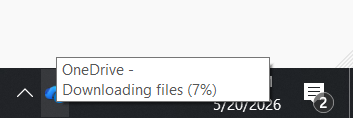
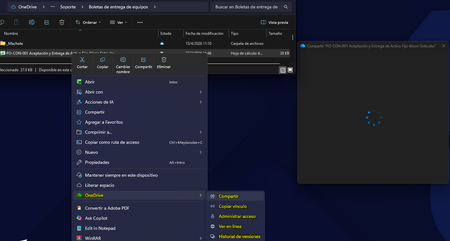
I uploaded some videos to my OneDrive Photos section, but they don't show up under Photos. It shows up under Files -> Photos with a blue in progress icon next to it. This didn't happen a month ago, and I couldn't figure out what the icon meant. At first, I thought it was syncing, but it's been 11 hours, and it's still there. Any ideas? thanks247Views0likes4CommentsOneDrive “Share” window stuck loading from File Explorer (works on web)
Description: Hi all, I'm experiencing an issue with OneDrive where the "Share" option from Windows File Explorer gets stuck indefinitely loading (blank window with spinner). Details: The issue occurs only when using right-click → Share from File Explorer Sharing works correctly from OneDrive web interface Issue is affecting multiple users in the same environment OneDrive sync itself is working normally Troubleshooting already performed: Reinstalled OneDrive completely (clean install) Cleared local cache and removed residual folders Reinstalled Microsoft Edge WebView2 Runtime (Evergreen x64) Cleared Windows Credential Manager entries Reconnected Work/School account (WAM reset) Tested on different networks (including mobile hotspot) Windows fully updated Environment: Windows 11 (corporate environment) Microsoft 365 / OneDrive for Business Observation: The issue seems isolated to the File Explorer integration (possibly WebView2 or WAM-related), since web sharing works fine. Has anyone experienced this behavior recently or is there any known issue with the OneDrive Explorer integration? Thanks in advance.1.2KViews0likes4CommentsOnedrive Web search : "Location" column always shows "My Files" for folders path
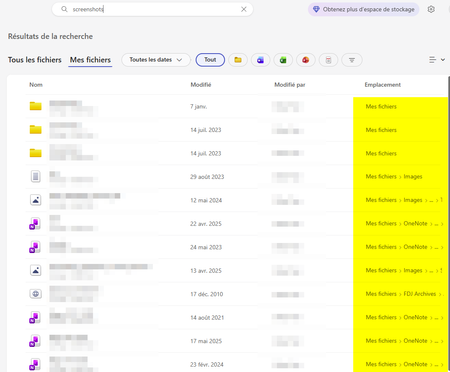
reproducible bug in the OneDrive web search results Summary: the "Location" column systematically displays "My Files" for folders, regardless of their actual location in the directory tree. This does not affect files — files correctly display their real path in the same column. Expected behavior: The "Location" column should display the actual parent path of the folder (e.g. My Files > Subfolder A > Subfolder B ...). Actual behavior: The "Location" column displays "My Files" for every folder result, regardless of where the folder actually sits in the hierarchy. Note: The same search correctly shows the real path for files inside those same folders. The issue is exclusive to folder-type results. Environment: Account type: Personal Reproducible: Yes, 100% consistently Impact: This makes it impossible to disambiguate between folders with the same name located in different parts of the tree when using search. Please let me know if additional information or screenshots would help. Thank you.137Views0likes2Comments
Unable to restore one drive personal vault file
Im trying to restore my onedrive file that I did not even deleted from personal vault I simply renamed it and somehow it got auto deleted now when Im trying to restore the file Im unable to restore it. You can in right panel it is "Waiting" indefinitely Please help I need these files urgently. ASAP.50Views0likes0Comments
Upgrading 365 Personal bought from Google Play
I previously bought OneDrive 365 Personal from the Google App Store and now want to upgrade to 365 Family purchased from Microsoft (to take advantage of the Workplace Discount Programme available from my employer). It seems that I can't do a simple upgrade however - Microsoft Support states If you bought Personal via Apple/Google Play, cancel it there first and wait for it to expire before purchasing the Family plan on the web. How can I do this without losing the 800gb of photos and files currently saved on OneDrive?149Views0likes2Comments








Events
Recent Blogs
- Get ready for May’s OneDrive Customer Office Hours! This session creates space for open conversation around the latest updates and how they support the way you use your files every day. In this month...May 14, 2026380Views0likes0Comments
- Last year, we made a promise: your files should work for you, not the other way around. That meant reimagining OneDrive not just as a place to store files, but as an intelligent layer that surfaces w...Apr 21, 20266.3KViews3likes2Comments