Recent Discussions
Users prompted for WHfB auth for Entra SSO resources
My colleagues and I have noticed that we are frequently being prompted to perform a Windows Hello for Business authentication when we use Edge to access resources that use Entra for authentication. Previously, this authentication occurred transparently. Has something changed recently?Solved84Views0likes3Comments
Favicons for bookmarks broken since Edge v149 update
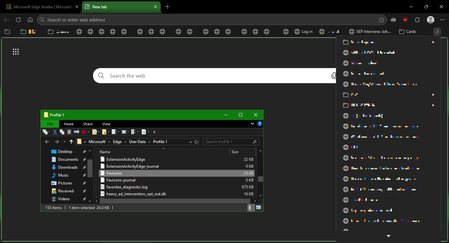
I've recently had Edge update to the v149.0.4022.52 stable-channel releases, and ALL my bookmarks now have no favicons. When I visit any webpage, Edge successfully loads the favicon for the tab of that website. But when I visit a bookmark, the favicon doesn't get updated after it has loaded for the site. And new bookmarks I add also don't show a favicon. If I go into my Edge profile-folder (which can found via edge://profile-internals/ , clicking the heading, then looking next to "Profile Path"), then it is still creating the "Favicon" and "Favicons-journal" files, but I assume isn't populating them with anything? I've tried deleting both files, restarting my PC, but even after Edge recreates them, no bookmarks are gaining any favicons. Is anyone else getting this issue...? OS: Windows 10 Home 22H2 x64 (OS Build: 19045.7291 : May 2026 ESU)Solved3.6KViews4likes23Comments
Password autofill broken in Edge Dev 149.0.4009.0
It looks as if the Password Autofill is broken in Edge Dev build 149.0.4009.0. Toggling autofill on and off again doesn't resolve the problem. All saved passwords are still searchable and can be manually copied/pasted, but autofill appears to not be working. Tested on both 64-bit and arm64 versions of this Edge Dev build. Anyone else seeing the same?Solved44Views0likes1Comment
MS Edge use of file:// protocol in script and link tags
I'm trying to view an html file that exists on my hard drive. I have <SCRIPT> and<LINK> tags with relative addresses to files (stylesheets and scripts) in the folder (and subfolders) that contains the html file. OOTB Edge errors in the console attempting a GET for these files. Is there a way, perhaps via Internet Options, to override this behavior and access the additional files from my hard drive? I'm not interested in a webpage self-hosting solution. Thanks in advance for any insight you can provide.Solved50Views0likes1CommentEdge Beta 147.0.3912.26: This policy is blocked, its value will be ignored.
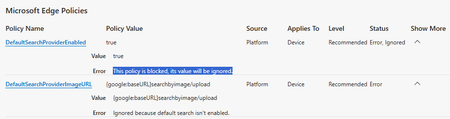
Starting with Edge Beta 147.0.3912.26 as well as Edge Dev 148.0.3928.0 I'm facing the problem, that the so called "sensitive policies" (which need an MDM or AD-Joined Device) are blocked. Error-Message in edge://policy/ shows up with: This policy is blocked, its value will be ignored. Using Edge Stable 146.0.3856.84 works fine (on the same machine). Issue is only related to the so called "sensitive policies" and ist clearly new with Edge Beta 147.0.3912.26 as well as Edge Dev 148.0.3928.0 ... I didn't change anything except updating Edge Beta and Edge Dev ... and as I said: Edge Stable still works fine on the same machine. The Release Notes https://learn.microsoft.com/en-us/deployedge/microsoft-edge-relnote-beta-channel don't show any new changes regarding those "sensitive Policies". So what happened? Did Microsoft break the Policies with those new Versions?Solved496Views0likes9Comments
Azure Tiles Not loading with MS Edge Beta v147.0.3912.16
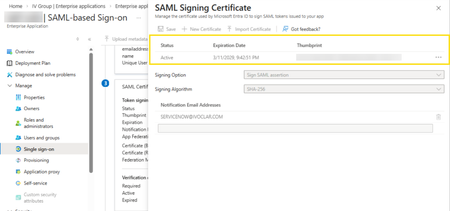
In the latest version of MS Edge, we cannot view or access the SAML Certificate data for Enterprise Applications hosted in Entra ID. Before: (v146.0.3856.62) After updating to v147.0.3912.16: As can be seen, the certificates cannot be displayed or accessed from this tile. This is affecting our test users who cannot rotate their SAML certificates but may have other impact for other Azure resources being accessed with MS Edge Beta.Solved108Views0likes2CommentsDesktop icons flicker for one second when closing Microsoft Edge
Hello, I would like to report a regression affecting Microsoft Edge on Windows 10. Starting with version 145.0.3800.70, and still present in the current stable version 145.0.3800.82, closing the Edge window causes the desktop icons to flicker for about one second, as if the desktop is being refreshed. This issue occurs only on Windows 10. On Windows 11, the same versions of Edge do not produce this behavior. The flicker happens consistently every time Edge is closed, and it does not occur with any other application.Solved608Views1like7Comments
Edge 144 Creates Multiple GNOME Menu Icons
Starting in Edge 144, there are now 2 icons displaying in the GNOME applications menu. com.microsoft.Edge.desktop microsoft-edge.desktop Both of these files are installed as part of the RPM; the first has "NoDisplay=true" at the bottom, but that doesn't seem to work as intended. I think this value needs to be in the first section, under "[Desktop Entry]", in order for it to work properly.Solved128Views1like1CommentiPhone Edge 144 "Send to devices" - "No Device found"
About a week ago, when Edge was on version 143, everything worked as expected. After updating to version 144, the “Send to devices” feature no longer detects any Windows computers on the same network. No settings were changed on my end — the only change was updating Edge to the latest version on both iPhone and Windows. Any ideas?Solved388Views5likes3CommentsNew Tab Search UI (Ctrl + Shift + A) has changed - how to revert to previous behavior?
Since the latest Microsoft Edge update, the Tab Search panel opened with Ctrl + Shift + A has changed. It now opens on the side instead of in the center, and arrow key navigation no longer works. Only Tab navigation works now. This makes it much harder to use quickly. Is there any way to restore the previous centered Tab Search UI, or re-enable up and down arrow navigation, or undo this specific UI change? The old version worked perfectly for my workflow. The new version slows everything down. Thanks, MichaelSolved1.2KViews8likes10CommentsGo Links on Edge Mobile
Dear community members, We use Intune managed computer and Zscaler that delivers DNS Search Domain. When user type a https://go/links in Edge browser, it automatically appends the FQDN to the address bar to become https://go.mycompanydomain.com/links. It is a quite common practice for Enterprise to provide convenience to access internal shortened URLs. With Intune managed mobile (also has Zscaler), can we achieve the same goal for Edge mobile? For the mobile use case, it is less of typing the go links directly in the browser. Because there are a lot of go links shared in Email and Chats from communications and newsletters, when user click them in Outlook or Teams on the phone, it will open in Edge. I am hoping when Edge opens these links, it automatically appends the search domain like on computers. I have looked up all Intune device and Edge documentation, chatted with three different LLMs, couldn't figure out a solution. All ideas are welcome! Thanks. Best regards,Solved259Views0likes1Comment- 1.4KViews0likes5Comments
[Deleted] What's news on the version 76.0.147.0 (Official build) canary (64-bit) ?
Hello this team ? What is the news version ?Solved1.2KViews2likes2Comments[SOLVED] Microsoft Edge
Hello Microsoft Edge, It lacks several security features related to passwords (security password) and a search engine with security levels (as "Safepay - Bitdefender", and as "McAfee SiteAdvisor") ! When you add please ? For exemple, Windows Security SiteAdvisor/Safepay...Solved3KViews0likes8Comments






Events
Recent Blogs
- 8 MIN READMicrosoft Edge for Business, the new, dedicated work experience for the Microsoft Edge browser, is now available in Microsoft Edge stable version 116. All customers who sign into Edge using Microsoft...Aug 04, 2023302KViews2likes73Comments
- Microsoft Edge for Business, the new, dedicated work experience for Microsoft Edge, is in preview today! Microsoft Edge for Business is planned to be the standard browser experience for organi...Jul 11, 202310KViews3likes2Comments