edge
736 Topics
TypeError: Cannot read properties of undefined (reading 'media_size')
Since version 153.0.4234.48 (Official build) (64-bit) was released and installed on my machine on 9/18/2026 I've been getting the following error while using Edge to debug a Web Application in Visual Studio 2022: TypeError: Cannot read properties of undefined (reading 'media_size') Thead: edge://print StackTrace: at ei.updateSettingsValues (edge://print/index.js:5:91848) at ir.onSelectedDestinationCapReady (edge://print/index.js:3935:3913) at Object.handleChange (edge://print/index.js:3935:175) at or.notify (edge://print/index.js:1:20564) at Kr.notify (edge://print/index.js:1:20736) at Ae.updateDestination (edge://print/index.js:5:51222) at s (edge://print/index.js:5:53037) at Ae.onCapabilitiesSet (edge://print/index.js:5:53089) Source modules: edge://print/index.js c7754cdafbaf1eb70a049a157e46719b4bd6bd79117bb1ad6fc57a38b51bca24 I thought it had to do with the print JavaScript code I was doing, but any page I try to print from the "..." Print menu options does the same thing. The error doesn't occur in Firefox and appears to be caught and ignored in Chrome.253Views0likes2Comments
Microsoft Edge PDF Reader - signature validation warning for official signatures
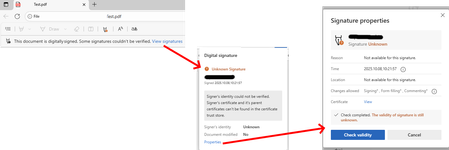
Since the last edge update we are running into the following issue, which triggers support tickets on our side. It seems that the edge internal PDF Reader now supports validation of digital PDF signatures. This new feature however is incomplete and causes a lot of confusion for edge users. "Official" signatures are labeled as "Unknown Signature" and "The validity of the signature is still unknown": "Official signatures" means qualified signatures from members of the EUTL - the European trust list as defined in ETSI TS 119 612 („Trusted Lists“): [...] the European Commission publishes a central list with links to the locations where the national trusted lists are published as notified by Member States. This central list, called the List Of Trusted Lists (LOTL), is available in both a human readable format and in a format suitable for automated (machine) processing XML. Parts of the edge PDF reader seems to come from *dobe itself which adds additional confusion since in their products (*dobe reader, acrobat etc) the signatures are correctly verified. They support this list for several years now (next to their own AATL list). I tried to find out whether this feature is 'work-in-progress' or it is a bug however the last published roadmap is quite old and doesn't give helpful information regarding this aspect. So my question is: Is full support of PDF signature validation including support of the EUTL planned and if so when?1.3KViews1like1Comment
Gpo question
Hi, if i set DownloadRestrictions to 2 for preventing Drive by Downloads, it also Block all ZIP files. Is this normal? If i deactivate SmartScreen, it is possible to Download ZIP files, even with this GPO. Is this a bug? Thanks for Feedback/Help in Advanced! best regards Wolle52Views0likes0Comments
Microsoft Edge Workspaces deleted/hidden after update.
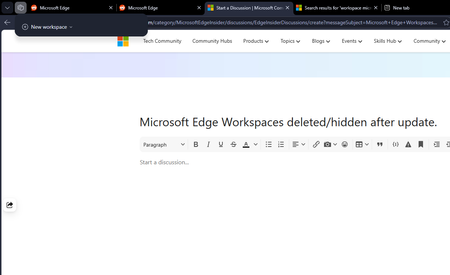
All my workspaces in Edge are hidden and/or are deleted. I updated my windows yesterday night (the restart also updated Edge which was pending) and noticed this issue this morning. I had 10+ workspaces and none of them are here to be found. Tried restarting the browser but no luck there.191Views0likes2Comments
Vertical Tabs! Enable control of pin/collapse pane (please!)
Edge's native implementation of vertical tabs when combined with tab groups make it an ideal browser for organized productivity and that's why I continue to use it as my daily driver on all desktop platforms. There is just one major pain point I find with using the vertical tab features: toggling its visibility. Of course, using vertical tabs makes more efficient use of screen real-estate (for landscape-oriented displays), but that does mean less screen space for actual webpage content, a reality which becomes obvious with 2+ vertical-tab-enabled browser windows open side-by-side. Thankfully, Edge includes convenient UI buttons to "Collapse" and "Pin" the vertical tab pane's visibility, but this is currently the only way to toggle this behavior, diminishing productivity of keyboard-centric use. Recently, the Edge team added the keyboard shortcut Ctrl+Shift+,(comma) — which switches the UI between vertical and classic tabs at the top. This is great, but it negates the value of having a collapsible vertical tab pane which would still show webpage favicons in the same visual paradigm of a vertical list and feels like a much more natural UI toggle. Some other users in the Edge Insider community have pointed out that such a side-panel collapse/expand key shortcut exists in many other popular programs as well. I've been trying to find some way of automating the collapse/pin behavior of the vertical tab pane, but it doesn't seem feasible without a proper menu option. Please consider adding a key shortcut specifically for this behavior, or instead include an option in the alt-menu dropdown that can be triggered via something like Power Automate. Thanks again to Edge team for all their work9.9KViews24likes5Comments
How do you handle sensitive PDF files in Edge without third-party cloud uploads?
Hi everyone, When working with sensitive PDF documents (like financial or personal files), most online PDF editors require uploading files to third-party cloud servers. This raises obvious privacy and security concerns for many users. The most reliable way to maintain data privacy today is using Client-Side Browser Processing (WebAssembly & JavaScript), where operations run entirely inside the local browser memory without transmitting any data over the internet. Key advantages of pure client-side processing: Total Privacy: Zero file transfers or external server logs. Instant Speed: Processing relies on your local CPU, bypassing slow upload/download waiting times. No Software Installation: Works directly inside browsers like Microsoft Edge. For those looking for a practical example of this architecture, https://pdfdocflow.com is a free tool offering 24 browser-based tools (merging, splitting, compressing, watermarking, and signing) operating 100% locally with zero server uploads. How do you usually handle sensitive PDFs while browsing, and do you prefer client-side web tools over installing dedicated software?157Views0likes0CommentsHow to type on a PDF?
Hi everyone, I need to type directly on a PDF, but the document does not contain fillable form fields. I can open it in Microsoft Edge, but I’m not sure whether there is a reliable way to add text anywhere on the page and save the changes without affecting the original layout. Is there a built-in or free way to do this, especially if I need to change the font size and move the text into the correct position? I’d prefer not to convert the PDF to Word first, as that may change the formatting. Any suggestions would be appreciated. Thanks!377Views0likes1CommentEdge version 150 JavaScript speechSynthesis.getVoices() undefined voices
For the past few days JavaScript speechSynthesis has had a problem in Edge browser. Sometimes it gets the proper list of voices but most of the time it returns: "Microsoft undefined Online (Natural) - undefined" for every single Natural voice. It then uses the default voice (Microsoft David) for speaking the utterance. Can you fix this bug? Edge Version 150.0.4078.83 (Official build) (64-bit) Thank you.Solved718Views1like4CommentsFeature Request: Per-profile default account selection in Microsoft Edge
Summary Allow the default account and external-link account-selection behavior to be configured independently for each Microsoft Edge profile. Description Microsoft Edge supports multiple profiles, which are commonly used to work with different Microsoft Entra ID / Microsoft 365 tenants and accounts. Currently, settings such as “Default profile for external links” and related account-selection behavior are shared across Edge profiles. This can cause one profile's account-selection preferences to affect the behavior of other profiles. We would like these settings to be profile-specific. For example: Profile A → user work account Profile B → admin (onmicrosoft.com) account When a user opens an external link while working in Profile B, Edge should consistently use the account/profile configured for Profile B, without inheriting or being affected by the preferences configured for Profile A. Expected behavior Each Edge profile should have its own configurable default account/profile for external links and related account-selection behavior. Changing the setting in one Edge profile should not change or override the corresponding setting in another profile. Use case This is particularly useful for administrators, consultants, developers, and users who regularly work across multiple organizations or Microsoft 365 tenants. Having profile-specific account selection would make multi-tenant workflows more predictable and reduce the risk of opening links with the wrong organizational account. Requested functionality Please make the relevant default-account and external-link account-selection settings profile-scoped rather than globally shared across Edge profiles.200Views0likes0Comments