microsoft edge
119 Topics
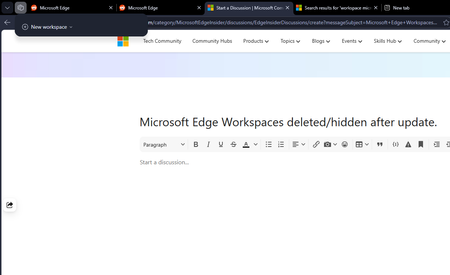
Microsoft Edge Workspaces deleted/hidden after update.
All my workspaces in Edge are hidden and/or are deleted. I updated my windows yesterday night (the restart also updated Edge which was pending) and noticed this issue this morning. I had 10+ workspaces and none of them are here to be found. Tried restarting the browser but no luck there.287Views0likes2Comments
Feature Request: Native Multi-Container Tabs (Session Isolation) for Edge Workspaces and Tab Groups
Microsoft Edge developer team, As a developer who regularly tests complex web applications locally and on staging environments, I rely heavily on Microsoft Edge's Tab Groups and Workspaces to keep my projects organized. However, testing multi-role workflows—such as simultaneously testing Admin, Manager, and Standard User accounts on localhost—is currently very frustrating. When logging into a secondary account in another tab within the same Edge window, the newly created authentication token overwrites the existing cookies, localStorage, and session context across all open tabs for that domain. This causes the first tab to automatically switch sessions upon refresh or navigation, breaking side-by-side workflow testing. Mozilla Firefox solves this problem cleanly with Multi-Account and Temporary Containers, allowing tabs inside the same window to maintain fully isolated storage contexts. Bringing native container tabs or tab-level session isolation to Microsoft Edge, especially tightly integrated with Tab Groups, would eliminate the need to run multiple heavy browser profiles or separate windows. It would make Edge the absolute premier browser for developers, QA engineers, and power users who manage multiple user roles daily. Please consider adding tab-level container isolation to the Edge product roadmap.301Views1like1Comment
Feature Request: Expose a Versioned UI State API in Microsoft Edge for AI Agent Integration
I'm submitting this to the Tech Community to amplify a formal Feature Change Request (FCR) already on record with the Microsoft Edge product team via the official Feedback Portal — where it has already moved to "We're Reviewing This" status within 48 hours of submission (September 16, 2026). The core problem: Microsoft Edge does not expose its live UI state to AI agents — including Microsoft's own Copilot. This forces agents to generate step-by-step instructions based on stale training data, guessed UI layouts, and cached assumptions. The result is real, visible, recurring failure: instructions referencing moved menus, renamed paths, occluded click targets, and frozen containers that agents cannot detect. Three concrete Feature Change Requests are on the table: FCR-001 — Versioned UI State API Edge should expose a versioned, permissioned browser-side API (e.g., a Manifest v3 edgeUIState permission + browser.edgeUI.getSnapshot() method) that allows approved agents to query live UI layout metadata — control labels, element positions, sidebar geometry, overlay presence, and container status. Versioned so agents can declare compatibility ranges and degrade gracefully across Edge update cycles. FCR-002 — Container & Overlay Awareness Edge should surface a lightweight heartbeat signal (~500ms) to credentialed agent sessions covering: container responsive/frozen state, sidebar bounding rectangle in viewport-relative coordinates, and full or partial overlay presence. This directly resolves Copilot sidebar occlusion failures and Application Guard container freeze blindness. FCR-003 — Official UI-Check Protocol Specification Microsoft should publish and maintain a formal specification defining when and how Edge-integrated AI agents are required to perform a live UI check before generating user-facing instructions — including required fallback behavior and disclaimer language when live UI data is unavailable. Published alongside WebView2 and extension API references, with a named owner and versioned changelog. Why this matters right now: These failures occur in standard Edge configurations and are disproportionately likely during AI-assisted task flows — precisely because those flows involve the Copilot sidebar being open. Single-agent failure is a user frustration. Systemic agent failure across every Edge user running Copilot is a platform trust problem. Feedback Portal submission (status: We're Reviewing This): https://feedbackportal.microsoft.com/feedback/idea/e3dfa689-02b2-f111-aad1-000d3a02f23c If this resonates with your workflow or development experience — please upvote, comment, and share. The more traction this gets in the community, the stronger the signal to the product team that this is a priority worth accelerating. — CA_MGooGG | Chicago, IL | September 18, 2026140Views0likes0Comments
Feature Request: Add toggle to fully disable VideoOverlayToolbar (video overlay buttons)
In recent Microsoft Edge versions, a built-in VideoOverlayToolbar appears automatically on top of web videos. It contains Picture-in-Picture, Video Enhancement, Video Summary, Video Translation buttons. Current limitations: 1. We can only disable the corresponding functions, but cannot hide these overlay buttons on video. 2. Legacy flag #edge-video-super-resolution is removed. 3. Launch parameter --disable-features=VideoOverlayToolbar no longer works on new Edge builds. Request: Add a unified switch in Edge Settings to let users completely hide this entire overlay toolbar, to avoid covering video content and improve viewing experience.160Views0likes0CommentsPersistent issues with Read Aloud in Edge
I have Windows 11. Today I began having an issue wherein the Read Aloud feature built into Edge doesn't work. I was initially trying to use a similar function on Internet Archive, and noticed that while all the Microsoft voices seemed to be available in the onsite dropdown, the only voices that made any sound were David, Mark, and Zira---none of the "Online (Natural)" voices. I tried to use Read Aloud as a workaround, and found all the buttons greyed out completely. Mind you, everything worked fine yesterday, and I made no changes to my computer in the intervening time. I've opened up two support tickets, but neither live chat agent was able to resolve the issue. Here are the things I've tried with their help: trying the feature on different websites updating & restarting Edge resetting Edge settings to defaults updating & restarting computer switching wifi networks connecting to a hotspot using InPrivate mode using a new Edge profile (rule out interference from extensions) checking that English tts is downloaded in Time & language > Language & region turning Online speech recognition off and back on again resetting experimental features checking sound systems (they work, but just in case) doing a system reset (?) to 24 hours ago, which took about an hour and undid all the updates I just mentioned maybe something else I don't remember? The next thing I am going to try is give my computer a long nap. It's been a while, so maybe it just needs some shut eye. Otherwise, help????2.2KViews0likes2Comments[SOLVED] Can't login on Edge anymore! (Login and Sync issue)
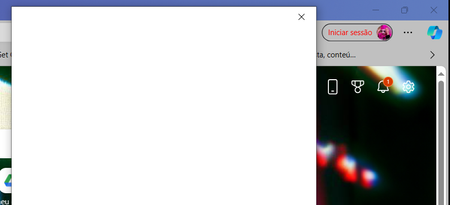
UPDATE 10 APRIL: Finally got a hold on https://support.microsoft.com/, initiated a live chat with support, and they had to install Install Quick Assist (Install Quick Assist - Microsoft Support) and they had to enter my PC and check what was wrong. They had no idea what was happening at the time (this all happened a few weeks ago - sorry for the late reply ut I had a lot of work delayed due to this error) and reinstalled Windows = issue solved. The following day however, windows asked me to update again and the issue returned ahahahaha but I removed it, and then the following system updates didn't carry that sign in issue anymore. Thank you all for your help and support during these VERY STRESSFUL DAYS! Hope the issue got solved for everyone! ____________________________________________________________ UPDATE 25TH - 4:52 GMT: - Run every possible workaround thanks to comments on my Microsoft Community thread and here (Tech) (Thank you everyone!) - Can't get pass the edge login pop-up => can't sync and have access to workspaces; - Already reported twice on Alt + Shift + I (with screen recording video and photos); - No 3rd party antivirus issue; - Some people on the Community post were able to surpass this by uninstalling KB5035853 - but I don't have it; - Using Windows 10 Home version 22H2, with Edge version: 123.0.2420.53 (64 bits) [also tried on Edge Beta version: 123.0.2420.53, but uninstalled it for now] ____________________________________________________________ UPDATE: 22nd OF MARCH: There was already some suggestions left here (https://answers.microsoft.com/en-us/microsoftedge/forum/all/cant-login-on-edge-anymore-sync-issue/6433b1dc-0f99-401f-86e6-90b36c7f2d34but it didn't work. Anyone? Please? _______ original message posted on 20th March _______ Already hit restore on windows' applications and restarted my pc, but every time I open Microsoft Edge now, on the top right corner it says my account is not logged in. And when I try to do it, the pop-up window says it's loading and then just turns to all white. Anyone can help me please? Don't want to lose my favourites, passwords and workspaces ;_; 1) already deleted all cookies 2) already confirmed if it was an issue with the Wi-Fi 3) already hit «repair» twice on the program 4) already tried to add a new account (didn't work cause the issue with the popup to login is the same) 5) already disabled all extensions and tried to login again after that 6) my account is not blocked - in fact I can login on Microsoft with it on my phone and website (otherwise I wouldn't be able to post this question). The issue is only with logging in on the Edge browser. 7) already deleted and reinstalled Edge. And yes, I restarted my pc every time I tried something. What else can I do? I need to access my Edge Workspaces!39KViews2likes29Comments
Propuesta para mejora de Microsoft Edge
Propuesta de mejora para Microsoft Edge: Configuración de carpeta predeterminada por sitio web Asunto: Solicitud de función: Carpeta predeterminada por sitio para cargas y descargas de archivos en Microsoft Edge Estimado equipo de Microsoft Edge: Quisiera proponer una mejora que sería de gran utilidad para profesionales que trabajamos con múltiples plataformas web que requieren la carga y descarga constante de documentos. Actualmente, Edge permite controlar permisos de acceso a archivos por sitio, pero no ofrece la posibilidad de asignar una carpeta predeterminada específica para cada página o dominio. Esta función sería especialmente valiosa en entornos legales, administrativos y gubernamentales, donde distintos portales requieren manejar documentos en rutas separadas para mantener orden, trazabilidad y eficiencia. Beneficios de la función solicitada Reducir tiempos de navegación al seleccionar carpetas en cada carga de archivo. Evitar errores al subir documentos desde carpetas equivocadas. Facilitar flujos de trabajo donde cada plataforma requiere carpetas distintas (por ejemplo: "Acceso" y "Firma"). Mejorar la productividad en sectores que dependen de múltiples portales judiciales, administrativos o corporativos. Propuesta técnica Agregar en la configuración de permisos por sitio una opción como: "Asignar carpeta predeterminada para cargas/descargas en este sitio" Esto permitiría que Edge recuerde automáticamente la carpeta seleccionada cada vez que el sitio solicite subir o guardar un archivo. Estoy seguro de que esta mejora beneficiaría a miles de usuarios que trabajamos diariamente con plataformas que requieren manejo intensivo de documentos. Agradezco su atención y quedo a disposición para aportar más detalles si son necesarios. Atentamente, Víctor Hugo Escobedo Barajas No soy programador, soy abogado y este modificación directo desde configuración por sitio ayudaría bastante a reducir el tiempo de revisión de mis actividades diarias.51Views0likes0Comments