Recent Discussions

New Copilot update has made a chat inaccessible
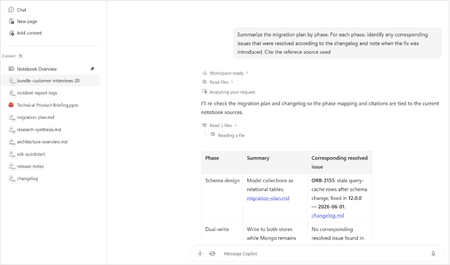
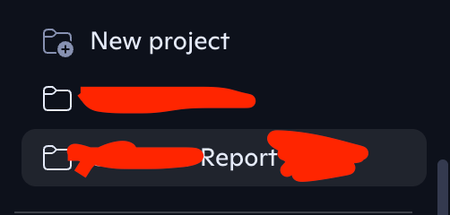
I am experiencing an issue with a Copilot chat that appears to have become inaccessible after a recent update where the . This happened since Friday 21st August. I first noticed when all of my chats were migrated except one chat which is no longer visible in my chat history. I am logged into the same Microsoft account for the chat that is missing on which I created it. I have tried searching for it on the desktop app and in the browser with no luck. By some chance I had a Chrome browser tab open from an older Copilot session, which shows the older Copilot UI and the chat is there. The chat is fully functional: I can open it, view its history, send new messages, and receive responses. But this chat only is visible in the old UI and cannot be accessed in the new Copilot experience. The URL cannot be copied and pasted into a new tab because it redirects the copilot.microsoft.com URL to copilot.com and goes to a blank chat. The problem is if I close this browser tab, it will not be visible anymore. I have tried on the desktop app, a fresh browser tab, a fresh browser using incognito mode and even on mobile and on all of those, the new Copilot UI/Experience loads up without the chat I need. As part of my troubleshooting on the old Copilot Experience, I moved the chat to a "Project". But now I am unable to move it out of the "Project" And the new Copilot experience doesn't have a "Projects" section but instead a "Notebooks" section and I can't find it there either. You can see in both screenshots the UI is different. Because the chat now is in a Project it has a URL in the format: https://copilot.microsoft.com/projects/{project-id}/chats/{chat-id} Opening this URL on other devices or browsers redirects to the new Copilot experience and starts a new chat instead of opening the existing Project chat. As mentioned before on the new Copilot experience, this chat cannot be found anywhere else, even in the list "Chats". I can confirm that this is the same Microsoft account since my other chats have synced correctly. I have tested the URL on other browsers too with the redirect issue. The Project chat remains accessible and functional only within the old Copilot session. The chat I need contains an active, ongoing project. Although it remains accessible in the current browser tab, I have no reliable way to reopen it elsewhere, and I am concerned that if the session is lost or if I have to restart my browser or PC, I may permanently lose access to the Project chat and its accumulated context. Could you please investigate whether this Project chat is associated with an older Copilot experience, a migration issue, or a synchronisation problem between Project chats and the newer Copilot interface? Thanks, J33Views2likes0CommentsAccepted the new Copilot update from Mac, iPhone, and iPhone and lost my entire Library
Greetings, all. I just accepted the install for a new Copilot update for my three Apple devices, and lost all pages in my Copilot Library. Microsoft promotes the sustainability of the Library storage as their AI continues to evolve and improve. But, really not happy that I've lost all of the documents where my edits to the pages were not covered in a chat conversation. Has anyone else experienced this problem and hopefully found solutions to retrieve the lost pages? I've tried to use Copilot to solve this problem without any success. Thanks, all.28Views0likes0Comments
Recent Bug or issue i got for last 3 days when i am using Chat sessions.
Recent Bug or issue i got for last 3 days when i am using Chat sessions after creating New Projects and saving outside chats there. But in New chats when i opened and used attachment to it from Notta Memo it is clearly working its taking transcript and giving Summary and details i asked. Please help if any one faced same issue and you guys got any resolution in fixing this issue. Thanks in advance.21Views0likes0CommentsUpdate: Root Cause Identified
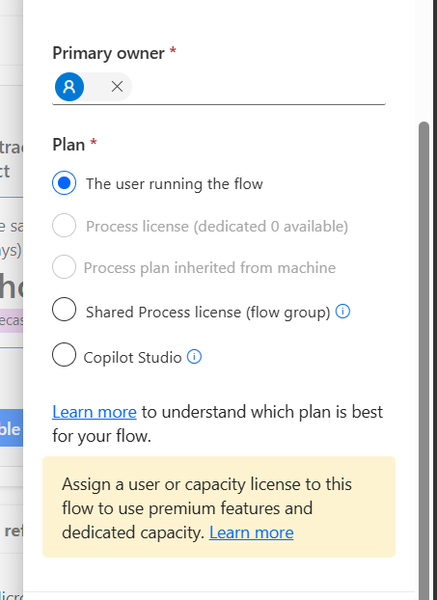
Hi everyone, I would like to share the root cause and solution in case someone else encounters the same issue. The Problem I created several agent flows directly in Power Automate using: https://make.powerautomate.com The flows were configured correctly: The flow starts with When an agent calls the flow The flow ends with Respond to the agent The flow and agent are in the same environment The flow is included in a solution The flow is published and fully functional The flows could be added to an agent and executed successfully. However, unlike flows created directly from Copilot Studio, they did not appear in the Global Tools directory. What I Investigated I verified: Trigger configuration Respond to the agent action Environment consistency Solution membership Publish all customizations Asynchronous response settings Synchronization delays between Power Automate and Copilot Studio None of these were the root cause. Root Cause The issue was related to the workflow Plan. I discovered that: Flows created directly in Power Automate were assigned: Plan = The user running the flow Flows created directly in Copilot Studio were assigned: Plan = Copilot Studio Although the Power Automate flow was fully functional and could be used by the agent, it was not visible in the Global Tools directory. Solution After changing the workflow Plan to: Plan = Copilot Studio the flow immediately appeared in the Global Tools directory. Configuration Location The setting can be found in the workflow properties under: Primary owner → Plan Important Note Based on my testing, changing the Plan to Copilot Studio appears to be a one-way operation and may not be reversible. It may be a good idea to export or save the flow before making the change. Acknowledgements Special thanks to sohnash for reproducing the scenario and providing troubleshooting suggestions, and to Patty_Velasquez for sharing similar observations that helped confirm the behavior. Hopefully this helps others who encounter the same issue. Best regards, Adhonaï KOUKA62Views1like0Comments
Seeking Guidance on Microsoft 365 Copilot Adoption Support for an Enterprise Customer
Hi Everyone, We are a newly enrolled Microsoft partner currently working with a customer to accelerate Microsoft 365 Copilot adoption across their organization. We are exploring how we can best support the customer and would like to understand whether there are any Microsoft programs, resources, partner managers, or engagement channels available to help us collaborate with Microsoft on Copilot adoption opportunities. Could anyone advise on: The recommended Microsoft channel/team to engage for an enterprise Copilot adoption opportunity Any Microsoft programs or resources available to support customer adoption How partners can collaborate with Microsoft for customer-specific Copilot adoption support Any guidance on the appropriate Microsoft team, program, or point of contact would be greatly appreciated. Thank you!40Views0likes0Comments
Free, read-only PowerShell tool to find SharePoint oversharing before enabling Copilot
The first time I pointed my own tool at a tenant, it found three sites the whole company could open. A search center was one of them. Nobody had shared them on purpose. They came that way, and Copilot would have read every one. That is the thing people ask before a Copilot rollout. What will it actually surface. Copilot only returns what a user can already open, so the real exposure is the broad access that was already there. The Everyone and Everyone except external users grants. The anonymous and organization-wide links nobody remembers making. Microsoft has reports for this and they sit inside the paid SharePoint Advanced Management add-on. For teams without that license I put together a free open-source PowerShell module that answers the same question. Sharing it here in case it helps someone planning a rollout. What it does Get-EveryoneAccess finds every place the Everyone and EEEU claims grant access, on one site or the whole tenant. Get-OversharedContent finds the anonymous Anyone links and the organization-wide links. It reads them from the hidden SharingLinks groups instead of walking every file, so it stays quick on a big tenant. Invoke-CopilotReadinessAssessment runs both, scores the exposure out of 100, and writes an HTML readiness scorecard you can hand to your security team. Install Install-Module CopilotGovernance -Scope CurrentUser It is read only. It reports, it never changes anything. It needs PowerShell 7 and PnP.PowerShell and your own Entra app client id, because PnP 3.x no longer ships its own sign-in app. It also reports coverage, so a site it could not read is flagged and never counted as clean. Being upfront about the limits today. It scans each site and its lists, and subwebs are still on the roadmap. Links created as Flexible on the newer sharing experience can be under-counted, so pass -IncludeSpecific to review every link. The module is on the PowerShell Gallery at powershellgallery.com/packages/CopilotGovernance and the code is on GitHub at github.com/gvijaikumar9/CopilotGovernance Feedback and edge cases welcome. Happy to fix what people hitDLP for Microsoft 365 Copilot is four behavior, Microsoft's own sources disagree on their status
"DLP for Microsoft 365 Copilot" gets talked about as one switch. Microsoft Learn now documents four behaviors, on four different schedules, and they still do not share one status. Restricting Copilot from processing sensitivity-labelled files and emails comes closest to settled. Roadmap 557255 reads "Launched", General Availability, dated April 2026. Learn states only that the feature "is available", without naming a release stage. The behavior that blocks external web search when a prompt contains sensitive info types shows on Microsoft 365 Roadmap 548671 as "Launched", while Learn gives that section no status at all. That same roadmap record carries both General Availability and Preview tags. Message Center MC1263277 was the rollout notice; it expired 31 July 2026. Blocking sensitive info typed into the prompt is the contested one. Roadmap 515945 has read "Launched", General Availability, since 14 May 2026, while Learn, edited since, still says the feature is in preview and rolling out. Verify it in your tenant before you rely on it. External email as grounding data runs the opposite way: Learn tags it "(preview)", while Roadmap 561552 reads "In development" with GA scheduled for January 2027. A setup detail that catches teams out: this is configured only through the Custom DLP template, and selecting the Copilot location disables all other locations in that policy. Confirm what content DLP actually evaluates rather than assuming it. Before you map "DLP covers Copilot," decide which of the four behaviors you need and verify each one's status in your own tenant.41Views0likes0CommentsUnanswered Questions on GitHub Copilot Harness in Copilot Studio
We're piloting the GitHub Copilot harness in Copilot Studio (GA August 2026) and several operational and architectural details remain undocumented in the GA FAQ, Microsoft Learn, or licensing guides. Looking for official answers or PM contacts on: Architecture & Execution – When the harness breaks tasks into subtasks, does it use internal sub-agents or only skills/connected agents, what are the exact timeout/retry/max-execution-duration limits for long-running workflows, and are planning/context-retrieval/orchestration internals documented anywhere or is the orchestrator a black box? Model Selection – Can individual skills within one agent use different models or is selection strictly agent-level, how are models chosen internally when multiple skills execute, are any internal models developer-configurable, and what's the roadmap for models being added/retired/deprecated plus the lag between public release and Copilot Studio availability? Cost & Token Optimization – How exactly is the ~45% token reduction achieved, how much control do makers have over context/caching/retrieval/tool calls, what are per-model credit consumption characteristics, which models are most cost-effective for specific workloads, and what's the minimum credit cost for trivial interactions? Memory Management – What are retention periods for session/working/agent memory beyond the documented 28-day user-memory expiry, is true long-term memory supported, and what changed versus earlier implementations? Knowledge Retrieval – Can skills or system instructions influence retrieval strategy/document selection/prioritization/filtering, can planning stages perform conflict/duplicate/version detection before retrieval, and how does the harness decide which sources to search? Apps Feature – What is the "Apps (preview)" capability for, when does it GA, and how does it differ from workflows/skills/adaptive cards/agents? Billing & Credit Sizing – Is there a framework to classify users/agents by expected consumption and size credit allocation per group (citizen vs pro developers), and what's the minimum/typical consumption for simple/medium/heavy interactions? Governance & Admin – Can usage limits be set at user level (not just environment/agent), is there an API/IaC path for large-scale credit assignment, can non-admins view their own consumption/remaining allocation, and is there a self-service request-more-credits dashboard? ALM & Environments – What's the recommended path to move harness agents across Dev/Test/UAT/Prod (Solutions/ALM "setup differs" per parity chart—how?), does GitHub integration replace or complement solution-based deployment, are there recommended AgentOps practices for source control/releases/versioning, and what baseline credits and onboarding model are suggested for citizen developers under usage billing—any enterprise reference implementations?138Views1like0CommentsHow Do I Secure Copilot? A Practical Guide to Protecting Your AI Assistant
Artificial intelligence has become an essential part of modern workplaces, and Microsoft Copilot is leading the way in helping organizations improve productivity. From drafting emails and summarizing meetings to generating code and analyzing documents, Copilot makes daily work faster and more efficient. However, with these powerful capabilities comes an important question: How do I secure Copilot? https://dellenny.com/how-do-i-secure-copilot-a-practical-guide-to-protecting-your-ai-assistant52Views0likes0CommentsPattern for governing Copilot Studio agents before they reach production
I keep seeing the same gap across Copilot Studio deployments: agents get built and shared before anyone has answered three basic governance questions. Before I call an agent production-ready, I check: -> Who's the sponsor? Not just who built it, who's accountable for it existing. -> What's it grounded on, and who can actually read that data? A knowledge source that's technically "in scope" isn't the same as verified content people should be answering from. -> Is there an audit trail for what the agent said and to whom, if someone asks later? None of this shows up in a demo. It only shows up a few months in, when the agent's still running and nobody remembers why. I wrote a longer breakdown of this governance model, including how Microsoft Agent 365 fits into it, here: https://jpmarquez.com/blog/microsoft-agent-365-licensing-what-you-actually-buy/ Curious what pattern others are using here, especially for the sponsor/ownership question, since that's the one I see skipped most.71Views0likes0CommentsHow Sales Teams Can Close Deals Faster with Copilot in Dynamics 365
In today’s competitive sales landscape, speed is no longer just an advantage it’s a necessity. Sales teams are expected to respond quickly, personalize every interaction, manage multiple opportunities, and close deals in shorter sales cycles. However, administrative tasks, scattered customer information, and manual follow-ups often slow down even the most experienced sales professionals. https://dellenny.com/how-sales-teams-can-close-deals-faster-with-copilot-in-dynamics-365/35Views0likes0Comments
New experience workflow can't use dynamic value in Business central connector bool
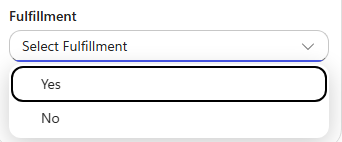
Hi all As the title states I have run into an issue when trying to use the Business central connector in a new experience workflow to create a record in my sales invoice lines. I am trying to create a prototype for an agent that can create invoices in my Business central environment based on certain criteria given by my customers. To let the agent do things in Business central I am trying to create workflows for it to use as tools, but when trying to add sales lines to the invoice, I can't seem to use dynamic values in two boolean fields, it only shows a dropdown with true/false. I know I could use a condition and use the create record four times depending on the combination of the two fields, but that seems messy, especially when this was possible back in power automate flows. Has anyone experienced this and do we know if this is considered a bug or won't it get fixed?36Views0likes0CommentsMicrosoft Copilot for Project Management: A Complete Guide to Smarter Planning
Project management has always been about balancing priorities, managing deadlines, coordinating teams, and making informed decisions. As projects become increasingly complex, project managers are expected to do more with less—less time, fewer resources, and tighter budgets. Fortunately, artificial intelligence is transforming the way teams work, and Microsoft Copilot is leading that transformation. https://dellenny.com/microsoft-copilot-for-project-management-a-complete-guide-to-smarter-planning-faster-decisions-and-better-team-collaboration/106Views0likes0Comments
Copilot Studio Agent for Excel Macro Modernization — Anyone Tried This?
Anyone built a Copilot Studio agent to analyze macro-enabled Excel workbooks (.xlsm) and recommend a modernization path — e.g., migrating logic to Power Automate or rebuilding as Power BI dashboards? Curious about real-world attempts: what worked, what didn’t, and where the ROI actually showed up. Would love to compare notes before diving in myself. #CopilotStudio #Excel #PowerAutomate #PowerBI #PowerPlatform29Views0likes0CommentsIs Copilot Notebook Replacing OneNote? What I Tell Concerned Users
Copilot Notebook and OneNote both use the word notebook, so it is easy to assume that one is replacing the other. That is not what is happening. OneNote remains a useful place to capture notes, organize information, and develop content over time. Copilot Notebook serves a different purpose. It brings selected sources together so Copilot can help you work toward a specific project, topic, or outcome. You may use both tools within the same workflow. However, there are also times when Copilot Chat or SharePoint may be all you need. In my full article, I compare Copilot Notebook and OneNote, explain the licensing considerations, share workplace examples, and provide a simple way to choose the right Microsoft 365 tool for the work. https://traccreations4e.com/copilot-notebook-vs-onenote/ #MSFTOneNotePartner #traccreations4e-p26 8/3/2026Looking for ideas: Reducing "Allow" prompts when using SharePoint Knowledge
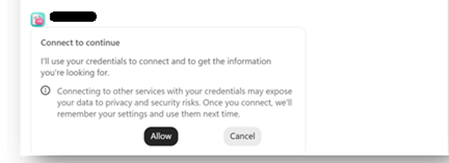
Hello community members! I'm hoping to get some advice from people who may have come across a similar challenge with their Copilot Studio "SharePoint knowledge retrieval" agents 🤞 Current setup Agent set up in Copilot Studio and published to channels - M365 Copilot and Teams Agent is connected to 4 SharePoint folders (I'm using Method#1 - see below screenshot for reference). This is essential because the documents inside the folders contain both text and image-based content. This is the only method that brings results Users have permissions to access the content in these folders Problem We are currently preparing to roll out this agent but we've hit a user experience issue that is becoming a blocker for moving forward. When a user interacts with the agent for the first time, they are asked to click "Allow" ... 4 times .. one for each of the folder that the agent is connected to This experience feels heavy for users (based on our pilot feedback) and people give up after the first or second time because they think it is not working. In spite of comms and a video about having to repeat this action until done. We want the first time experience to be as smooth as possible to drive adoption. Also, we are going to expand the solution to include more folders soon - so there is also a concern that number of consent prompts could grow further. What I've tried Used Method#2 to connect to SharePoint folders. While this didn't pop up the "Allow" prompts, as indicated earlier, this approach doesn't work because it doesn't return any results from documents as they contain both text and image content. Tried Method#1 to connect to the library (and use instructions to indicate necessary folders) - this didn't work because the method doesn't allow to connect to libraries. Note - I cannot restructure the library and put all the documents into one folder because that's the way the documents have been maintained for a long time & direct links to the folders are being used across the organization via. emails, decks etc. Looking for advice Has anyone found a way to reduce or eliminate these consent prompts? Are there any other recommendations on using SharePoint as a knowledge source that respects user permissions without these consent prompts? Does anyone know why Method#1 and Method#2 have different user experiences where the first one prompts for consent and the second doesn't?70Views1like0Comments
Deterministic way to mark generative answer output as AI-generated - AI Act
Hi all, We have a text-based RAG agent in Copilot Studio using the Azure AI Search connector as the knowledge source. It's customer-facing. We need every generated turn to carry a machine-readable marker identifying it as AI-generated, not just a visible disclaimer line. Instructing the model to append something isn't acceptable for us, because it's non-deterministic and can be prompt-injected away. Has anyone found a cleaner pattern? Like how to do it?25Views0likes0CommentsIs My Code Safe with GitHub Copilot? A Practical Guide for Developers and Businesses
Artificial intelligence has transformed software development, and one of the biggest names leading this change is GitHub Copilot. It helps developers write code faster, generate functions, explain unfamiliar code, and even suggest complete implementations based on natural language prompts. While the productivity gains are impressive, one question continues to surface among developers, engineering managers, startups, and enterprise organizations: https://dellenny.com/is-my-code-safe-with-github-copilot-a-practical-guide-for-developers-and-businesses36Views0likes0Comments
Scout Not Working After Upgrade from 0.23.331 to 0.23.578
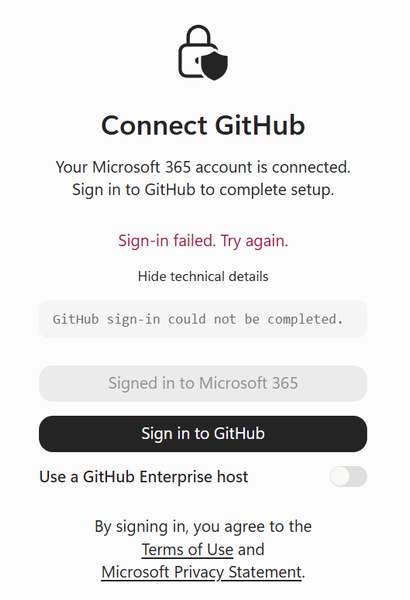
I have been using Scout actively and after upgrading to 0.23.578 the device registration with GitHub has stopped working. I get to the point where it asks me for the device ID, GitHub accepts it then shows "sign-in could not be completed". I'm wondering if anybody else has experienced this. I'm inclined to think it is a new bug since the added the Enterprise host in this version.52Views0likes0Comments






Events
Recent Blogs
- Bring READMEs, wikis, logs, transcripts, and rich-text files into Copilot NotebooksAug 13, 20266.7KViews4likes4Comments
- Now the LegalZoom agent works inside Microsoft 365 Copilot so a legal task no longer means stepping away from your work.Aug 12, 20261.1KViews0likes0Comments