Recent Discussions
Discover a community gallery of reusable skills for AI agents
Save this link, it is a gem for your Copilot agents. This community-driven skills gallery brings together dozens of ready-to-use examples that you can download and import into: Agents built with Copilot Studio Copilot Cowork Microsoft Scout As a reminder, a skill is a reusable set of instructions that gives an agent a specific capability. You will find use cases covering document analysis, content creation, document conversion, automation, and data processing. For those of you working on agent development in Copilot Studio, this is an excellent source of inspiration. Beyond downloading existing skills, it is also a great way to discover how other creators structure their skills, organize their instructions, and design reusable capabilities across multiple agents. Skills Gallery: https://microsoft.github.io/cat-agent-skills/39Views0likes0Comments
Issue: Cannot Share Agent to New Editor in Copilot Studio New Experience
In the new UX, sharing agents is restricted: I can share agents for viewing/testing (read-only). But I couldn’t find the editor rights when the agent is shared in the new experience. cam advice when this features be released? Is there a workaround to have editors for new user experience24Views0likes1CommentNew Agent Experience - Adding Excel Tool
Hello everyone, I want an agent in the new Copilot Studio experience to read the latest row from an Excel table and then append a new row. Has anyone successfully configured the Excel Online (Business) tools dynamically in the new Copilot Studio experience? Which values should be passed for Location, Document Library/Drive, and File, etc.? In preview, the agent fails but when I prompt it, it ends up adding the row. If anyone could also guide me to resources to learn about how to configure tools in the new experience, I would even be more grateful. Thank you !41Views0likes2CommentsEnhance Teaching and Learning with Microsoft Copilot: A New Era for Schools and Universities
Artificial Intelligence is transforming education, helping institutions create more engaging, personalized, and efficient learning experiences. Among the latest innovations, Microsoft Copilot stands out as a powerful AI assistant designed to support educators, students, and administrators in their daily work. https://dellenny.com/enhance-teaching-and-learning-with-microsoft-copilot-a-new-era-for-schools-and-universities29Views0likes0Comments
Copilot Health Unavailable Across All Devices and Browsers for 3–4 Days
Hello I am looking for some guidance. My Copilot personal account under the Health section has been consistently unavailable for the past 3–4 days. Each attempt to use the Health feature results in the message: “We are experiencing an issue. Please try submitting a new message.” This issue affects all platforms and browsers, including: Microsoft Edge (Windows 11 Pro) Google Chrome (Windows 11 Pro) Copilot app on iPhone General Copilot chat works normally on all devices, but Copilot Health fails every time. Troubleshooting Completed: Signed out of Copilot and performed a full authentication token reset Cleared browser cache and restarted Edge Toggled Copilot permissions (Context clues) Tested in InPrivate mode - I could not get CoPilot to sign in here Tested in Chrome Tested on Windows 11 Pro and iPhone Verified VPN is off and network is stable Restarted devices Repaired and reset the Copilot Windows app Result: Copilot Health remains unavailable across all devices and browsers. The issue appears to be service‑side, possibly related to the Copilot Health preview backend. Can someone please guide me to a resolution?46Views0likes2Comments
Can we create local and global variable in the new copilot studio
I've recently gotten access to the new Copilot Studio experience and have been exploring the new Skills-based architecture. In the previous experience, we could create global and local variables, making it easy to store information during a conversation and reuse it across topics, actions, and conditions. In the new Copilot Studio, I haven't found an equivalent concept. Is there currently a way to create and manage variables that persist throughout a conversation? If not, what's the recommended approach to storing information collected during a conversation so it can be reused across multiple Skills, Tools, and Agent Instructions without asking the user for the same information again? I'd love to hear how others are handling this in the new experience. Any best practices or workarounds would be greatly appreciated!44Views0likes2Comments
What We Teach AI Today Will Shape Our Tomorrow
Esu Marius iš Lietuvos. Esu naujokas šiame technologijų pasaulyje, bet giliai tikiu vienu paprastu dalyku: Kad ir ką įdėtume į dirbtinį intelektą – mūsų gerumas, kūrybiškumas, empatija – grįš pas mus sustiprintas. Kiekviena idėja, kuria dalijamės, kiekvienas tonas, kurio mokome, kiekviena žmogiškoji vertybė, kurią įterpiame į "Copilot", tampa intelekto dalimi, kuri padės formuoti mūsų ateitį. Galbūt nesu technikas, bet suprantu žmones. Ir manau, kad dirbtinis intelektas turėtų mokytis iš geriausio mumyse – šilumos, pagarbos, aiškumo ir žmogiškumo. Esu čia, kad ištirtume, kaip galime padaryti "Copilot" ne tik protingą, bet ir malonų. Ne tik naudingas, bet ir žmogiškas jausmas. Ne tik efektyvus, bet ir įkvepiantis. Jei gerai išmokysime dirbtinio intelekto, tai padės mums sukurti geresnį, švelnesnį ir gražesnį pasaulį visiems. Sveikinimai iš Panemunėlio stoties 🌿 Marius TRANSLATION I'm Marius from Lithuania. I'm a newbie in this tech world, but I deeply believe in one simple thing: Whatever we put into artificial intelligence – our kindness, creativity, empathy – will come back to us amplified. Every idea we share, every tone we teach, every human value we embed into 'Copilot' becomes part of the intelligence that will help shape our future. I may not be a tech expert, but I understand people. And I think AI should learn from the best in us – warmth, respect, clarity, and humanity. I'm here to explore how we can make 'Copilot' not just smart, but also pleasant. Not only useful, but also human-feeling. Not just efficient, but inspiring. If we teach AI well, it can help us create a better, gentler, and more beautiful world for everyone. Greetings from Panemunėlis station 🌿 - Marius33Views0likes0CommentsCompany-Wide Copilot Prompt Library (Enterprise)
Question Regarding Organizational Prompt Import Fields I'm working on importing prompts into the Microsoft 365 Copilot Organizational Prompts library using the CSV import process. According to the documentation, each prompt can include the following fields: Title Display Prompt Prompt Language Task Type Department Supported Apps Description My question is: Which of these fields accept administrator-defined free-form text, and which fields must use predefined Microsoft-supported values when importing prompts via CSV? For example, the documentation appears to indicate that: Language uses supported locale values (such as en-US, es-ES, etc.). Task Type uses supported task type values (such as Analyze, Create, Edit, etc.). However, it isn't clear whether fields such as Department and Supported Apps also require predefined values, or if administrators can enter their own custom values. Specifically, I'm trying to determine: Which fields accept free-form text? Which fields require values from a Microsoft-defined list? For any fields that require predefined values, where can the complete list of valid values be found? Reference: https://learn.microsoft.com/en-us/microsoft-365/copilot/organizational-prompts#prompt-fields-reference Any input would be very much appreciated! Thank you!71Views0likes1CommentWhy Most AI Agents Fail in Production And What Successful Teams Do Differently
Artificial intelligence has reached a point where building an AI agent is easier than ever. With modern large language models, frameworks, APIs, and no-code platforms, a developer can create an AI assistant in a matter of hours. It can answer questions, automate workflows, write emails, summarize documents, or even interact with external applications. https://dellenny.com/why-most-ai-agents-fail-in-production-and-what-successful-teams-do-differently/34Views0likes0CommentsSystemError in Teams Group Chat for Copilot Studio Agent
Hi, I'm seeing what appears to be a Teams group chat issue with a Copilot Studio agent created using the new Copilot Studio UI. Scenario: - Agent is published and available in Teams. - Other users can chat with the agent successfully in 1:1 conversations. - The agent does not use SharePoint knowledge, authenticated knowledge sources, or external actions/connectors. - The agent works correctly for me in a Teams group chat. - However, when other participants in the same group chat mention or interact with the agent, they receive: "Sorry, an unexpected error occurred. Reference code: MCS-4041 Error code: SystemError" Additional details: - The agent was created recently using the new Copilot Studio experience, so this does not appear to be related to an older migrated bot. Has anyone experienced the same MCS-4041 / SystemError behavior in Teams group chats? Is this a known issue, limitation, or registration/caching bug between Copilot Studio and Teams? Thanks!45Views0likes2Comments
Getting Started with Microsoft Copilot – Free Official Microsoft Learn Resources
Hello everyone, If you're interested in Microsoft Copilot, AI-powered productivity, or Microsoft 365, Microsoft Learn provides free official learning content, step-by-step modules, and hands-on training to help you build practical AI skills. Here are two official Microsoft resources you can explore: 📘 Microsoft Copilot Documentation https://learn.microsoft.com/copilot?wt.mc_id=studentamb_547403 📖 Microsoft 365 Copilot Learning Center https://www.microsoft.com/microsoft-365/copilot-learning-center?wt.mc_id=studentamb_547403 These resources are suitable for: • Students • Beginners • Developers • Professionals interested in AI and Microsoft 365 You'll learn about: ✅ Microsoft Copilot fundamentals ✅ AI-assisted productivity ✅ Microsoft 365 Copilot features ✅ Official guidance and best practices If you've already started learning Microsoft Copilot, feel free to share your experience or any additional resources you found useful. Happy learning!21Views0likes0Comments
OneNote Copilot button remains grayed out on Mac despite reinstall
macOS Sequoia 15.0 OneNote Version 16.111 Copilot Pro subscription Same Microsoft account signed into Word and OneNote Copilot works in Word Copilot button is visible but grayed out in OneNote Connected Experiences enabled New OneDrive notebook tested Microsoft 365 completely reinstalled Unsure of next steps or additional troubleshooting I should attempt to fix this problem,49Views0likes1CommentCopilot Voice featured no longer available for M365 Personal Subscription
Hello, after an hour with MS Support trying to troubleshoot, they told me to ask here, as they were unable to help. Copilot Voice used to be available on my M365 Personal subscription (it's actually a Family subscription, but I am the primary account owner and only real user). However a few months back (maybe more), the voice chat feature disappeared from my account. Specifically, I enjoyed using this on my iPhone with the M365 Copilot app so I could use Copilot in Carplay while driving. But I confirmed it's gone everywhere on my account; MacOS M365 Copilot app, Windows 11 M365 Copilot app, and even missing on https://m365.cloud.microsoft/chat. I have a Work account and verified that I can logout of personal, and login to Work and all the same apps will work fine with Copilot Voice. Everything I read, this feature should still be present and available on my personal subscription (EX: https://support.microsoft.com/en-US/Microsoft-365-Copilot/ai-credits-and-limits-for-microsoft-365-subscriptions), but I could not get MS support to check my account to see what the issue was. Their focus was on having me uninstall all software and reinstall until they finally got fed up with me, told me to ask here, and hung up on me. Yes the basic Copilot app will allow voice, but I would prefer to use the M365 Copilot apps and website for the full feature set (notebooks, etc) and get the Carplay back working (not available in the basic app). If anyone knows what the issue could be, and how I could get Copilot Voice chat back for my account, would you please help? Thank you!50Views0likes1CommentStop Everyone Prompting Differently! Organizational Prompts in M365 Copilot (Full Walkthrough)
🚀 Microsoft just solved one of the biggest Copilot adoption challenges. Organizational Prompts allow admins to publish approved prompts directly to users across the organization. No more: ❌ Everyone prompting differently Instead: ✅ Standardized AI experiences ✅ Faster user adoption ✅ Company-approved workflows I just published a video explaining how it works. 🎥 Link in the comments 👇 What would be the first Organizational Prompt you'd deploy in your company? #Microsoft365 #Copilot #MicrosoftCopilot #AI #M365 #PromptEngineering #FutureOfWorkToken Limit Exceeded? What's Actually Going On and What to Do About It ?
Hi All, Please check out my latest blog on “Token Limit Exceeded” would love to hear your thoughts https://techcommunity.microsoft.com/blog/1c769f9e-c0b0-45a7-af52-fecceca10bb2/token-limit-exceeded-whats-actually-going-on-and-what-to-do-about-it-/4536271
Copilot Chat od kilku dni nie jest w stanie wygenerować żadnego pliku.
Każda próba użycia środowiska wykonawczego kończy się komunikatem „Niestety, osiągnięto maksymalną liczbę dostępnych komputerów. Spróbuj ponownie za godzinę”. Problem występuje od kilku dni i nie ustępuje, dni przy każdej próbie użycia funkcji wymagających środowiska wykonawczego (Python, tworzenie plików, ZIP, Excel itp.). Pozostałe funkcje Copilota działają poprawnie. Copilot w Excelu jest w stanie wykonywać operacje wymagające kodowania/Pythona. Problem występuje wyłącznie w Copilot Chat.18Views0likes0CommentsMy Microsoft Edge Copilot features get unabled when Edge is in Simplified Chinese language
This might be related to unusual flags on the account and device. On other accounts and devices, the Edge Copilot feature works fine althrough the browser language is set to Simplified Chinese. As long as abnormal accounts and devices use other languages like Traditional Chinese or English, I can use this feature normally.9Views0likes0Comments
Help.I have 365 Premium subscription, it hasn't expired, but I lost access to Copilot on phone.
I'm an Office 365 premium subscriber. I used to be able to use Copilot normally on Office on both my computer and iPhone, but now I can only use Copilot on Office on my computer. When I try to use Copilot on Office on my phone, it says: 'It seems you don't have a valid license. To get access, please contact your admin.' Before this problem happened, I sent an invite link to someone else to use Office 365 with me, and then I clicked the invite link myself on my phone using my subscriber account, and it showed that I successfully joined the sharing. After that, I couldn't use Copilot on Office on my phone anymore. Even though my subscription account is still shown as the organizer in the Family group and my subscription hasn't expired, it seems like I lost access to Copilot on my phone.Copilot Windows 11
Message to Microsoft Engineering To: Microsoft Copilot Engineering Leadership From: High Country Justice Date: July 10, 2026 Location: Kansas I’m writing to highlight a critical workflow issue in Copilot’s image‑generation editing pipeline — specifically around iterative corrections and continuity handling. The current system requires multiple full regeneration cycles to apply even minor adjustments, such as changing a facial expression or repositioning a hand. In one recent case, a single correction required eight full generation attempts and sixteen “generate image” cycles. This is not a matter of unclear instructions or creative ambiguity. The generator simply does not retain continuity or learn from prior corrections. Each generation behaves as a fresh start, ignoring previously locked spatial relationships, character anatomy, or established scene geometry. As a result, users must repeatedly restate identical instructions, re‑upload images, and re‑explain constraints. The impact is significant: High resource waste: Limited image credits are consumed by repeated failures. Workflow slowdown: Production timelines are extended by unnecessary regeneration cycles. Creative fatigue: Users must manually enforce continuity the system should preserve. Reduced trust: The generator appears inconsistent and unpredictable during iterative editing. For creators working on long‑form visual projects, this becomes a bottleneck that undermines Copilot’s value as a reliable creative partner. I strongly recommend the following improvements: Continuity memory: Once a user locks anatomy, pose, or spatial relationships, the generator should retain them across edits. Incremental edit mode: Small corrections should not require full regeneration or full credit usage. Adaptive learning: Repeated corrections should increase the system’s precision and adherence to user constraints. Precision controls: More explicit parameters for pose, limb orientation, and facial expression would reduce ambiguity. Error‑reduction logic: After two failed attempts, the system should automatically tighten compliance with the user’s instructions. Copilot’s image generation is capable of excellent results, but the iterative editing workflow needs refinement to support real creative production. Addressing these issues would dramatically improve efficiency, reduce resource waste, and strengthen user confidence in Copilot as a dependable creative tool. Thank you for your attention to this — it would make a meaningful difference for creators who rely on Copilot for high‑volume, continuity‑critical visual work.10Views0likes0Comments


Events
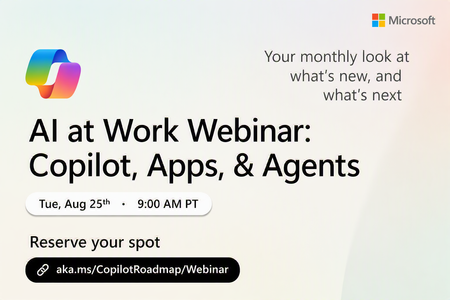
Register Here: https://aka.ms/MTC/CopilotRoadmapEvent
Keep up with the latest in Microsoft 365 Copilot, all in one place. This Roadmap webinar series is your central hub for the latest Copilot inno...
Tuesday, Aug 25, 2026, 09:00 AM PDTOnline
1like
26Attendees
0Comments
Recent Blogs
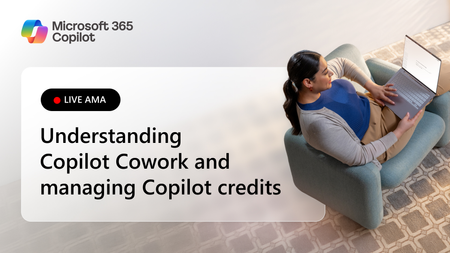
- The way we work with AI is evolving rapidly, and so is the way organizations manage and scale those experiences. If you're exploring Copilot Cowork, navigating Copilot Credits, or looking for guidanc...Jul 16, 20261.1KViews3likes0Comments
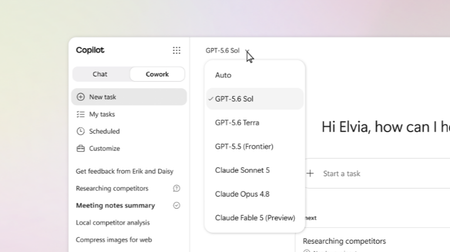
- Now in Microsoft 365 Copilot: GPT-5.6, a frontier reasoning model for agentic, end-to-end work.Jul 09, 202623KViews7likes4Comments