Pinned Posts

Forum Widgets
Latest Discussions

Welcome to the Azure Purview tech community!
Azure Purview is a fully-managed, serverless, PaaS unified data governance service to maximize business value of data. Manage and govern your on-premises, multicloud, and software-as-a-service (SaaS) data. Easily create a holistic, up-to-date map of your data landscape with automated data discovery, sensitive data classification, and end-to-end data lineage. Empower data consumers to find valuable, trustworthy data. To ramp-up quickly, we suggest you visit the Azure Purview product page . Get started with Azure Purview documentation and view the Mechanics video to see Azure Purview in action and give us your feedback via UserVoice. Have a question, comment, or request? Post it right here. The Azure Purview team.Sumi VenkitaramanDec 03, 2020Microsoft4.8KViews20likes3Comments
Forced to new purview portal nothing works or is too slow
so what we feared has occured; forced to the new portal and nothing works. cannot change roles we have roles as they worked in the old portal but new portal doesn't seem to accept the custom roles. cannot implement content search across SPO anyone else having issues?mikebaker26Nov 25, 2024Brass Contributor2.5KViews8likes12CommentsAzure Purview Roadmap
Hi, I was looking for Azure purview product roadmap. If there is any link, pls share. ThanksvikisinghMay 07, 2021Copper Contributor17KViews8likes9Comments
Purview Data Map scanning Microsoft Fabric and no classifications applied or scan rule sets
Microsoft Purview cannot currently apply built-in or custom classifications (including sensitive information types) to metadata discovered from Microsoft Fabric workspace scans. While Purview can register Fabric workspaces and extract structural metadata (workspaces, Lakehouses, Warehouses, tables, columns, and limited lineage), classification rules are not executed against Fabric assets in the same way they are for supported sources such as Azure SQL, ADLS Gen2, or on-prem databases. This results in classification gaps across a core enterprise analytics platform. Why This Is a Significant Service Omission 1. Breaks the Core Value Proposition of Purview 2. Undermines Regulatory and Risk Management Controls 3. Creates an Inconsistent Governance Experience 4. Blocks Downstream Purview Capabilities 5. Forces Anti-Patterns and Workarounds The lack of automated classification support for Microsoft Fabric workspace data represents a material service omission in Microsoft Purview, significantly limiting its effectiveness as a unified data governance platform and introducing avoidable compliance, operational, and assurance risks—particularly in regulated environments. Are there plans to improve this and if so what are the timescales?AdamPurviewProFeb 04, 2026Copper Contributor368Views5likes4CommentsSharing: PDF readers that support Purview labels
As I was researching on Adobe Acrobat reader and Sensitivity labels, I decided to check if the common alternative PDF readers out there are able to support Purview MIP Sensitivity labels. There is already a published documentation on this for SharePoint-Compatible PDF readers that supports Microsoft IRM: https://learn.microsoft.com/en-us/purview/sp-compatible-pdf-readers-for-irm (last updated Nov-2023) but I wanted to see if these same PDF readers supports the ability for end-users to use/ select labels similar to that of Adobe Acrobat As of 11-June-2025; atleast one of them clearly do: Nitro PDF: Yes. Documentation shows that users can see and use the sensitivity labels. PDF -X.change Editor: Yes. Documentation show that users can see and use the sensitivity labels. (check the official website, I can't hyperlink it because the site is blocked. FOX PDF editor: No. Documentation only states RMS and not clear if it show Purview labels. This is for F.O.X.I.T editor (spelled without the ".") but for some reason there is a community ban on that word and it won't allow me to post the full name PDFescape: No. Sumatra PDF: No Okular: No If there are other PDF readers that I've missed, I encourage you list it down in the comment below. Would love to grow this list.1.2KViews5likes4CommentsPurview Message Encryption - Broken Icon
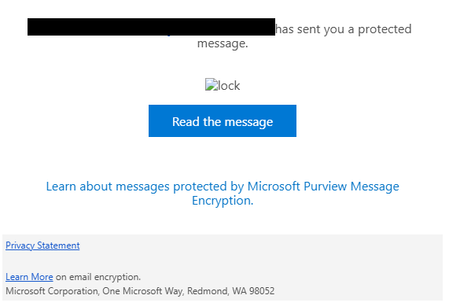
The lock image url referenced in the "has sent you a protected message" email is invalid. Image source: https://outlook.office365.com/Encryption/lock.png I can confirm this was last working on 2/12/2025. Messages sent on 2/12 and today 3/6 reference the same url. This is not a case of the image being blocked by the mail client. Thank you, MattmjhelmbMar 06, 2025Brass Contributor1.1KViews5likes15CommentsSend retention policy and labels events to Sentinel
We wanted to manage the creation/modification/deletion events of retention policies and labels in Sentinel. Currently, these events are not being sent to a Purview connector in Sentinel. We would like these events to be sent via a Purview connector in Sentinel. In comparison, the creation/modification/deletion events of conditional access policies are sent to Sentinel, allowing us to generate alerts when detected by Sentinel. How can we request this feature?mcsaulnierMar 03, 2025Copper Contributor149Views4likes2Comments
Discover your Amazon S3 data with Azure Purview
Azure Purview allows you to explore your data across clouds in one unified solution, by scanning and classifying data from various data storage services, including Amazon S3. Do you have data stored in Amazon S3 buckets? Amazon S3 scan is now in private preview. Would you like to evaluate it, get visibility to your data and share your feedback? Register here for the private preview program. It’s your chance to influence the Azure Purview product.OdedBergmanJan 06, 2021Former Employee2KViews4likes2CommentsMicrosoft Purview PowerShell: Interactive Sign-In Basics + Fixing Common Connect-IPPSSession Errors
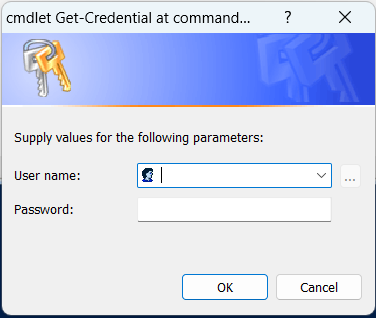
If you’re new to Microsoft Purview PowerShell and your interactive sign-in fails when you run Connect-IPPSSession, you’re not alone. In this post, I’ll walk through the quick setup (module install + connection) and then cover practical fixes for a common authentication failure: “A window handle must be configured” (WAM / MSAL window handle error). Once connected, you can run Purview-related cmdlets for tasks like working with sensitivity labels, DLP policies, eDiscovery, and other compliance operations (depending on your permissions). Step 1: Install the Exchange Online PowerShell module Install-Module ExchangeOnlineManagement Import-Module ExchangeOnlineManagement Step 2: Connect to Microsoft Purview (Security & Compliance) PowerShell For interactive sign-in, you can start with the standard connection pattern below (replace the placeholder with your User Principal Name) Common issue: Interactive sign-in fails with a WAM “window handle” error The ExchangeOnlineManagement module uses modern authentication. In some hosts/environments, the sign-in UI can’t attach to a parent window, so token acquisition fails and you may see the error below. This is commonly associated with WAM (Web Account Manager) / MSAL interactive sign-in. Error Acquiring Token: A window handle must be configured. See https://aka.ms/msal-net-wam#parent-window-handles A window handle must be configured. See https://aka.ms/msal-net-wam#parent-window-handles At C:\Program Files\WindowsPowerShell\Modules\ExchangeOnlineManagement\3.9.2\netFramework\ExchangeOnlineManagement.psm1:591 char:21 + throw $_.Exception.InnerException; + ~~~~~~~~~~~~~~~~~~~~~~~~~~~~~~~~~ + CategoryInfo : OperationStopped: (:) [], MsalClientException + FullyQualifiedErrorId : A window handle must be configured. See https://aka.ms/msal-net-wam#parent-window-handles You’ll often hit this on secured devices, PowerShell ISE, or hardened corporate images. Below are two solutions to bypass this error. Start with the recommended option first. 1. Recommended workaround: Use Get-Credential without disabling WAM This approach avoids the WAM-based interactive prompt. You’ll be asked for credentials via a standard PowerShell credential dialog, and the module will complete modern authentication. $cred = Get-Credential Connect-IPPSSession -Credential $cred A credential prompt appears: Enter your username and password. After authentication, you should be connected to the Security & Compliance (Microsoft Purview) PowerShell session. As a quick validation, try a lightweight cmdlet such as Get-Label or Get-DlpCompliancePolicy (availability depends on permissions). If this works in your environment, it’s a simple way to proceed without changing system-wide WAM behavior. 2. Alternative workaround: Disable WAM for the session (use with caution) If the interactive UI is failing, you can try disabling WAM. Newer versions of the ExchangeOnlineManagement module support a -DisableWAM switch on the connection cmdlets, which bypasses the WAM broker and can avoid the “window handle” failure. Connect-IPPSSession -UserPrincipalName <yourUPN> -DisableWAM If you can’t use -DisableWAM or if it is not working as expected (or you’re troubleshooting a specific host issue), some admins set an environment variable to disable WAM for MSAL using the commands below. Treat this as a temporary troubleshooting step and follow your organization’s security guidance. $env:MSAL_DISABLE_WAM = "1" setx MSAL_DISABLE_WAM 1 Important warning! Changing authentication/broker behavior can have security and supportability implications. Use this only for troubleshooting and revert when you’re done using the following commands. $env:MSAL_DISABLE_WAM = "0" setx MSAL_DISABLE_WAM 0 Quick summary If you’re scripting for Microsoft Purview and interactive sign-in fails due to the WAM “window handle” error, try the sequence below. Install-Module ExchangeOnlineManagement Import-Module ExchangeOnlineManagement $cred = Get-Credential Connect-IPPSSession -Credential $cred Hope this helps! If you’ve hit this in a specific host (PowerShell ISE vs Windows PowerShell vs PowerShell 7, RDP/jump box, etc.), share what worked for you in the comments. Thanks for reading. Happy Scripting! Reference: Connect to Security & Compliance PowerShell | Microsoft LearnPrathista IlangoApr 18, 2026Microsoft311Views3likes2Comments

Tags
- purview149 Topics
- microsoft purview99 Topics
- Information Protection33 Topics
- Sensitivity Labels30 Topics
- ediscovery18 Topics
- data loss prevention17 Topics
- Azure Purview16 Topics
- endpoint dlp14 Topics
- Retention Policy14 Topics
- api14 Topics