Pinned Posts

Forum Widgets
Latest Discussions

I just want to secure AI. DLP vs Info Protection vs DSPM vs Governance vs...
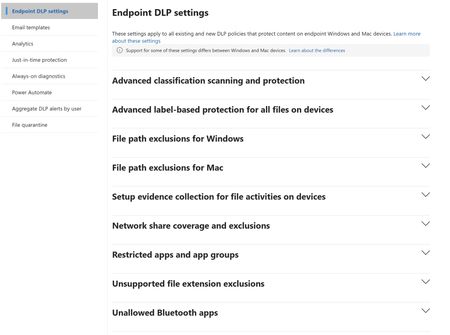
I'm with an MSP, and I've avoided Purview like the plague, because it seems to be suffering from the same 'made by marketing teams' 'strategy' the 365 documentation is. However, it's my understanding Purview policies are needed for Data control of Copilot. Here's my issue: all of these different 'solutions' sound like the exact same thing, but are pitched as if they are something different. i'm going to post a couple of descriptions for these 'solutions' to illustrate this. 'discover, label, and protect sensitive and business-critical info' 'make sure your organization can identify, monitor, and protect sensitive info across the expanding Microsoft 365 landscape' 'discover and secure all your sensitive data across Microsoft 365 and non-365 data sources' 'Discover, label, and protect sensitive and business-critical info across your multicloud data estate.' I genuinely do not have time to figure out what each of these 'solutions' are, then figure out their policies, then their giant library of settings (below)... It's not even clear to me what's active NOW, considering we never licensed Purview - but somehow have been roped into it. It SEEMS like these are all variations of marketing terms, which all point to 3-4 actual technical implementations in obscure ways. Can someone advise on the ACTUAL technical policies we want to target and enable? Or just give some clarity? I've never felt so overwhelmed or disconnected from Microsoft's environment. We just want to secure our tenant's AI usage.159Views0likes5Comments
Data System Wide Lineage via API Request
I'm struggling with finding a solution. My goal is to identify all existing lineage relationships for any data objects within a specific data system they belong to. I've been using the Purview REST API (Datamap Dataplane) but I haven't found an endpoint returning data system side lineage/relationships. For my scenario I have a Databricks metastore and need to know the existing lineage relationships of those data objects within Purview so I can purge them out when we are doing our scheduled lineage refresh.southpawmurphJun 02, 2026Copper Contributor85Views1like2Comments
Lakebase connector
I'm requesting a native Purview connector for Databricks Lakebase. Although Lakebase reached general availability in January, no dedicated connector currently exists. As a workaround, we're scanning Lakebase Postgres tables as generic PostgreSQL sources, but this approach only supports username/password authentication and prevents us from using service principals—a requirement for our security posture. I believe that Lakebase volume will grow and it would be a great add on.joaosilveira07Jun 02, 2026Copper Contributor37Views0likes1CommentPerformance in scanning
We are trying to search for CUI data on internal file stores. Last week, I decided to run another discovery scan, this time using ALL instead of Policy Only. It took much longer and left the scanner server in an almost unusable state and didn’t give really any more information than the first one did. Based on my research, we need to define and set the policy before we run scans. This is the information tip from the Purview scanner settings: Scan started at: 2026-05-20 22:54:06Z Scan ended at: 2026-05-24 16:16:51Z Scan duration: 3 days, 17 hours, 22 minutes, 45 seconds Scan id: 93acb922-e2ac-4fb7-b259-d6184e7aa434 Repository: \\cab-filesrv-01.fg.com\Departments. Enforce mode is Off Scanned files:3509640 Actions: Classified:3369456 Classified as Public:14 Classified as Fg Private:3369442 Labeled:0 Remove label:0 Protected:0 Remove protection:0 Files with matched information types:572895 Skipped due to - No match:0 Skipped due to - Not supported:0 Skipped due to - Already labeled:0 Skipped due to - Already scanned:0 Skipped due to - Require justification:0 Skipped due to - Unknown reason:0 Skipped due to - Excluded:98833 Skipped due to - Attribute:0 Failed:41318sagedogusaJun 01, 2026Copper Contributor39Views0likes1CommentSeparating IRM Full Control from Excel Worksheet Protection
We've developed several excel workbooks that leverage VBA macros with workbook structure and worksheet password protections to maintain standards. The VBA macros unlock workbook/sheet protections to perform tasks and relock on completion. Our executive management has tasked us to protect the workbooks to prevent unauthorized access so we have applied a sensitivity label to restrict access to an AD group (Project Managers). However, short of granting Full Control, the IRM prevents the macros from removing sheet/book protections. We have tried to allow permissions for OBJMODEL and DOCEDIT already at Copilot's recommendation but this was unsuccessful. We don't want to grant full control because users are then able to remove the document label. Any suggestions for how to grant workbook/sheet protection permission without allowing users to remove labels? At this time the best we've come up with is to grant the full access but require an explanation for a label downgrade with an alert to the admin/document owner.jmartosMay 19, 2026Copper Contributor114Views0likes2Comments
Endpoint DLP Device Onboarding - WorkspaceOne
Hi everyone, We have a customer who is using WorkspaceOne for managing the Endpoints. It is an Hybrid environment. We need some guidance and documentation(if any), to help onboard devices for Purview eDLP. The ruled-out option is Group Policy as some employees are working from home and some working from office. There are around 25k+ devices in the tenant that needs to be onboarded. The customer is not using Intune or SCCM. We are looking for best method/approach to onboard devices where the org is using WorkspaceOne.Sabita1May 18, 2026Microsoft157Views0likes2Comments
eDiscovery search: Sites not available when adding a Group data source
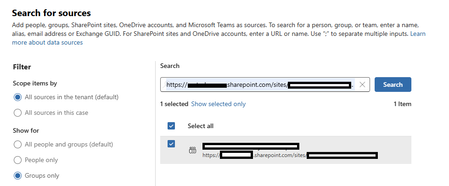
Hi, I am attempting to use Purview eDiscovery to search a SharePoint site associated with a Group. When adding the Data Source, I search for the URL of the SharePoint site, and the Group is returned. However, after selecting the group and clicking Manage, it indicates Sites are "Not Available". What causes this, and how do fix it? My user is a member of the "eDiscovery Manager" role group as an "eDiscovery Administrator", and licensed with "Microsoft 365 E3" and "Microsoft Purview Suite". It is also an Owner of the target Group / SP Site.danielschmidtMay 11, 2026Copper Contributor103Views0likes1Comment
DLP Policy - DSPM Block sensitive info from AI sites
Having issues with this DLP policy not being triggered to block specific SITs from being pasted into ChatGPT, Google Gemine, etc. Spent several hours troubleshooting this issue on Windows 11 VM running in Parallels Desktop. Testing was done in Edge. Troubleshooting\testing done: Built Endpoint DLP policy scoped to Devices and confirmed device is onboarded/visible in Activity Explorer. Created/edited DLP rule to remove sensitivity label dependency and use SIT-based conditions (Credit Card, ABA, SSN, etc.). Set Paste to supported browsers = Block and Upload to restricted cloud service domains = Block in the same rule. Configured Sensitive service domain restrictions and tested priority/order (moved policy/rule to top). Created Sensitive service domain group for AI sites; corrected entries to hostname + prefix wildcard a format (e.g., chatgpt.com + *.chatgpt.com) after wildcard/URL-format constraints were discovered. Validated Target domain = chatgpt.com in Activity Explorer for paste events. Tested multiple SIT payloads (credit card numbers with/without context) and confirmed detection occurs. Confirmed paste events consistently show: Policy = Default Policy, Rule = JIT Fallback Allow Rule, Other matches = 0, Enforcement = Allow (meaning configured rules are not matching the PastedToBrowser activity). Verified Upload enforcement works: “DLP rule matched” events show Block for file upload to ChatGPT/LLM site group—proves domain scoping and endpoint enforcement works for upload. Disabled JIT and retested; paste events still fall back to JIT Fallback Allow Rule with JIT triggered = false. Verified Defender platform prerequisites: AMServiceVersion (Antimalware Client) = 4.18.26020.6 (meets/exceeds requirements).Bosanac89May 11, 2026Brass Contributor371Views0likes9CommentsGet-AdaptiveScopeMembers doesn't show the SiteURL for OneDrive
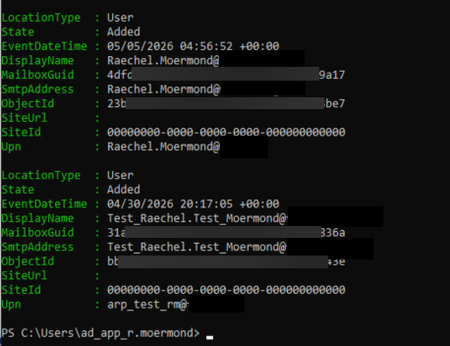
I am working through reporting for Adaptive Scopes and Adaptive Retention policies. I'm so close. But I discovered a problem with my script in that when people return to the company after their account has been deleted, they get a new OneDrive URL. This is expected. While they can have the same email address as an inactive mailbox, they cannot have the same OneDrive URL as an inactive URL. Since we keep all data for a minimum of 7 years, it is possible for a UPN to be the "owner" of 2 or more OneDrive URLs (one active and the others are from previous accounts). I have no easy way of seeing which OneDrive URL is active short of looking for digits at the end of the URL and taking the highest digit. But, what I want to know, is why isn't it here? Why doesn't "Get-AdaptiveScopeMember" return the SiteURL for the user? I thought maybe it was because my test user didn't have a OneDrive site when the account was added to the scope, so I added my actual user account to the scope and it shows the same thing. Is SiteURL only for SharePoint sites and not OneDrive sites? This makes no sense. Does it just take more time to show up? what's the time frame on that?Raechel MoermondMay 07, 2026Brass Contributor88Views0likes2Comments
Purview not getting enough attention from Microsoft - Will be Decom
At this stage is clear for everybody that Microsoft is not putting the same effort in Purview as they are putting in other products like Fabric, D365 , etc.. Seems to me that in one or two years purview will probably be decommisioned Rational : - The support is very week (teams taking care of the support tickets are very week from a knowhow perspective and take ages to resolve something ) - Functionalities take a lot of time to be released - Its not properly integrated with Fabric, for example there is almost no lineage and the classification is not set via data map - DLP for Fabric only works with some SITs, does not work for example with Trainable Classifiers, etc.. - The Roadmap takes care of something, but minimal - The Way to Log Error records for data quality rules is very week and not user friendly I wonder what is the idea of Microsoft for the next 3 or 4 years when it comes to Purview Will it continue to have Governance ? will it only be taking care of security or compliance?riverazureMay 06, 2026Copper Contributor170Views0likes1Comment
Tags
- purview149 Topics
- microsoft purview99 Topics
- Information Protection33 Topics
- Sensitivity Labels30 Topics
- ediscovery18 Topics
- data loss prevention17 Topics
- Azure Purview16 Topics
- endpoint dlp14 Topics
- Retention Policy14 Topics
- api14 Topics