Pinned Posts

Forum Widgets
Latest Discussions

How to Prevent Users from Adding there Personal Microsoft OneDrive
I am looking for option to block Personal Microsoft account from accessing and how to prevent users from Adding their personal Microsoft account in organization owned Machines. I was told Intune will be Helpful to deploy the policy to prevent but, i am pretty new to Intune , just started working on Intune.royraiz21Jun 20, 2022Copper Contributor38KViews1like4Comments
Azure Purview Roadmap
Hi, I was looking for Azure purview product roadmap. If there is any link, pls share. ThanksvikisinghMay 07, 2021Copper Contributor17KViews8likes9Comments
Can I block upload of data based on DLP Policy and/or Sensitivity Label?
Hi everyone, Is there a way to block users from uploading files to the cloud that are identified as Sensitive Information Type/DLP or marked with a Sensitivity Label (SL) via OneDrive Sync and Teams (Windows app)? I know you can block the web version of Teams through Defender for Cloud, but that is not enough. This is because some customers don't want their data to be sent or stored in the cloud. This means that the data needs to be blocked before it reaches the cloud. Users' devices are all managed by Intune and use M365 Apps for Enterprise. Only certain customer data must not be uploaded to the cloud, so we want to use SIT/DLP and SL to identify the data. The solution can be a third party agent/app that needs to be installed on the device. Thanks in advance.Solved16KViews1like3CommentsDLP policy using File Type as condition to block copy to removable usb device
Hello all, Kindly advice what are the exact steps to create the policy to block/audit users while copying and pasting data removable device using file type as condition. Currently I have created the policy it is not triggering the alerts. RegardsAfsar_ShariffApr 25, 2023Brass Contributor15KViews0likes5Comments
Exporting Microsoft Purview Data Assets using the REST API
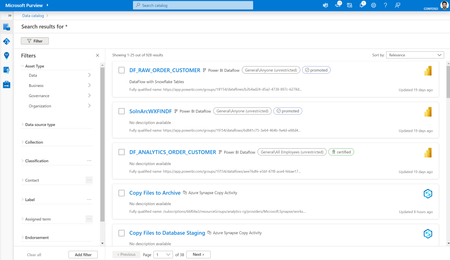
Exporting Data Assets from Microsoft Purview using the REST API in Python enables a streamlined process to retrieve structured metadata and asset information. By leveraging the REST API and Python, users can effortlessly access and export Data Assets, ensuring a programmatic and efficient approach. The powerful combination of the REST API and Python empowers users with flexibility and automation capabilities, facilitating the extraction of Microsoft Purview Data Assets and seamless integration with various data management and analytics workflows. I performed a sample search on the Microsoft Purview governance portal using "*" as the keyword to generate a list of all data assets. The accompanying screenshot from the Purview portal serves as a reference. The generated CSV file shown below is the output obtained from Microsoft Purview using the REST API. Here's a guide on exporting data assets from Microsoft Purview using the REST API in Python. To access Microsoft Purview through the Python SDK, please ensure that you install the following PyPI libraries: pip install azure-identity pip install azure-purview-scanning pip install azure-purview-administration pip install azure-purview-catalog pip install azure-purview-account pip install azure-core pip install pandas Important Your endpoint value will be different depending on which Microsoft Purview portal you are using. Endpoint for the classic Microsoft Purview governance portal: https://{your_purview_account_name}.purview.azure.com/ Endpoint for the New Microsoft Purview portal: https://api.purview-service.microsoft.com Scan endpoint for the classic Microsoft Purview governance portal: https://{your_purview_account_name}.scan.purview.azure.com/ Endpoint for the New Microsoft Purview portal: https://api.scan.purview-service.microsoft.com To create a Service Principal and grant Data Reader or Data Curator access to the Service Principal at the Microsoft Purview Collection Level, please refer to the instructions provided [here]. keywords = "*" tenant_id = "<Please update the Microsoft Purview tenant ID here>" client_id = "<Please provide the updated Service Principal client ID that has access to the Microsoft Purview account>" client_secret = "<Please update the Service Principal client secret for the aforementioned client ID>" purview_endpoint = "https://<Please provide the name of the Microsoft Purview account>.purview.azure.com/" purview_scan_endpoint = "https://<Please provide the name of the Microsoft Purview account>.scan.purview.azure.com/" Retrieve the entire notebook file from [GitHub]. from azure.purview.catalog import PurviewCatalogClient from azure.identity import ClientSecretCredential from azure.core.exceptions import HttpResponseError import pandas as pd from pandas.io.json import json_normalize keywords = "*" export_csv_path = "purview_search_export.csv" keywords = "*" tenant_id = "<Please update the Microsoft Purview tenant ID here>" client_id = "<Please provide the updated Service Principal client ID that has access to the Microsoft Purview account>" client_secret = "<Please update the Service Principal client secret for the aforementioned client ID>" purview_endpoint = "https://<Please provide the name of the Microsoft Purview account>.purview.azure.com/" purview_scan_endpoint = "https://<Please provide the name of the Microsoft Purview account>.scan.purview.azure.com/" def get_credentials(): credentials = ClientSecretCredential(client_id=client_id, client_secret=client_secret, tenant_id=tenant_id) return credentials def get_catalog_client(): credentials = get_credentials() client = PurviewCatalogClient(endpoint=purview_endpoint, credential=credentials, logging_enable=True) return client body_input={ "keywords": keywords } try: catalog_client = get_catalog_client() except ValueError as e: print(e) try: response = catalog_client.discovery.query(search_request=body_input) df = pd.DataFrame(response) jdf = pd.json_normalize(df.value) jdf.to_csv(export_csv_path, index=False) except HttpResponseError as e: print(e) The provided Python notebook or script is capable of exporting the following set of columns in the output CSV file. endorsement collectionId updateTime name description displayText label sensitivityLabelId objectType isIndexed assetType @search.score updateBy qualifiedName createBy owner id entityType createTime classification Additional Reference: Exploring Purview’s REST API with Python (microsoft.com)nsakthiOct 09, 2023Microsoft13KViews1like4CommentsDLP policy to monitor every file copied to USB drive
Hello All, I am looking for an option in Microsoft DLP to monitor every file copied to a USB drive so that I can pull a report periodically. The policy is not to capture when someone copies sensitive data to a USB drive, but rather looking for a policy that can capture every file copied to a USB drive. Kindly advice.SolvedAfsar_ShariffApr 17, 2023Brass Contributor9.6KViews0likes2Comments
DLP policy to block access to external organization however allow access for some external domains
Hi, we have successfully setup a DLP policy to block sensitive information from going outside using "Block access to external organization", however we want to allow a few domains to receive those files. How can we whitelist those external domains so they can receive the content? any thoughts? Thanks FahadSolvedFahadAhmedAug 22, 2023Brass Contributor9.4KViews1like9Comments
Data Lineage Not Showing despite creating ADF connection
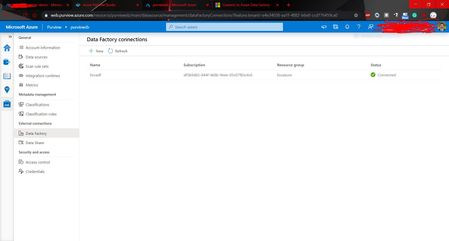
Hi! I've been experimenting with the recently launched Azure Purview service. I followed the steps mentioned in the https://docs.microsoft.com/en-gb/azure/purview/how-to-link-azure-data-factory for creating an Azure Data Factory connection in the Management Center (image attached). However, even after creating the ADF connection, data lineage was not visible for my datasets. Furthermore, Azure Data Factory was not showing in the Browse Assets section. Has anyone else faced a similar issue, or are there any additional steps apart from the ones mentioned in the documentation? Any help appreciated! Thanks in advance!SolvedSushantBindraDec 14, 2020Copper Contributor6.5KViews0likes3CommentsExchange DLP detection is not working
I have a customer that has "Microsoft 365 E5 Information Protection and Governance" Add-on license, they also have the M365 E3 license. We have setup DLP policies in Exchange to detect Credit card numbers, (policy has no actions, no alerts or incident) we just need to see the DLP matches, nothing is showing in Activity explorer or in DLP matches report after many tries. Also we have another policy to detect in Teams but also nothing is showing in Activity explorer The same policy works fine in another tenant and I could see the detections in the Activity explorer but it has the Full E5. What might be the issue that DLP policies are no showing any activities or detections. Note: the same policy is working for SharePoint DLP detectionsBaselFawalMay 03, 2023Brass Contributor6.5KViews0likes8Comments
Tags
- purview149 Topics
- microsoft purview99 Topics
- Information Protection33 Topics
- Sensitivity Labels30 Topics
- ediscovery18 Topics
- data loss prevention17 Topics
- Azure Purview16 Topics
- endpoint dlp14 Topics
- Retention Policy14 Topics
- api14 Topics