planner
652 TopicsAbility to send an email to Planner and create a Task
Is this on the roadmap? Our organization is starting to lose the battle of using Planner instead of Trello, pretty much because of the sole feature that Trello allows you to send an email to a specific email address and it will automatically create a Task. It is quite a simple model: Email Subject = Task Title Email Body = Task Description Email Attachments = Task Attachments This would be a massive win for adoption. Looks like this is the entry with the most votes, but there are about 100 of them that individually are asking for the same/similar functionality: https://planner.uservoice.com/forums/330525-microsoft-planner-feedback-forum/suggestions/13076007-ability-to-add-email-as-planner-task222KViews75likes39Comments
2026.02.20 - Planner UI update is worse
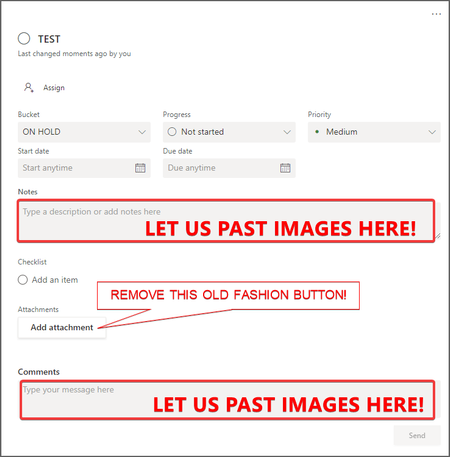
The UI changes to Planner within the latest Teams desktop app update (version 26032.208.4399.5) has regressed in its functionality and is worse than before. Previously, all of the contents of an item in the Planner were visible at the same time. Now I have to tab between Task Details, Attachments and Checklist, and am unable to view these at once, which has become a critical workflow for me. It is extremely irritating, as I've developed a workflow around how Planner was presented (which was that everything within a task was visible at once), and now it has been compartmentalised. Please unwind this - it is a regressive update and provides less information and requires more interaction to work through the detail of a task.4.2KViews31likes22CommentsCan I delete or reorder the un-used labels in Planner?
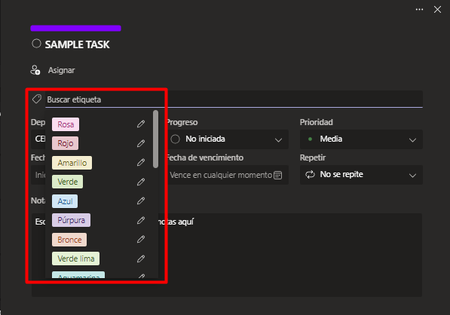
I noticed that there are a lot more color labels in Planner and picked the brighter colors that are lower in the drop-down list. When I use "Group By Labels" to view my planner according to these color labels, my tasks are listed way to the right end side of the board, with a bunch of empty color label columns I didn't use. I tried re-ordering and deleting those un-used color labels but I can't seem to find the features. This really defeats the purpose of adding all the new labels...46KViews30likes29CommentsWay to see all Planner tasks assigned to a team member?
Is there a way to see all project tasks assigned to a team member? Or is this functionality on the radar? I can see all my assigned tasks, and I can see tasks by person by project, but as a manager, I would like a way to see all tasks assigned to my team members across all of their projects/functional areas, so that we can quickly evaluate their current workload, reprioritize and assign new tasks accordingly. What I'm thinking is that there would be a filter option to see buckets by team member of their collective project tasks, like the view currently available right now by individual projects. Interested in the capability to overlay multiple projects. Thanks!58KViews30likes45Comments
Frustrations with the New Planner Update
I was looking forward to the new Planner update, but instead of improvements, I’m seeing several changes that have negatively impacted my team’s workflow. Here are the main issues: "Assigned to Me" View: Previously, this view acted as a personal Planner automatically grouped by buckets, which was really helpful. Now, it’s been replaced with a simple list view, and the "Schedule" view for personal tasks has also been removed. Copying Plans: In the previous version, we could copy a plan and retain all the tags we'd created. Now, when copying a plan, the tasks no longer retain these tags, and when attempting to reassign them, the tags aren’t available in the copied plan. These changes have made it more challenging for us to manage tasks effectively. Is there any way to revert to the previous version of Planner or enable these features again?5KViews26likes28Comments
Planner - Save Settings
We use Planner throughout the organization...more for task management than project management. The filtering and grouping is very useful and would be helpful if those settings could be saved by user. Often when meeting with a group to review open items, we will filter and/or group tasks. However, when we move to a different tab and then return, Planner returns to the default setting.22KViews23likes17CommentsWhat’s Good About Microsoft Planner So Far (and What’s Still Missing)
After several months of using Microsoft Planner in Office 365 to manage tasks and collaborate on projects, I've put together my thoughts on what's good so far, and what's missing. Click here to read my blog post Things on the roadmap that I'm looking forward to: Mobile apps for iOS and Android Assigning tasks to multiple people External guest access Templates Things I couldn't find on the roadmap yet, but I would like to see: Better Outlook integration (there’s no connection between Planner tasks and Outlook tasks). Wrapping of long bucket names. Marking checklist items within a task should automatically mark the task as “In progress”. New tasks in a bucket should be added to the bottom of the list Sorting of My Tasks list by due date Notifications for tasks about to expire/expired Daily digest email of tasks due today/tomorrow/this week/this month Favorite plans not added to Outlook favorites automatically Multiple plans per Group Charts for plans showing per-bucket progress of items12KViews22likes38Comments
Email Notifications for Comments on Planner Tasks
Please add the ability for the assigned person(s) / creator on a Planner Task to receive an email when the task is commented on. I use Planner to manage tasks assigned to several different departments with about 200 people on the Team, and when they comment back to me after creating the task I don't get notified. Need a solution ASAP (and please don't tell me to comment on every task I create - I want a solution not a workaround) Thank you65KViews21likes32CommentsPlanner Task Dependencies and Task Ordering
Something I'd like to add to Planner thinking is the concept of Task Dependencies. If this concept was added it would make ordering somewhat easier whereby it could order tasks in each bucket based on dependencies. Yes this would require some thinking in terms of manual re-ordering, but at least it would provide a somewhat better experience without having to manually re-order 50 tasks. Ordering is a major pain in Planner. I just created a plan with 42 tasks and 4 buckets (somewhat similar to Agile scrum boards). I created the tasks based on a proposal document from top to bottom. The first problem is that whilst you're working top to bottom in your proposal document, Planner adds the tasks in reverse order and provides no alternative method of adding a task to a specific position (Last, First, etc.). So for tasks 1 through 5 you add task 1 then 2 and so on, but Planner adds task 2 above 1, 3 above 2 and so on. With 40 tasks, what you're left with is having to shuffle the tasks around by dragging and dropping them one above the other. Painful! On top of that there are also random re-ordering issues which I posted about here171KViews20likes24Comments