office 365
20609 Topics
Allow removal of "Copilot Suggestions" from right-click menu
I have been using Excel for decades and CONSTANTLY use the right-click menu for quick access to basic functions (e.g., "Insert"). Ever since "Copilot Suggestions" was added to the drop-down list, it always throws me off due to its placement. I have Microsoft 365 on Windows 11 Pro. I have searched for ways to remove this from appearing there and the result said "go to File > Options > Copilot and uncheck the 'Enable Copilot' box". However, when I attempt to do that, there is NO "Copilot" option available! PLEASE allow removal of "Copilot Suggestions" from the right-click menu OR at least the option to move it to the bottom (so it isn't in the way of things used ALL the time). I realize that Copilot is a great resource for many users, but I am confident in my Excel skills and in my ability to research/learn new skills the "old school" way, so I have little use for this feature now and would prefer to hide it.2.8KViews20likes9CommentsEmail Showing as Quarantined in a Message Trace, but Not Showing up in MS Defender
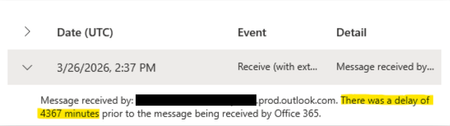
A customer of ours was waiting on an email to arrive and to help figure out where the email was or if it was sent yet we ran a message trace. The message trace showed that the email was sent to quarantine. With this information in mind, I went to MS Defender > Email & collaboration > Review > Quarantine but could not find the message. I modified some of the filters and could not get the quarantined message to appear. I triple checked the filters I created and made sure the information was correct. I also removed all filters and looked for the time period the email came in, but could not find it. Not sure if this is related, but this email had a significant delay likely coming from the sender. Any thoughts or ideas? Or anything that I am missing?21Views0likes1CommentSTOCKHISTORY and Stock Data not working
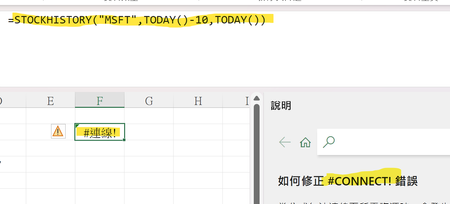
Is it only me? Or everyone else having the same problem? My Excel 365 cannot use STOCKHISTORY Function anymore. It shows #connect! Error. Also, I cannot use the stock data anymore. (The other data types are not functioning as well.) (The error message says "Sorry, we are having a temporary server error. We are trying to fix this problem.") Is it only me? Or everyone else is having this problem?Solved1.1KViews14likes30Comments
filter and find
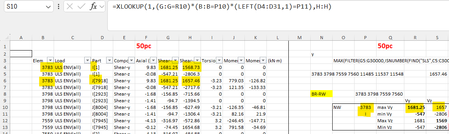
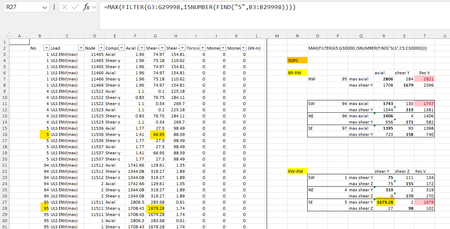
hi I am using filter and find function but the function is returning wrong results. cell R27 should return value from column G for No. '5' (B column) but instead its returning value for No. '95'. how do i fix this. on a side note while posting queries how do i remove this ribbon; its a bit annoying45Views0likes2Comments
OneNote breaks if I move it onto an external display
Hi guys I use OneNote extensively for work as my virtual notepad. At most of my working locations, I use my laptop - Dell Latitude 7440 - connected to either a Dell Docking station + 2 monitors, or a pair of samsung monitors which have an inbuilt hub, connect via USB-C and are daisychained together. I've never had any issues with OneNote in the past, but recently have found that if I try and move my OneNote window onto either external monitor, it seems to break OneNote - the whole window becomes just the index list which is normally a column on the left (where it shows all your notebooks and pages) and it won't actually display any of the content from the notebooks/pages. If I try minimizing that column, it has a complete breakdown as if its unable to properly load the actual page content. The only way to fix this is to drag the window back to my laptop screen and then close it and reopen. Has anyone else experienced this? It's really frustrating and affecting my productivity as I often need it side-by-side with other screens.17Views0likes0Comments
VBA concern: support for macros or controls not installed
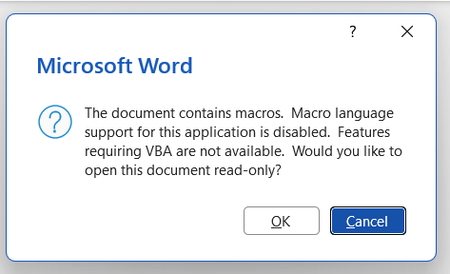
Background: installed Zotero, a citation manager, to use on Word but it uses macros My Word doesn't seem to have VBA installed. Every time I open the app, error boxes appear. Screenshotted below: I have tried a few things to fix this but without benefit: Macros enabled in the trust centre VBA enabled in the trust centre Rapid and online repair completed I have attempted to 'change' the program in the Control Panel in order to access the 'expand/add features' option but this does not exist as an option for me. When I press 'change' only repair options appear for me. Screenshotted below: My impression is that somehow VBA was not installed when I downloaded Office form my account. I appreciate VBA is downloaded automatically but this has not been the case for me. Please advise on next steps. Thanks in advance.53Views0likes3Comments
Upgrading 365 Personal bought from Google Play
I previously bought OneDrive 365 Personal from the Google App Store and now want to upgrade to 365 Family purchased from Microsoft (to take advantage of the Workplace Discount Programme available from my employer). It seems that I can't do a simple upgrade however - Microsoft Support states If you bought Personal via Apple/Google Play, cancel it there first and wait for it to expire before purchasing the Family plan on the web. How can I do this without losing the 800gb of photos and files currently saved on OneDrive?38Views0likes2CommentsI am Facing Microsoft form related issue
I am Facing Microsoft form related issue, I can see when I am downloading a Excel copy some columns are blank. This is my survey form, and I cannot add manually however this will reflect manipulation in data, as this is technical glitch need assistant from your side on urgent basis16Views0likes0CommentsMISSING FUNCTIONS THAT I PREVIOUSLY HAD ACCESS TO
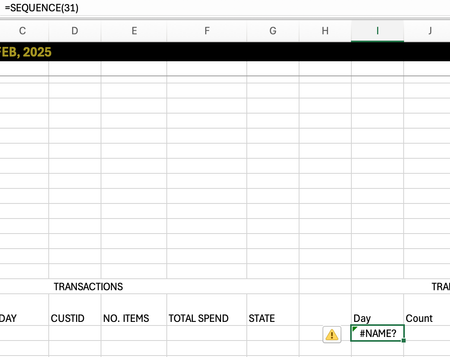
I just switched macbooks and opened my excel to discover I had a few missing functions: MAXIFS, SEQUENCE. This is not a problem regarding the software as mine is MICROSOFT365 and I used the same account previously. Is there any way I can gain these functions back! Thank you!18Views0likes0Comments