office 365
20877 Topics
Accepted Domain Verification Causes Mail Flow Failure to Google Workspace Recipients (No MX Changes)
Scenario Source: - Google Workspace (production) - All users actively using Gmail Target: - Microsoft 365 tenant - Existing Exchange Online users Actions Performed 1. Added the production domain to Microsoft 365. 2. Added only the TXT record required for domain verification. 3. No MX, SPF, or other mail-routing records were changed. 4. Domain verification completed successfully. Observed Behavior - Users in the Microsoft 365 tenant could no longer send email to recipients hosted in Google Workspace using the same domain. - Google Workspace users continued to receive email from external senders. - MX records remained pointing to Google Workspace. Testing Performed 1. Removed the domain from Microsoft 365. Result: Mail flow to Google Workspace users worked normally. 2. Added the domain and TXT verification again. Result: Mail flow failure immediately reoccurred. 3. Repeated the test multiple times with consistent results. Question Is this expected behavior when a domain becomes an accepted domain in Exchange Online, even if MX records remain pointed to Google Workspace? Has anyone experienced similar recipient-resolution or routing behavior during Google Workspace to Microsoft 365 migration preparation?17Views0likes0Comments
New Family Subscription: Flexibility is nice, axing storage (5=>2 TB) is NOT
As you likely all know, MS just announced to change the storage model for Office 365 family subscriptions. Instead of having 5 users with 1TB each there will be 2TB shared space. The email announcement did not talk about families that use more than 2TB. In a chat with the support I just learned: The new flexibilty is nice... but axing storage more than half is terrible! What makes it even worse is that neither I nor ChatGPT could find information what it will cost if I want to continue using 5TB. I do understand that prices are increased from time to time. But making it so shady and intransparent is not what I would expect from a firm like MS...13Views0likes0CommentsNew Zoom Feature allways removes like it's never been
Hi everybody, Ever since the zoom feature was introduced, I’ve repeatedly encountered a phenomenon where the feature—despite having been present—suddenly disappears. There is no slider, no zoom option in the ribbon, and no corresponding database options. I am using Microsoft® Access® for Microsoft 365 MSO (Version 2609, Build 16.0.20430.20032, 64-bit) on the Monthly Enterprise Channel. Following an update to this version, the feature reappeared. I opened several databases, and the slider was visible—it worked without any major issues (even though I rarely use it), with no crashes or error messages. Then, upon opening another database, the slider and all other elements related to the zoom feature vanished. When I went back to the previous databases, the feature had disappeared there as well. Restarting the PC and performing a "Quick Repair" had no effect. I have observed the same behavior across the previous five versions; the feature keeps disappearing. It seems that a new "Click-to-Run" update might re-enable it (though I’m not entirely certain). Something—or someone (Microsoft ?)—is disabling it. Fortunately, I haven’t incorporated this new feature into any of my objects or VBA code yet; otherwise, the database would crash! Does anyone have any ideas? Thx 4 reading38Views0likes2Comments
User Forms not displaying correctly in MS365 Excel for Mac
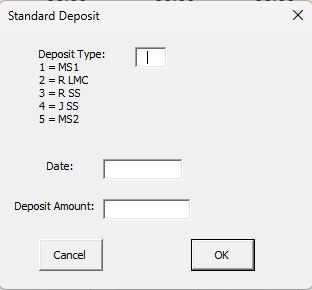
I need some help. I developed a simple budgeting system in Excel many years ago, which revolves around a spreadsheet with sheets for each account. I built three user forms to allow for a Deposit (which is distributed among the accounts based on data in the summary sheet); Single Entry (which can be either a credit to or debit from a specific account), and a Transfer (which takes an amount from one account and transfers it to another. Here are pictures of the three User Forms as displayed on my Windows machines (whether running Office 2019 Excel or MS 365 Excel for Windows): The key is that the Single Entry and Transfer forms display a list of accounts that can be selected from. The problem I am having is that when I try to do this in MS 365 FOR MAC, the lists of accounts are not displayed and cannot be selected from (only a blank box appears). The Deposit form, which has no list to select from, works perfectly fine, so it's not a general problem with macros. Fortunately, even after the file is opened and edited on Mac, it can be reopened back on a Windows machine and still works properly there. I know that there are limitations in Excel for Mac with regard to building User Forms, but I didn't see anything specifically described that would create this situation. I'm wondering if perhaps it might be a font issue?? I built these years ago and have used them for many years without problems. I'm pretty sure I can come up with another way to do this, but I was hopeful that someone out there might have a simple solution for me?? I moved from Office 2019 to MS 365 specifically to allow me to use a Mac, so this is really throwing a monkey wrench in my plans!!! Thanks to all for your consideration!!110Views0likes3CommentsPivot Table sorting is not working. Name are sorting like month names.
I have a pivot table with Names and Data for each name. I select the LastName column as the first Row in the pivot table. Excel sorts the name March to the top of the list thinking it is a data with the month of March. I have made sure there are no hidden characters, turned off custom sort lists. Nothing works. This is a serios issue because if I need data for Mr March and scroll down to where it should be, I would conclude ther is no data for him. This should work as expected and not have to try some work around like i was an IT expert. Nothing has worked even applying the knowledge I have about programming. Any ideas?Solved109Views0likes5Comments
fichiers supprimés de onedrive
Bonjour, Suite à une mauvaise synchronisation entre deux appareils, des fichiers importants ont été effacés de mon onedrive. Le problème est que je m'en suis rendue compte après les 30 jours requis. Ils étaient également enregistrés sur mon disque dur mais ont été supprimés de tous mes appareils après leur effacement des serveurs. J'ai tenté de les récupérer via des logiciels de récupération, avec windows file recovery, j'ai essayé de remonter dans l'historique de mon ordi et de mon onedrive, de chercher dans la mémoire de tous les appareils qui étaient connectés à mon compte microsoft, mais rien n'y fait, je ne parviens pas à récupérer ces documents. Est ce que quelqu'un aurait une idée de génie à laquelle je n'aurais pas pensé? Merci pour votre aide72Views0likes2CommentsI Can't get Microsoft's help
Why is it that it is so difficult to get Microsoft to help me access my account? I have been trying for a few months now and have not had any issues resolved. I can no longer access some of my accounts. My Authenticator app on my iphone is asking for a code from my Authenticator app which is circular reasoning. This is impossible. I have also tried to call Microsoft multiple times but their automated system hangs up on me because they are experimenting technical issues. We'll, guess what! I'M HAVING TECHNICAL ISSUES AS WELL.. I'm hoping someone from Microsoft well see this and reach out. I need to log into my new PC I purchased and I can't.90Views0likes1Comment
[Community tool] Find the GPO, registry value and Intune setting for any Office ribbon button
Hi everyone, as a technical service owner for Microsoft 365 Apps, one question comes up for me again and again: which policy actually controls this button or option? The information is all there – in the Office ADMX/ADML templates, the Office Fluent UI control ID lists, the Intune Settings Catalog and many Learn articles. But I never found it in one place, so every answer meant connecting several sources by hand. Especially when onboarding new colleagues, this costs a lot of time. So I built a free community tool for it: Office Admin Explorer https://tools.pascal-donath.de/office-admin-explorer/ How it works It's a clickable mock of Word, Excel, PowerPoint and Outlook (ribbon, File menu, Options, Trust Center). Click any element and you get: idMso and Policy ID (for customUI and the "Disable commands" policy) the ADMX policy with its exact path in Group Policy Management the registry value it writes, with ready-to-copy PowerShell or .reg the matching Intune Settings Catalog entry Cloud Policy notes, step-by-step guides and Microsoft Learn links The search covers all Office ADMX policies (2,400+) and command IDs (8,000+), including elements that aren't part of the mock. Also included Ribbon builder – hide or disable buttons, groups or tabs and export the result as customUI XML, a macro-free add-in (.dotx / .xlam / .ppam) or the "Disable commands" policy for Group Policy and Intune Deployment view – configuration.xml generator for the Office Deployment Tool User Support view – typical user problems: symptom → cause → fix Policy names and registry values are checked against Microsoft's ADMX/ADML files, and the Intune mapping against the Graph settings catalog. It runs in the browser without sign-in and is available in English and German. Please test any configuration on a lab device or pilot group first. I'd like your input How do you handle this today – ADMX search, Group Policy Search, the Intune catalog, your own documentation? Which Office settings do you get asked about most often? I'd like to add the most requested ones next. If you find a wrong or outdated entry, every entry has a "Report it on GitHub" link – corrections are very welcome. Thanks! Pascal --- *Transparency note: The tool was developed with the help of AI. The content is based on my own admin experience, and policy names, registry values and Intune mappings are validated automatically against Microsoft's official sources (ADMX/ADML templates, Fluent UI control lists, Microsoft Graph settings catalog). This is a community project and not affiliated with Microsoft.*