microsoft teams
24 Topics
Viva Engage Notifications
We would like to understand whether Viva Engage supports any of the following capabilities: Automatically enabling email notifications for new members when they join a community. Configuring community members to receive notifications by default and requiring them to opt out rather than opt in. Applying a tenant-wide or community-level policy that enables email notifications for all members of selected communities. Configuring notification settings through Microsoft 365 admin settings, Viva Engage admin settings, PowerShell, Microsoft Graph, or any other administrative mechanism. Identifying whether this functionality is on the Microsoft roadmap if it is not currently available. Our company is currently test piloting Viva Engage with a few different departments, but they are noticing that member engagement is not very high. We are looking for ways to get members more engaged in the product. Thanks, Greg368Views0likes1Comment
Collateral storage and creation of M365 Group
Hi there Can you please answer a few questions for me? Is it true that for each campaign created, a Microsoft Team and SharePoint site is also created? And, I discovered that collateral is saved to the creator's OneDrive, (if above is true) is it also saved in the SharePoint site for the campaign? What is the reason for saving it to the user's OneDrive? .And how are past campaigns affected if that user leaves the organisation and the OneDrive account is deleted? Thank you.442Views0likes4CommentsViva Connections sends reoccurring notifications to Teams
In our global SharePoint Online intranet we have set all country sites as Official news sites and targeted news for each country. The problem with Viva Connections notifications in Teams occurs in one of the country sites: people who belong to the target group receive at least 4 notifications per news post (1 or 2 per day) saying "Review important news from your organization". This site is multilingual so there are 8 language versions for each news post. Do Viva Connections send a notification from each language version separately? However, people do not get 8 notifications - just 2 to 5 notifications per news post. This is very annoying and we receive a lot of complaints. Why do we receive this kind of reoccurring notifications and what can we do to prevent them? From all other sites we receive just regular notifications (1 per news post) saying "<Someone> published news"527Views0likes2CommentsTheme reverting to default blue
Hi. We have recently (in the past week) noticed an issue with our branding in the Connections app within MS Teams desktop and web, where our custom theme keeps reverting to a default blue colour. Refreshing the page does not fix the issue. Our chosen theme only reappears when a user navigates to another tab (e.g. Activity, Chat, Calendar) and then returns to the Connections tab. The colour theme works as expected when accessing Connections outside of Teams (e.g. via SharePoint). Has anyone else experienced similar issues, or know a potential cause/fix? Thanks.250Views0likes0Comments
401 Unauthorized error in MS Teams
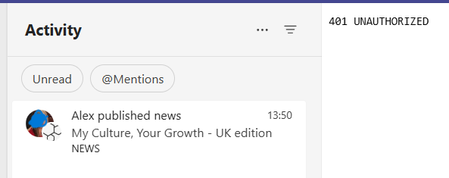
When a news post is published in our intranet in Sharepoint, a MS Teams notification is sent from the system to all colleagues who are used to collaborating (they are in his “circles” according to VIVA Insights) with the author of the post. Although the publication is successful and the link to the news post is active, sometimes those who click on the notification from MS Teams receive a “401 Unauthorized” error message that makes the post unviewable from MS Teams. In the past we fixed this issue on the specific client by clearing the Teams cache, but we have more than 6000 clients... This creates a flaw in the user experience that we need to fix. Thanks!523Views0likes1CommentChange the logo across all platforms
Hi, is there a way to change the Viva Connections icon across all platforms? We have updated it in Teams, but are having trouble updating it elsewhere (like through office.com). We would like the new icon to appear consistently across all Viva Connections experiences. Is there any method to achieve this? Thanks in advance!308Views0likes1CommentHow to download/export usernames in Viva Engage?
Hi, I am trying to find ways to download information who has posted a comment, and other information as shown below. I tried exporting page analytics, but it does not show me the names and also, I need the counts. Who has responded to the discussion? Who has submitted a picture How many likes received on the picture How many comments received on the picture How many likes/loves received on the comments How many responses submitted on a discussion How many likes received on the discussion How many comments received on the response How many likes/loves received on the response Does anyone know how can I get this? Many thanks in advance! Thanks BanashreeSolved534Views1like2Comments
Delete default "all company"
Hi! In my company we created a new "all" community in Viva Engage. We deleted the default "all company" but, on the client and web apps, it still appears in the "my communities" section. If you click it, it says the community has been deleted. Is there a way to make deleted communties disappear from "my communities" section? Thank you2.2KViews0likes3Comments
Viva connections icon change in Teams mobile app shows blank square
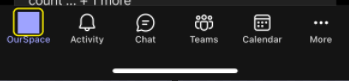
Hello, Last week we setup our SPO intranet site as a home site set as the default experience in Viva Connections in MS Teams. Whilst this works well in the desktop app, when using the Teams mobile app a custom icon we've deployed, doesn't show and instead just shows this blank square as highlighted below: Is this happening because the teams mobile app doesn't support custom icons? or have we missed something in the Viva Connections configuration to get the custom icon deployed correctly to the teams mobile app? Thanks!805Views1like1Comment