meeting
62 Topics
MS Teams policy doesn't work as it is set
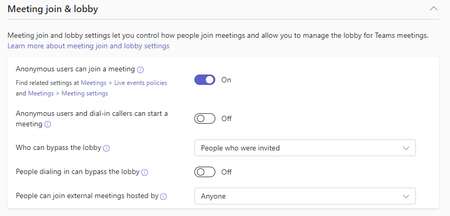
hi, we have the Meeting join & lobby settings like this: the problem is that some users if they create a meeting, their all invited participants land in the lobby. Yes - we have a few policies, and yes all have the same settings regarding Meeting join & lobby. Do you have any idea what's wrong?672Views0likes1Comment
User unable to manage reoccurring meeting they are the organizer of
Hello Tech Community! Hopefully someone else has dealt with this issue and has some insight into the solution. Anyways, One of our users reported that they cannot manage a reoccurring meeting they organized, since they missed one meeting. They are now seen as an "attendee". I have looked all over for resolution, coming to the conclusion that MS does not have the capability for admins to manage calendar events/meetings like this. Here is the original request the user sent: "I had created a reoccurring meeting in October and declined it one week when I wasn’t going to be available. I had accidentally cancelled the meeting from my calendar and I had to have someone re-invite me to the meeting so I could still access it since I was the host. Now I am unable to make changes to the meeting invite, it doesn’t give me the option to edit or cancel it because it’s counting me as an attendee instead of the organizer." We have checked in OWA and desktop app. Same issue. Thank you in advance to any input anyone can provide.688Views0likes1Comment
Scheduled meeting appears in calendar at a different time
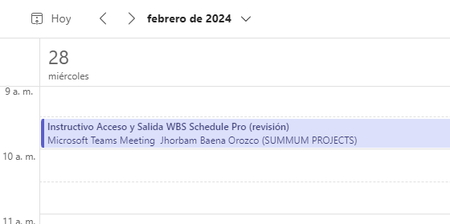
Best regard. Yesterday at 8:25am I scheduled a meeting for the afternoon of that day from 2:30pm to 3:00pm and I sent the invitation, when it appeared on my calendar the meeting appeared graphically to run from 9:30am to 10:00am. When I entered the meeting to edit it, the screen that appears shows that it was scheduled from 2:30pm to 3:00pm. Can someone help me or explain to me why these cases occur? Screenshots. /************************************************** ******************************************/ MEETING ON CALENDAR (as it appears) /************************************************** ******************************************/ MEETING IN EDIT MODE (actual schedule appears from 2:30pm to 3:00pm)5.2KViews1like11Comments
27 years with Organizer-as-dictator problem: Allow attendees to actually change a meeting
As a communications tool, the Outlook meeting invitation is saddled with some deeply unpleasant social implications, because once someone sends one, they are now the "organizer" and no one has any power to fix the organizer's mistakes, present better ideas, etc. without creating disagreeing/conflicting information of their own on the calendar. Small groups of people in a single organization need to be enabled to co-own their meetings, and unilaterally make corrections or other changes. Outlook has never allowed this without granting much broader access to an entire calendar at once. Technically, this would have to be an option, since the "dictator" model is important for things like an employee all-hands with hundreds of people invited. In Google Calendar, it was a simple checkbox option to let other attendees modify the original invitation and keep each other up-to-date. In my time with it, no one at that company ever felt the need to ask someone else for permission (in a preliminary email or phone communication) to send a calendar invite. In an Outlook/Exchange environment, people do this all the time. Some people who want to meet and even know when they want to do it are intimidated to send the invite and make themselves "organizer". We regularly have faulty information on our calendars because it belongs to someone else who doesn't know how or won't fix it. It's all very ridiculous and it's been this way for 27 years. I've seen similar problems with shared information in Teams corrected already, during its brief life. For Outlook/Exchange, it's been intractable. Is there any hope for a change?317Views0likes0CommentsOutlook meeting problem when made by delegate
Hi Exchange Team, We recently have 2 similar issues reported from Personal Assistant when they created a meeting request from their manager calendar. Let me explain. The assistant has the delegation on the Manager's calendar. She created an appointment from her Outlook on the manager calendar and invited bunch of people. The invitation is sent, we can see that is sent "On Behalf Of" and attendees received the invitation. However this meeting is not in the manager calendar. We can see it in the "sent items" of the Assistant, it is in attendees calendars but not in the manager one which is a problem now because she needs to update it but cannot find it. By searching the item in the manager mailbox, we can find an item but with message class IPM.Note and note IPM.Appointment. I tried to make a Point in Time recovery of the manager's mailbox at the time the meeting has been created, but I find exactly the same as in the current mailbox. I ran Get-CalendarDiagnosticLog and Get-CalendarDiagnosticAnalysis but I don't find any obvious problem that could explain this behavior. Did someone have a similar problem? My installation: Exchange 2016 CU 22 Security Update Nov 2022 DAG with 4 nodes Hybrid mode with Exchange on-prem and Teams1.1KViews0likes0Comments
Teams meeting history question
Hello, I have the following scenario here- There are three email addresses, for simplicity sake I will name them as EmailA, EmailB and EmailC. My phone has Teams setup and is logged in as EmailA. EmailB sent a Teams meeting invite to EmailC. I used my phone to open the invite email sent to EmailC, I then joined the Teams meeting as EmailA because I was already logged in as EmailA on Teams. Is it possible to still view the meeting history in this case? I couldn't find any sort of chat or meeting history under EmailA account. The meeting invite was listed under the calendar for EmailC.Solved1.8KViews0likes2CommentsHide bar at top of teams sharing
Hi all When I share my screen in meetings it involves using a browser i.e. I`m presenting things using google chrome. I get a bar asking me to change my screen size/settings etc on teams. It's frustrating because I have to click away or wait a moment. Is there a way to stop this from appearing?? thanks!Solved456KViews55likes137Comments