link
27 Topics
Why not give us the possibility to connect via USB-C?
Hi, I'm enjoying a lot this app, but why not making it possible to connect via USB-C like PCVR? better latency and for people with the wifi not on the same room, better image quality. Is this an option we will have in the future? Thanks! (QUEST 3)142Views0likes1Comment
Phone Link will not Launch
I am running Windows 11 Pro Insider Preview, I am unable to launch or open Phone Link App. I have tried repairing, resetting, re-registering in Windows Powershell, enabled phone link in registry, uninstall and reinstall Phone link via powershell command. I still cant open Phone link.Solved1.1KViews0likes2CommentsSharePoint Document Details Path with or without copy path button.
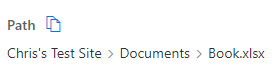
I noticed between SharePoint 2019 and SharePoint Online the Copy Path button ( ) only appears in SharePoint online. Is there a way to make this copy path button appear in the on prem sites too? Examples: (Document Library > Select File > Details panel > Path) SharePoint Online SharePoint 2019590Views0likes0Comments
No Teams link when creating a meeting via the Outlook calendar
Hi everyone, I'm having trouble creating a new Teams meeting via the Outlook calendar. No link appears and the section is completely empty. I've searched a lot of forums and tried many solutions, but my problem persists. Here's some more information: I have an M365 Apps for Business license. My Office pack is in 32-bit version (mandatory to work with third-party software) The meeting is created in a shared calendar on an Exchange mailbox hosted by a service provider other than Microsoft. Everything worked fine a few weeks ago, and still works on other PCs. As far as I'm concerned, changing PCs hasn't solved the problem, which is why I'm turning to you today. If anyone has any ideas... Thank you3KViews0likes2Commentsrestrict anyone link creation to specific users/groups per site
Hi everyone. I have a scenario here with a customer, where we want to restrict "anyone" link creation to specific users/groups per site. I know it's possible tenant wide as described https://learn.microsoft.com/en-us/sharepoint/turn-external-sharing-on-or-off#more-external-sharing-settings under "Allow only users in specific security groups to share externally". But we need to do this per SharePoint Site. Example of what we want to achieve: SharePoint X: Every Owner and Member can create anyone sharing links SharePoint Y: Only User1 and User2 or Security Group Y can create anyone sharing linksSolved1.2KViews0likes1Comment
Short URL to fit in a teams channel list
Hi Microsoft community, I am trying to create an inventory of questions raised in several teams channels in a list. However, when I create the list in a teams channel and try to copy the teams chat link I have an error - the URL exceeds the acceptable 255 characters. Do you know how can I have a list in teams that would allow me to copy several links from several teams channels? How can I shorten the URLs for them to be accepted in the teams channel list? Thanks in advance Regards, Ana1.5KViews0likes2Comments
Assign Task Reminders to Assigned Individuals
Currently, To-Do allows you to assign a new task to someone in your shared list. It is great! However, I notice that whenever I assign a task to someone I would have to contact them (via email or text, or phone call) to confirm they have completed the task. I think it would be a very nice feature to have the option to assign task reminders for workers or others to complete the task they are assigned instead of just being given the task. I understand that when a task is assigned you can manually input a reminder for yourself once assigned. However, more times than not, you often forget, therefore, when given a reminder from your boss or manager you are able to be reminded by the app. This would eliminate the need to have your boss remind you to complete the task.6.2KViews6likes3CommentsIs it possible to embed a SharePoint link in an iframe?
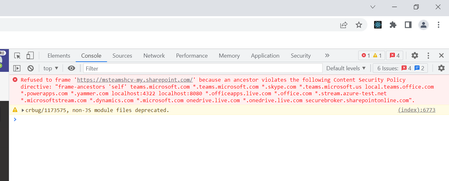
I have some files sitting in OneDrive. They are Word documents. I would like to be able to view them inside of a dialog (as read-only). Is it possible to show a document in an iframe? e.g. (I have removed the real parameters) const fileUrl = 'https://mytenant-my.sharepoint.com/:w:/g/personal/myalias_mytenant_onmicrosoft_com/docid'; <iframe height="900" width="900" src={fileUrl} > </iframe> When I try that I get an error:6.1KViews0likes2CommentsDeep link to the scheduling dialog issue - Teams for iOS doesn't add participants to dialog.
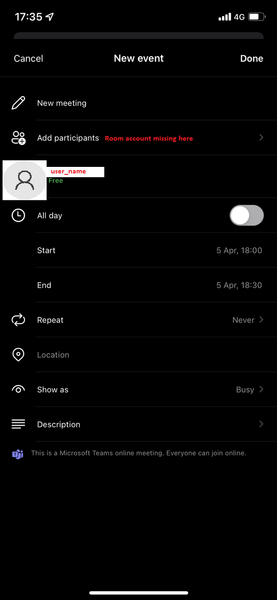
Greetings Tech Community ! Please help me to find a solution for the following issue : My organisation is using Teams Room Console systems and recently we have implemented QR codes with https://docs.microsoft.com/en-us/microsoftteams/platform/concepts/build-and-test/deep-links to the scheduling dialog with the Teams room account- for quick and easy on the go scheduling using mobile versions of MS Teams. At first everything was looking good, but soon we started getting negative feedback from users with iOS devices. When they access the deep link - they are redirected to the scheduling dialog, but the room account is missing from the participants list. Accessing the link from Android devices works just fine (sorry for cyrilic): I have tried both of the following format - with the same results : https://teams.microsoft.com/l/meeting/new?subject=New%20meeting&attendees=Email address removed msteams://https://teams.microsoft.com/l/meeting/new?subject=New%20meeting&attendees=Email address removed At this point I am not sure if it is something I am doing wrong, or it is some kind of Teams for iOS functionality bug. Thank you in advance.1.5KViews0likes2Comments
[Teams/SharePoint] Datei verlinken für neue erstellte Datei
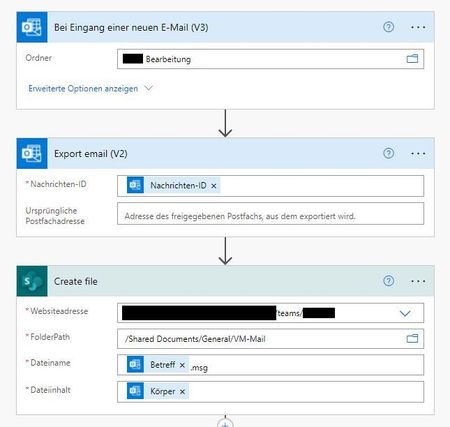
Servus, ich bin irgendwie am verzweifeln und finde den Fehler nicht. Bin dabei das eine E-Mail automatisch abgespeichert werden soll und gleichzeitig soll mit dem Betreff ein SharePoint Element angelegt werden. Funktioniert soweit auch gut - nur bekomme ich nicht den Link der neu erstellten Datei in das Element. Ich hätte gerne in dem "VM-LINK" den Link zur gespeicherten Mail (Create File) Kann mir da jemand helfen? Danke