feedback
381 Topics
Repeated prompt "Some information has changed" when reconnecting to mobile hotspot
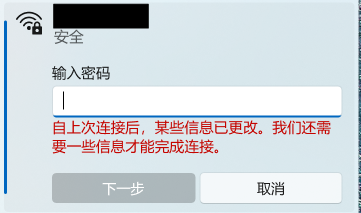
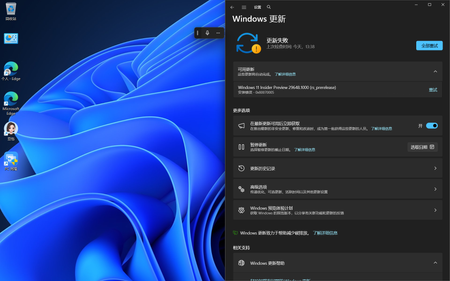
Problem Description When attempting to reconnect Windows 11 to a personal mobile hotspot, the connection frequently fails to connect automatically. Instead, Windows displays the following prompt: "Some information has changed since the last time you connected. We need additional information to complete the connection." (自上次连接后,某些信息已更改。我们还需要一些信息才能完成连接。) The system forces re-entering the Wi-Fi security key every time, even though the SSID, password, and security type on the phone have not changed. Steps to Reproduce Turn on the personal mobile hotspot on the smartphone (WPA3-Personal). Connect the Windows PC to the hotspot, check "Connect", and verify successful connection. Disconnect or disable the mobile hotspot. Turn on the hotspot again later and try to reconnect from Windows. Windows fails the handshake and displays the "information has changed" prompt requiring manual password entry. Observations & Potential Causes Forgetting the network via `Settings > Network & internet > Wi-Fi > Manage known networks` temporarily resolves the issue for one session, but it recurs on subsequent reconnections. Device & OS Environment OS Version: Windows 11 Insider Preview (Build 26340.9577) Network Adapter: [Intel Wi-Fi 6E AX210 160MHz] Hotspot Device: Android 16 Smartphone Hotspot WPA3-Personal 5GHz82Views0likes2CommentsForms Ideas
Does anyone know if there's a portal to submit ideas for MS Forms? I saw a link to one on a post from 2018 but that site is no longer live. I've accidentally moved a form to the wrong group, and there is no way to undo or move to a different group. I'd like to submit this, or upvote existing ideas, to resolve this issue. If you can move a form to a group, you should be able to move it back to yourself or move to a different group, especially if you're an owner for that group. Usually it's as simple as Googling "MS Forms Ideas" but all I've been able to find is this community.114Views1like2Comments
CRITICAL REGRESSION: Build 26200 broke Mic, Game FPS & Cursors!
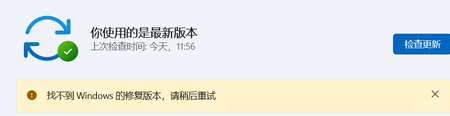
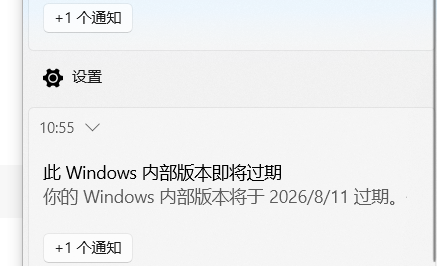
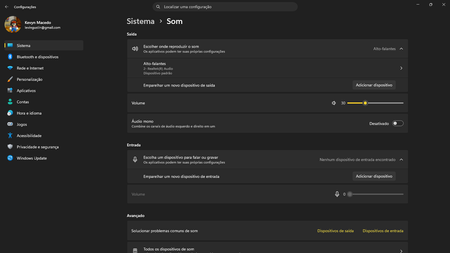
System Specifications: Device: Acer Aspire 5 A515-57 Memory: 16GB RAM Storage: 2x 250GB SSDs OS Build: Windows Insider Preview Build 26200 (KB5120998) Edição Windows 11 Home Single Language Versão 25H2 Instalado em 18/07/2026 Compilação do SO 26200.9278 Pacote de recursos Pacote de Experiência de Recursos do Windows 1000.26100.360.0 Issue 1: Integrated Microphone Failure Immediately after installing this build, the integrated microphone completely stopped working and disappeared from the system inputs. The audio jack still accepts headset microphones, but the internal laptop mic is dead and undetected. Issue 2: Severe Performance/FPS Drop in Gaming Game performance has been severely crippled. In Dragon Quest X S Definitive Edition (Steam), I consistently reached 40 to 50 FPS prior to this update. Post-update, the game is heavily bottlenecked, only reaching 20 to 30 FPS. This feels like a major regression in GPU scheduling, driver compatibility, or background AI/VBS overhead introduced in this preview build. Issue 3: Custom Cursors (.cur, .ani, .ini) Blocked Applying custom cursors manually no longer works. Even after moving the custom cursor files directly into the official C:\Windows\Cursors directory, the system refuses to apply .ini, .ani, or .cur files. This feature worked perfectly prior to the update. Please investigate and fix these regressions in the 26200 flight. Attached are screenshots demonstrating the update build and the issues.407Views0likes2Comments
SAP Benefits for Partner with Specialization
SAP on Azure helps customers modernize their SAP landscape with a secure, scalable cloud platform while unlocking AI, analytics, and productivity capabilities from Microsoft. It creates opportunities for partners to deliver migration, modernization, data, and AI services that drive business value for customers. Business Benefits Faster SAP migrations to the cloud using Azure's infrastructure and SAP-certified services. Reduced infrastructure costs through scalable cloud resources and pay-as-you-go consumption. Access to Microsoft and SAP joint go-to-market opportunities, which can help partners expand customer reach. Ability to build solutions that combine SAP business data with Microsoft AI, analytics, and productivity tools. AI & Innovation Benefits Extend SAP environments with Microsoft Copilot and Azure AI capabilities. Use Azure services for advanced analytics, machine learning, and data integration. Connect SAP data with Microsoft Fabric, Power BI, and Microsoft 365 to generate business insights. Reliability & Security Enterprise-grade security, compliance, and identity management through Microsoft Azure. High availability and disaster recovery options for mission-critical SAP workloads. Global Azure regions supporting multinational customers. Partner Benefits New consulting, migration, managed services, and AI transformation opportunities. Ability to create differentiated offerings around: RISE with SAP on Azure SAP S/4HANA migrations SAP Business Technology Platform (BTP) Data & AI solutions leveraging SAP and Microsoft technologies Access to Microsoft partner programs, co-sell motions, and marketplace opportunities (where applicable). We invite you to share any comments, feedback, or suggestions regarding additional partner benefits you would like to see included.134Views0likes0CommentsWOA 29639.100 explorer.exe freeze when open some folders
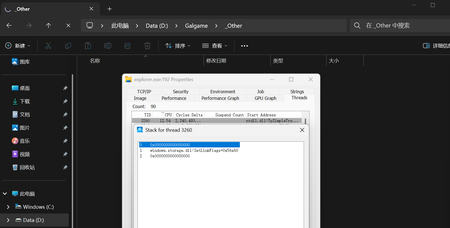
When attempting to open certain folders, File Explorer's CPU usage spikes rapidly, and some or all file items become invisible. Stack traces viewed via Process Monitor reveal that the activity consistently involves the `SetLinkFlags` function shown in the image. Third-party file management tools such as File and 7-Zip operate normally, and issues related to non-system Shell components have already been ruled out by ShellExView. 7zip can show all files normally.191Views0likes1CommentHacked please help
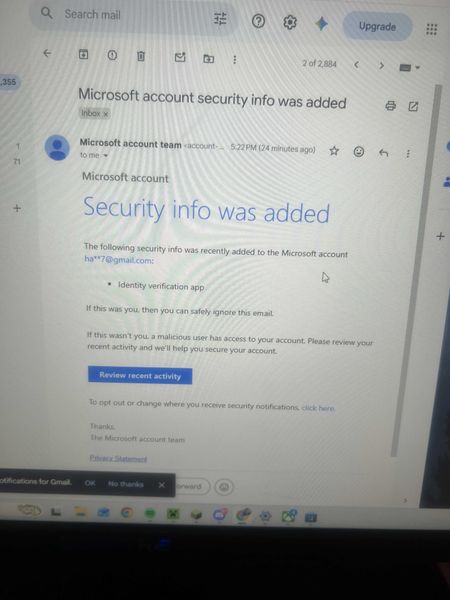
My Microsoft account was hacked today. The attacker changed my sign-in alias to a random Outlook address, removed my phone number, added their own Authenticator app, and changed the recovery email. My original email now says the Microsoft account doesn’t exist. I have the Microsoft security emails proving the changes. I also have other forms of proof. If there is any moderator or anyone who can help me recover my account I had some important stuff on there I would like to get back. It wasn't this email but another one I made this so I can ask for help. When I tried to recover the email they changed it as provided in the screenshots down below. I tried to call support and fill out recovery stuff but since they changed the email for the account there is not much I can do.409Views0likes2CommentsCan we get Microsoft to make the CorePC modular OS into a windows 12 smooth experience?
Guys I was thinking microsoft should change the software architecture for windows on ARM devices since they chose to use a unified memory architecture and ram consumption is nuts, I thought we could maybe convince them into making it so that the Os they seem to be planning to make for arm devices is rlly lightweight and modular, if compatibility was an issue they could maybe make a wine-like compatibility layer that doesnt run unless the program is categorized as x64 rather than arm, like a "better prism" which is the current compatibility layer, and maybe make better use of the npu so it actually helps the OS rather than just idling there, unmenacingly, MICROSOFT TEAM IF U SEE THIS PLEASE DO I NEED THIS, THESE ARM DEVICES HAVE SO MUCH POTENTIAL BUT RIGHT NOW THEY ARE KINDA BAD PLEASEEEEEE, GET EM BOYS218Views0likes2Comments