feedback
381 Topics
Repeated prompt "Some information has changed" when reconnecting to mobile hotspot
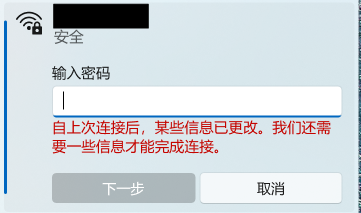
Problem Description When attempting to reconnect Windows 11 to a personal mobile hotspot, the connection frequently fails to connect automatically. Instead, Windows displays the following prompt: "Some information has changed since the last time you connected. We need additional information to complete the connection." (自上次连接后,某些信息已更改。我们还需要一些信息才能完成连接。) The system forces re-entering the Wi-Fi security key every time, even though the SSID, password, and security type on the phone have not changed. Steps to Reproduce Turn on the personal mobile hotspot on the smartphone (WPA3-Personal). Connect the Windows PC to the hotspot, check "Connect", and verify successful connection. Disconnect or disable the mobile hotspot. Turn on the hotspot again later and try to reconnect from Windows. Windows fails the handshake and displays the "information has changed" prompt requiring manual password entry. Observations & Potential Causes Forgetting the network via `Settings > Network & internet > Wi-Fi > Manage known networks` temporarily resolves the issue for one session, but it recurs on subsequent reconnections. Device & OS Environment OS Version: Windows 11 Insider Preview (Build 26340.9577) Network Adapter: [Intel Wi-Fi 6E AX210 160MHz] Hotspot Device: Android 16 Smartphone Hotspot WPA3-Personal 5GHz77Views0likes2CommentsForms Ideas
Does anyone know if there's a portal to submit ideas for MS Forms? I saw a link to one on a post from 2018 but that site is no longer live. I've accidentally moved a form to the wrong group, and there is no way to undo or move to a different group. I'd like to submit this, or upvote existing ideas, to resolve this issue. If you can move a form to a group, you should be able to move it back to yourself or move to a different group, especially if you're an owner for that group. Usually it's as simple as Googling "MS Forms Ideas" but all I've been able to find is this community.109Views1like1Comment
Why Metro design should make a grand return
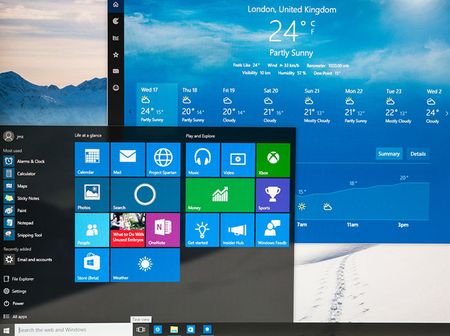
Metro UI wasn’t just a design language. It was a declaration. It respected motion, space, clarity, and user autonomy. It gave us live tiles that pulsed with relevance, panoramic pivots that guided flow, semantic zoom that revealed structure, and full-screen hubs that anchored experience. It was unapologetically modern, minimal, and meaningful. Then came the drift. Fluent UI buried Metro under acrylic, chrome, and overlays. It softened the edges, blurred the motion, and diluted the clarity. What was once a bold interface became ornamental. Metro was never about decoration—it was about discipline. Im still using Metro UI in my projects, not because I need too, because i like how it looks, but you created fluent design, that ruined it all. Microsoft, you knew Metro was good. You launched it with pride. You made it the face of Windows Phone, Zune, Xbox, and Windows 8. You called it “authentically digital.” You were right. So stop burying it. Stop apologizing for it. Stop pretending Fluent is a replacement. It’s not. Bring back Metro UI: As a first-class design option With full support for live tiles, semantic zoom, and panoramic navigation Without overlays, blur, or ornamental drift Not as nostalgia. As correction. Metro was clarity. Metro was discipline. Metro was good. Let it speak again.1.7KViews3likes8Comments
Microsoft Edge PDF Reader - signature validation warning for official signatures
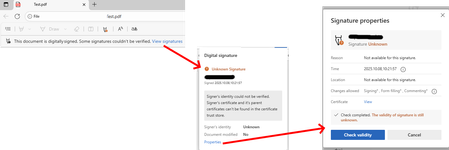
Since the last edge update we are running into the following issue, which triggers support tickets on our side. It seems that the edge internal PDF Reader now supports validation of digital PDF signatures. This new feature however is incomplete and causes a lot of confusion for edge users. "Official" signatures are labeled as "Unknown Signature" and "The validity of the signature is still unknown": "Official signatures" means qualified signatures from members of the EUTL - the European trust list as defined in ETSI TS 119 612 („Trusted Lists“): [...] the European Commission publishes a central list with links to the locations where the national trusted lists are published as notified by Member States. This central list, called the List Of Trusted Lists (LOTL), is available in both a human readable format and in a format suitable for automated (machine) processing XML. Parts of the edge PDF reader seems to come from *dobe itself which adds additional confusion since in their products (*dobe reader, acrobat etc) the signatures are correctly verified. They support this list for several years now (next to their own AATL list). I tried to find out whether this feature is 'work-in-progress' or it is a bug however the last published roadmap is quite old and doesn't give helpful information regarding this aspect. So my question is: Is full support of PDF signature validation including support of the EUTL planned and if so when?1.3KViews1like1CommentFeedback about MS-102 retirement
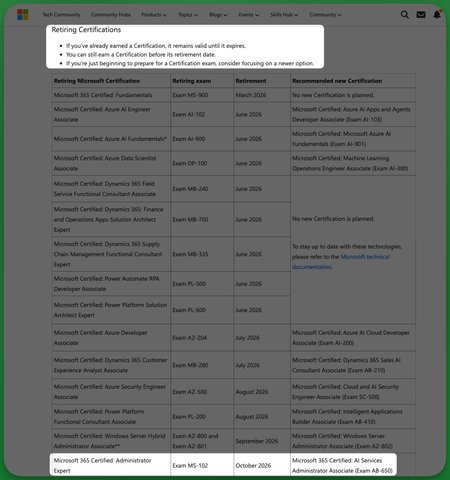
TL;DR: I don't think you should retire the MS-102 as it really is a big downgrade losing and expert M-365 administor certification just for it to be replaced by an unrelated and under leveled AI Services administrator one. Hello community, This is my first post and I think it's a good time to open a thread to share some feedback about the retirement of the MS-102 exam and certification and I encourage others learners and users to do the same. For those who don't know It was announced last June 25th that exam MS-102 and Microsoft 365 Certified: Administrator Expert are retiring October 2026 replaced by AB-650 Microsoft 365 Certified: AI Services Administrator Associate, exam beta on July 26. You can check the announcement here: https://techcommunity.microsoft.com/blog/skills-hub-blog/microsoft-credentials-roundup-june-2026/4528350?WT.mc_id=studentamb_165290 I was shocked to read that because last week I scheduled my exam and I didn't see any notice about future retirement. I just rechecked today and there isn't still any update on the retirement on the MS-102 cert or exam pages: Cert page: https://learn.microsoft.com/en-us/credentials/certifications/m365-administrator-expert/ Exam page: https://learn.microsoft.com/en-us/credentials/certifications/exams/ms-102/ So even today, lot's of users are scheduling the MS-102 exam right now without knowing that it is expected to be retired soon I think's it's a weird move to retire an expert Microsoft 365 administrator certification just for it to be replaced by just an associate certifciation AI Services Administrator Associate. So we lose and expert certification abount managing M365 and we can only get an associate certification about AI services in it's place I think it would've better to have AB-650 as an additional certification, maybe even a prerequisite for the M365 Administrator Expert just like MS-700 or the SC-401 Lot's of recruitments department look for expertise about managing M365 and MS-102 take a big part on lot's of admins resumes to provee their knowledge about managing M365, so we won't only lose a cert or exam, we lose a way to prove knowledge about managing M365 at an expert level. I've read lot's of users complaining about this retirement and I hope you could get feedback about it and rearrange this move. Thank you for reading.8.3KViews63likes65CommentsWhere to obtain Windows XP in 2025?
I am putting together a retro PC from the XP era and haven't used XP in at least 10 years. I have since tossed all my OS discs, but also know XP is insecure to use now. I heard you can install an unofficial SP4 to get it much safer though. Anyway, where is a legit/"safe" place to get an XP installer or ISO that is "secure" that isn't going to be full of malware? I am just trying to run old benchmarks and a handful of games, but would like to be online. Any advice from those running XP on retro PCs welcome, this is my first one!31KViews2likes10Comments
A Vision for Windows 12: Familiar Power Meets Modern Innovation
Dear Microsoft Windows Development Team and Community Hub, With the inevitable speculation around Windows 12, I wanted to share a comprehensive vision for the next iteration of Windows. The goal is to blend the best elements of past versions with modern needs, creating a truly powerful and personalizable operating system. Here’s what many users like myself are hoping to see: 1. A Revitalized Start Menu & Screen Fresh, Resizable Layout: A clearly divided Start Menu with dedicated zones: Account Area (top-left), Shortcut Area (far left for common folders), List Area (pinned, most-used, and suggested apps), and a Pinned Tiles Area (right side, four-column layout). It should be resizable by dragging its edges. Full-Screen Start Screen Option: A return of the full-screen Start that combines the easy-to-browse list from Windows 7 with the dynamic Windows 8.1-style Live Tiles, supporting both horizontal and vertical arrangements. Enhanced Tile Flexibility: Tiles in five sizes (small, medium, long, wide, large, tall) with smooth resizing animations. New customization options should include colorful, gradient, light, dark, transparent, and semi-transparent tones. Migration Friendly: When upgrading from Windows 7, 8.1, 10, or 11, all pinned apps and websites should automatically migrate. Copilot Integration: A dedicated, prominent Copilot Tile to highlight the AI assistant's role, perhaps with a new rainbow effect for visual flair. 2. A More Functional Taskbar & Search Comprehensive Taskbar: Featuring the Cortana icon, mobile devices, Start, Search, Task View, Chat, applications, and the system tray. Prominent Search Box: The search box should be more prominent, changing from a circle to a rectangular shape, serving as a stronger entry point. Flexible Search Menu: The search interface should be highly adjustable and consistent with the new Start menu's style. 3. Personalized User Experience Lock Screen Customization: Options for left or center-aligned date and time. New photo effects that highlight the main subject, allowing it to overlay the time. Windows Hello: Facial recognition that works while wearing a mask. Enhanced Widgets: Desktop Pinning: Widgets should be pinnable anywhere on the desktop, not just in a sidebar. Full-Screen Widgets Board: A full-screen mode with a widget panel on the left and news/feeds on the right, supporting up to six columns. New Widgets: Introduction of a 'Calendar', 'People', 'Microsoft Edge', 'Cortana Suggestions', and a dedicated 'Microsoft Store' widget. 4. Peak Productivity & Multitasking Task View & Virtual Desktops: A return to the mature Windows 10 experience, allowing windows to be dragged directly to other desktops in Task View. Timeline Returns: The Timeline feature should come back, including cross-device history. Classic Alt+Tab: The Windows 10 Alt+Tab window switcher experience should be restored. Supercharged Snap Assist: Enhanced Snap Layouts supporting up to 8 segments for large screens, with specific, intelligent layouts for ultrawide (21:9, 32:9) monitors. 5. Application & Ecosystem Evolution App Updates: New versions of Mail, Calendar, and People. The new Outlook app should fully support popular third-party email services like QQ, 163, and 126. A New Cortana: Multilingual support with the return of consumer skills (music control, smart home, third-party skills). It could be offered in two visual forms and power the 'Cortana Suggestions' widget. Screenshot Tool Upgrade: Should support full-screen recording. Media Player: The return of an appearance selector and support for live tiles. Microsoft Store Revamp: UWP Return: High-quality UWP and classic Metro apps should return to the store, with PWAs transitioning to UWP. Gaming Expansion: Addition of dedicated PlayStation and Nintendo Switch apps, including a Nintendo game section. 6. Visual & Nostalgic Enhancements Refined Aesthetics: Improved window transparency with a new glass effect, rounded rectangle system avatars, and a new top bar (weather, system tray, time). Dynamic wallpaper effects would be a welcome addition. Keep the Win11 Sound: The Windows 11 startup sound is great and should be retained. The "Bold Strategy" – Legacy Feature Return: To satisfy power users and nostalgia, consider the large-scale return of beloved features like MSN apps, Windows 7 Desktop Gadgets, Windows Media Center, Groove Music, HomeGroup, a significantly enhanced Tablet Mode, and Windows Ink Workspace. 7. Hardware, Compatibility & Core System Broad Controller Support: Native compatibility with DualShock 4/5, Joy-Con, and others. Android Subsystem (WSA) Return: WSA should return with a focus on fixing previous pain points, especially full-screen landscape app support. Separated Notification Center: The Notification Center and Calendar quick actions should be separated for a cleaner interface. "Next-Gen PC" Promise: Windows 12 should deliver on larger storage, longer battery life, more power, and enhanced security/stability. Enhanced Backup & Transfer: Windows Backup should expand to more regions and add support for backing up personal files and apps to external drives, including migration from old PCs or to new hard drives. 8. Core Versioning & Hardware Requirements A Fresh Start: Version 26H1, with an internal OS version reset to 12.0.0.0. Tiered Editions: Windows 12e (for education, 2GB RAM), Windows 12 (mainstream, 4GB RAM, removing strict TPM restrictions), and Windows 12 Ultra (flagship, 8GB RAM, unlocking all AI and performance features). Extensive Free Upgrade Path: A critical strategy, offering free upgrades from Windows 11 (including SE), Windows 10 (including S), Windows 8/8.1 (including RT), and Windows 7. Doubled Support Lifecycle: Home/Pro/Workstation: 24 months → 48 months. Enterprise/Education/IoT: 36 months → 72 months. In summary, we envision a Windows 12 that isn't afraid to learn from its rich history while pushing forward with modern innovation. It should be a system that respects user choice, empowers productivity, and welcomes everyone from legacy users to those with the latest hardware. If you like this vision and want to support it, you can upvote it here: https://aka.ms/AAylqhw Thank you for considering this feedback. Sincerely, A Passionate Windows User10KViews1like10CommentsImprove readability of Task Chat in new Microsoft Planner (full-width option needed)
Hello, First of all, thank you for the new Planner experience and the introduction of Task Chat. I think it’s a very welcome improvement over the legacy comments system, because it allows to edit already posted comments. However, there is a significant usability issue that is affecting our daily work: 👉 The Task Chat is displayed in a narrow side panel, which makes reading longer conversations difficult and inefficient. In many real scenarios, task discussions are not just short comments. They often include detailed explanations, decisions, or back-and-forth exchanges between team members. The current layout forces users to read long messages in a very constrained width, which reduces readability and slows down collaboration. Suggested improvement: (preferred) Provide an option to expand Task Chat to full width -maybe another button like the one that already exists for 'Comments'- (or open it in a larger, dedicated view) Alternatively, allow resizing of the chat panel Even a “pop-out” experience (similar to Teams chat) would be helpful This would significantly improve usability, especially for teams, like mine, that rely heavily on Planner for collaborative work and decision tracking. Thanks for considering this feedback. I believe this change would greatly enhance the new Planner experience.501Views8likes2Comments