office 365
20477 Topics
Change in return of AVERAGE function - Mac Excel
I was puzzled that a spreadsheet I use daily generated an error today that had not existed in earlier versions. Attempts to confirm the validity of the spreadsheet functions by running prior versions that had previously run error free resulted in the same error. Eventually, it seems that the operation of the AVERAGE function has been changed in an Excel program update that was installed yesterday. Previously, if an AVERAGE function addressed a range of empty cells, it would return a zero value. Now it is returning the error #DIV/0! This is strange because the AVERAGE function will now return zero if the addressed range contains zeros rather than just being empty. Not sure if Microsoft intended this change or if the change might also apply to other functions. In muy case, I'm able to change my spreadsheet to provide for this but it would have been nice to have some warning.Solved91Views0likes3CommentsChart from dynamic array challenge
Hi (Excel 365 v2512 b19530.20144 Current Channel / Windows 11 25H2) Charts are definitively not my thing. Spent hours on the following, searching, testing… to no available The below chart data range is a dynamic array (could be wrong for the desired chart) - named GRAPH_Series on sheet GRAPH_Ranges - similar to the array on the left side of the pic. The arrays dynamically resize according to the 'START Year' & 'TOPN Cat' variables - so far so good Setting the Chart data range as =GRAPH_Ranges!GRAPH_Series and changing nothing else the chart updates as expected according to the 'START Year' & 'TOPN Cat'. On the other hand if I change anything in the Select Data Source dialog box the chart won't update properly anymore The expected chart is the same as above with 2020, 2021...2025 (instead of 1, 2,...6) horizontally & D, F, B, A as legend (instead of Series1, Series2...Series4) Thanks & any question please let me know Lz.29Views0likes0Comments
Corrupted VT+ transaction files
We are a small accounting company using VT+ Transaction on a local drive synchronized with OneDrive for backup and file storage. A few days ago when we tried to open the application, we suddenly started receiving the following error messages: Run Time Error 0 and Run Time Error 440, and the program does not start. According to VT+ support the program files are corrupted and the data can only be restored up to the year 2022, as the more recent backups are also affected. Somehow the system is overriding our backups, which makes the latest ones unusable. Any advice what could cause that and how to resolve the issue. Thanks78Views0likes1Comment
Autocomplete not working
I have Microsoft 365 Version 2512: January 13, which is the latest update. I am operating Windows 11 Home Version 25H2. When I try to use the autocomplete facility in Excel it does not work. The 'Enable autocomplete for cell values' tick box & the one below in File; Options; Advanced are both ticked. I have tried this in all existing worksheets and IMPORTANTLY in a new blank worksheet. I have asked a friend to try it on his Windows 11 laptop with the same Excel and his does not work on his either. HOWEVER, it does work on my MacBook which is operating system Monterey Ver 12.7.6 & Excel Version16.89, which is an older version. There it works in both a new blank worksheet AND also if I copy the relevant file and paste into the Apple iOS system. I have posted questions on Q&A but have not had any response that indicates a valid reason for the problem or more importantly how to solve it. I would obviously like to speak to someone but I think this is likely to be impossible. It appears that autocomplete does not function in Excel in Windows 11? Can someone help?109Views0likes1CommentOutlook changing styles/colors of incoming email?
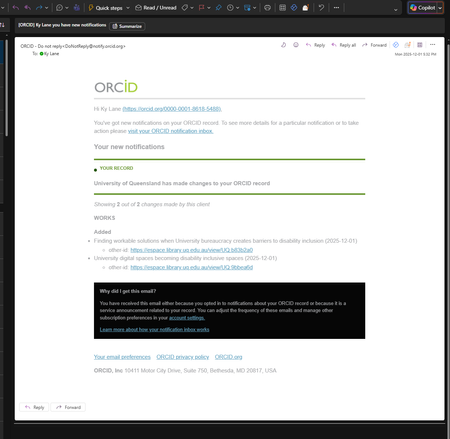
HI friends - I recently got an email from a research org named ORCid and I noted when I received the email that it was hard to read - the text was a lightt grey on white, or light grey on dark grey in dark mode: I emailed ORCid back and explained that this was going to fail any WCAG/Accessibility checks, and could they take a look. I spoke back and forth with their internal developer who insisted that it didnt look like that on being sent - he sent me examples from his own inbox as proof: And these look perfectly fine. Weirdly - when I forwarded this email to a colleague, they showed me on their screen it appeared as intended with the tetxt darker and more legible. They forwarded it back to me - and surely enough, it looks correct. This using the Outlook desktop app in both old and new mode - and dark or light profile - and also in the web outlook as well. Im really confused as to how/why when I receive it the first time it looks so unreadable? Any advice would be awesome.108Views0likes2CommentsOrganizing email account folders on PC
Since updating to the new Outlook, I am not able (on my PC or Mac) to drag and drop account folders to arrange them in a priority fashion. I have downloaded the classic version again, but the new version opens up anyway. I have tried on the app AND using a browser. Any help is GREATLY appreciated. I don't know if I am just not doing something correctly, or if that function is not available, except on my mobile devices. TYIA24Views0likes1CommentFeedback to users who report phishing
Hi, is it possible to create a power automate flow to find submissions from users and as soon as MS has added a verdict to a submission as real phish send a notification back to the user who has reported it? Trying to figure out what is needed for such integration and build a flow but I am stuck. Anyone who has built that and like to share learning?833Views0likes1CommentExcel Challenge - Pivoting poorly structured data
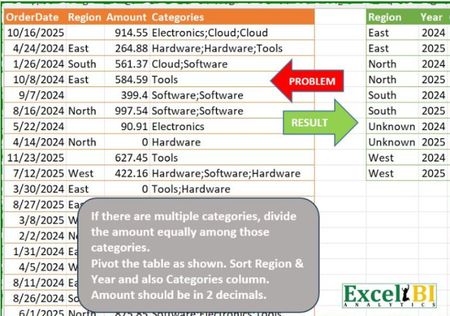
This is from an ExcelBI challenge. I thought it may be worth while posting my solution here as a demonstration of modern Excel methods. Challenge Like many of such challenges, the natural solution approach is to use BYROW but that creates the usual 'array of arrays' error. Solution: Gradually I am moving to a point at which I have no formulas showing in the workbook other than calls to Lambda functions. In this case, the worksheet formuloa is = PIVOTBYCATEGORYλ(OrderTbl) The function works row by row apportioning the amounts against the listed categories PIVOTBYCATEGORYλ // Groups and pivots table by category = LAMBDA(table, LET( normalised, BYROWλ(table, APPORTIONλ), // Identify fields from normalised table dimension, TAKE(DROP(normalised,,1),,2), category, TAKE(normalised,,1), partCost, TAKE(normalised,,-1), // Pivot by category return, PIVOTBY(dimension, category, partCost, SUM,,0,,0), return ) ); The function APPORTIONλ divides the amount between categories so each record within the source data returns a number of rows APPORTIONλ // Splits by category and assigns costs = LAMBDA(record, LET( category, TOCOL(REGEXEXTRACT(INDEX(record,4),"\w+",1)), amount, INDEX(record,3) / COUNTA(category), year, YEAR(INDEX(record,1)), region, IF(LEN(INDEX(record, 2)), INDEX(record, 2), "Unknown"), broadcast, B∕CASTλ(HSTACK(region, year, amount), category), return, HSTACK(category, broadcast), return ) ); /* FUNCTION NAME: B∕CASTλ DESCRIPTION: Broadcasts the terms of a vector over the shape of a second array */ B∕CASTλ = LAMBDA(vector, array, IF({1}, vector, array)); The key to making the formula work is the function BYROWλ that I wrote to generalise the inbuilt but over-restrictive BYROW function. The PIVOTBY function returned the required crosstab from the normalised data arraySolved255Views2likes7CommentsOutlook for Mac missing ToDo
Since a recent update, our Mac clients don't have any way to view ToDo or Tasks in the New Outlook. The tasks don't show in the My Day/Task pane, nor do we have a ToDo Icon ion the left sidebar like users of New Outlook on Windows do. Accessing OWA is now the only way for users to see tasks/flagged emails, but very much not the preferred solution since there IS a desktop client which should do that. Microsoft® Outlook for Mac Version 16.105 (26011018) This is a serious usability issue, is this really a design decision or some sort of an issue?288Views2likes3Comments
Office v2508 feature update (new vbe7.dll) breaks library compatibility with LTSC VL versions
Since the Jan 2026 updates, some `accde` or `mde` libraries built with the semi-annual enterprise channel (v2508, Build 19127.20484) can no longer be used with the volume-licensed version of Office LTSC (tested with the Jan 2026 release of Office 2024 LTSC VL, v2408, Build 17932.20638). The reason for this seems obvious: The v2508 feature update contains an updated vbe7.dll. Apparently, this change is backwards-compatible (code compiled with the old dll will run with the new dll) but not completely forwards-compatible (code compiled with the new dll might not run with the old dll, even if the new RegExp class is not used). That's a problem for us. We can't just tell our customers to upgrade, because those with an Office 2024 LTSC volume license already use the latest version available to them. Does Microsoft consider this a bug or "by design"? If the latter, what is Microsoft's recommendation for software vendors who want to build software that runs on all currently-supported versions of Access? We currently plan to work around this issue by installing v2502 of the semi-annual enterprise channel on our "build VMs" (32 and 64 bit) and use those to build our software. (Reverting dev machines to an old Office version is not an option for obvious security reasons.) Repro On a PC with v2508 or newer: 1. Create a new mylibrary.accdb with a module with the following code: Public Function GetColorCode() As Long GetColorCode = vbRed End Function 2. File/Save as/Create accde. 3. Copy mylibrary.accde to a PC with v2507 or older (for example, with the current version of Office 2024 LTSC volume license). On a PC with v2507 or older: 4. Create a new database. 5. Create/Module/Tools/References 6. Add a reference to mylibrary.accde 7. Add the following code to the module: Sub Test() Debug.Print GetColorCode() End Sub 8. Debug/Compile Expected result: The database compiles. Actual result: "Compile error: Can't find project or library". The "references" window opens automatically and highlights "mylibrary". Notes We are not library developers, but we are still impacted by this issue, since the software we ship consists of a (modifiable) startup mdb referencing an (unmodifiable) mde containing the business logic. If you want to try to reproduce this issue but don't have a volume license of Office 2024 LTSC lying around (we certainly don't), you can install a trial version with the Office Deployment Tool and the following configuration file: <Configuration> <Add OfficeClientEdition="64" Channel="PerpetualVL2024"> <Product ID="ProPlus2024Volume"> <Language ID="en-us" /> </Product> </Add> </Configuration>44Views0likes0Comments