error
202 TopicsHow to resolve 'path is too long' error - endless abending loop!
I'm searching for the proper procedure to resolve a OneDrive for Business issue where a file path is too long. Still, when revised in SharePoint, the OneDrive account doesn't sync the changes and continues to alert the path being too long despite being renamed in SharePoint.89KViews0likes7Comments
Insights from Copilot have stopped working for us
We're all licensed (verified) with M365 Copilot, and for about the last week, one of our workhorse intake forms has stopped working with regards to the "Insights from Copilot" feature. When we attempt to refresh the insights, it presents the message, "Your form has XX responses. Copilot is analyzing the data to provide insights.", then spins for about 30 seconds, and then presents the error, "The insights haven't been generated successfully. Please try again." We're syncing responses to an Excel workbook, and that seems fine, but after about a week these "insights" just started failing in this fashion. We've done basic troubleshooting like trying InPrivate browsing, cache clearing, and since we are only at about 100 responses for this particular small form we're not hitting any limits. Regardless, it's wedged stuck in this state. I reported it via the M365 Admin portal and received the usual "No issues found" reply. 🙄 Anyone else seeing this problem? Does anyone actually use this feature? 😜300Views0likes2Comments
Error Redeeming Reward due to Change in Price
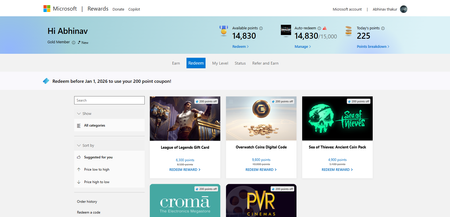
I wanted to buy "Roblox Digital Card—1000 Robux" which is for 16050 points but i had set my goal before its price was changed, earlier the price was 15000 points and with a 200 discount its price had reduced to 14800 points, but when i tried to redeem it says "Sorry you do not have enough points" On clicking manage On clicking redeem reward130Views0likes1Comment
Opening Form through a non compliant browser looses full URL
When opening a Form on a non compliant browser - access is blocked and an option to Launch in Edge is suggested. Once Launch in Edge is selected a full URL to exact Form is lost and general page opens: https://www.microsoft.com/en-gb/microsoft-365/online-surveys-polls-quizzes Other resources such as specific files on sharepoint - onedrive opens fine. This is especially painful when Forms are being opened via QR. QR Code > Camera > Default Browser > Block > Managed Browser > General Forms Page. Does this sound like a design choice for Forms ?26Views0likes0Comments
I can't log in to my Microsoft account
This is incredibly frustrating, to put it mildly. Over 48 hours ago, I changed the passwords for my three email accounts. Once I made the change, I could log into Hotmail and see my emails and everything. Now, when I try to access them through my mobile phone, it says the password I'm entering is incorrect (obviously, I'm entering it correctly for each account). I also had access on my PC. Just in case, I thought, "Okay, I'll change it again," and when I try to change it through my mobile phone, it says "Not available at the moment, please try again later." I thought it was just a one-off... A while passes, I try again, and it still says the same thing. On one of the accounts, after trying several times with the code they sent me, it locked the account. They told me to wait 24 hours and it wasn't fixed. Then they told me to wait a week because after so many attempts to remove the "block" (you can check if it's blocked by entering it in the help section)... Are we crazy or what? This afternoon I spoke with Spanish support, and the woman who helped me really tried. We tried to log in and change the password through a VPN, but this time I didn't receive the code, so she opened a ticket and escalated it to a higher level, telling me to wait 3 to 5 business days. I know what that smells like: wait and then the same thing again. The real surprise was that I couldn't access my other two accounts for 48 hours, so I thought, "Okay, I'll check." I entered the password correctly, but it still said it was incorrect (even though it was correct), and I tried mobile verification, but it wasn't available... even using a VPN. I checked the status of both accounts in the help section, and they said there were no problems with them. Why am I never going to be able to access my three Hotmail accounts again? What's the solution? It doesn't matter if I use a VPN, if the account is blocked, or if it's unblocked. It's always the same. It doesn't accept the correct password -> you try to reset it -> you don't receive a code -> if you try again, it blocks you. Can someone tell me WHAT I NEED TO DO TO FIX THIS ATROCITY? Because waiting is clearly pointless, since the other accounts aren't blocked and I can't log in or reset my password. Furthermore, the account I blocked for trying to access it was unblocked after 24 hours, but it was still the same until it was blocked again. The other two accounts have gone 48 hours without me trying to log in, and I'm still stuck. MICROSOFT, do you plan to offer any solution other than "waiting"? I'm sorry if my English isn't very clear, I'm Spanish and I use a translator102Views0likes0Comments
Teams stuck in "Loading latest updates..." error
I have been having the same error with Teams for the past few months, across two different computers, and with me having uninstalled and reinstalled Teams several times. Effectively, Teams works fine the first time it is reinstalled, but when I go to use it the following day, even if the computer has not been shut down in the meantime, I get a "Loading latest updates... in the meantime, you can still send and respond to messages" line in the toolbar. I cannot actually send or respond to messages (or receive them) while this is going on, though. If anyone has any suggestions, I would really appreciate the guidance - Teams is effectively unusable for me right now, which is a problem given how much we use it to communicate in my department.39KViews8likes15CommentsThis form can't be distributed as it is asking for personal or sensitive information
Two issues, one with what the system flagged, and the second with how the system is not designed to help you correct the error. First Issue: It took me an hour of clicking in form fields and making minor text changes to get the system to momentarily clear the error and allow me to make a copy of the form for rough cut deletion of the offending section. That was a pain and part of what I will get into in part 2. When I finally had a copy I could work with, I deleted sections until I got to the question “EA Passes” with the subtext “how many Early Access Passes does your crew need”. This was the offending question. EA Passes. I changed it to EA Games, EA Medical, EA Social Security… these were all fine. But “EA Passes”. Flagged. This is not sensitive info, you may wish to have your system let that one go. Second Issue: and this is user satisfaction related. The system flags and makes the entire form unusable rather than flagging the individual question or phrase. Having a helpful popup showing what is flagged and making the form usable without this question would be wonderful! Especially considering the fact that the term flagged was not clear or even remotely sensitive in nature. Thank you for considering 1. The flagging of “EA Passes”, I changed this to Early Access Passes to get past it, and 2. Some help fixing/flagging the issue/phrase rather than dynamiting the form and forcing you to delete most if not all of your work to try to find the issue.196Views1like1Comment
Azure VPN issues - RasMan service - Unknown state
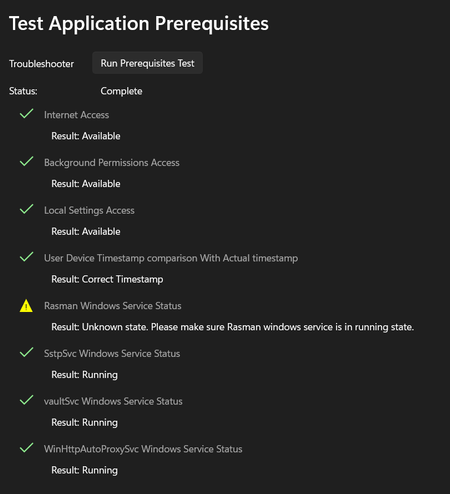
Azure VPN Client stopped working after KB5065813 update – RasMan service Unknown state Environment details: Azure VPN Client version: 4.0.4.0 (Microsoft Store) Windows version: Windows 11 Pro, 23H2 (fully updated) Issue Summary: The Azure VPN Client worked fine from Friday (14 November 2025) until Sunday (16 November 2025). On Sunday, Windows installed updates, and starting Monday morning (17 November 2025), Azure VPN stopped working. When I run the Prerequisites Test in Azure VPN Client, everything passes except: Rasman Windows Service Status Result: Unknown state. Please make sure Rasman windows service is in a running state. However, sRasMan service it's running Registry keys for RasMan exist, and Svchost\netsvcs includes RasMan What changed: I noticed that the update KB5065813 seems to be causing the issue. This KB is installed on my machine, but my colleagues have KB5041655 instead. As part of troubleshooting, I even changed my laptop to a brand-new device with a fresh OS install, and the issue persists after KB5065813 is applied. What I’ve tried: Restarted RasAuto and dependencies Reinstalled Azure VPN Client Installed older versions of Azure VPN Changed my laptop with a brand new one and a fresh OS install Questions: Is KB5065813 confirmed to break Azure VPN Client functionality? Is this related to the October 2025 RasMan vulnerability patch (CVE-2025-59230)? Any official Microsoft steps or scripts to fix this? Screenshots attached for reference.319Views0likes3CommentsExcel Does Not Sync Until Opened
I created a form linked to an Excel spreadsheet in SharePoint as well as a Power Automate approval flow triggered on submission. In addition to sending out confirmation/approval emails, the flow also updates the associated Excel spreadsheet with the approval/denial. The flow was working fine until last week but since then has failed 2 consecutive times. The failures appear to be related to the flow unable to find the automatically generated submission ID in the Excel spreadsheet. When I open the linked spreadsheet, the submission is not immediately present at first but the file does sync at that point and the entry appears. When re-triggered after the sync, the flow completes successfully. Not sure if it is related, but MS form/linked spreadsheets have been updated by Microsoft recently and I was prompted to go through an update process for synced Excel spreadsheets. I completed the update with this specific form last week after the flow failed for the first time. TLDR - my form only syncs with the spreadsheet once opened. Any ideas how to get MS Forms to update the spreadsheet in real-time as opposed to when it is opened?4.7KViews3likes4CommentsWhy is Excel macros sometimes missing ?
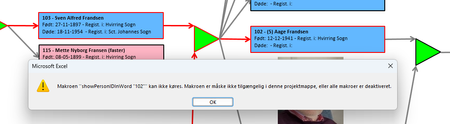
I have an excel file with a lot of rectangular shapes showing a tree structure for a family. When the user clicks on one of the rectangulat shapes the 'story' of that person opens up in a Word dokument. BUT ... Most often the macro 'assigned' to the OnAction WONT run - instead this message comes up: The macros is NOT shown when I "show macros" but it IS present in the VBA section when I press alt+F11 ! When it's working it's most often reight after a reboot og the machine - then it maybe works in 10-30 minuts and then the problem is back again ! I HAVE chesked the security setting allowing macros to be activated ! I have tha SAME file running under Window 10 for years WITHOUT any problems !!!! I can see out there that people FOR YEARS have had similar problems with missing macros - but unfortunately I found no solution ! What the _BEEP_ is wrong here ?535Views0likes9Comments