Accessibility
251 Topics
Clipboard History does not recognize the Delete key on Windows 11
I recently moved to Windows 11 (installed from scratch), and as soon as it was ready I activated the Clipboard History with the Win+V shortcut, since I really liked this feature on Windows 10. But after a short while I noticed the Windows 11 Clipboard History does not recognize the Delete key anymore. On Windows 10 this works: - Invoke the Clipboard History with Win+V - Scroll to the entry you want to delete with your arrow keys - Hit Delete on your keyboard and that entry will be removed from the history. Clipboard History remains open so you can repeat this for as many entries as you like. On Windows 11: - Invoke the Clipboard History with Win+V - Scroll to the entry you want to delete with your arrow keys - Hit Delete on your keyboard, then the Clipboard History closes with no error or message. If you invoke the Clipboard History again, the entry is still there. So apparently there are only two options on Windows 11 now, use the "Clear all" button to remove all the entries from the history. Or click the 3 dots next to each entry you want to remove and then click Delete, which is... annoying if compared to Windows 10. Is there a way to make the Delete key work again?6.9KViews28likes35Comments
Fx-audio Dac-X6 drivers fail after 14/01/2024 update
Hello I have an issue that my DAC is not recognized by windows after latest update. There is code 10 in drivers (It is polish language): Nie można uruchomić tego urządzenia. (Kod 10) Zasoby systemu są niewystarczające do ukończenia operacji API. When i was backing windows up it went even further. Repair tool reinstalled some system files on E. partition xD. So software just crashed and i had to reinstall windows. On the very first launch everything was fine. DAC installed their drivers automatically. It was recognized by soft, and played the sound. When I updated and restarted pc the problem was back, though. Again code 10. "System resources does not perform requirements to finish the API operation". Is there any possibility for install selective updates? Please, help! Excause my english, I try my best.Solved6.1KViews15likes30CommentsWhat's one 'missing' feature from a previous version of windows that you would bring back ?
As a designer, I would love the folder previews within the File Explorer icon. My workflow involves navigating folders filled with hundreds of project files. In windows 10 , that little thumbnail preview on the folder icon itself was an incredibly fast, visual way to identify the right project folder without having to open it or read the name. It is a tiny change but it was helpful on my workflow. I still appreciate much of the new design and security enhancement of Windows 11.86Views5likes3Comments
Windows 11 updates failed for Cumulative Update 24H2. Any fix available?
This error message came up when installing cumulative update for Windows 11 Version 24H2. It says: Windows Updates failed. Your device is missing important security updates. Make sure to keep your device on and plugged in so updates can complete! My computer is connected to Internet and no problem for installing Windows 11 update in the past. But now, it is a big problem. How can I fix Windows 11 updates failed for Cumulative Update 24H2? Restart did not work as I tried a couple of times but no avail.24KViews4likes15Comments
Windows Version 24H2 Causes Remote Desktop to Freeze on reconnect.
After upgrading to Windows 11 latest version We lost the ability to reconnect in Remote Desktop as the screen just went black and froze. The only fix was to login as a different user and kick the other account out or login locally and log out. I researched this and was told to install all new updates and this would resolve the issue. We have homeworkers that connect over a VPN and this is causing work loss. When I look it up I get all kinds of different answers like. I read to deploy the latest patches to fix this, but nothing has worked. The only work around I have is to kick the user using qwinsta to find the session and rwinsta to kill it. I have tried turning off UDP and all the other work arounds I found with no luck. I am getting ready to just switch them out to another remote program as this is ridiculous that Microsoft would release a patch and not have tested it on a highly used application.Solved23KViews4likes20CommentsThe OneDrive share menu in Windows 11 has changed.
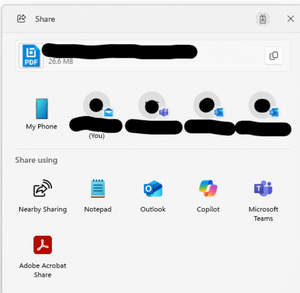
After selecting a file and clicking the top share button or right-clicking “Share,” the pop-up menu fails to generate viewable/editable share links (only supports sending via Outlook attachments or standard copy). The folder share button appears grayed out and unusable, even for folders previously shared successfully. Suspecting this is due to an interface change from an update, how can I restore the previous sharing functionality?763Views3likes3CommentsWindows 10 still better than 11
So dear Microsoft, don't scare us hundreds of millions of Windows 10 users that you will stop supporting it and don't force us to switch to a worse system - Windows 11. ! When in the supposedly more modern Windows 11 system engineering, calculation, simulation, graphic, assembly, 3D rendering, animation programs will run as fast or faster as in Windows 10, and when Games will run faster than in Windows 10, we will think about switching. Currently, Windows 10 is often a dozen or so percent faster in many games and programs! Or better say Windows 11 is even a dozen or so percent slower than Windows 10 :) You have a problem with programmers/coders/developers, I guess, problems with code optimization, there are probably a lot of programming errors in the Kernel that this system works slower than the older Windows 10! ;) Or other problems "under the hood" that the more modern system works slower than the old one. (so MS don't force us to switch to a worse product from a better one :) I'm not even mentioning that W11 is good for amateurs, ;) a lot of things happen secretly.. enthusiasts prefer the more transparent Win10 :) It's easier to recognize what the system is doing..)887Views3likes2CommentsHow can I easily install pending Windows updates on my PC?
Call 1-855-535-7109. To install pending Windows updates easily on your Windows PC, follow these steps: Open Windows Settings: Press Windows + I to quickly open the Settings menu. Go to Update & Security: In the Settings window, select Update & Security. Check for Updates: Under the Windows Update section, click Check for updates. Windows will search for any pending updates. Install Updates: If updates are available, click on Install to begin the installation process. Windows will automatically download and install the updates. Restart Your Computer: After updates are installed, a restart may be required. Windows will prompt you to restart, or you can manually restart your PC. Use Windows Update Troubleshooter (if issues occur): If updates aren’t installing properly, try using the Windows Update Troubleshooter. Go to Settings > Update & Security > Troubleshoot > Additional troubleshooters, then select Windows Update and run the troubleshooter.57KViews3likes1CommentCannot Adjust External Monitor Brightness in Windows 11 Without Third-Party Software
I am unable to control my external monitor’s brightness through Windows 11 settings, but third-party software like Twinkle Tray works fine. I want to understand why Windows doesn’t provide this feature and if there is a way to enable it without using third-party apps. System Specifications: OS: Windows 11 (latest updates installed) CPU: AMD Ryzen 9 9900X GPU: NVIDIA GeForce RTX 4060 Ti (latest drivers installed) Monitor: LG 34GP63A Connection Type: DisplayPort 1.4 (tried HDMI, same issue) Issue Details: The Windows brightness slider is missing for my external monitor. Brightness adjustment works with Twinkle Tray, meaning my monitor might support DDC/CI. No brightness control option in NVIDIA Control Panel, only gamma and contrast. Monitor OSD settings don’t show any clear option for DDC/CI (only OSD Lock On/Off). What I’ve Tried: Checked Windows Display settings (no brightness slider). Enabled OSD settings, but no DDC/CI option found. Updated NVIDIA drivers and Windows. Switched to DisplayPort, but the issue remains. Tried adjusting brightness in NVIDIA Control Panel (only gamma available). Questions: Does Windows 11 natively support brightness control for external monitors? Why does third-party software work but not Windows? Is there a way to enable DDC/CI in Windows without external apps? Could this be a driver or hardware limitation? I’d appreciate any insights or possible solutions! Thanks in advance.922Views3likes1CommentRequest to make a offline account
Dear Microsoft developers(W11). Please let us users have a choice when we install to make a Offline account or not?. You allowed us users to in the past. Now you have removed it and this is highly annoying as Windows 11 and 10 won't install without a Microsoft Account, Give us the choice developers please.405Views3likes2Comments