Forum Widgets
Latest Discussions
Expanding the Reach of AI-enabled Cloud PCs for Frontier Firms
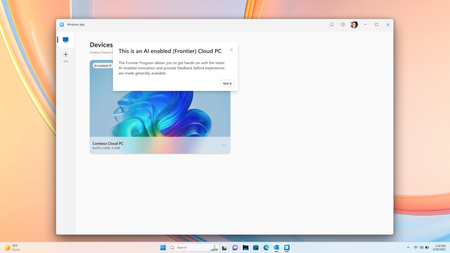
Co-Authored by Lakshmi Rayasam Over the past several months, we’ve been focused on a clear goal: making AI-enabled Cloud PCs easier to adopt, easier to deploy, and available to more customers—wherever they are. Following the momentum from Ignite, releasing Improved Search & Click to Do, we’ve continued to evolve the AI-enabled Cloud PC experience in Frontier Preview, prioritizing scale, accessibility, and product market fit. The latest set of enhancements removes deployment blockers and expands where—and how—customers can get started. We’ve also added a new refreshing AI-enabled end-user experience explaining the value of Frontier while users hover over the AI-enabled (Frontier) tag. Note: Future availability of these features is dependent on the results of this Frontier Preview and is subject to change Removing the need for Windows Insiders AI‑enabled Cloud PCs now work with standard Windows 11 retail builds, eliminating the need for Windows Insider participation. This change alone unlocks broader enterprise deployment scenarios and removes a major barrier for production use. AI-enabled Cloud PCs are just one toggle away as IT admins can join our Frontier Program and enable AI-enabled Cloud PCs via a newly introduced policy setting within the Devices – Onboarding: Windows 365 > User Settings blade, and further filter access based on Microsoft Entra ID group access. Note: After enrolling the latest Windows 11 25H2 (OS Build 26200.7840 or higher) you must reboot your Cloud PC. Expanded regional availability To meet customers where they operate, we’ve expanded AI‑enabled Cloud PCs to additional Azure regions:‑ Japan East Germany West Central South Central US Canada Central This expansion improves latency, supports data residency needs, and enables more global customers to participate in the Frontier Preview. 128GB disk support for Windows 365 Enterprise We’ve added support for 128GB disk size Windows 365 Enterprise licenses, offering greater flexibility for customers who don’t require larger footprints while still enabling AI‑driven workflows. These right‑sized deployments and makes it easier to scale across broader user populations. Together, these updates directly address the most common Ignite feedback and are expected to unlock large‑scale deployments, including enterprise pilots transitioning into sustained usage. What Comes Next Following the March rollout, our CY26 focus shifts to closing parity gaps using cloud‑based models, in close partnership with Windows platform teams. Initial work centers on enabling Text Actions for Click‑to‑Do via a cloud models within Frontier Preview—one of the most requested capabilities from customers.‑‑‑ In parallel, we’ll continue investing in foundational improvements that increase perceived feature depth and usage signals, including cost optimization, reliability enhancements, and productivity scenarios that compound value across the Cloud PC experience.237Views1like2CommentsAzure Default Outbound Access Changes: Guidance for Windows 365 ANC Customers
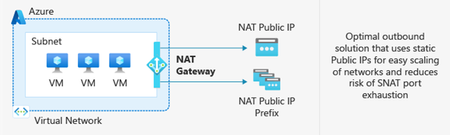
Editor’s note, March 27, 2026: An earlier version of this post listed Azure Load Balancer (SLB) as a supported outbound access method option for Windows 365 ANC. This has been updated. SLB is not a supported outbound access method for ANC. After March 31, 2026, newly created Azure Virtual Networks (VNets) will no longer have default outbound internet access enabled by default. Windows 365 customers choosing Azure Network Connection as a deployment option must configure outbound connectivity explicitly when setting up new VNets. This post explains what’s changing, who’s impacted, and the recommended actions, including Azure Private Subnets and Microsoft Hosted Network. What is Default Outbound Access (DOA)? Default Outbound Access is Azure’s legacy behavior that allowed all resources in a virtual network to reach the public internet without configuring a specific internet egress path. This allowed telemetry, Windows activation, and other service dependencies to reach external endpoints even when no explicit outbound connectivity method was configured. What’s changing? After March 31, 2026, as detailed in Azure’s communications, Azure will no longer enable DOA by default for new virtual networks, instead the VNet will be configured for Private Subnet option, allowing you to designate subnets without internet access for improved isolation and compliance. These changes encourage more intentional, secure network configurations while offering flexibility for different workload needs. Disabling Private Subnet option will allow administrators to restore DOA capabilities to the VNet, although Microsoft strongly recommends using Azure NAT Gateway. Impact on Windows 365 Azure Network Connection Customers For Windows 365 Azure Network Connection (ANC) deployments using virtual networks created after March 31, 2026, new VNets will default to private subnets. Outbound internet access must be explicitly configured for the VNet; otherwise, Cloud PC provisioning will fail. Existing virtual networks are not affected and will continue using their current internet access configuration. Note on Microsoft-hosted network: For Microsoft-hosted network deployments, which is the Microsoft recommended deployment model for Windows 365, Microsoft fully provides and manages the underlying connectivity in Azure on your behalf. There is no impact or change needed for those deployments. What You Should Do To prepare for Azure’s Default Outbound Access changes and ensure your Windows 365 ANC deployments remain secure and functional: Recommendations Transition to Microsoft-hosted network (MHN) if possible. MHN provides secure, cost-effective connectivity with outbound internet access by default, reducing operational overhead and ensuring compliance with Azure’s updated standards. Update deployment plans to ensure either an explicit NAT, such as a NAT Gateway or Default Outbound access (not recommended) is enabled by disabling the Private Subnet option. Test connectivity to ensure all services dependent on outbound access continue to function as expected, and that the ANC does not enter a failed state. Supported Outbound Access Methods To maintain connectivity, choose one of these supported methods: NAT Gateway (recommended) Note: Direct RDP Shortpath (UDP over STUN) cannot be established through a NAT Gateway because its symmetric NAT policy prevents direct UDP connectivity over public networks. Azure Firewall or third-party Network Virtual Appliance (NVA). Note, it is not recommended to route RDP or other long-lived connections through Azure Firewall or any other network virtual appliance which allows for automatic scale-in. A direct method such as NAT Gateway should be used. Unsupported Outbound Access Methods Azure Standard Load Balancer Azure’s Standard Load Balancer is not supported as an outbound access method for ANC. Instead, using NAT Gateway is recommended. More information about the pros and cons for each method can be found at Default Outbound Access. Resources: Azure updates | Microsoft Azure Default Outbound Access in Azure Transition to an explicit method of public connectivity | Microsoft Learn Deploy Microsoft Hosted Network (MHN) QuickStart: Create a NAT Gateway Optimizing RDP Connectivity for Windows 365 | Microsoft Community Hub Quick FAQ Does this affect existing VNets? No. Only new VNets created after March 31, 2026, are affected. Existing VNets will continue to operate as normal. Do Microsoft Hosted Network deployments require changes? No. MHN already includes managed egress. What if I do nothing on a new VNet? ANC checks will fail because the VNet does not have internet access. Configure NAT Gateway or another supported method. What are the required endpoints? Please see here for a list of the endpoints required. Why might peer-to-peer connectivity using STUN-based UDP hole punching not work when using NAT Gateway? NAT Gateway uses a type of network address translation that does not support STUN (Simple Traversal Underneath NAT) based connections. This will prevent STUN-based UDP hole punching, commonly used for establishing peer-to-peer connections, from working as expected. If your application relies on reliable UDP connectivity between peers, STUN may revert to TURN (Traversal Using Relays around NAT) in some instances. TURN relays traffic between endpoints, ensuring consistent connectivity even when direct peer-to-peer paths are blocked. This helps maintain smooth real-time experiences for your users. How do I configure Azure Firewall? For additional security you can configure Azure Firewall using these instructions https://learn.microsoft.com/en-us/azure/firewall/protect-azure-virtual-desktop?context=/azure/virtual-desktop/context/context. It is strongly recommended that a direct method of access is used for RDP and other long-lived connections such as VPN or Secure Web Gateway tunnels. This is due to devices such as Azure firewall scaling in when load is low which can disrupt connectivity. Wrap-up Azure’s change reinforces intentional networking for better security. By planning explicit egress (or choosing MHN), Windows 365 ANC customers can stay compliant and keep Cloud PCs reliably connected.2.1KViews0likes1Comment
Is it possible to migrate Windows 365 between two Entra ID/MS365 tenants?
Hello, we're merging two companies, and as part of this merger, we want to migrate one Entra/MS365 tenant to another. Migrating mailboxes, OneDrive, SPO sites, and other 365 services is no problem for us, but we'd also like to migrate ~40 Windows 365 instances (Entra-Joined, hot Hybrid). Is this possible? Regular workstations can be migrated without a wipe using third-party services (like PowerSyncPro and similar), but in this case, these are VMs managed by Windows 365 service.AllanStarkMar 18, 2026Copper Contributor65Views1like1Comment
More than 30 minutes to install a language pack?
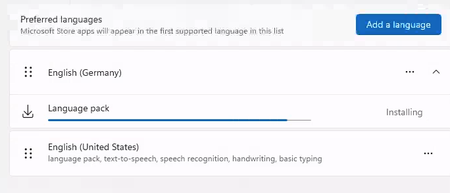
Happy new year to everyone. Is it normal that the Windows 365 PC , 2 core with 8GB RAM takes more than 30 minutes (still running) to install a language pack? I see lots of online discussions stating that the disk performance is terrible for this configuration and hence the performance. Any suggestions or words of advice would be appreciated.bijucyborgMar 14, 2026Copper Contributor6.6KViews2likes10Comments
MS designer is NOT WORKING!
It only makes 1 image not 4, it takes way too long time,. and it doesnt follow prompting,. and it makes imegs in 3:2 not 16:9... thsi has been goign on for over 2 weeks,... alsmot 3.. i have been in contact with support many times woith zero help.. HOW can you have a product in your office bunlde ant it not workign an zero supprot on it? I need teh application to make my videos,. im just abptu to cancel all subscritopons to micrposft an switch to apple..dj0kerMar 10, 2026Copper Contributor56Views0likes0Comments
OneNote - Location, Name, Resolving Backup (& Search dropdown)
I recently had a problem with the Search function in OneNote - where Search was not finding words in recently created Notes. And I fixed that problem, eventually, by deleting all of the files in the OneNote cache. But after that, when restarting OneNote, it came up Empty (with Errors). After jacking around with copying the old OneNote folder and renaming it, Opening Backups, etc. - I finally got my OneNote back up and working (sort of - see paragraph at the end). My problem now is the "Info" is showing 2 Notebooks - "OneNote Notebooks 4" and "OneNote Notebooks 2" - and even worse, the location shown for Notebooks 4 is: https://onedrive.live.com/view.aspx?resid=562C6E59%21s0bcbd9618347485ca665bf8f3012d298&id=documents&end=()&end. I created Notebooks 4 on the advice for another post to get things running again - but, WHERE AM I? - which Notebook am I using? How do I get back to a single notebook at a reasonable location instead of the ridiculous link above. I also have a question about the OneNote locations shown in the "Save & Backup" option - I don't understand a couple of things there. [And a side note - even though OneNote Search is now working, the dropdown list is now showing the full path name for the Note location instead of the Page/Tab name for the location of the Note. Is there some option that I reset while trying to get OneNote working again.] I obviously need help with this one - and am afraid to mess around experimenting since OneNote is back up and working well (except for the dropdown). ron in shawneeroninkansasFeb 14, 2026Brass Contributor207Views0likes2Comments
Cannot Access Windows Hardware Developer Program in Partner Center — How to Sign Drivers in 2025?
Hi all, I'm trying to sign a Windows driver and need access to the Microsoft Windows Hardware Developer Program. **What I'm trying to achieve:** - Sign a driver for Windows using the standard Microsoft hardware signing process. **The issue:** - When I try to register for the Windows Hardware Developer Program, I get a message saying "Hardware Program is already in Active state". - However, when I go to Programs > Settings in Microsoft Partner Center, the Hardware Developer Program is NOT visible/available. - I have Global Admin permissions, and I’ve also tried using an account with Owner permissions — no difference, the Hardware Program is missing from the list. **My question:** - How do I get access to the Windows Hardware Developer Program if it's "Active" but not visible in the Partner Center? - Is there any way to manage or join the Hardware Program in 2025 if it's not listed? - Is there an alternative process for signing Windows drivers now? Any up-to-date guidance for 2025 would be super helpful. Any advice or escalation contacts would be highly appreciated! Thanks in advance.ykryvosheievJan 20, 2026Copper Contributor733Views5likes6Comments
Map only local drives and default printer from clients computer when logging into 365 Desktop?
Hello, I have gone into Intune and created a new config profile and have set Windows Components > Remote Desktop Services > Remote Desktop Session Host > Printer Redirection \ Device and resource redirection to let the users map drives and printers that are on their laptop into Windows 365 Desktop. However, how can we set it so that: 1. The only printers that are mapped to the 365 desktops from the client's device is the clients default printer and not any network printers that are installed on the laptop. 2. The only drives it maps into 365Desktop are the clients local drives like their SSD drive, and usb drives pluged in and not any network drives that are on the laptop.tylderlurdenNov 26, 2025Brass Contributor145Views0likes1Comment
26 ноября
Здравствуйте! Хочу обратиться в службу поддержки с целью продвинуть компанию Microsoft. Дело в том, что мой друг сегодня активировал Windows, чему предшествовало огромное количество шуток на эту тему. Я создал google-форму, а точнее петицию, в которой призываю граждан любой страны утвердить 26 ноября как праздник "Активации Windows". Я бы хотел, чтобы вы рассмотрели мою идею и, как основная сторона, согласились на это, а также расширили этот опрос в больших кругах. Прикрепляю ссылку на google-формы: https://docs.google.com/forms/d/e/1FAIpQLSfrlFcap22IUJhrLBeRp4C8tAcxlGRY_AMPVqxcQJjwxPB4Tg/viewform?usp=publish-editor С уважение, Дмитрий Translation: Hello! I want to contact support in order to promote Microsoft. The thing is, my friend activated Windows today, which was preceded by a huge number of jokes about it. I created a Google form, or rather a petition, in which I urge citizens of any country to establish November 26 as "Windows Activation" Day. I would like you to consider my idea and, as the main party, agree to it, as well as help spread this survey more widely. I am attaching the link to the Google form: https://docs.google.com/forms/d/e/1FAIpQLSfrlFcap22IUJhrLBeRp4C8tAcxlGRY_AMPVqxcQJjwxPB4Tg/viewform?usp=publish-editor Sincerely, DmitryL_DM3Nov 26, 2025Copper Contributor58Views0likes0Comments