User Profile

FrankMartin1610
Copper Contributor
Joined Feb 15, 2021


User Widgets
Recent Discussions
Error when creating task using command prompt in Windows 2019 docker container
My host is Windows 2019 standard. It contains docker image which is also based on Windows 2019 standard core (no GUI). This is the image I am using: http://mcr.microsoft.com/dotnet/framework/aspnet:4.8-windowsservercore-ltsc2019 When I run following command on host then it works fine. But running same command in Docker container results in error. Command schtasks /create /sc minute /mo 1 /tn StudentManagementSystem /tr C:\StudentManagementSystemConsole\StudentManagementSystemConsole.exe Error The task XML contains a value which is incorrectly formatted or out of range Using following PowerShell script in Docker container also results in exact same error. $action = New-ScheduledTaskAction -Execute "node" -Argument "C:\StudentManagementSystemConsole\StudentManagementSystemConsole.exe" $now = Get-Date $interval = New-TimeSpan -Seconds 60 $forever = [System.TimeSpan]::MaxValue $trigger = New-ScheduledTaskTrigger -Once -At $now -RepetitionInterval $interval $settings = New-ScheduledTaskSettingsSet $task = New-ScheduledTask -Action $action -Trigger $trigger -Settings $settings Register-ScheduledTask -TaskName ‘Student Management System’ -InputObject $task How to fix this issue?What are UserEngagement, MicroblogUsageTelemetry, RequestUsage and FeatureUsage logs and how to stop
My SharePoint 2016 is generating a lot of these logs. From where are they coming and how to stop them. SP log level is set to default. UserEngagement MicroblogUsageTelemetry RequestUsage FeatureUsage They are being generated at default SharePoint log location which is inside web server extensions directory.365Views0likes0CommentsA security-enabled local group membership was enumerated
Infrastructure team has informed me about following two alerts generated by SharePoint server. 1. A security-enabled local group membership was enumerated (this is generated by Administrators group) 2. A scheduled task was created (this is generated by service account which is running Workflow Manager) I believe we need to ignore/whitelist these alerts because this is done by SharePoint. I remember I asked about similar alert on old TechNet forums and Trevor Seward replied to ignore it but that post and forum is now nowhere to be found. What shall I reply Infrastructure team?817Views0likes1CommentSome trusted domain users are not appearing in People Picker
I have two domains, Domain1 and Domain2. There is 2-way trust between them. Users are connected to Domain1 while SharePoint is installed on Domain2. I have enabled that setting so people picker reads data from both domains but for some users, it doesn't pick their user from Domain1. Here is one case I encountered today. 1. A new site collection is created 2. User@Domain2 is added to Members group. User@Domain1 is not appearing in people picker so couldn't add it. 3. When same User@Domain1 tries to access the site then he gets that error "Sorry this site hasn't been shared with you". So, he fills out that form on that page and sends request for access. 4. When I go to "Access requests and invitations" page in site settings, I can see that User@Domain1 request is there. 5. I approve his request and now User@Domain1 is also added to Members group. Which means now both User@Domain1 and User@Domain2 are part of Members security group. 6. He is able to access site successfully BUT his User@Domain1 is still not available in people picker when I try to search it. Only User@Domain2 is appearing. How to diagnose and fix this issue?765Views0likes0CommentsShall we use same service account on DR as Production
I have a production SharePoint farm. Now I am planning to prepare DR farm. Do you think it would be better to create new service accounts for DR or use the same ones as Production? Both Prod and DR are connected to same AD so the accounts will be available to both of them. What is best practice in this case?Solved587Views0likes1CommentDisable contextmenu (right click) in Media Web Part
I want to disable contextmenu (right click) in Media Web Part so user cannot download video file. Found solution here which I tested in browser by inspecting element and updating HTML and it worked. https://sharepoint.stackexchange.com/questions/147180/remove-save-as-and-copy-video-url-in-media-web-part Solution is to write code oncontextmenu="return false;" in video control. My question is how do I actually update code permanently and not just in inspect element/developer tools because on page refresh, the code is gone.Solved2.2KViews0likes1CommentSharePoint doesn't warn when setting maximum file size greater than allowed limit
As we know in SharePoint 2016, the maximum allowed file size is 10GB (default is 2GB) but when I try to set a file size greater than 10GB in Central Admin then it doesn't actual warn or show error and happily accept that value. Same is the case with PowerShell i.e I am able to set a value higher than 10GB and it doesn't show any error. So, if I set value 20000MB then will I be able to actually upload such file or will it show error?1.2KViews0likes1CommentPeoplePicker randomly showing users from different domains
This is about SharePoint 2016 on premise. Currently we have two Active Directories; CurrentDomain.com and NewDomain.com Plan is to migrate everything from CurrentDomain.com to NewDomain.com and as a first step SharePoint has been migrated. So all users are on CurrentDomain.com while SharePoint is on NewDomain.com All users who are on CurrentDomain.com, their account also exists on NewDomain.com but like I said right now they all are accessing SharePoint from CurrentDomain.com while SharePoint is on NewDomain.com I have enabled PeoplePicker to pick people from both domains but it is showing weird behavior. For some users it shows both of their accounts from CurrentDomain.com and NewDomain.com, while for some users it only shows their account from CurrentDomain.com and for some it only shows from NewDomain.com When I display result of following then it shows both domains (and IsForest is true) so that means PeoplePicker is working fine. $wa.PeoplePickerSettings.SearchActiveDirectoryDomains I checked logs and found that it seems to be working fine and when we search for some user, then it returns results from both domains. But people picker doesn't show both users like I explained above. Here are the logs when I tried to search user "some.user" SearchFromGC name = currentdomain.com. start ... SearchFromGC query = (|(&(objectCategory=person)(|(anr=some.user*)(SamAccountName=some.user*................. SearchFromGC name = currentdomain.com. returned. Result count = 1 SearchFromGC name = newdomain.com. start ... SearchFromGC query = (|(&(objectCategory=person)(|(anr=some.user*)(SamAccountName=some.user*................. SearchFromGC name = newdomain.com. returned. Result count = 1 In all of this, one really strange thing happened. I was trying to search user "another.user" and it was only showing result from NewDomain.com. But after about 30 minutes of so, when I searched same user in people picker, then it started showing this user from both domains. I didn't do anything but it automatically started working correctly. How do I check as to why it is not showing users from both domains?609Views0likes0CommentsUnable to view all projects in Project Center 2016 on premise
I am quite familiar with SharePoint but not Project Server. Using Project Server 2016 on premise. Currently logged in as Farm Admin which is also site collection administrator of PWA but when I open PWA site and click on projects, then I only view a few projects while other users see a long list of projects. I am talking about project center where all projects are displayed. There is a user let's call him "user1" which is able to view all projects. I went ahead and added this Farm Admin in same SharePoint groups as that user but still can't view all projects. Then I went into PWA Settings --> Manage Users and there I assigned same groups as "user1" but still problem remains. From where project center is reading permission? Could it be some custom permission defined in SQL Server table?547Views0likes0CommentsUser department not displaying when reading from user profile using code
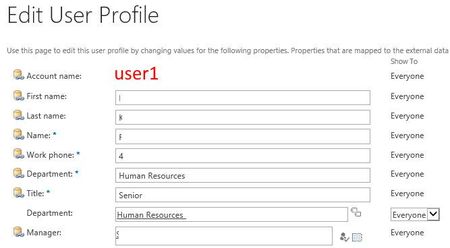
I am facing this issue where the following code is not working for one user (there may be more) i.e. Department field is coming as blank while for others it is working. If you see screenshots below, I am showing two users; user1 and user2 and for user1 it is working fine i.e. Department is being displayed but for user2 not Department is being displayed i.e. it is blank. Code using (SPSite site = new SPSite(SPContext.Current.Site.RootWeb.Url)) { string userName = System.Web.HttpContext.Current.User.Identity.Name.Replace("0#.w|", ""); SPServiceContext context = SPServiceContext.GetContext(site); UserProfileManager profileManager = new UserProfileManager(context); UserProfile currentUserProfile = profileManager.GetUserProfile(userName); txtDepartment.Text = (string)currentUserProfile["department"].Value //in above code txtDepartment.txt is coming as blank for user2 but for user1 it is showing dept } User1 screenshot of User Profile Service User2 screenshot of User Profile Service608Views0likes0Comments
Recent Blog Articles
No content to show