User Profile

Elipum
Brass Contributor
Joined Mar 30, 2020


User Widgets
Recent Discussions
Re: New Office 365 Group not shown when creating new Planner Plan
For anybody coming here to find a solution. This issue is still happening today. What worked for me was: Add yourself as member. EVEN if you are already and Owner, do not change your permission, just add yourself as member again. It will still show you as Owner, but you will be now able to select the group from the dropdown. Warning!!! Any other Owners in the site, are NOT automatically added to the Plan. You need to, either invite them, or repeate and add them as members on top of their owner permissions. 😫1.9KViews6likes1CommentRe: Weird. Duplicated values highlighted in Excel, but they are clearly not duplicates!
Thanks for the time Sergei. The format I gave them was Text for all. I don't know why it is changing when opening in your side. Maybe that is part of the use. Some cache or big on my side..? They are meant to be formated as text all. Weird50KViews0likes2CommentsRe: Weird. Duplicated values highlighted in Excel, but they are clearly not duplicates!
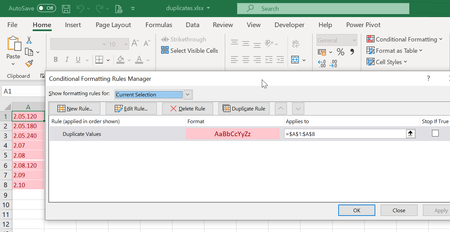
Riny_van_Eekelen really? See screenshot. They do show as duplicates on my file (all red). If you delete any of the cell values, one of the other cells becomes white, meaning, its duplicate has been deleted. But obviously they were not duplicates at all!51KViews0likes12CommentsWeird. Duplicated values highlighted in Excel, but they are clearly not duplicates!
In excel, I am getting warning of duplicated values from this list. This prevents me from creating a data model relationship one to many. However, the values are not duplicated at all: 2.05.120 2.05.180 2.05.240 2.07 2.08 2.08.120 2.09 2.10 Isn’t it weird? Have you experienced something like this previously, and if so, is there a known solution for it? Thanks!62KViews0likes22CommentsDefault custom columns when creating new site
Hi, I would like to set a custom column as default, so that when a new site is created, it will appear visible automatically. This custom column contains a link to a flow and it is a site column (it is a column formated with JSON to add the link). Is this possible? I find it very strange that no one has asked this before, or that this is not an option! Any help will be appreciated. Thanks!1.8KViews1like1CommentRe: Create Universal Metadata Columns for all my sites in tenant.sharepoint.com/sites/
Hi RioRene , I have the same question! I am creating a column with a link, that connects to a flow for quality assurance/revision/Inspecting documents, triggered by "on select". Thanks to WonderLaura, I found the way to have a single flow for this actions, independently of which library or site the flow is triggered from (same flow across multiple sites). But now, I am stuck on finding a way to implement this column, that is formatted with JSON code, in multiple sites, and more importantly, that appears by default automatically when a new site is created. Is really not an option?1.1KViews0likes0CommentsRe: Pivot table and graphic
Hi Jasmine2470 I would suggest this trick: Create 2 pivot tables. Use one for showing the data Use the second one (you can hide it in a different tab or outside the print area) for generating your chart. And voila! If you need to filter both, pivot table and graphs, with the same slicer. You can then link the Filter Slicer to both pivot tables.849Views0likes0CommentsRe: Pivot tables
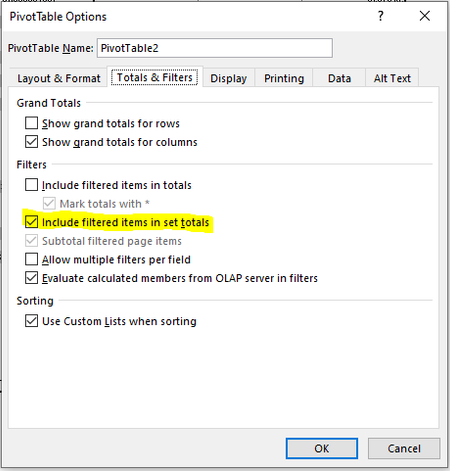
KPPWM Hi, Have you try excluding filter elements from totals? Right click on your pivot table, select: PivotTable Options. On the Totals & Filters tab, unsleect the option "Include filteres items in set totals" And also uncheck "Include filtered items in totals"485Views0likes0CommentsRe: Pivot Tables!!!!!
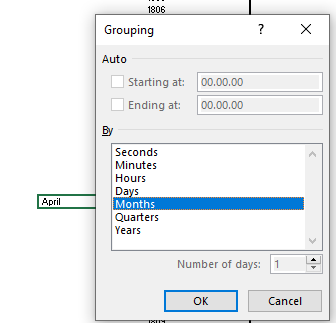
Hi jacovdl , Follow the steps from SergeiBaklan in his previous post, and then, in your pivot table, right click over the column that contains the Dates labels, and select: "Group" Since you have already formated as Date, it will recognise the possibilities for grouping automatically, and will give you the following options:1.5KViews0likes0Comments
Recent Blog Articles
No content to show