User Profile

ajm-b
Brass Contributor
Joined Jun 24, 2019


User Widgets
Recent Discussions
Do user licenses affect application of Retention Policy?
I'm really confused on this. Example scenario: Let's say AAD end user John owns a file in OneDrive named "reports". A retention policy is defined for OneDrive to retain everything for x days (the timespan is not important to this question). Do the licenses assigned to John's user (like AAD PP1, 365 A1, etc) affect whether or not the retention policy applies to John's "reports" file?2.8KViews0likes5CommentsWindows print spooler making indecipherable kerberos spn request
I've been looking at eliminating NTLM use in my domain, and noticed that Windows clients' print spooler service is falling back to using NTLM to reach the print server. Digging deeper, it's making a request that I can't decipher at all... "The service principal name (SPN) krbtgt/NT mailto:Authority@<my domainfqdn> is not registered, which caused Kerberos authentication to fail: 0x7. Use the setspn command-line tool to register the SPN." Kerberos auth works for everything else in the domain, I'm ONLY seeing this from the print spooler.13KViews0likes3CommentsRe: Why ReportViewerWebPart.wsp don't work on SharePoint 2019 with Kerberos?
Vasily, Sorry I don't exactly have an answer, but I'm seeing a similar nonsensical request to "krbtgt/NT AUTHORITY@<domain fqdn>" that I've traced back to print spooler service on Windows clients trying to access shared printers on a print server. The apparent problem is that no such SPN exists in my domain - but why spooler is even trying to find such a nonsensical spn in the first place has me stumped. It appears to be related to remediations performed by the PrintNightmare patches, but I haven't had any luck narrowing it down more than that.1KViews0likes0CommentsRe: After Hyper-V failover + failback, where are VM's files?
answered my own question: I've verified it's a non-issue. You don't need to specify a different storage location on the primary or replica hyper-v host - because during the planned failover, they each shake hands and understand that one data location is now the replica (the original primary), and the other data location (the previous replica server, which is now becoming the primary) is the primary.992Views0likes0CommentsAfter Hyper-V failover + failback, where are VM's files?
What is the best practice replica storage location on the primary Hyper-V node when I expect to planned failover to a secondary, then failback to the primary, such as for regularly scheduled maintenance? What storage location will a VM be running from after these steps? planned failover a vm (\\primary\s\Hyper-V\...) to secondary node (\\secondary\s\ReplicaStorage) replication traffic begins flowing from \\secondary\s\ReplicaStorage to \\primary\s\ReplicaStorage failback from secondary to primary, what files are the VM running from? \\primary\s\ReplicaStorage - or the original location of \\primary\s\Hyper-V\ ???Solved1.1KViews0likes1Comment(AAD) I want to force security info registration only for certain users
This seems silly but I'm not seeing a way: The bulk of my users won't be licensed for MFA/SSPR, so I only want to force security info registration during logon for users that are assigned one of our AADPP1 licenses. How can I accomplish this?SolvedGetting to the bottom of it: Remote Computer Management\Storage\Disk Management - SOLVED
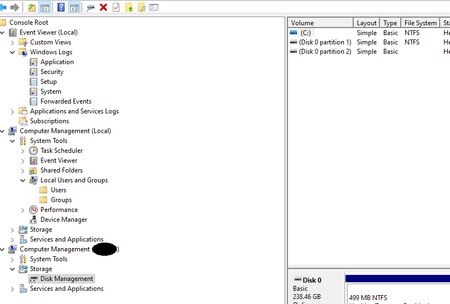
I just wanted to share a solution to a challenging, poorly documented issue (as far as my research found). 3 parts to allow managing a remote system with Computer Management\Storage\Disk Management: On both systems (one you are trying to manage, and the one you are on), enable firewall rule group Remote Volume Access (I turned on rules only for Domain profile) On both systems (again, one you are using and your target system) need to have Virtual Disk Service started (or at least set to Automatic Startup, I believe default is Manual) On the system YOU (the manager) are on, you probably need to ensure that somehow, someway, the TARGET COMPUTER ACCOUNT (it's DOMAIN computer account) has, on YOUR SYSTEM, the User Logon Right Access this computer from the network. I achieved this by adding the target system to my local system's Remote Desktop Users group, because that and Administrators are the only two groups granted this URA by the "MSFT Windows 10 2020 - Computer" baseline GPO. BOOM! Totally works to a remote system now. In my case, both systems are Windows 10 2004. You probably wouldn't want to add "Domain Computers" permanently to all your IT Techs' PCs as Remote Desktop Users, but you could add them temporarily just when you need to remote disk manage something for a ticket, then remove it. Cheers!16KViews0likes4CommentsRe: Do user licenses affect application of Retention Policy?
VasilMichev Please let me check that I understand this correctly. Essentially, when I create a Retention Policy, I'd select a location, then subselect only a group of users that has one of these licenses = "Microsoft 365 E5/A5, Microsoft 365 E5/A5 Compliance, Microsoft 365 Information Protection and Governance, Office 365 E5/A5, and Office 365 Advanced Compliance" (as listed on the URL)?2.6KViews0likes1Commentretention / deletion question - exclude long-lived files?
Noob question: I really like the idea of defining a blanket [retain 1 year then delete] policy, but users sometimes have files they legitimately need to keep for longer - how can I exclude those? The data are basically working/reference material I'd want to retain 1 year from creation date... but I don't care about retaining it longer + also don't want to automatically delete it the huge variety of content would be impossible to reliably match by query; only the end user knows "I want to keep this thing indefinitely until I'm done with it" It seems like I could accomplish this with multiple labels/policies but I'm a little hazy on the details. Help?1.4KViews0likes2CommentsRe: (AAD) I want to force security info registration only for certain users
Thijs Lecomtethanks for the feedback! Could you clarify something? So requiring MFA via Conditional Access policy on an account that hasn't yet registered will prompt them to register during their next sign-on instead of just locking them out, correct?1.8KViews0likes1Comment"invisible" VM not shown in Hyper-V Manager or Failover Cluster Manager (2012 r2)
I have a VM that is up and running on my 2012 r2 cluster (psremoted it, RDP'd it, I personally created this VM on this failover cluster) but I can't see it in failover cluster manager or hyper-v manager anymore recently. I'm not sure exactly when it stopped being listed in either tool. backstory that might be relevant: a CAU updating run failed 7/7 and again yesterday for reasons unknown to me at this time (node failed to drain, and a specific kb - a .net one - failed to transition to installed). It almost seems like the vm in question is in limbo "between" the two nodes of the cluster. any help appreciated.SolvedRe: How can I safely implement required ldap signing?
I hope this helps someone. Here's some initial results from test environment. [2012 r2 dc, forest/domain level @ 2008 R2, windows 10 1903, rolling with defaults for group policy except these 2 noted below] shutdown client (set to negotiate for both settings) change domain gpo to have "domain controller: ldap server signing requirements" and "network security: ldap client signing requirements" set to REQUIRE SIGNING gpupdate domain controller, verify with mmc rsop that it has applied these settings startup client: I'm able to logon w/o issue. nltest /sc_query:<testenv domain> verifies that the secure channel is established mmc rsop verifies that the client has applied both settings set to REQUIRE SIGNING gpupdate succeeds on client able to browse \\<testenv domain>\sysvol launch ADSIEdit on client: attempting to simplebind to <testenv>:389 while specifying credentials fails with error: "Operation failed. Error code: 0x2028 A more secure authentication method is required for this server. 00002028: LdapErr: DSID-0c090202, comment: The server requires binds to turn on integrity checking if SSL\TLS are not already active on the connection, data 0, v2580" repeat same scenario except unchecking simplebind in ADSIEdit results in success as expected for this testenv, trying to bind 636/TLS/SSL does not succeed, verifying we aren't falling back to SSL/TLS to avoid required signing without realizing it. sidenote on ADSIEdit oddity: if I didn't check "specify credentials", I could still bind even if simple bind was checked...I'm assuming ADSIEdit was reaching over the already-established secure channel but if someone can confirm that behavior of ADSIEdit I'd appreciate it. So to summarize: it does seem confirmed that unreachable/offline clients (set to negotiate) are able to come back later after the DC has already processed REQUIRED SIGNING and get the new settings- even though I'm not sure technically how that actually works. If someone can shed light on that I'd appreciate it...I'd assume the client coming back and trying to reach DC for group policy would be like: (client comes back online with its last group policy set to negotiate) client tries to negotiate ldap with DC that is set to REQUIRE ldap signing. DC rejects client's bind attempt client cannot update group policy or talk with DC anymore ...Now it certainly didn't work this way in my testing, but I have no idea why. Do you?7.3KViews0likes3Comments2012 R2 Failover Clustering, SMB v1, SMB Signing, NTLM v1, crashed guests
This is blowing my mind, please help. I've been phasing in group policy to: disable SMBv1 require SMB signing client/server e.g. [ms network client/server...(always) = enabled] require ntlm v2 only, reject ntlm v1 (same settings as current MSFT baselines) I've phased this trio onto everything else in our environment with no problem - clients, member servers, DC's: everything was/is working fine. However when I applied this same set of group policy on one of our WS 2012 R2 Hyper-V nodes in our 2-node failover cluster, 10 different VM's crashed at the guest level seeming to think their disk(s) were surprise removed and the other node took over driver's seat on the CSV, those VM's were automatically started but *some* got a boot failure; manually stopping/starting them got them to boot normally with no observed issues. Why did this happen- and why only these 10 random VM's, which weren't even ALL the VM's on that node at the time the change was applied? Why did these changes make the CSV coordinator be moved to another node? This is DAS shared storage (Dell MD1400) over HBA in Storage Spaces. Any insight you can provide would be helpful, I'm totally stumped and I *really* need to get this policy set applied for security reasons in light of vulnerabilities/best practice recommendations that came to light after patches last month (month 6 in 2019).Re: How can I safely implement required ldap signing?
Steve Norton"If you set the server to require LDAP signatures, you must also set the client devices to do so. Not setting the client devices will prevent client computers from communicating with the server. This can cause many features to fail, including user authentication, Group Policy, and logon scripts." If clients are set to negotiate, and the server is set to require, clients will be rejected.7.5KViews0likes4CommentsHow can I safely implement required ldap signing?
https://docs.microsoft.com/en-us/windows/security/threat-protection/security-policy-settings/network-security-ldap-client-signing-requirements "If you configure the server to require LDAP signatures, you must also configure the client computers. If you do not configure the client devices, they cannot communicate with the server, which could cause many features to fail, including user authentication, Group Policy, and logon scripts." Given this - how in the world can you safely implement this? It seems to me that unless everything processed right at the same time - you're guaranteed to have some clients that cannot communicate to even get group policy anymore?Solved8.2KViews1like7Comments
Recent Blog Articles
No content to show