User Profile

MarcoMangianteIM
Brass Contributor
Joined Jan 16, 2017


User Widgets
Recent Discussions
Microsoft Entra Connect sync stopped, request upgrade and library not found
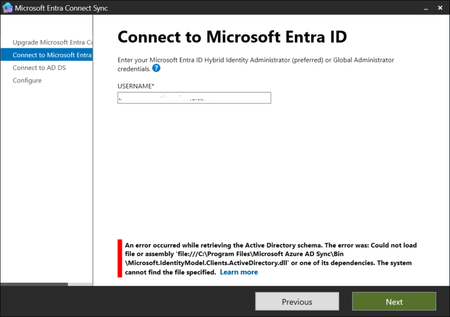
Hello, I have the latest (for our company, present on Entra blade) version of Microsoft Entra Connect Sync: 4 days ago I noticed on Synchronization Service Manager that there is no sync of data; I have started the Microsoft Entra Connect Sync and found a big button with "Upgrade" word; I tried to execute the upgrade but when the it arrives to the Connect to Microsoft Entra ID step, I fill with my global administrator account but found a stop error: An error occured while retrieving the Active Directory schema. The error was: Could not load file or assembly 'file:///C:\Program Files\Microsoft Azure AD Sync\Bin\Microsoft.IdentityModel.Clients.ActiveDirectory.dll' or one of its dependencies. The system cannot find the file specified. and when I click again on Next I have the same request of global administrator user and password and the same error. Now, the library is not present but I verified, in a test tenant where I have a working Entra Connect Sync system, that the files is not present even there (and also when I start Microsoft Connect Entra Sync I haven't the upgrade button there); I also tried to repair the installation, but obviously the file is no there. What can I do? Are there other people with the same issue? Any idea is appreciated.Re: Microsoft Entra Connect sync stopped, request upgrade and library not found
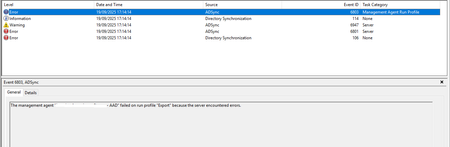
Thanks Kidd_Ip for your suggestion; however, during the search to understand what's happening, I found something (for me) crazy. I updated to the version 2.5.79.0 (last available from Entra Connect Sync blade for me) in march and until now all is working; I tried a sync, obtained an error in cloud connector during the export (stopped-extension-dll-exception) and after this I searched for in Windows Logs Application event I found that warning: Assembly version ("2.4.131.0") in configuration of ECMA2 connector: "imncloud.onmicrosoft.com - AAD" is earlier than the actual version ("2.5.79.0") of "C:\Program Files\Microsoft Azure AD Sync\Extensions\Microsoft.Azure.ActiveDirectory.Connector.dll". Found also errors, bound to the file not found with text like this (event ID 106): Failed to connect to Windows Azure Active Directory during export. Exception: System.Management.Automation.CmdletInvocationException: Could not load file or assembly 'file:///C:\Program Files\Microsoft Azure AD Sync\Bin\Microsoft.IdentityModel.Clients.ActiveDirectory.dll' or one of its dependencies. The system cannot find the file specified. ---> System.IO.FileNotFoundException: Could not load file or assembly 'file:///C:\Program Files\Microsoft Azure AD Sync\Bin\Microsoft.IdentityModel.Clients.ActiveDirectory.dll' or one of its dependencies. or this (event ID 6801): The extensible extension returned an unsupported error. The stack trace is: "System.Management.Automation.CmdletInvocationException: Could not load file or assembly 'file:///C:\Program Files\Microsoft Azure AD Sync\Bin\Microsoft.IdentityModel.Clients.ActiveDirectory.dll' or one of its dependencies. The system cannot find the file specified. ---> System.IO.FileNotFoundException: Could not load file or assembly 'file:///C:\Program Files\Microsoft Azure AD Sync\Bin\Microsoft.IdentityModel.Clients.ActiveDirectory.dll' or one of its dependencies. The system cannot find the file specified. This is a screenshot: I have done another control: in Entra site, under Entra ID->Entra Connect->Connect Sync, I clicked on Click here to use the tool in Is Cloud Sync the right solution for you? that loaded the page Guide to add or sync users with Entra Connect or Entra Cloud Sync then I clicked on Troubleshooting and a Microsoft Entra Cloud Sync queries problems is found click on Next and the result is: The version recognized is 2.4.131.0, the last before the upgrade; I don't know why the system, at a point of time, recognized this version and not the last installed (in control panel the version installed is 2.5.79.0. I also found in a trace log that you suggested to check the message: Version 1.5.3599.0 is below the required version 1.5.4326.0 of product Microsoft Azure AD Connect Agent Updater is installed and requires upgrade and under event Windows Logs->System an error on distributed COM (event 10016): I see the error every day, one time a day, but I notice that the description of the error is this before the stop The application-specific permission settings do not grant Local Activation permission for the COM Server application with CLSID {D63B10C5-BB46-4990-A94F-E40B9D520160} and APPID {9CA88EE3-ACB7-47C8-AFC4-AB702511C276} to the user [domain]\Administrator SID (..........) from address LocalHost (Using LRPC) running in the application container Unavailable SID (Unavailable). This security permission can be modified using the Component Services administrative tool. while immediately after the stop The application-specific permission settings do not grant Local Activation permission for the COM Server application with CLSID {D63B10C5-BB46-4990-A94F-E40B9D520160} and APPID {9CA88EE3-ACB7-47C8-AFC4-AB702511C276} to the user [domain]\ADSyncMSAc2ec7$ SID (......) from address LocalHost (Using LRPC) running in the application container Unavailable SID (Unavailable). This security permission can be modified using the Component Services administrative tool. the user is changed from Administrator to ADSync.... I don't know what to do; a quick search on chatgpt suggest to reinstall but I followed the steps on my test tenant and when I reinstall the Connect Sync it doesn't find the previous configuration (chatgpt suggested that uninstall the Connect Sync doesn't cancel the local db, but it seems not true). I have no backup of the configuration, or better, I have the json file that I have done as backup before install in march (and is quite good because in the meantime I add in the scope only another OU); I can't do the backup because the PowerShell cmdlets don't work and via UI is impossible. Do you have other suggestion? Maybe I can save the local db, but how? Any suggestion is appreciated.2Views0likes0CommentsEntra hybrid join issue caused maybe by 2 M365 accounts
Hello to everyone, one of my collegue has 2 Microsoft 365 accounts on its notebook when we tried to do the procedure to hybrid join his device; I suppose the other account give us problem in the procedure; now, there is only one account even if I can see in event log, in AAD log, that there is an error and 2 warnings bound to the old account. However, I tried to repeat the procedure but without any luck; what I see that it is different from the other devices, if I give the cmd dsregcmd /status is in these 2 lines: DisplayNameUpdated : YES OsVersionUpdated : YES while on other devices I see: DisplayNameUpdated : Managed by MDM OsVersionUpdated : Managed by MDM We have all a Microsoft 365 Business subscription and the configuration and steps for the other devices was: We have all devices with Entra registered user, we started with this when we have only the Microsoft 365 Basic subscription We enrolled all devices, with group policy, in MDE when we upgraded to the business Installed the Azure AD Connect Users sync Devices sync So, in the Entra portal we have first only the entry for registered, then when we synced the devices we have a second entry with hybrid registered and finally only one entry with Owner, MDM and Settings field filled with correct data; for example, when I make an hybrid join device, initially in the row I see MDE as MDM, then when the hybrid and registered compose one row I see Intune in that field. For the device that give us problems, I see a row like this in Entra portal while in Intune Any help is greatly appreciated.Re: Hybrid join and device registered as username_windows_date_time instead of device name
Suresh_M340 thanks for your reply: I have other 18 devices that I do hybrid join without any issue and in the list in Intune are with the correct name; when I try to leave and then join again, I deleted all the entries in Intune, then done the leave, seen that in Entra ID devices list it come back as registered, then joined and in the list it appeared as hybrid join with the correct name, but as I said, without any other parameters. Is it possible to scan Intune log or other resources to understand what happens? I also seen in AD events but I can't find nothing significant.1.5KViews0likes0CommentsHybrid join and device registered as username_windows_date_time instead of device name
Hello, I'm hybrid joining my company notebooks and have an issue with one of them; when I do all the operation to hybrid join the device, I see in Entra portal that it is hybrid joined but nothing more (only in 2 trial I've seen the owner field filled, the other like MDM and Security settings are empty). On the Intune side, I see many entries that as name have username_windows_date_time as format instead of device name, so for example, instead of pc-something, I see marcomangiante_Windows_3/13/2024_10:01 AM I tried many times to do an unjoin and a join (with instructions on link https://learn.microsoft.com/it-it/office/troubleshoot/activation/activation-error-0xcaa50021 in the section Leave and rejoin Microsoft Entra ID) but without luck. Tried to do a research on search engine, some people have same issue but have found nothing, only that maybe the problem is the device. Any help or suggestion?Re: Permission on folder in a document library
Hello Kelly_Edinger thanks for your reply. I thought to do with Power Automate and use that trigger but while with the built-in rules are simple to do, if I use the trigger in Power Automate I have to create a flow for every project I have, because at this time there is no support to pass a variable inside the trigger and it expects the exact document library.1.3KViews0likes0CommentsPermission on folder in a document library
Hello, I need this configuration; I created a subsite and inside this a list: with this list, I create every time a document library that is a project inside my company; every document library has two folders, one for technician documentation, the other for sales docs. I need to have two distinct types of permission group for the folders: the technician can see theier folders, the sales can have access to both folders. I used power automate to try to make some automation on it; first, I create 2 security groups under AAD and make it visible under my subsite that is something like https://mytenant.sharepoint.com/commesse ; then, I broke the inheritance with the parent and give the owner of the subsite to the account that also run the flow; every time I create a document library, I assign the 2 groups on that library and then assign to technician folder the security technician group and the sales group while assign the sales group alone to the sales folder. All works, but when, inside a folder, I try to create a rule to send an email to a user when a file is created (with the menù inside the folder, Automate->Rules->Manage rules->Create a rule) I obtain the error We couldn't create your rule; please try again. I found this support document https://support.microsoft.com/en-us/office/create-a-rule-to-automate-a-list-or-library-151ea008-7fa6-409b-b0bd-b04a3b3cacd5 where there is clear that the user must have edit permission, an my users inside the security groups have those permissions? Where am I wrong?1.5KViews0likes2CommentsRe: Show multiple document libraries in a page
Hello ganeshsanap thank you for your support: I tried your suggestion and I like it, but finally I solved in another way: I have a list and inside that list I have a link to every document library: so, I formatted the column where there is the link like a button and so I have access in the list to every document library. Thanks a lot for your support.2.8KViews0likes1CommentShow multiple document libraries in a page
Hello, I have multiple document libraries in a subsite and I'd like to show them in a page, with maybe a link to that page in the left menù panel; I'd like to have something like the page of "Content site" but with only the document libraries. Is it possible? How to achieve this? RegardsSolved3.2KViews0likes3CommentsRe: Issue after sync with Azure AD Connet
Hello mikhailf I didn't quite understand your reply; at this time, I have no clients enrolled in Intune; also, I don't know if it is possible to do an Azure AD disconnect on the workstations..and even if it were possible, I can't do it workstation per workstation.4.6KViews0likes0CommentsRe: Issue after sync with Azure AD Connet
Hello mikhailf and other, I left my lab for some times without any action; now I loaded the AD portal devices page and found that every device has an activity near tha day I'm writing this message, so, for example, for my test client I have an activity for the Azure AD Registered and also for the Hybrid counterpart; I expected that, after ingested the device and it became Hybrid registered, I have no activity on the AAD registered item. I tried to disable the AAD registered device, but after have restarted it, I can't use Teams and Office: how I can solve the issue? I can't have and start a production environment where I have duplicated clients and can't disable the AAD registered; I red the documentation but it seems that what is written sometimes doesn't happens. I attach a screenshot. What I'm not understanding or doing wrong?4.5KViews0likes2CommentsRe: Issue after sync with Azure AD Connet
Helllo mikhailf thanks for you reply. I read that article when I started my experiments and interpreted that word as an automatic cancellation of the device, after some time, from the list; I say this because in my first lab I obtained this result, but the difference is that in my first iteration I synced the OU with computers at the start with the others data and object and also checked the password hash sync option, but I suppose this is not relevant for the devices. From what I've see, the Registered and Activity colums have, for the Azure AD Registered devices, the date when I created the devices for my test and installed the apps for Office (and Teams), while the hybrid counterpart has the date of ingestion; I noticed 2 things: the ingestion was 6 May andd from that date I can't see any update date, while I accessed the devices and also if, as I said in my previous post, if I disable my Azure AD Registered device, I can't use Office apps; I've done the command dsregcmd /status but it seems that I have no error. What I expected was that the Azure AD Registered devices disappeared automaticallly, or, like in your case, I have the possibility do delete them without any issue. Thanks.4.5KViews0likes0CommentsRe: Issue after sync with Azure AD Connet
Hello mikhailf I have something like this in AD: and in Azure AD Connect, in Domain and OU filtering I have configured this: In Azure AD All Devices I see this: I replied in the test environment what I have in my company AD; in Azure AD also replied the status quo, with all devices Azure AD Registered (because we have Office desktop apps on them); I suppose to have the behaviour in the screen because I have done a first sync without the OU where I have the computers, and then added them to the sync; what I expected, even with this 2 steps, was that I have, after some time, only one notebook per user and with hybrid registration; I can't disable the Azure AD Registered because I've seen that the apps on them are unusable. Hope to have clarified.4.5KViews0likes5CommentsIssue after sync with Azure AD Connet
Hello, I'm trying to do some experiments with Azure AD Connet and found some issue and I like to find some suggestion from other experienced people on how to manage them. First thing I noticed is with the registered devices: I simulated my organization, so I created some virtual machine where I installed Office desktop apps and Teams; the devices are seen in AAD as Azure AD Registered; then I've done the sync of the devices from AD; I have an OU with inside our org accounts, so I have, for example, an inner Management OU with management user accounts; inside Management OU I have an OU called Management Computers where there are the management's devices; I have synced them and then enabled the Hybrid Join in Azure AD Connect. I've seen that the devices have been registered as Hybrid Join, but I have the situation where there are the duplicated devices; on every system, there is a Windows 10 version greated than 1803; I waited 2 days but never happened: I red some people that deleted the Azure registered one, but have red also that people have experiecenced issue to do so. Other question: I synced my users and it seems was all ok, so I saw in AAD Users->All Users the parameter "Directory synced" on Yes; after some delta sync I saw that a user that was synced that have no more Yes on that parameter and a new user, with that parameter was created; I deleted it and done a sync but on the old user I can't see that directory sync is again true: how to resolve this issue? Apart from these problems, I'd like to have a suggestion on how proceed when I have to sync real data; as I said previuosly, I have nested OU with users and their computers, but I don't want to sync all the users together; for example, I thought to sync first OU Managers (and their devices), than Marketing (and their computers) and so on: do you think this is an acceptable approach or I have to change it? Any help is very appreciated.Re: Azure AD Connect OU sync suggestion
Thanks VasilMichev for clarification: I thought to the the fact that I want to register our notebooks in Intune; I want to do in waves to have a better control over user and client registered: we all have Azure AD registered devices and in my trial sometimes I have seen that if I try to "transform" them in hybrid registered, even with Windows 10 more than 1803, I have duplicated devices. -- Regard1KViews0likes0CommentsAzure AD Connect OU sync suggestion
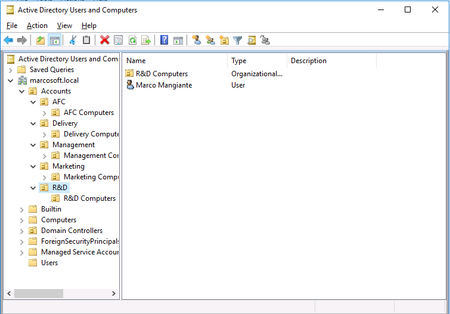
Hello, after some experiments I'd like to apply in our company the Azure AD Connect sync, but I have some operational questions; we have a structure in AD with an OU called Accounts and inside there various other OU, like Marketing, Management, Delivery,etc.; inside these OU, we have the users with an AD account and also every OU has another OU with inside the people's computers, so the Marketing OU has inside UserA, UserB and UserC and also an OU, Marketing computers, with the devices of UserA, UserB and UserC. One difficult thing is that not every user works in corporate office bacause our company decided for an hybrid formula of work; I'd like also to sync users in chunk, to not buy all the M365 licenses, but not every people of the same OU are in the same time in the office, and I am worried of device sync. What do you think is the best way to follow? I have to move the users and computers in a OU created to sync these objects in chunk? But, when I end the onboardin, what happens if I want to move the users and computers in their original OU? Are the users and devices sync 2 times? I appreciate an help. RegardsAzure AD Connect reset test environment
Hello, I'm tryng to test Azure AD Connect before to apply it on our tenant; to do so, I created a dev subscription environment for testing on developer.microsoft.com and also downloaded the Windows 10 and Office 365 Deployment Lab Kit; I've done some testing, but now I need to reset the Azure environment to repeat some testing in clean environment: I could create another account, but I'd like to understand if is it possible to clean that created, beacuse if I have to test other things I don't want to create a dev environment every time. Any help is appreciated. -- Regards, Marco MangianteSolvedAdd custom action with add-pnpcustomaction
Hello, I'm trying to hide the delete button in SharePoint Online list ribbon; I tried with custom action and powershell but I'm blocked (see SPO custom action to hide delete button - Microsoft Tech Community ). With other research I find that, maybe, is possible to add a custom action with the powershell cmdlet add-pnpcustomaction of Pnp.PowerShell module; I have seen the syntax of the cmdlet but I don't understand some thing; I have a list, only a SPO list, where I want to apply the custom action: is it possible? Say I have the mytenant.sharepoint.com/sites/testsite where I have some lists, but I want to hide the delete button in the mytestlist: how to reference it in the command? From some sample found online and also from the documentation sample I write something like this: Connect-PnPOnline -Url "https://mytenant.sharepoint.com/sites/testsite" -Interactive $cUIExtn = "<CommandUIExtension><CommandUIDefinitions><CommandUIDefinition Location=""Ribbon.ListItem.Manage.Delete"" /></CommandUIDefinition></CommandUIDefinitions></CommandUIExtension>" Add-PnPCustomAction -Name 'HideDeleteButton' -Title 'HideDeleteButton' -Location 'CommandUI.Ribbon' -RegistrationType List -Sequence 10000 -RegistrationId 101 -CommandUIExtension $cUIExtn But, my 2 questions are: is it correct how or where reference the list? Any help is appreciated. -- Regards4KViews0likes1Comment


Recent Blog Articles
No content to show