User Profile

JasjitChopra
MVP
Joined Oct 14, 2016


User Widgets
Recent Discussions
MS Teams Audio/Video Redirect support for Windows 11 on Azure AD Joined AVD?
Does anyone know if MS officially supports MS Teams Audio/Video redirect like in Windows 10 on Windows 11 AVD yet? We have successfully deployed Azure AD Joined AVD (Cannot wait to get rid of On-Prem AD), however, we are unable to get the Teams redirect setup working. We followed the same instructions as written in the docs here. There version information after completing installation does not show "WVD Media Optimized" or "WVD Media Disconnected" like it should. Any help is appreciated.2.9KViews0likes3CommentsRe: PUBLIC PREVIEW: Announcing public preview of Azure AD joined VMs
DavidBelanger Can someone please explain this statement from the documentation? "Azure Virtual Desktop doesn't currently support single sign-on for Azure AD-joined VMs." The whole point of setting up Azure AD Joined VM for me is to achieve single sign on end-to-end including my apps like Office, Teams etc. FYI - SUPER DUPER Excited to get rid of domain controllers now ! This is great progress. Loving it.12KViews0likes4CommentsAutomate business processes and build business apps with SharePoint, PowerApps, and Microsoft Flow
Automate business processes and build business apps with SharePoint, PowerApps, and Microsoft Flow (Spanish Translation Available) Get insights into integrating SharePoint, PowerApps, Power BI, MS Flow and Forms for Business Process Automation. Come to the Microsoft Ignite The Tour - Mexcio to engage with Microsoft Technical experts. Register here: https://www.microsoft.com/es-mx/ignite-the-tour/mexico-city Let me know if you are at this conference and would like to connect one-on-one to discuss in depth. Would love to engage and help out while I am at the conference.841Views0likes0CommentsRe: How to disable OneDrive for Business for some user
Not sure if you have already looked into this but this should solve your issue at hand: https://www.penthara.com/blog/what-no-one-tells-you-about-disabling-onedrive-for-business/ Let me know if this is in any way helpful.52KViews3likes4CommentsRe: Help with pricing
See if this helps: https://docs.microsoft.com/en-us/azure/billing/billing-getting-started But you should be able to go to the "Billing" blade under portal.azure.com and see the burn out rate their for various Azure resources to understand how you are consuming $$. PS: If you have a smartphone - Skype works on it and it has a microphone :)1.4KViews0likes0CommentsRe: Help with pricing
Anthony Marrian - there is a billing report dashboard that gives you exact run down of your free credit burn rate. If it is not too much of hassle - I can help you out and show this to you in a short 15 min skype call. This way you will know exactly how much you are paying for the amount of data you are backing up.1.5KViews0likes2CommentsFrom anonymous form to a secured SharePoint list in less than 20 minutes
Many of us have been in this situation where want to save data in SP List. Many times, our requirement is to have an anonymous user fill in the data and you want to end up using that data in a SharePoint list. Earlier this was not an easy thing to achieve with either SharePoint online or with SharePoint on premises because of various configurations and setup process involved to enable anonymous access. We can achieve the same thing today and deliver an end-to-end solution in less than 20 minutes. Technology Stack used for this scenario: TypeForm (https://www.typeform.com) for creating anonymous forms SharePoint online (Office 365 Tenant) for storing the final data Microsoft Flow to create the connection and pass data between TypeForm and SharePoint online Pre-Requisites for this setup: You need to have a TypeForm account (free tier subscription works just fine, for more details on pricing check out https://www.typeform.com/pricing) You also need a SharePoint online site with edit access (read and write and create list) to store the data in a SharePoint list You need to sign up for Microsoft Flow with your Org account (The account you use to login to your SharePoint online site) You can watch the video here for the remaining steps and complete implementation: http://www.jasjitchopra.com/from-anonymous-form-to-a-secured-sharepoint-list-in-less-than-20-minutes/2.3KViews1like0CommentsRe: samAcocuntName issue in Azure AD Domain services
Thanks DaniMartMS Jerry Meyer Adam Fowler The issue indeed had nothing to do with Azure AD Domain Services it was the way the object was synced to the Azure AD in the first place due to a duplicate item created long back. Before I could troubleshoot this in detail I had to move my office 365 tenancy to another tenant as it was created in wrong country ages ago by mistake. Apologies for the late reply but everything you guys are pointing out makes sense and I definitely have a better and clear understanding of troubleshooting and approching this issue in a better and faster way in future :)11KViews1like0CommentsRe: Moving authenication from ADFS to Azure AD
Jason Benway Also i have tried this with my already deployed WIndows 10 domain joined machines - Add them to Azure AD for seamless authentication for on prem and cloud resources with SSO. When I join my Win 10 machine to Azure AD accessing any O365 does not even require any username or password - logs you in straight. https://docs.microsoft.com/en-us/azure/active-directory/active-directory-azureadjoin-devices-group-policy This only works with Windows 10 though. PTA might be your best choice for seemless authentication in your scenario.6.8KViews3likes0CommentsRe: Restrict email access to Exchange Online
Hi PKlapwijk, Let me try that in my lab setup - that kinda sounds strange and I would think MS would have thought of this scenario you are trying to achieve - which is a common ask from other customers too I presume. I will get back to you and let you know. Regards, Jasjit15KViews0likes2CommentsRe: Restrict email access to Exchange Online
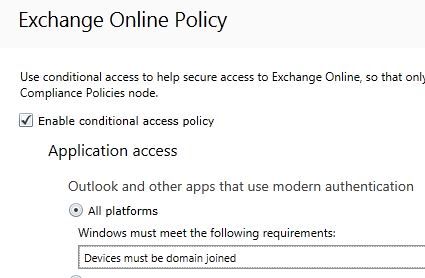
Hi Peter, Have you tried this setting within Intune? If you do not want to cover all platforms with generic policy you can also select specific platforms like below: You also get a way to block OWA and ActiveSyn clients: This will cover non-domain joined windows 7 also. Let me know if this helps. Regards, Jasjit15KViews1like5Comments

Recent Blog Articles
No content to show