User Profile

JamesPhImp
Copper Contributor
Joined Oct 26, 2022


User Widgets
Recent Discussions
- 260Views0likes0Comments
Planner Premium adding a Guest
Hi We have just started testing the use of Planner Premium. We have a project that involves several third parties that we want to give access to the planner as a guest to the third parties, However to get certain functions of Planner premium such as comments and ability to upload files it seems that you need to link planner premium to a team. I have therefore created a team, however this means to add a guest I need to add them to the whole Team as planner premium doesn't seem to allow you to share the plan to an individual, you need to add them to a group and thus the team. But I do not want them to have access to the whole team as it could mean they have access to files outside the planner that we do not wish them to have. Is anyone aware of a workaround here? Have to say the planner premium seems very badly designed from this point of view.427Views0likes3CommentsIs there a way to assign a task to a group of people?
Hi, I need to create a task that my whole team needs to complete, but if one of them hits complete it completes the whole task. Is there a way to resolve this? Either in free of new planner premium? I know there is a workaround with checklist but this not ideal. Many thanks607Views0likes2CommentsSharepoint List Column Lookup based on other columns
Hi I have 3 Sharepoint Lists 1- System Names 2 - System Access Rights 3 - System Access List 1 has just one Column called Title and has a list of system names that we use as a business. these Values are all unique. For example System 1, System 2, System 3 etc List 2 has 2 columns. System Name - which is a lookup of the above list and Access right name which is a test field. This List lists out all the access types relevant for each System, eg System 1; Payment Inputter System 1; Payment Releaser System 1; System Administrator System 2; Read Only List 3 has 3 columns. Person Name - Person field, System Name - lookup from List 1, Access Rights - which is where I have my question I would like the Access Rights column to be a lookup but only show filtered items relevant to the system selected in the System name column. For Example: John Smith; System 1; This I want to just display Access rights relevant to System 1, using example above Payment Inputter; Payment Releaser; System Administrator and allow user to select relevant right or rights relevant to that person from the lookup list. Hope this makes sense, is this possible?1.4KViews0likes3CommentsVBA to check the date in column A, if its more than 40 days in the past then hardcode that line
Hi, I have a spreadsheet and would like a VBA code that checks the date that will be in column A, if the value of that date is older than 40days then it hardcodes that entire row (ie removes formulas and keeps the values), albeit there is only data is columns A:Z. I have about 10k+ lines to go through so something fairly efficient would be great! Thanks for help.1.4KViews0likes2CommentsRe: VBA code to find and replace in each row based on cell value
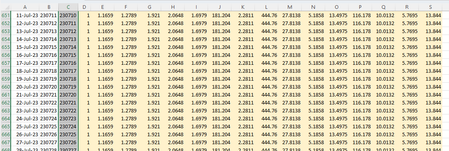
HansVogelaar Apologies the screenshot had a typo, should be 230711. Each day links to a new file with a date format YYMMDD and we update once a month or less, so I don't want to have to go and do 30+ different find and replace functions manually and unfortunately the indirect formula means opening each file to link to a dynamic file name as far as I am aware.7.5KViews0likes3CommentsRe: VBA code to find and replace in each row based on cell value
Hi thank you for the suggestion but neither work. I am not looking for it to replace the value in column B, it need to search the row for the values in column b and replace with the value from column c. I have formulas in other cells in the row that need updating with the data8.1KViews0likes7CommentsVBA code to find and replace in each row based on cell value
Hi I need a VBA code that will cycle through a sheet and do the following. highlight the row and do a find and replace for that row, find the value in column B and replace with the value in column C for that row. It will then cycle through the sheet (as long as there is a value in column A). For example: it will take row 651 find and replace 230710 with 230711 for that row, it will then go to row 652 and replace 230711 with 230712 for that row and so on until no value in column A..8.9KViews0likes10CommentsVlookup from a closed workbook where the filename changes with the date.
Hi, I have a vlookup: =VLOOKUP(C$1,'https://abcdef.sharepoint.com/sites/ABC/Shared Documents/ABC/Daily Process/CFF/FX Rates/[230710 FX RATES.xlsx]FX rates'!$A$1:$N$452,2,FALSE) Every day I need top extend the formula to the next day and change the date in the file name to the relevant day eg: 230710 would become 230711. Would it be possible to either get the filename to increment by 1 when I drag it down or preferably use a formula (linked to a cell perhaps) that takes the date and puts that in the filename. I have seen there is an indirect formula but this involves opening the file which I wish to avoid? Any ideas? Thanks882Views0likes1CommentDisplay email from a person column
Hi I would have thought this would have been quite easy but can't seem to work out how to do! I have a SP list that has a Person column called Contact which links to our internal directory. I have another column called Email which is also a Person column that I have set to display the email address for that Person. So when entering a person I need to select the the name twice. How can I set it that when I select a name in the contact column that it displays the email in the Email column? Many thanks for help.Solved53KViews0likes10Comments

Recent Blog Articles
No content to show