Forum Discussion

JamesPhImp
Jul 27, 2023Copper Contributor
VBA code to find and replace in each row based on cell value
Hi I need a VBA code that will cycle through a sheet and do the following. highlight the row and do a find and replace for that row, find the value in column B and replace with the value in column C...
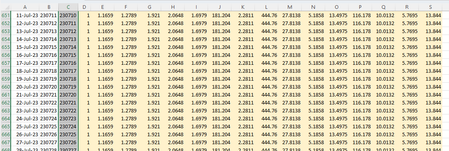

HansVogelaar
Jul 27, 2023MVP
Why would you want to replace 23010 with 2307111?

JamesPhImp
Jul 28, 2023Copper Contributor
HansVogelaar Apologies the screenshot had a typo, should be 230711. Each day links to a new file with a date format YYMMDD and we update once a month or less, so I don't want to have to go and do 30+ different find and replace functions manually and unfortunately the indirect formula means opening each file to link to a dynamic file name as far as I am aware.
- HansVogelaarJul 28, 2023MVP
Are the dates sorted in ascending order?
- JamesPhImpJul 28, 2023Copper Contributoryes they are
- HansVogelaarJul 28, 2023MVP
Thanks. We'll have to loop from the bottom upwards, otherwise 230709 would be replaced with 230710, then with 230711, then with 230712 etc.
Sub C2B()
    Dim r As Long
    Dim LastRow As Long
    Application.ScreenUpdating = False
    LastRow = Range("A" & Rows.Count).End(xlUp).Row
    For r = LastRow To 2 Step -1
        Range("B" & r & ":B" & LastRow).Replace _
            What:=Range("B" & r).Value, _
            Replacement:=Range("C" & r).Value, _
            LookAt:=xlWhole
    Next r
    Application.ScreenUpdating = True
End Sub