User Profile

Kreera_House
Steel Contributor
Joined Jun 22, 2018


User Widgets
Recent Discussions
Re: Meeting "Send Update" No Longer Prompts to Send Updates to Everyone or only Added Users
Karen_L - Did you ever get an answer to your question? It's two years later and we're seeing the same behavior as what you described in Outlook 2016 on Windows 10: "When I remove an attendee from my invite which has more than 200 attendees, it doesn't prompt for whether I want to send to "all" or just "added/removed" attendees. It automatically sends an update to all attendees, although I haven't made ANY updates to the body, location or time. When I do this with a smaller attendee list, it works as expected." Thanks Kreera27KViews3likes1CommentRe: Azure AD Security Group - Can I mail enable the group?
VasilMichev Have there been any changes on mail-enabling dynamic Azure security groups? In our use case, we need dynamic mail-enabled groups to assign sensitivity labels and Exchange Dynamic Groups don't work for that and I don't want to create a Microsoft 365 Group with all of its trimmings.70KViews1like0CommentsRe: Support for Plus Addressing in Office 365
Tanya Denton - Looks like it arrived early 🙂 This was just posted on UserVoice: ADMIN Sean S (Admin, Microsoft Office 365) responded · Sep 23, 2020 I’m pleased to announce that the plus addressing feature is now available for Exchange Admins to enable. This can be done through Powershell using the following command: Set-OrganizationConfig -AllowPlusAddressInRecipients $true For instructions on how to use Powershell, you can find out more here: https://docs.microsoft.com/en-us/powershell/exchange/exchange-online-powershell-v2?view=exchange-ps The setting may not instantly take effect so please expect a delay before you can start using plus addresses. Regards, The Exchange Transport team84KViews0likes4CommentsRe: Outlook - Change the displayed meeting room capacity in location suggestions
ChristianBergstrom - Our most recent response from Microsoft support is: "I can also reproduce this issue on my OWA and Outlook for Windows. We have submitted a ticket about this unexpected behavior to make sure that Exchange Online engineering team is aware of it as you mentioned. I will keep monitoring it and share any update once I get more new information." For now, it seems that the only solution is to inform users of this bug and to point them to OWA.19KViews1like1CommentRe: Outlook - Change the displayed meeting room capacity in location suggestions
ChristianBergstrom - We're seeing the same issue in our org and the support representative referenced this thread in her communications to us. What makes no sense to me is that a user's cached entry is supposed to be the cause of showing the wrong number if we have never changed the capacity on the backend. Not to mention that some of the affected users are seeing different numbers at different times for the same room. Again, caching implies that the room's capacity was actually set to the value the user sees. Additionally, Outlook on the web shouldn't be doing any caching at all and the affected users see the wrong number there, too.20KViews0likes4CommentsRe: Feature update: Email sending behavior for Groups in Outlook
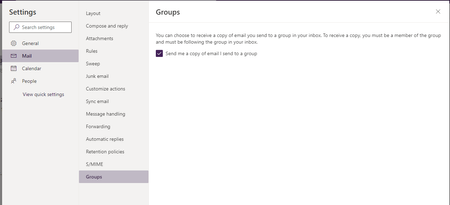
Ravin Sachdeva Since this keeps popping up when searching for O365 Groups email sending behavior and there is now an option to control this, albeit only in OWA, I just want to add this here. The linked roadmap item, which has been launched, addresses the ability to control whether one wants to receive a copy of messages they send to one of their groups: https://www.microsoft.com/en-US/microsoft-365/roadmap?filters=&searchterms=52391 Thanks, Microsoft, for adding this feature!5.1KViews0likes3CommentsRe: Room calendar working hours not showing properly in Outlook
neil grinnall Was there ever a solution for this issue? We're still seeing this today: When you add a conference room calendar to your calendar view, it briefly shows the room's working hours, then the screen refreshes and the entire days appears gray like non-working hours do. In the Scheduling Assistant view, when scheduling a meeting, you can see the working hours and the Room Finder suggests rooms as well. The "issue" appears only in the calendar view. Is this a training issue to get people to use the Scheduling Assistant and Room Finder instead of adding conference room calendars to their Outlook profile?30KViews0likes0CommentsRe: Syncing categories from Outlook to To-Do
Kiran Thalakokkula The user voice post you suggested was merged into a different suggestion regarding groups and has nothing to do with Outlook Categories. While the groups are a great addition, they don't address syncing categories from Outlook. There are several posts requesting Outlook Categories to sync to To-Do, some in other languages. The one with the most votes, 874 at the moment, is this one: https://todo.uservoice.com/forums/597175-feature-suggestions/suggestions/36965485-add-outlook-categories-to-tasks It would be really great if the To-Do team could look through the User Voice posts on a regular basis and merge the ones that really are about the same topic.21KViews4likes2CommentsRe: The new look Microsoft To Do
Polly DavidsonNice touch that the wallpaper setting syncs across devices! Are there plans to allow users to upload their own photos? While the Berlin TV tower may be nostalgic for Wunderlist users, some of us might like to use more personally relevant wallpapers. 😊23KViews2likes0CommentsRe: What happened to the rich entry bar ion Microsoft To-Do?
Jeffrey Allen The tweet mentions "Windows Insider on the Fast Ring" … doesn't that imply that features are experimental and will change? I still see it in the Android beta version, so the To-Do team is likely working on improvements to deploy it to GA.847Views0likes1CommentRe: FindTime showing "unknown" instead of availability
Saifarshad Just wanted to update this post: The issue was identified as a problem with FindTime and has since been resolved, although the Microsoft engineer we worked with couldn't tell us what caused the issue in the first place or how it was resolved.2.9KViews0likes1CommentRe: Can't sign in to To Do desktop client with Office365 account. Error 80070008
JamesT2420 We're seeing this behavior in our org too and are waiting from Microsoft to provide an update to fix it. In the meantime what works for us as a workaround is to wait 24-48 hours after the installation of the win 10 to-do app. After that, the user can successfully log in. Maybe that will work for you, too?28KViews0likes0CommentsRe: FindTime showing "unknown" instead of availability
We're not having any problems with the desktop client when you create a poll. The issue is when invitees receive the invitation to vote and want to see their availability for the proposed options before voting on each time slot.3KViews0likes3Comments
Recent Blog Articles
No content to show