User Profile

Viesturs
Copper Contributor
Joined Oct 25, 2022


User Widgets
Recent Discussions
Re: Sync your device with Intune issue, mac, not compliant
Hi Somesh Comp Portal is installed after device has been setup/enrolled by user so it is automated and is one of the apps that will get installed after. It is setup in Intune to specifc group same as compliance policies. It is assigned to security group. So pretty much all, policies assigned, apps installed, profiles are after the enrollment of mac based on groups.13KViews0likes0CommentsRe: Sync your device with Intune issue, mac, not compliant
Anyways, I have noticed some things that have fixed it now. For example keeping company portal open on the mac, Checking the status occasionally, trying to Install some app from it, cause when it does, it syncs with Intune (Have noticed on compliant devices). Upgrade macOS. So by doing these somehow it was compliant again cause did sync, I believe after the macOS update it became compliant12KViews0likes0CommentsRe: Sync your device with Intune issue, mac, not compliant
Other policies are fine, it is just the not active state. I am not sure what causes that as macs are used constantly. Maybe the fact that company portal is not open and signed in with users credentials. But others do not use it too and have no issue13KViews0likes0CommentsRe: Sync your device with Intune issue, mac, not compliant
mikemather Hey, so far not really. I got in conversation with MS Support as well and the only thing they can advise is to reenroll, so to wipe it and fresh setup. If that is not the way, you can setup new mac using users credentials and migrate with migration assistant. That will fix it but it needs latest macos 13.1 on both to work best. Haven't found other solutions though for this issue with mac corporate devices. I am still testing but so far to not lose any data migration is the best option what I have tried. If you got some news can let me know.13KViews0likes1CommentDelay until expires after 30 days, alternative
Hello, I got power automate flow that has delay until step to send an email, delay until expires after 30 days and the flow fails. Haven't found any alternatives to this for now but maybe there is something? One option might be to run separate flows instead of one. I use this for new employee creation. Thanks, ViestursSolvedSync your device with Intune issue, mac, not compliant
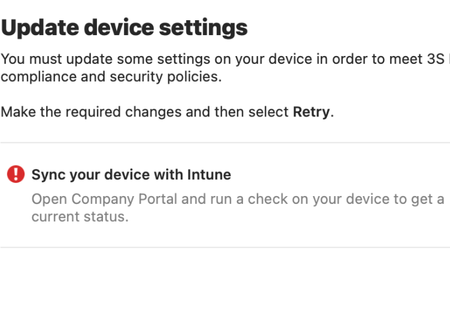
Hello, Some users face issue that their mac is not compliant. When checking status on Company portal it states: There was an error while checking your status. Your status may not be up to date. Try checking again. As far as I see it is not related to specific macOS version and is just for some 5% of all users. When clicking on learn more it states Sync your device with Intune and the last checked: months ago What I have noticed these users got the same problem that the Built in device compliance policy shows them as Is active = Not compliant Status in Intune troubleshoot & support for the device: Other than that I do not see any issues. Maybe someone knows what might be the case here? Thank you14KViews1like8CommentsTurn on device encryption, endpoint
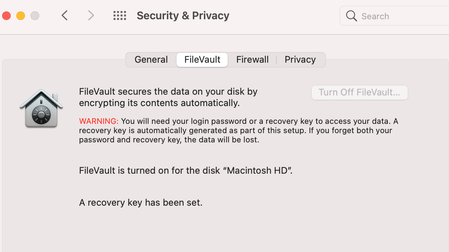
Hi, I have migrated to new macOS device using Migration assistant and in company portal it states to Turn on device encryption even though FileVault is turned on. We got following setup: All devices have been managed by our organisation, we use macs In Endpoint there is Compliance policy setup that requires computer to have FileVault disk encryption enabled. If it is not, device will not be compliant. After migrating to new mac it shows the disk encryption is not setup even though it is. Have tried to turn it off and on again but some basics do not really help in this case. When checking the status in Company portal it still shows the same that it is not compliant. Maybe someone knows what could be done so this could be fixed? Other option would be to reinstall macOS but do not really want to do it.1.3KViews0likes0CommentsRe: MS Teams, Unknown User Mac
I think this is just the thing I was looking for, cause the blocked sign-in we got by default to all new joiners which would make sense. As well in that material you sent it states quite clearly about it. I think we will just Unblock sign in earlier so it does not cause any problems. Thanks for all input!4.3KViews1like0CommentsRe: MS Teams, Unknown User Mac
kaaven Hey, thanks for the reply How are the new users created in your tenant? They are first created by power automate flow where they are assigned with company email and licences. At that point users are blocked from signing in. They are created straight away with proper names, emails, business structure etc Is the problem present for all users in the organization? Only new employees and not all of them which makes it strange cause the initial setup is the same. Yes, changes in azure might take some day or more as I have noticed to show up in teams. That's why I am wondering if that might be the problem cause teams do not get the info if user is blocked from signing in. And then when you unblock the user and reset psw the same joining day it only starts to sync with Azure not earlier. I am just wondering not sure if this might be the case.4.4KViews0likes2CommentsMS Teams, Unknown User Mac
Hello, New users are shown by their name and department in MS Teams search but when chatting they are shown as Unknown User, they got office premium licence and all details input in Azure, users visible in Teams Admin, admin.microsoft. So I cannot see where the problem might be. After some time it syncs and the name is shown properly but for first few days or even more for some users it might show as Unknown user when chatting with the person. Hope someone has found smth similar, thanksSolved4.8KViews0likes4Comments
Recent Blog Articles
No content to show