endpoint management
45 TopicsIdentity at Every Hop
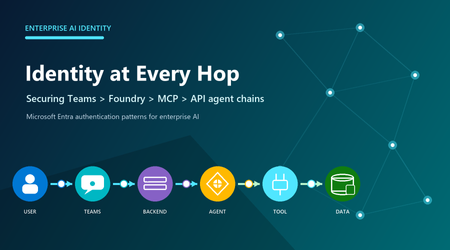
Use delegated On-Behalf-Of access only when a downstream service must enforce the signed-in user's permissions. Use a managed or agent identity for unattended work. At every hop, obtain a token for the intended audience instead of forwarding one issued for another service. Model every hop as a boundary A Teams request can involve a user, Teams app or bot, application backend, Foundry project or agent, MCP server, and protected API. Each component may use a different principal, token audience, permission model, and consent boundary. Decide whose authority each downstream resource should evaluate, then grant that principal only the required access. For a Teams tab, getAuthToken() returns a JWT whose audience is the application's client ID. Send it to the backend over HTTPS and validate signature, issuer, audience, expiry, and tenant. It is not a general-purpose Microsoft Graph token. Bot SSO uses the Bot Framework token service; documented SSO supports one-to-one and group chats, not channel scope. Do not authorize from a display name, email, or client-parsed claim. The backend must establish the trusted principal first, then apply application authorization. Teams SSO gets identity into the application; it does not grant automatic access to Foundry, a tool, Graph, or business data. Exchange tokens when user authority must travel OAuth 2.0 OBO is for a middle-tier API calling another API under a signed-in user's delegated authority. The backend validates Token A, authenticates as a confidential client, and exchanges Token A at the tenant-specific Entra endpoint. Entra returns Token B for the downstream audience and scopes. Present Token B only to that resource. OBO requires a user principal and delegated scopes. An app-only token cannot be used as the OBO assertion; use client credentials or managed identity when no user is present. Never relay the backend token to Graph, MCP, or another API. Relay breaks audience enforcement and can conflict with Conditional Access. Surface interaction-required claims challenges back to the client instead of hiding them as generic server failures. Assign the correct Foundry identity An agent identity is a specialized Entra service principal. Unpublished agents share a project-level development identity; publishing creates a distinct production agent identity. Permissions do not transfer automatically, so assign downstream roles to the published identity. At runtime, Agent Service obtains a scoped token for the target service; the audience is that service's resource identifier, not necessarily the MCP endpoint URL. Apply Foundry RBAC at the narrowest useful scope. Foundry Agent Consumer is for invocation, Foundry User is for building and testing, and Foundry Project Manager supports project management and publishing. Prefer Entra authentication: resource keys provide coarse access and bypass these role distinctions. Role names may still appear under older Azure AI labels during rollout. Treat MCP authorization as an explicit design MCP defines tool discovery and invocation; it does not make a server trusted. For remote servers, choose no authentication only for intentionally public services. Otherwise use custom keys, custom OAuth, a user Entra token, project managed identity, or agent identity according to who must be authorized. A configured connection does not grant downstream permission by itself. Toolbox can centralize credential injection, refresh, versioning, and policy behind an MCP-compatible endpoint. Allow-list required tools, require approval for risky writes, and log tool names, authorization outcomes, and approvals without logging tokens. Prefer managed identities or federated credentials to stored secrets. For user-owned mail, files, or other delegated resources, choose supported user passthrough or OBO. For background jobs, use workload identity. When every published agent needs distinct permissions and audit, use its distinct agent identity. Use project managed identity only when all agents in that project should share the same Azure access after explicit risk review. Practical identity checklist Multitenant sign-in does not make every downstream exchange cross-tenant. Customer consent creates a service principal in the customer tenant, but Foundry's built-in OAuth identity passthrough requires the user's tenant to match the Foundry project tenant. Define tenant placement, administrator consent, issuer validation, and offboarding; use a validated custom OAuth design when built-in passthrough cannot meet the requirement. Troubleshoot from the resource that rejected the request. A 401 usually points to a missing, expired, malformed, or wrong-audience token. A 403 usually means the identity is recognized but lacks permission, although service firewalls can also return 403. DNS failures, TCP timeouts, and private-endpoint routing errors are not repaired by adding RBAC. Question Production decision Whose authority? User: delegated OBO. Workload: managed or agent identity. Correct token? Validate issuer, audience, tenant, lifetime, scopes, and claims. Correct principal? Reassign target RBAC after publishing creates a new identity. Tool governance? Allow-list tools; approve side effects; broker shared credentials. Cross-tenant? Design consent and offboarding; built-in passthrough requires matching user and Foundry tenants. Failure class? Separate 401, 403, consent, DNS, firewall, routing, and timeout evidence. Conclusion Design identity before connecting tools. Ask who the downstream service should authorize, exchange tokens for the correct audience, and scope RBAC to the resulting principal. Validate consent, renewal, revocation, tool approval, and network reachability one hop at a time.233Views0likes0CommentsEndpoint Stability: Bridging Firmware & OS Deployment
In modern enterprise IT environments, maintaining absolute endpoint stability requires bridging two domains that are frequently siloed: deep hardware diagnostics and modern operating system provisioning. Over 14 years of hands-on experience across commercial hardware maintenance and system administration have proven that software-level deployment is only as reliable as the underlying hardware integrity. 1. The Foundation: Component-Level Diagnostics & Firmware Integrity Before executing any master image deployment, endpoint reliability starts at the metal. Unresolved motherboard anomalies, power delivery fluctuations, or corrupted BIOS/EEPROM binaries invariably lead to post-deployment Blue Screens (BSODs) and unpredictable system behavior. Implementing strict hardware inspection protocols—ranging from reading bin dumps via EEPROM programmers to performing chipless firmware modifications—ensures that the endpoint is operating at peak physical health before any OS touches the drive. 2. Granular Windows Provisioning and Clean Deployment Relying on bloated factory images introduces legacy vulnerabilities and latent performance degradation. A robust provisioning strategy relies on: Clean OS Installations: Stripping out unnecessary pre-installed components to build a lean, optimized baseline image. Granular Manual Configuration: Fine-tuning registry keys, local group policies, and driver repositories specifically tailored to the target hardware architecture. Update Monitoring: Exercising strict control over patch management cycles to prevent disruptive updates from breaking enterprise workflows. 3. Evaluating Stability via Windows Insider Builds To stay ahead of enterprise deployment roadblocks, integrating testing phases with Windows Insider builds is crucial. It allows IT administrators to evaluate how upcoming kernel modifications, driver models, and security patches interact with diverse hardware tiers, ensuring seamless production rollouts once updates hit general availability. Conclusion True infrastructure resilience is achieved when system administrators understand their endpoints down to the silicon level. By combining meticulous hardware diagnostics with clean, automated OS provisioning, organizations can drastically reduce downtime and secure long-term system stability.88Views0likes0CommentsEnterprise Security Assessment: A Strategic Lens for Mission Critical Environments
Understanding Enterprise Security at Scale Understanding security posture at scale requires more than isolated control reviews or point‑in‑time assessments. The Enterprise Security Assessment (ESA) helps organizations understand their security posture across Azure, Microsoft 365, and hybrid environments from a true enterprise perspective. Instead of assessing individual services or workloads in isolation, ESA provides a single, enterprise‑wide view of security. By examining identity, data security, endpoints, threat protection, and cloud infrastructure together, ESA helps uncover gaps that often span multiple teams and platforms. This broader perspective enables clearer prioritization, stronger alignment across security teams, and a more resilient foundation for long‑term security improvement. ESA complements other Microsoft assessments, such as workload‑specific reviews, by connecting the bigger picture - to align security priorities across teams and platforms, fostering a more cohesive and resilient security approach. From Standard Engagement to Strategic Partnership An Enterprise Security Assessment is typically delivered as a focused engagement designed to establish an enterprise‑wide view of security posture. At Microsoft, we begin by reviewing Secure Score insights, analyzing a defined set of core security datasets, and correlating those signals across Azure and Microsoft 365. For many organizations, this approach works well. Collecting and evaluating these datasets provides a high‑level understanding of security posture, highlights common gaps, and identifies priority improvement areas. In standard enterprise environments, ESA delivers actionable insights with minimal disruption and sets a solid foundation for security improvements. How ESA Evolves in Mission‑Critical Environments In large or mission‑critical environments, security is often distributed across multiple teams and tools. Operational constraints, regulatory requirements, and business dependencies introduce complexity that standard assessments cannot fully capture. For mission‑critical customers, ESA goes beyond a baseline review and becomes more consultative. This typically includes: 📝 Structured discovery sessions across multiple security domains 🤝 Deep‑dive workshops with specialized teams 🎯 Validation of findings against real‑world operating models 🔄 Iterative analysis to validate findings against real operational conditions This ensures recommendations reflect how security is actually managed, not just how it is documented. Why Going Deeper Matters to Customers For organizations operating at scale, this consultative ESA approach delivers significantly more than a standard readout: A realistic, enterprise‑wide understanding of security posture, grounded in actual configurations and operating models Clear visibility into cross‑team dependencies and systemic risks Prioritized recommendations aligned to existing licenses, third‑party tools, and regulatory requirements A realistic, phased security roadmap focused on adoption, not theory The result is a clear starting point for security improvements that teams can execute with confidence. A Continuous Improvement Model ESA is not a one‑time exercise. For most customers, it becomes the foundation for ongoing security maturity. Once a baseline is established, future ESAs are faster and more efficient, allowing organizations to track progress, validate improvements, and maintain alignment as environments evolve. Over time, ESA functions as an annual enterprise security health check, supported by follow‑up reviews and continuous improvement. In mission‑critical environments, this means: The first ESA requires deeper engagement investment Building cross-team alignment takes time Future assessments become smoother and more efficient once a baseline is established Over time, ESA functions as an enterprise security health check that supports continuous improvement. It works best when treated as a starting point for continuous improvement, and Enterprise Security Alignment. What Customers Gain from an Enterprise Security Assessment A true enterprise view Visibility across identity, data, devices, cloud workloads, and threat signals - without losing sight of critical details. A customized security roadmap Recommendations aligned to existing licenses, third‑party tools, hybrid footprints, and regulatory requirements - making adoption realistic, not aspirational. Momentum and measurability Many organizations track progress using dashboards or scorecards to measure improvement and sustain focus over time. Repeatability Once a baseline is established, future ESAs become easier and more efficient - serving as a regular health check rather than a brand‑new effort. A consultative model ESA delivers far more value than a one‑time assessment by fostering collaboration, shared understanding, and long‑term alignment. A Foundation for Continuous Improvement Enterprise security is complex, especially at scale. In mission‑critical environments, security success depends on embracing complexity, aligning teams, and moving beyond a standard assessment playbook. An Enterprise Security Assessment is more than a snapshot. It’s an opportunity to build alignment, inform strategy, and create a resilient security foundation that evolves with the organization.1.7KViews3likes0Comments
Compliance licenses at tenant level
Hi, We are a small organization of about 200 employees, and we have following requirements. DLP policies configuration at Exchange, OneDrive, SharePoint BYOD security Users should not be able to send files outside the org And so on as we evaluate We already have M365 Business Premium. However, after researching we figured out that M365 Business premium will alone not solve our requirements. May be compliance license will. We want to apply security policies at tenant level in our organization but definitely do not want every user to get licenses as this will be expensive for us and there is no requirement at all for our users. The question is, Is there a way to solve the above scenario?862Views1like3Comments
Arcihtekt M365 // Ogłoszenie pracy
Kim jesteśmy? Technologia to nasza pasja, ale nie tylko! Wspieramy inicjatywy społeczne, ekologiczne i promujące aktywny styl życia. Jesteśmy laureatem prestiżowych nagród posiadamy certyfikat Great Place to Work, a na co dzień współpracujemy z globalnymi liderami IT - VMware, Fortinet, IBM, HPE, Dell, Hitachi, Microsoft, AWS. Nasz zespół tworzą utalentowani inżynierowie i doświadczeni architekci IT. Dołącz do nas i zostań częścią #ITSFteam! Kogo szukamy? Arhitekta M365, który dołączy do naszego zespołu i będzie odpowiedzialny za projektowanie, wdrażanie oraz zarządzanie rozwiązaniami opartymi na Microsoft 365. Idealny kandydat to osoba z doświadczeniem w architekturze chmurowych rozwiązań Microsoft, posiadająca umiejętność kompleksowego projektowania i optymalizacji procesów w obrębie aplikacji i usług M365, takich jak Teams, Sharepoint, Exchange Online, OneDrive, Power Platform czy Microsoft 365 Copilot. Warto od razu zaznaczyć, będzie to praca w modelu hybrydowym 4/1 w Warszawie. Co oferujemy? Współpaca bezpośrednio z nami na okres długofalowy (5+ lat); Możliwość rozwoju przy pracach dla największych klientów Enterprise w całym kraju; Pakiet medyczny Medicover; Karta Multisport; Program PPK; Lekcje angielskiego; Dodatkowy dzień urlopu z okazji urodzin; Około 8 integracji frmowych w roku :) Jeśli propozycja brzmi interesująco i chciałbyś poznać więcej szczegółów na temat wymagań, bądź zakresu obowiązków — to śmiało aplikuj przez link niżej: https://itsf.traffit.com/public/an/0ed08bcedcd522af2936290b48d33a9e48697565167Views0likes0Comments
Windows 11 Upgrade mit Intune
I used Intune (Feature Update) to upgrade from Windows 10 to Windows 11. For some devices, the update was completed within 12 hours. However, there were also devices that took 48 hours or longer to update to Windows. In the meantime, I carried out software installations (via Intune) on the devices within an hour. How can I force the feature update? Especially for new devices? Thank you for your support Stefan327Views0likes1Comment
Azure AD Join (Entra Join) vs Hybrid Azure AD Join vs Azure AD Registration (Workplace Join)
I still find it hard to understand the differences between Azure AD Join (Entra Join) vs Hybrid Azure AD Join vs Azure AD Registration (Workplace Join). I know Azure AD Registration (Workplace Join) is supposed to be nest for Personal devices (BYOD) but if you have security as an important part of your business why would you want to allow this? You could end up with a billion random machines in your Entra. What's the benefit of this? Also, if I have a Hybrid environment and I have booth cloud and on prem apps that do auth via both on prem (for on prem apps linked to AD) and Entra for cloud do I need to be Hybrid Azure AD Joined to support on prem an cloud? Or will a person working from a Azure AD Joined machine still be able to access on prem resources like file servers and any app that uses AD groups for auth, access provisioning etc?1.5KViews0likes2Comments