powerapps
1310 Topics
Unattended RPA — the real problem isn't starting the bot
Unattended RPA is not just about running a bot without a user I was working on an unattended desktop automation recently, and one thing that stood out to me was that making the bot run automatically is actually the easier part. The real question is: What happens when nobody is there to fix it? For example, the bot starts processing invoices at night. The machine is available. The user session is ready. The desktop flow starts normally. But halfway through the process, the legacy application shows a popup that wasn't there during development. The bot stops. There is no person sitting in front of the machine. Now the problem is no longer just a failed desktop flow. The question becomes how the automation is going to recover. This made me look at unattended RPA a little differently. Before moving a desktop automation to production, I think we should consider things like: What if the machine is unavailable? What if someone is already logged in? What if the target application is down? What if the application UI changes? What if credentials expire? What if the bot fails after completing 50% of the transactions? How do we know which transactions were completed? Can the process be restarted without processing the same transaction twice? For me, an unattended automation is not really unattended if someone from the support team has to keep checking it manually. The automation needs a proper failure and recovery strategy as well. The interesting part of RPA isn't making the happy path work. It's deciding what should happen when the happy path doesn't happen. What has been your experience with unattended desktop flows in production? #PowerAutomate #PowerAutomateDesktop #RPA #UnattendedRPA #PowerPlatform
PowerApp and SharePoint Online permissions
Hi, I recently joined a company that uses a PowerApp with SharePoint in the following manner. When a new project is started, a custom built PowerApp is used to create a new SharePoint Site and that is where the project documentation, meeting minutes, etc will be stored. During the site creation (or afterwards) project team members are added, again via the PowerApp. When these new members are added, the PowerApp then calls a PowerShell script which assigns the correct permissions (within SharePoint) to these users (to the project files). The idea here is to ensure only project team members can view the project documents. My question is this: Is invoking a PowerShell script via the PowerApp to set project team member permissions to the Project documents and site the most efficient way of achieving this goal? Or, is there a recommended (and maybe better) way? In the future, we would like to implement Microsoft Purview, so the correct Information Protection sensitivity labels and protection can be applied - but that's in the future. Thank you, SK
Web invoke in power automate says unauthorized but can browse from browser
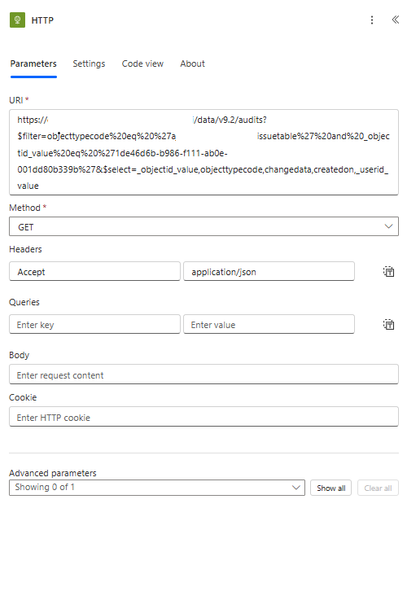
I am able to browse to this url directly from browser https://my365.crm9.dynamics.com/api/data/v9.2/audits?$filter=objecttypecode%20eq%20%27myissuetable%27%20and%20_objectid_value%20eq%20%271de46d6b-b986-f111-ab0e-001dd80b339b%27&$select=_objectid_value,objecttypecode,changedata,createdon,_userid_value but when i use the invoke http from power automate it says unauthorized. i am using the same account. What is the issue is there anything i need to do so that it works?Microsoft list item not loading and giving "Getting your data..." error
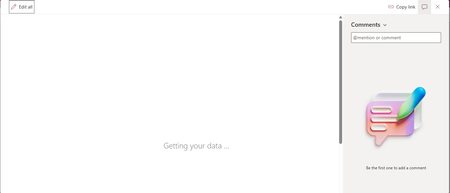
I have a Microsoft list which has a custom form using Power Apps. I am able to enter new entries into the list but when I click any previously entered list item, it shows "Getting your data..." but does not load even after long. Screenshot shown below:
How to update a specific set of SharePoint list records after changing variables in Power Apps.
I have a timesheet app that captures start and end times. Within the associated SharePoint list, there are calculated fields. I have these fields included on the Power Apps form. The problem is that the calculated fields are not updating after the Patch action (updates or new saves). I tried the REFRESH action, but it is not refreshing the calculations. The only way I have found to view the updated calculations in the Power App is to filter the list to a different set of records, then back to the original. Once the filter returns to the original updated records, the new calculated results can be viewed. There has to be an easier way to do this.
Populating word template stored in Organizational Asset Library (OAL) using Power Automate
The objective is to implement an automated document generation solution that leverages the Microsoft SharePoint Organizational Asset Library (OAL) to provide users with standardized Word templates. These templates must dynamically self-populate with real-time identity data (Name, Email, Job Title, and Department, for now which can be extended) sourced from Microsoft Entra ID (formerly Azure Active Directory) upon instantiation. In other words, how to use a Word Template stored in Microsoft SharePoint Organizational Asset Library to populate with his or her own user information like Name, Email, Job Title, Department etc getting fetched from Azure Active Directory, whenever that user opens the template by going to File -> New -> Selecting Organization Tab and selecting the template. How can we populate this template using Power Automate?power apps free subscription-cancel
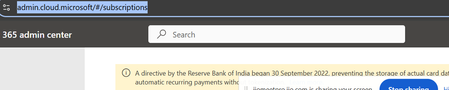
Hi All, I am using below id for power apps(email address removed for privacy reasons) using free subscription. with in one month i have cancelled my payment in bank. As of now i am not able to log in admin.cloud.microsoft. Microsoft authentication is not working . I can not delete and re add again. cancel subscription by bank side only enough or we need to do it in microsoft account (email address removed for privacy reasons)
Power Automate - iAuditor integration to Excel for business
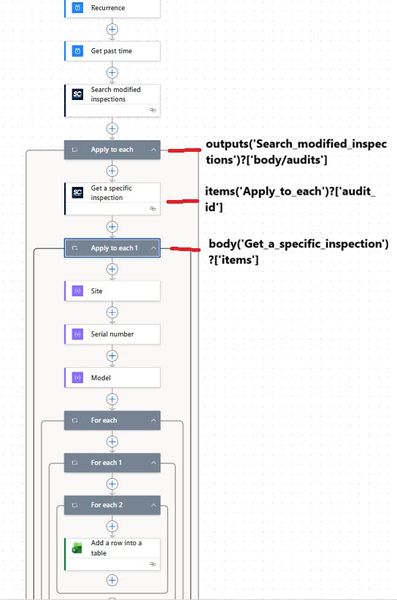
Hi all, I'm trying to build a flow in Power Automate to feed data in Excel file (located on SharePoint) used for my Power BI report but i don't know why it does not want to work. This is my flow as shown in the photo In the first "For Each" action i have " body('Site') ", second " body('Serial Number') "..... When i test this is how it looks like If i remove the second and third FOR EACH, it goes to the excel action and stops there. Does anyone have a similar flow or does anyone know what i'm doing wrong? Thank you in advance if anyone has a solution.
Could you tell me about how to trigger power automate for desktop on windows 11 free version?
Hi, friend! I from Japan. just coming spring season right now. by the way. Could you tell me about when it executes command of power automate, but it couldn't succuss. according to the error message it doesn't know like this flow ID. but actuary on the other hand. in my hose case, like this method was succussed. if you know how to fix better, could you suggest it?