User Profile

jonwbstr24
Iron Contributor
Joined Mar 02, 2018


User Widgets
Recent Discussions
Character limited for Partner Support Ticket notes
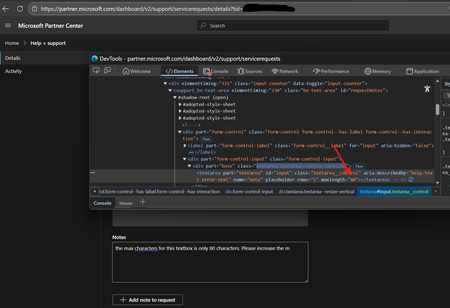
When updating a partner center support ticket from the Partner Center (https://partner.microsoft.com/dashboard/v2/support/servicerequests) However, the textbox for adding a new note from the portal has a max length of 80 characters. Has anyone else noticed this? I shared this observation with the partner center support team a while ago and learned that the portal is working as intended. The web portal should only be used for adding short notes. For longer notes, partners should update the ticket via email. I hoped my feedback might reach someone that could make this improvement to the partner experience, but it's taking longer than expected. Has anyone else noticed this issue, or am I the only partner that finds this behavior less than ideal? On more than one occasion I have modified the HTML using the browser dev tools by changing the maxlength="80" to "maxlength="800" and didn't have any trouble adding the longer note. Has anyone else run into this challenge and used the a workaround like the one I used?Re: 715-xxxxxx code when assigning SPD Developer and Azure benefits
Update: I received a phone call later that afternoon letting me know this was a problem on the backend that was impacting multiple partners, and the issue has been resolved! I also learned that this type of block is normally account specific and was advised to have someone who doesn't login from multiple locations (like an azure vm) try to assign the benefits. I wasn't able to test that before the issue was resolved, so I'm unable to confirm if that would have worked. Timeline 12/25/2025 I first started receiving this error 01/05/2026 opened the first case 01/06/2026 first case closed advising this block was working as intended and would not be lifted. 01/07/2026 opened second case and received the update that the issue was resolved.263Views1like0Comments715-xxxxxx code when assigning SPD Developer and Azure benefits
Hi all! We recently renewed our Solutions Partner Designation which includes some cloud licenses, developer (visual studio) licenses and azure credits. From the partner center we did not have any issues adding the cloud licenses. However, both the developer and azure benefits are giving us the following error when attempting to assign them. Some users, entities, and locations are restricted from using certain Microsoft services. For this reason, leveraging anonymizing or location hiding technologies (such as VPN, virtual machine, Internet tracking blocking, etc.) when connecting to these services is not allowed. If you are using one of these technologies, you'll need to disable/change your settings to gain access. If you believe you encountered this problem without one of those causes, please wait 24 hours and try again. If the issue persists, contact our support team and reference the below message code and transaction ID. We will engage a team of ex-perts that will help verify your account. Code: 715-123160 NOTE: Hyphen added because that phrase is not permitted in the forum I opened a support ticket and after about 24h I received the following response from partner support as my ticket was closed: I am writing to formally inform you that, following the escalation of your case and a comprehensive review conducted by a higher‑tier security team, a final determination has been issued. The official statement is as follows: “Thank you for your interest in the Microsoft partner program. We are committed to ethical and responsible business practices, as noted in the Partner Code of Conduct. Following an in-depth review of your case, we are unable to unblock your account” This resolution is definite and irrevocable. Accordingly, no further actions, reviews or exceptions are available in relation to this case. We understand that this determination may have operational or business implications, and we sincerely acknowledge the impact this may have. Please note that the decision was made in full adherence to established security policies and applicable procedures. At this stage, our role is to keep you informed of the results of the investigation. Based on the final determination, no additional actions can be taken, so this case will now be closed. If you re-open the case it will give you the same answer. We truly appreciate your understanding and cooperation throughout this process. I reached out to another member of the Partner Support team and learned it is normal for this canned response to be sent out, and a few days later for the block to be removed. I also got the impression that opening another ticket and requesting re-escalation could be helpful to us... The response we received does not provide us with any details on how Microsoft determined our accounts are not permitted to activate these benefits or how to correct the issue. It suggests we are in violation of... something. But we aren't permitted to know what we did wrong and there is no way to clear up the misunderstanding. This is not the kind of language I would expect to receive from Microsoft as a valued partner. Especially not when they are looking for my understanding and cooperation through this process. I'm sure it's all a big misunderstanding and we could find a mutually satisfactory resolution if given a chance! While I felt bad giving the partner support ticket a 1 star survey response, because I know they have no control over how the security team handles this type of issue. On the other hand, the ticket survey is intended to collect feedback about my experience, and that experience had a lot of room for improvement! Does anyone know what may have caused our partner accounts to be blocked by the partner security team? We work all over the US and we also use cloud PCs to login to various Microsoft platforms. We don't use any VPNs or location blocking features, so my best guess the azure VMs might be the underlying issue.SolvedCustomer CUSTOMER_NAME notified of anomalous activity in Azure subscription
How do others feel about the alerts showing up in the Partner Center? We’ve detected suspicious or malicious activity in this Azure subscription. The customer of this subscription has been notified. What suspicious or malicious activity did microsoft detect you ask? An important security update is available for your Windows Server Update Services (WSUS) resource(s). That's right, there is no suspicious or malicious activity. Microsoft wants people to install an out of band security update and thought sending a notification to all azure customers was the best way to ensure that happened. Half the clients that received this alert aren't even running windows servers! Those that are running windows servers do not have the WSUS role installed. All the clients Microsoft alerted us about to suspicious activity in their subscriptions... Don't use WSUS We did have the pleasure of manually closing every single alert as "ignore" and I'm delighted to know that these alerts didn't count towards the security requirement to have an avg response time of less than 24h. I thought the partner security alerts were to notify us of critical issues microsoft detected in azure subscriptions. This, does not appear to be that. Am I missing something? thoughts?Re: Users section missing from the new M365 admin center?
The issue disappeared on the admin.cloud.microsoft.com portal earlier this week when the redirect from admin.microsoft.com to admin.cloud.microsoft was turned off. The product group says they didn't make any changes, so hopefully the issue does not return when the new admin.cloud.microsoft.com portal goes live again!293Views0likes0CommentsRe: Users section missing from the new M365 admin center?
Hi Jill, my initial post shared what support has told me so far. That's because I have an open support ticket. The latest update is that the product group misspoke and there is no CommerceShadowRoleAdmin to remove and they are trying to figure out a new solution.224Views0likes0CommentsRe: Users section missing from the new M365 admin center?
Hi Jill, unless you know how to remove the CommerceShadowRoleAdmin role, we are still looking for a solution to this issue. I was hoping other partners would confirm if they are or are not impacted by this and their own experiences.278Views0likes1CommentRe: Users section missing from the new M365 admin center?
Good news! M365 admin support provided the following update from the product group. If the admin is assigned the CommerceShadowRoleAdmin role, the “Users” section in the left navigation pane will be hidden and not accessible. This is an intentional design choice within Microsoft Admin Center (MAC), and the system is functioning as expected for this role. For reference, This behavior does not happen in the legacy admin.microsoft.com portal, and the users who are impacted have the same GDAP role as those who are not.Users section missing from the new M365 admin center?
Hi all, Microsoft recently started redirecting admin.microsoft.com to admin.cloud.microsoft. People with the correct GDAP roles are able to access the Users section from the admin.microsoft.com admin center, but that section is missing on the new admin.cloud.microsoft admin center. The issue does not appear to be impacting everyone with the appropriate GDAP roles. Has anyone else run into this issue? Support tells me that we are the only partner reporting this issue. Thanks! -jonSolvedRe: What happens to Perpetual licenses when you remove a partner relationship?
Hi Matt, When I looked into this a few months ago I concluded the perpetual software is cancelled and we ended up tagging the client in the partner center to distinguish them from other clients. The links that indicated this are hiding from me today.374Views2likes1CommentSecuring Global Administrator accounts
Hello all, According to this article: Use admin accounts only for Microsoft 365 administration. Admins should have a separate user account for their regular use of Microsoft 365 Apps, and only use their administrative account when necessary to manage accounts and devices, and while working on other admin functions. It's also a good idea to remove the Microsoft 365 license from your admin accounts so you don't have to pay for extra licenses. I should have a separate unlicensed admin account. How do I follow the above recommendation and continue to receive emails from the partner center? We have also been encouraged to use Privileged Identity Management, and use one account but only activate the admin role when needed. Does Microsoft recommend using PIM, or do they recommend using separate admin accounts? When using PIM, I only receive email sent to global administrators, when the PIM role is active. I am having trouble understanding how to follow this guidance when the admin portals do not appear to support emailing the "regular user account" of an administrator. When I asked Partner Center frontline support for clarification on this guidance I was asked to post my question here. Thanks!Re: Microsoft Fabric (Free) is missing from the CSP Price list
Hi Martin, you are correct. Per my original post jonwbstr24 wrote: The customer was not very happy about providing Microsoft billing details to purchase a free license when they never had to do this for any of their other free licenses... When I asked why Microsoft was choosing not to make this license available to partners the best answer I got was "business reasons." Is it really that complicated to allow partners to sell all free licenses? Do you have any ideas why the Partner program is forcing customers to purchase this free license direct and allowing them to purchase other free licenses through the CSP program? I was asked by the partner center frontline support team to post my feedback here and the partner center team would review it, and I'm patiently waiting for some feedback from Microsoft. While we wait, Do you think Microsoft should make this free license available through the partner program, like all the other free licenses. Or, is it completely acceptable to ask a partner client to enter credit card information buy this free license from Microsoft directly if they want it. While we're at it, do you think Microsoft should remove the "Teams Phone Resource Account" from the partner program and require those free licenses to be purchased from microsoft directly too? let me know what you think!
Recent Blog Articles
No content to show