User Profile

brogyi
Brass Contributor
Joined Nov 23, 2021


User Widgets
Recent Discussions
AVD connecton error
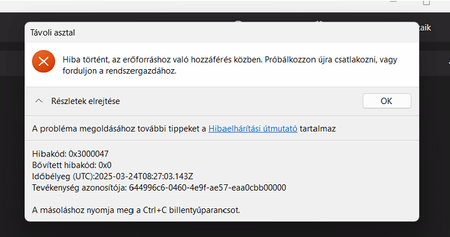
Hi! We are using Win11 multi user based OS-es. After we installed the 2025-03 march CU update (KB5053657) at weekend the session host started randomly having connection errors. The users experienced this error: The pool state first: You can say, the rdp agent are unhealthy of course the joining is not working. Even from the server in the save vnet i cant ping and cant rdp to them. The resolution was to reinstall agents, reboot computers, or deallate, start them, one of needed to be redeployed. After patch removal the issue seemd to be resolved, there were eventless couple days, yet today it happened again. Today only 2 servers were affected, march update not installed I checked. Agent health state shows all available, yet not able to ping, not able to rdp. One restarted from azure and one deallocated and started and started working. What can be this isse? Anyone met or experienced the same? How can I trouble shoot this, any idea? Tried searching event log, but I cant see the reason.Re: Unable to connect to Remote Desktop
Hello. We are operating an AVD environment with multiple win 11 multi user based session hosts. Our users also experienced this with the same error. We uninstalled the march cummulative update, after that the issue seems resolved. There is some kind of rdp issue. It is unclear the real root cause (least to me). Here are some hints in the topic: https://borncity.com/win/2025/03/17/windows-11-march-2025-updates-cause-issues-with-rdp-connections/ If you do not have admin access to the servers, ask your IT for help. I do not think it is an end user issue.487Views0likes0CommentsExchange online and MGGraph are interfering
I am creating a new script. The script is running unattended. The script doing a couple things, the important part here is: setting a new user a license and setting the new user mailbox Address book policy. The address book is an Exchange online task the license is Graph. I am getting an error. How to reproduce the error: 1. connect to MgGraph, I am using this command Connect-MgGraph -TenantId $tenantID -AppId $appID -CertificateThumbprint $CertificateThumbPrint -NoWelcome do some work, Disconnect-MgGraph 2. Connect to Exchange online, in the same script: Connect-ExchangeOnline -CertificateThumbPrint $CertificateThumbPrint -AppID $appID -Organization $tenantID -CommandName Get-EXOMailbox,Get-mailbox,Set-mailbox -SkipLoadingCmdletHelp -ShowBanner:$false The command verbose debug output is this: DEBUG: using System; using System.Net; using System.Management.Automation; using Microsoft.Win32.SafeHandles; using System.Security.Cryptography; using System.Runtime.InteropServices; using System.Runtime.ConstrainedExecution; using System.Runtime.Versioning; using System.Security; namespace Microsoft.PowerShell.Commands.PowerShellGet { public static class Telemetry { public static void TraceMessageArtifactsNotFound(string[] artifactsNotFound, string operationName) { Microsoft.PowerShell.Telemetry.Internal.TelemetryAPI.TraceMessage(operationName, new { ArtifactsNotFound = artifactsNotFound }); } public static void TraceMessageNonPSGalleryRegistration(string sourceLocationType, string sourceLocationHash, string installationPolicy, strin g packageManagementProvider, string publishLocationHash, string scriptSourceLocationHash, string scriptPublishLocationHash, string operationName) { Microsoft.PowerShell.Telemetry.Internal.TelemetryAPI.TraceMessage(operationName, new { SourceLocationType = sourceLocationType, SourceLoca tionHash = sourceLocationHash, InstallationPolicy = installationPolicy, PackageManagementProvider = packageManagementProvider, PublishLocationHash = p ublishLocationHash, ScriptSourceLocationHash = scriptSourceLocationHash, ScriptPublishLocationHash = scriptPublishLocationHash }); } } /// <summary> /// Used by Ping-Endpoint function to supply webproxy to HttpClient /// We cannot use System.Net.WebProxy because this is not available on CoreClr /// </summary> public class InternalWebProxy : IWebProxy { Uri _proxyUri; ICredentials _credentials; public InternalWebProxy(Uri uri, ICredentials credentials) { Credentials = credentials; _proxyUri = uri; } /// <summary> /// Credentials used by WebProxy /// </summary> public ICredentials Credentials { get { return _credentials; } set { _credentials = value; } } public Uri GetProxy(Uri destination) { return _proxyUri; } public bool IsBypassed(Uri host) { return false; } } [StructLayout(LayoutKind.Sequential, CharSet=CharSet.Unicode)] public struct CERT_CHAIN_POLICY_PARA { public CERT_CHAIN_POLICY_PARA(int size) { cbSize = (uint) size; dwFlags = 0; pvExtraPolicyPara = IntPtr.Zero; } public uint cbSize; public uint dwFlags; public IntPtr pvExtraPolicyPara; } [StructLayout(LayoutKind.Sequential, CharSet=CharSet.Unicode)] public struct CERT_CHAIN_POLICY_STATUS { public CERT_CHAIN_POLICY_STATUS(int size) { cbSize = (uint) size; dwError = 0; lChainIndex = IntPtr.Zero; lElementIndex = IntPtr.Zero; pvExtraPolicyStatus = IntPtr.Zero; } public uint cbSize; public uint dwError; public IntPtr lChainIndex; public IntPtr lElementIndex; public IntPtr pvExtraPolicyStatus; } // Internal SafeHandleZeroOrMinusOneIsInvalid class to remove the dependency on .Net Framework 4.6. public abstract class InternalSafeHandleZeroOrMinusOneIsInvalid : SafeHandle { protected InternalSafeHandleZeroOrMinusOneIsInvalid(bool ownsHandle) : base(IntPtr.Zero, ownsHandle) { } public override bool IsInvalid { get { return handle == IntPtr.Zero || handle == new IntPtr(-1); } } } // Internal SafeX509ChainHandle class to remove the dependency on .Net Framework 4.6. [SecurityCritical] public sealed class InternalSafeX509ChainHandle : InternalSafeHandleZeroOrMinusOneIsInvalid { private InternalSafeX509ChainHandle () : base(true) {} internal InternalSafeX509ChainHandle (IntPtr handle) : base (true) { SetHandle(handle); } internal static InternalSafeX509ChainHandle InvalidHandle { get { return new InternalSafeX509ChainHandle(IntPtr.Zero); } } [SecurityCritical] override protected bool ReleaseHandle() { CertFreeCertificateChain(handle); return true; } [DllImport("Crypt32.dll", SetLastError=true)] [SuppressUnmanagedCodeSecurity, ResourceExposure(ResourceScope.None), ReliabilityContract(Consistency.WillNotCorruptState, Cer.Success)] private static extern void CertFreeCertificateChain(IntPtr handle); } public class Win32Helpers { [DllImport("Crypt32.dll", CharSet=CharSet.Auto, SetLastError=true)] public extern static bool CertVerifyCertificateChainPolicy( [In] IntPtr pszPolicyOID, [In] SafeX509ChainHandle pChainContext, [In] ref CERT_CHAIN_POLICY_PARA pPolicyPara, [In,Out] ref CERT_CHAIN_POLICY_STATUS pPolicyStatus); [DllImport("Crypt32.dll", CharSet=CharSet.Auto, SetLastError=true)] public static extern SafeX509ChainHandle CertDuplicateCertificateChain( [In] IntPtr pChainContext); [DllImport("Crypt32.dll", CharSet=CharSet.Auto, SetLastError=true)] [ResourceExposure(ResourceScope.None)] public static extern SafeX509ChainHandle CertDuplicateCertificateChain( [In] SafeX509ChainHandle pChainContext); public static bool IsMicrosoftCertificate([In] SafeX509ChainHandle pChainContext) { //------------------------------------------------------------------------- // CERT_CHAIN_POLICY_MICROSOFT_ROOT // // Checks if the last element of the first simple chain contains a // Microsoft root public key. If it doesn't contain a Microsoft root // public key, dwError is set to CERT_E_UNTRUSTEDROOT. // // pPolicyPara is optional. However, // MICROSOFT_ROOT_CERT_CHAIN_POLICY_ENABLE_TEST_ROOT_FLAG can be set in // the dwFlags in pPolicyPara to also check for the Microsoft Test Roots. // // MICROSOFT_ROOT_CERT_CHAIN_POLICY_CHECK_APPLICATION_ROOT_FLAG can be set // in the dwFlags in pPolicyPara to check for the Microsoft root for // application signing instead of the Microsoft product root. This flag // explicitly checks for the application root only and cannot be combined // with the test root flag. // // MICROSOFT_ROOT_CERT_CHAIN_POLICY_DISABLE_FLIGHT_ROOT_FLAG can be set // in the dwFlags in pPolicyPara to always disable the Flight root. // // pvExtraPolicyPara and pvExtraPolicyStatus aren't used and must be set // to NULL. //-------------------------------------------------------------------------- const uint MICROSOFT_ROOT_CERT_CHAIN_POLICY_ENABLE_TEST_ROOT_FLAG = 0x00010000; const uint MICROSOFT_ROOT_CERT_CHAIN_POLICY_CHECK_APPLICATION_ROOT_FLAG = 0x00020000; //const uint MICROSOFT_ROOT_CERT_CHAIN_POLICY_DISABLE_FLIGHT_ROOT_FLAG = 0x00040000; CERT_CHAIN_POLICY_PARA PolicyPara = new CERT_CHAIN_POLICY_PARA(Marshal.SizeOf(typeof(CERT_CHAIN_POLICY_PARA))); CERT_CHAIN_POLICY_STATUS PolicyStatus = new CERT_CHAIN_POLICY_STATUS(Marshal.SizeOf(typeof(CERT_CHAIN_POLICY_STATUS))); int CERT_CHAIN_POLICY_MICROSOFT_ROOT = 7; PolicyPara.dwFlags = (uint) MICROSOFT_ROOT_CERT_CHAIN_POLICY_ENABLE_TEST_ROOT_FLAG; bool isMicrosoftRoot = false; if(CertVerifyCertificateChainPolicy(new IntPtr(CERT_CHAIN_POLICY_MICROSOFT_ROOT), pChainContext, ref PolicyPara, ref PolicyStatus)) { isMicrosoftRoot = (PolicyStatus.dwError == 0); } // Also check for the Microsoft root for application signing if the Microsoft product root verification is unsuccessful. if(!isMicrosoftRoot) { // Some Microsoft modules can be signed with Microsoft Application Root instead of Microsoft Product Root, // So we need to use the MICROSOFT_ROOT_CERT_CHAIN_POLICY_CHECK_APPLICATION_ROOT_FLAG for the certificate verification. // MICROSOFT_ROOT_CERT_CHAIN_POLICY_CHECK_APPLICATION_ROOT_FLAG can not be used // with MICROSOFT_ROOT_CERT_CHAIN_POLICY_ENABLE_TEST_ROOT_FLAG, // so additional CertVerifyCertificateChainPolicy call is required to verify the given certificate is in Microsoft Application Root. // CERT_CHAIN_POLICY_PARA PolicyPara2 = new CERT_CHAIN_POLICY_PARA(Marshal.SizeOf(typeof(CERT_CHAIN_POLICY_PARA))); CERT_CHAIN_POLICY_STATUS PolicyStatus2 = new CERT_CHAIN_POLICY_STATUS(Marshal.SizeOf(typeof(CERT_CHAIN_POLICY_STATUS))); PolicyPara2.dwFlags = (uint) MICROSOFT_ROOT_CERT_CHAIN_POLICY_CHECK_APPLICATION_ROOT_FLAG; if(CertVerifyCertificateChainPolicy(new IntPtr(CERT_CHAIN_POLICY_MICROSOFT_ROOT), pChainContext, ref PolicyPara2, ref PolicyStatus2)) { isMicrosoftRoot = (PolicyStatus2.dwError == 0); } } return isMicrosoftRoot; } } } IDX12729: Unable to decode the header '[PII of type 'System.String' is hidden. For more details, see https://aka.ms/IdentityModel/PII.]' as Base64Url encoded string. At C:\Program Files\WindowsPowerShell\Modules\ExchangeOnlineManagement\3.5.1\netFramework\ExchangeOnlineManagement.psm1:762 char:21 + throw $_.Exception.InnerException; + ~~~~~~~~~~~~~~~~~~~~~~~~~~~~~~~~~ + CategoryInfo : OperationStopped: (:) [], ArgumentException + FullyQualifiedErrorId : IDX12729: Unable to decode the header '[PII of type 'System.String' is hidden. For more details, see https://aka.ms/Id entityModel/PII.]' as Base64Url encoded string. Exception details: $exception.Exception.Message # empty $exception.Exception.ParamName $exception.Exception.TargetSite # empty $exception.Exception.Data $exception.Exception.InnerException #empty $exception.Exception.HelpLink $exception.Exception.Source $exception.Exception.HResult $exception.Exception.StackTrace IDX12729: Unable to decode the header '[PII of type 'System.String' is hidden. For more details, see https://aka.ms/IdentityModel/PII.]' as Base64Url encoded string. Name : Decode DeclaringType : System.IdentityModel.Tokens.Jwt.JwtSecurityToken ReflectedType : System.IdentityModel.Tokens.Jwt.JwtSecurityToken MemberType : Method MetadataToken : 100663422 Module : System.IdentityModel.Tokens.Jwt.dll IsSecurityCritical : True IsSecuritySafeCritical : False IsSecurityTransparent : False MethodHandle : System.RuntimeMethodHandle Attributes : PrivateScope, Assembly, HideBySig CallingConvention : Standard, HasThis ReturnType : System.Void ReturnTypeCustomAttributes : Void ReturnParameter : Void IsGenericMethod : False IsGenericMethodDefinition : False ContainsGenericParameters : False MethodImplementationFlags : Managed IsPublic : False IsPrivate : False IsFamily : False IsAssembly : True IsFamilyAndAssembly : False IsFamilyOrAssembly : False IsStatic : False IsFinal : False IsVirtual : False IsHideBySig : True IsAbstract : False IsSpecialName : False IsConstructor : False CustomAttributes : {} A metódus nem található: „Void System.Text.Json.Utf8JsonReader..ctor(System.ReadOnlySpan`1<Byte>, System.Text.Json.JsonReaderOptions)”. System.IdentityModel.Tokens.Jwt -2147024809 a következő helyen: System.IdentityModel.Tokens.Jwt.JwtSecurityToken.Decode(String[] tokenParts, String rawData) a következő helyen: Microsoft.Exchange.Management.AdminApiProvider.Authentication.JwtSecurityTokenUtils.GetTenantId(String accessToken) a következő helyen: Microsoft.Exchange.Management.AdminApiProvider.Authentication.TokenProviderUtils.GetTokenInformation(AuthenticationResult token AcquisitionResult, TokenProviderContext context) a következő helyen: Microsoft.Exchange.Management.AdminApiProvider.Authentication.MSALTokenProvider.<GetAccessTokenAsync>d__34.MoveNext() I tired: updateing both modules to the latest version removeing the Microsoft.Graph and Microsoft.Graph.Authentication module before connecting to Exchange online clearing the token cache file from AppData\Local\.IdentityService\mg.msal.cache I would like to avoid running two separate script or script isolation like new processes or jobs. Because i need to pass many variables between the two script, input and output. The app I am using and the cert is okay. If i am running separately it is working, so I can connect Exchange online with it. This github issue: https://github.com/microsoftgraph/msgraph-sdk-powershell/issues/1816 seems to have similar issue, but this was in 2023. There is a workaround, but I am unable to understand. Basically i should connect differently to Graph? or Exchange online? if so how? can anyone recommend a non interactive option? Any idea why is this happening? What should i check?Solved7.6KViews0likes13Commentsfull access automapping question
Hi! The environment is Exchange Online. There is User A who has full access with automapping enabled to user B's mailbox. User C has full access to user A's mailbox (with no automapping but in this case I think it is irrelevant). If I open user C's Outlook, and adding from file > + Add account > user A mail address, using user C's credential (this is to create separate OST file, but this is also irrelevant). After Outlook restart I can see user A mailbox, but here comes my problem, I can see user B's name as a separate e-mail account. I can not open it of course I do not have rights. But I can see it. This is a simple example to understand the problem. Image it in bigger numbers, with circular access rights. It is a nightmare. Who can I hide user B's mailbox? Turning off automapping in user A's mailbox is not a really good solution (again numbers in real life). I hope my question/ problem is understandable. If you need any more information let me know. Peter1.3KViews0likes2CommentsExchange backpressure limits are not changing
We have a 2019 CAS Exchange server. https://learn.microsoft.com/en-us/exchange/mail-flow/back-pressure?view=exchserver-2019 to MS docs, it is possible to change backpressure limits. The config file is located in %ExchangeInstallPath%Bin\EdgeTransport.exe.config. True. I would like to modify the system memory settings, so in the config file in the <appSettings> (this is my guess no exact description or example how to modify it...) I added these lines: <add key="SystemMemory.LowToMedium" value="88" /> <add key="SystemMemory.MediumToHigh" value="97" /> <add key="SystemMemory.HighToMedium" value="97" /> <add key="SystemMemory.MediumToLow" value="84" /> just to test. Restarted the trasport service and also the server, yet when I check, with Get-ExchangeDiagnosticsInfo command, I am still seeing the old default values. Why? (also why is not properly documented? 😞 ) Thanks1.1KViews0likes1CommentServer 2019 throttle outgoing mails
Hi all! Environment: We have a hybrid deployment. I need to throttle a user outgoing mails on the on-premise servers. We are using 2019 version, a mailbox and a sperate edge server. Goal: Throttle e-mails sending 2 email/minute, for test user. I do not know what happens exactly when the throttling happens. The goal is the server to accept more emails than 2 email/minute than send out them not as one big bulk mail but with some delay. For example if you send one mail with 10 recipients, send the mails out 2/mail/minute. Actions: Created test user, crated test throttling policy. Set the test policy on the test user. The policy is copied from default. Modified parameters are message rate limit: 2, owa max concurerency: 1. The messages are still not throttled. What am I missing? I know the policy is not taking affect immediate, it is already did, tested with recipient rate limit. Or somehow should I use, some connector limits? Or modify the whole server back pressure limits (if it is possible) like number messages in submission queue? https://learn.microsoft.com/en-us/exchange/mail-flow/back-pressure?view=exchserver-2019#number-of-messages-in-the-submission-queue Any ideas are welcome.1KViews0likes1CommentExchange online permission error
Hello! I am using a PowerShell script or least trying... to connect Exchange online. The script connect in non-interactive mode, I am using an Azure application to log in, which I uploaded a certificate, followed from this post: https://adamtheautomator.com/exchange-online-v2/#Setting_Up_App-Only_Authentication_using_PowerShell . I can log in, I can use the Get-mailbox command, but, when I am try to use the set-mailbox I am getting an error: The application had the Exchange Administrator directory role, but later I upgraded to Global Admin, still I am getting the same error. The only thing I am understanding that there is a permission issue. Any help would be appreciated.Solved1KViews0likes1Commentsharepoint 2013 workflows not working: request time out
Hello! Our onpremise Sharepoint 2013 servers's all workflows are stuck. We have a test workflow, and if I start a new it stuck at "started" state. After a time it hangs and goes to "suspended" state with an error: "RequestorId: 809e20a5-9578-bbe8-0000-000000000000. Details: An unhandled exception occurred during the execution of the workflow instance. Exception details: System.TimeoutException: The HTTP request timed out after retrying for 10.00:00:00. at the following location: Microsoft.Activities.Hosting.Runtime.Subroutine.SubroutineChild.Execute(CodeActivityContext context) at the following location: System.Activities.CodeActivity.InternalExecute(ActivityInstance instance, ActivityExecutor executor, BookmarkManager bookmarkManager) at the following location: System.Activities.Runtime.ActivityExecutor.ExecuteActivityWorkItem.ExecuteBody(ActivityExecutor executor, BookmarkManager bookmarkManager, Location resultLocation). I checked the admin center warnings, service states, event logs, everything’s look okay (for me). Maybe irrelevant, but the problem started (as far as I know) after one of the college renewed the SharePoint worklog manager certificate. The certificate is self-signed. I also cleared the sharepoint designer cache, ran Sharepoint 2013 product configuration wizzard, to repair SharePoint environment. Ran iis reset, did server restart. I have almost zero experience with SharePoint, so please give detailed requests and instructions if you need any more information. Any help appreciated. Thank you.1KViews0likes0CommentsRe: Full access with mail enabled security group access denied
I moved 10 mailbox to a new database. I can access them via group fine. Note they already have the group added at the full permission tab. If I create a new user mailbox, at the new database and adding the security group to it, the error still happening. Meaning (to me) the original old database has no problem. Something else is working here differently. I can't move newly created mailboxes between databases just to make this work... Why is this happening?5KViews0likes2CommentsRe: Full access with mail enabled security group access denied
Yesterday I did the maintenance. I dismounted the database and run the /mh switch check the output everything okay, clean state no waiting transactions. Starting with integrity check using the /g switch. The check was quite a time, but it found No error. I did prepare some repair cases, but I did not expect no error. I ran NewMailboxRepairRequest on all mailboxes, with all switches. Today morning I checked the access, and it seems working fine. So I ran a PowerShell script to add the group to all mailboxes. After the script completed I picked a random mailbox and tried to open it. It did not work! Here comes the interesting part. I do have a test mailbox who was in the test group (xch_test) for days. Steps I did: 1. I manually added the test group to a random mailbox to give full access 2. Tried to open the random mailbox with the test user – it succeeded 3. Added my account to the test group 4. tired to open the same random mailbox – it Not worked, same permission error I did logoff from OWA, from Exchange server, login, not helping. Why is the Exchange is not aware of that my user is part of the group?5.1KViews0likes3CommentsRe: Full access with mail enabled security group access denied
Update: I created a new test mailbox database, and move two mailboxes to it. Here the access via group works. I suppose the mail db is not perfect, so I am doing a check, and requesting maintenance window, to check the original db in offline state.5.6KViews0likes5CommentsRe: Full access with mail enabled security group access denied
On 03.26. I posted a reply dont know why it is not display. Trying again. EdTheFil I tried the step same error unfortuantelly. Deleted I did create a new db, to move two test mailboxes in it, to see if it is working on a fresh mail db. The new db asked for Information store restart, wich I can not do in the worktime. Today I will write a simple line of code to restart the service at night. My other plan was to restore the db and the logs from backup to new drive. And check the db's yesterday state. I tried to check the restored db, but, eseutil said that the db is not up to date, because some log files are still needed to be wrote in the db. Anyway I tried the /g switch, it warn me before it could result corrupted database, well it did.5.6KViews0likes6CommentsRe: Full access with mail enabled security group access denied
EdTheFil I did check the e-mail connectivity tab, Outlook on the web is enabled. Deleted What about granting full access to a single user account. Does this work? --> It does. similar cases which pointed in the direction of a corrupt database. --> could you help me with cheking an online database itegrity? Or how should I check it? we have only one. I am using the /g switch to check the db (which is in use). Probably this is the root cause, I am getting Jet error 1032, JET_errFileAccessDenied, can not acces file is locked or in use. How should I proceed?5.7KViews0likes2CommentsRe: Full access with mail enabled security group access denied
no-no, teszt.barnabas is the test user who's mailbox should be viewed through the xch_full_access group. To be clear in the Add-MailboxPermission the -identity is teszt.barnabas the test user and the -user is xch_full_access the security group.5.5KViews0likes1CommentRe: Full access with mail enabled security group access denied
Deleted this is the get mailboxpermission with format list RunspaceId : 5c55fc5e-0b2f-4ad4-8e71-940942488e19 AccessRights : {FullAccess} Deny : True InheritanceType : All User : domainName\delegate user Identity : domainName.hu/domainName/Users/teszt/Teszt Barnabás IsInherited : False IsValid : True ObjectState : Unchanged RunspaceId : 5c55fc5e-0b2f-4ad4-8e71-940942488e19 AccessRights : {FullAccess, ReadPermission} Deny : False InheritanceType : All User : NT AUTHORITY\SELF Identity : domainName.hu/domainName/Users/teszt/Teszt Barnabás IsInherited : False IsValid : True ObjectState : Unchanged RunspaceId : 5c55fc5e-0b2f-4ad4-8e71-940942488e19 AccessRights : {FullAccess} Deny : False InheritanceType : All User : domainName\xch_full-access-1-1356144182 Identity : domainName.hu/domainName/Users/teszt/Teszt Barnabás IsInherited : False IsValid : True ObjectState : Unchanged RunspaceId : 5c55fc5e-0b2f-4ad4-8e71-940942488e19 AccessRights : {FullAccess} Deny : True InheritanceType : All User : domainName\Tartománygazdák (<-- maybe "domain owners" not sure how to translate, it is a built in group) Identity : domainName.hu/domainName/Users/teszt/Teszt Barnabás IsInherited : True IsValid : True ObjectState : Unchanged RunspaceId : 5c55fc5e-0b2f-4ad4-8e71-940942488e19 AccessRights : {FullAccess} Deny : True InheritanceType : All User : domainName\Vállalati rendszergazdák (<-- maybe "domain administrators" not sure how to translate, it is a built in group) Identity : domainName.hu/domainName/Users/teszt/Teszt Barnabás IsInherited : True IsValid : True ObjectState : Unchanged RunspaceId : 5c55fc5e-0b2f-4ad4-8e71-940942488e19 AccessRights : {FullAccess} Deny : True InheritanceType : All User : domainName\delegate user Identity : domainName.hu/domainName/Users/teszt/Teszt Barnabás IsInherited : True IsValid : True ObjectState : Unchanged RunspaceId : 5c55fc5e-0b2f-4ad4-8e71-940942488e19 AccessRights : {FullAccess} Deny : True InheritanceType : All User : domainName\Organization Management Identity : domainName.hu/domainName/Users/teszt/Teszt Barnabás IsInherited : True IsValid : True ObjectState : Unchanged RunspaceId : 5c55fc5e-0b2f-4ad4-8e71-940942488e19 AccessRights : {FullAccess} Deny : False InheritanceType : All User : NT AUTHORITY\SYSTEM Identity : domainName.hu/domainName/Users/teszt/Teszt Barnabás IsInherited : True IsValid : True ObjectState : Unchanged RunspaceId : 5c55fc5e-0b2f-4ad4-8e71-940942488e19 AccessRights : {ReadPermission} Deny : False InheritanceType : All User : NT AUTHORITY\HÁLÓZATI SZOLGÁLTATÁS (<-- network service) Identity : domainName.hu/domainName/Users/teszt/Teszt Barnabás IsInherited : True IsValid : True ObjectState : Unchanged RunspaceId : 5c55fc5e-0b2f-4ad4-8e71-940942488e19 AccessRights : {FullAccess, DeleteItem, ReadPermission, ChangePermission, ChangeOwner} Deny : False InheritanceType : All User : domainName\Tartománygazdák (<-- maybe "domain owners" not sure how to translate, it is a built in group) Identity : domainName.hu/domainName/Users/teszt/Teszt Barnabás IsInherited : True IsValid : True ObjectState : Unchanged RunspaceId : 5c55fc5e-0b2f-4ad4-8e71-940942488e19 AccessRights : {FullAccess, DeleteItem, ReadPermission, ChangePermission, ChangeOwner} Deny : False InheritanceType : All User : domainName\Vállalati rendszergazdák (<-- maybe "domain administrators" not sure how to translate, it is a built in group) Identity : domainName.hu/domainName/Users/teszt/Teszt Barnabás IsInherited : True IsValid : True ObjectState : Unchanged RunspaceId : 5c55fc5e-0b2f-4ad4-8e71-940942488e19 AccessRights : {FullAccess, DeleteItem, ReadPermission, ChangePermission, ChangeOwner} Deny : False InheritanceType : All User : domainName\delegate user Identity : domainName.hu/domainName/Users/teszt/Teszt Barnabás IsInherited : True IsValid : True ObjectState : Unchanged RunspaceId : 5c55fc5e-0b2f-4ad4-8e71-940942488e19 AccessRights : {FullAccess, DeleteItem, ReadPermission, ChangePermission, ChangeOwner} Deny : False InheritanceType : All User : domainName\Organization Management Identity : domainName.hu/domainName/Users/teszt/Teszt Barnabás IsInherited : True IsValid : True ObjectState : Unchanged RunspaceId : 5c55fc5e-0b2f-4ad4-8e71-940942488e19 AccessRights : {ReadPermission} Deny : False InheritanceType : All User : domainName\Public Folder Management Identity : domainName.hu/domainName/Users/teszt/Teszt Barnabás IsInherited : True IsValid : True ObjectState : Unchanged RunspaceId : 5c55fc5e-0b2f-4ad4-8e71-940942488e19 AccessRights : {ReadPermission} Deny : False InheritanceType : All User : domainName\Delegated Setup Identity : domainName.hu/domainName/Users/teszt/Teszt Barnabás IsInherited : True IsValid : True ObjectState : Unchanged RunspaceId : 5c55fc5e-0b2f-4ad4-8e71-940942488e19 AccessRights : {FullAccess, ReadPermission} Deny : False InheritanceType : All User : domainName\Exchange Servers Identity : domainName.hu/domainName/Users/teszt/Teszt Barnabás IsInherited : True IsValid : True ObjectState : Unchanged RunspaceId : 5c55fc5e-0b2f-4ad4-8e71-940942488e19 AccessRights : {FullAccess, DeleteItem, ReadPermission, ChangePermission, ChangeOwner} Deny : False InheritanceType : All User : domainName\Exchange Trusted Subsystem Identity : domainName.hu/domainName/Users/teszt/Teszt Barnabás IsInherited : True IsValid : True ObjectState : Unchanged RunspaceId : 5c55fc5e-0b2f-4ad4-8e71-940942488e19 AccessRights : {ReadPermission} Deny : False InheritanceType : All User : domainName\Managed Availability Servers Identity : domainName.hu/domainName/Users/teszt/Teszt Barnabás IsInherited : True IsValid : True ObjectState : Unchanged The get-casmailbox owa enabled property is set to true5.3KViews0likes3Comments


Recent Blog Articles
No content to show