configuration
2307 Topics
Password Manager PIN reset
Windows 11 device Microsoft Edge browser Prompted for a 6-digit Microsoft Password Manager PIN The PIN is different from the Windows Hello PIN "Forgot PIN" directs you to Edge > Settings > Passwords > Change Microsoft Password Manager PIN No option to change or reset the Password Manager PIN appears in Edge Settings. I am trying to add a passkey to my online account for gaming. It prompted my to input my 6-digit PIN which is different than my Microsoft Hello 4-digit PIN. I cannot find the settings for the password manager PIN.23Views0likes1Comment
File History timestamp sync bug still broken in KB5124010 - Anyone else?
To the Microsoft technical team Hi everyone,Quick post to see if anyone else is still running into File History timestamp sync issues on the latest builds. Test Environments: Laptop: Windows 11 25H2 (OS Build 26200.8973) Desktop: Windows 10 22H2 (OS Build 19045.7725) Home version The Issue:This problem started back in July (KB5101684 / KB5120249). While KB5124010 fixed the scheduled backup failure and Reconnect drive prompt from KB5124008, the timestamp and version sync bugs remain unfixed: Triggering Run now manually in Control Panel does not update the Last backed up timestamp to the current time. For newly created files (such as Word files), File Properties > Previous Versions displays: No previous versions are available. Changes to the contents of older files will not display the latest timestamp version; only the date and time of the previous version will be shown. A new entity version of the file has been created without any modifications. Other users (including community members in Japan and previous discussion threads) have confirmed identical behavior. File History is essential for daily backups, so getting this sorted out is critical.I'm really on the verge of a breakdown... Hopefully, the security patch will be completed in October. If you are experiencing this issue, please upvote and comment on my Feedback Hub report so the Windows engineering team prioritizes a fix: Feedback Hub Link: https://aka.ms/AA13n22w483Views0likes10Comments
File History has stopped functioning
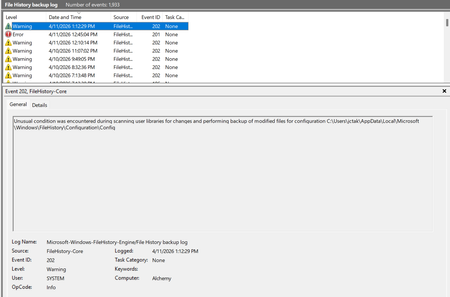
My file history program has stopped functioning. I tried searching the internet for some of these error messages and I have not found anything that has a solution that works. I tried deleting the backup on my backup drive, and also deleting the file history data/configuration folders so it would "start fresh" and I still keep getting errors. Here are some of the errors: Also have gotten a bunch of different errors for "reparse points". This is one example. I tried to exclude some of these folders from the backup but it didn't seem to help. But how do I find and eliminate a "reparse point" so it doesn't cause the file history to fail? And why doesn't file history just ignore those folders and go on and back up everything else?5.8KViews7likes58Comments
Family Safety: child PC registered but not connected (Event ID 454, 0x86000002)
Hello, I am reporting a persistent Microsoft Family Safety device-association issue on a newly configured Windows 11 Home PC. Microsoft Support case reference: 7109577064 Microsoft Support has confirmed that the standard consumer-support troubleshooting path has been exhausted and specifically advised me to post the full technical scenario in Microsoft Tech Community. Environment Windows 11 Home 25H2 OS Build: 26200.9550 Update: KB5124010 Newly configured PC Child uses a Microsoft consumer account based on an external email domain: OP.pl No email addresses or personal account identifiers are included in this public post. Problem The PC is correctly registered under the child’s Microsoft account and is continuously visible at: account.microsoft.com/devices However, Microsoft Family Safety still shows: No connected Windows device So the Microsoft Account device registration works, but the Family Safety device association does not. Configuration already verified Child account is a Standard User, not Administrator. Child is correctly added to the Microsoft Family group. Parent account is the Family Organizer. Parental consent is correctly granted. Windows activity reporting is enabled. Windows Settings → Accounts → Family shows that the child can sign in. FamilySafetyRefreshTask exists and completes successfully with result 0x0. Manual execution of: schtasks /run /tn "\Microsoft\Windows\Shell\FamilySafetyRefreshTask" returns SUCCESS. WpcMonSvc is running. wlidsvc is running. AppIDSvc is running. dsregcmd /status reports: WamDefaultSet : YES WamDefaultAuthority : consumers and the Microsoft consumer account is correctly detected. Troubleshooting already completed Child Windows profile was switched temporarily to a local account and then reconnected to the same Microsoft account. Child Windows profile was later completely removed from the PC and recreated from scratch. Microsoft Family Safety for Windows was installed. Microsoft.Windows.CloudExperienceHost was reset with PowerShell. DNS cache was flushed. PC was tested using a different Internet connection / mobile hotspot. Windows was fully updated to 25H2 build 26200.9550. Child was completely removed from the Microsoft Family group. Parental consent was revoked. Child was invited again to the Family group. Parental consent was granted again. The recreated family relationship synchronized immediately between the Family Safety web interface and the mobile app. FamilySafetyRefreshTask was run again after recreating the family relationship. The issue persists. Additional symptom Under: Settings → Accounts → Connected devices the child profile behaves inconsistently. The PC appeared there once after recreating the Windows profile, but after restarting Windows the local Connected devices list became empty again. However, the PC remains continuously visible under the child account at account.microsoft.com/devices, which indicates that the cloud device registration itself is persistent. Event Viewer findings In: Microsoft-Windows-DeviceManagement-Enterprise-Diagnostics-Provider/Admin historical events from 27 September 2026 show: Event ID: 454 Enrollment Type: FamilySafety CSP: AppLocker Path: ./Vendor/MSFT/AppLocker/FamilySafety/FamilySafetyGroup Error: 0x86000002 After recreating the Microsoft Family relationship, granting parental consent again, and manually running FamilySafetyRefreshTask, no new FamilySafety-related events are generated in this log. What is confirmed to work Microsoft account authentication Windows user profile Microsoft Family group membership Parental consent Windows device registration under the child’s Microsoft account Family Safety activity reporting configuration Synchronization between Family Safety on the web and the mobile app The remaining failure appears to be specifically: child Microsoft account → Microsoft Family group → registered Windows device → Family Safety device association Microsoft Support could not escalate the case further through the consumer-support channel and instructed me to post the issue here. Microsoft Support case reference: 7109577064 I would appreciate input from Microsoft engineers, moderators, or anyone who has encountered this exact issue, especially in relation to: Event ID 454 error 0x86000002 AppLocker/FamilySafety/FamilySafetyGroup device visible in account.microsoft.com/devices but missing from Microsoft Family Safety I can provide additional Event Viewer logs, screenshots, dsregcmd /status output, or other diagnostic information if required.164Views0likes3Comments
Unable to add Microsoft account in windows settings
Hi All, I am having an issue on signing in my Microsoft Account In Windows 11. When I am using the local account, everything are fine in the Setting - Account, however, after signing in the Microsoft account, it show the below screen. I have already tried every possible solution, change windows language, reset the region, create another local account and sign in again, reinstall the windows 11, even tried with another laptop, both cannot fix this error. After I saw the following article: https://techcommunity.microsoft.com/discussions/windows11/error-traceid-6-6-6-when-logged-in-windows-11-with-microsoft-id-account/4443036 I have contacted the Microsoft account support, they said is it related to windows issue and then forward me to another windows support agent, they have remote checked my windows devices and cannot found any issue on my windows, they agree that may related to the Microsoft account issue and then they recommend I create a post in here to ask for further supporting. So, can any help on it ? what is the next step should I take to solve this issue ?47Views0likes1CommentOctober 2026 Windows Update causing major issues
We have had about 50 computers in our organization giving boot failures after Windows restarts to apply the October update, KB5127648. Affected machines are Dell devices, both laptops and desktops. The most common error message is "file missing or containing errors \windows\system32\winload.efi" The only fix for now is to try booting into Safe Mode and uninstall the October update. We use a 3rd party tool to patch our devices, Automox, but manually triggering updates from Windows Settings yields similar results. But what I have noticed is that when running Windows Update from Settings, multiple drivers and firmware udpates are also being installed, so I'm wondering if there is incompatibility with outdated stuff in our machines. So we're pushing Dell updates for drivers, firmware, and BIOS, along with Windows Updates hoping that this will take care of the issue. Has anyone else experienced anything similar with this update? Or have any ideas on what may be the root cause in our case? Any feedback will be much appreciated.3.7KViews1like8CommentsWin11 Can't drag files into open app windows on taskbar
Dragging a file from File Explorer and dropping it onto an app icon on the taskbar no longer brings the app window to the foreground. The cursor displays a blocked indicator, preventing users from quickly opening the file by dragging and dropping it onto the app. Restarting File Explorer does not resolve this issue. While this behavior is inconsistent, it is common in third-party apps.461Views0likes3CommentsWindows 11 Error: UNMOUNTABLE_BOOT_VOLUME (0xED)
After turning on the computer, everything was working normally. I went to the kitchen, and when I came back, I found the computer was restarting. Then the UNMOUNTABLE_BOOT_VOLUME error (code 0xED) appeared, and the system booted into Safe Mode. I’ve tried several methods, but none of them worked. Currently, I can access files using Notepad via the Command Prompt and have copied some folders to a USB drive. However, my goal is to restore Windows to a normal boot state without formatting the hard drive. Please provide specific step-by-step instructions, explained in as simple and easy-to-understand terms as possible. Thank you.51Views0likes1Comment