Forum Widgets
Latest Discussions
Exchange database dismounted due to NTFS file extent limit reached – unexpected outage
Hi everyone, We experienced a serious outage on our Exchange 2016 server recently, and I wanted to share what we found during the root cause analysis – in case it helps someone else avoid the same scenario. Summary: After digging deep, we discovered that the issue was caused by the NTFS file system hitting its internal file extent limit on the .edb file. Once this threshold was reached, the database could no longer grow, and the system dismounted the database unexpectedly. No prior warning, just service interruption. Details: The .edb was around 1.2 TB in size. This isn’t a limit on database size itself — it’s about how fragmented the file is on disk. Once NTFS couldn’t track any more extents, the database stopped working. Microsoft doesn’t publish a clear fix for this; only scattered references to similar behavior in past cases. What we did: Created a fresh, clean database. Manually moved user mailboxes into the new DB. The old database couldn't be mounted anymore, so we brought the system live without historical mail – just to maintain continuity. We're now working on extracting data from the unmounted .edb using third-party tools. Looking for thoughts: Has anyone else hit the NTFS extent wall with Exchange? How do you monitor extent growth proactively? Did switching to ReFS solve this for you long-term? Open to any input or similar experiences – appreciate it in advance. Thanks!buraktrkFeb 24, 2026Copper Contributor232Views1like4Comments
Retire last Exchange Server but keep directory sync
Hello all -- I'm looking for guidance on the recommended way to retire our last Exchange 2019 server while maintaining directory synchronization in our environment. We do not have any mail flowing through our exchange server, never have. It was only installed 10 years ago for a hybrid deployment. I believe one supported path is to stand up a member server and install the Exchange Management Tools on it. Given that Exchange 2019 is already out of support, is the the long term path moving forward? I've also read about an attribute "IsExchangeCloudManaged". In this scenario, I can set this on a per-mailbox basis and manage attributes such as proxyaddresses, extension attributes, and other non-AD-managed attributes. Is this the more forward path to take? Thinking about our user provisioning process now, we have a PowerShell script that creates the user in AD and connects to our hybrid Exchange server to Enable-RemoteMailbox. In this scenario, we would still create the user in AD, wait for the sync to happen, then enable the IsExchangeCloudManaged. Would this now provide the ability to manage additional addresses, or even, shared mailboxes without having to migrate from AD --> EXO - all while keeping AD in sync with cloud mailboxes? Am I thinking about this correctly? Thanks for any insight sbStephen BellFeb 24, 2026Iron Contributor51Views2likes1Comment
Dynamic Distribution Group with no Disabled Accounts
Hi I'm trying to build a few Dynamic Distribution Lists in Exchange Online and want to only include Active Users (i.e., users that are marked "Active" in Azure AD). I've tried using the UserAccountControl attribute (-eq 514 or -ne 514 - both are returning the same results, which is strange), but it still includes user accounts that are disabled. This is how my recipient filter looks like: RecipientType -eq 'UserMailbox' -and UserAccountControl -ne 514 What's the best way to achieve this in Exchange Online? Thanks Taranjeet Singh3.9KViews0likes9Comments
Exchange 2010 to Microsoft 365 Migration – Recommended Approach and Tools
I’m looking for guidance on migrating Exchange 2010 (on-premises) to Microsoft 365 / Office 365. Is a direct migration from Exchange 2010 supported, or is an intermediate hop (such as upgrading Exchange or setting up a hybrid configuration) required? Additionally, could you please recommend any reliable tools that can help with this migration? I also have a few PST files that need to be migrated as part of the process. I’d appreciate insights on best practices, common challenges, and lessons learned from real-world migrations. Thanks in advance for your help.VineetLodhaFeb 17, 2026Copper Contributor135Views0likes3CommentsTeams delegation permission issue with Onpremise Exchange Server
we have migrated the exchange server from 2019 to SE Environment and configure the OAuth 2.0 which is working perfectly but there is one issue that one of the user is using Shared calendar but while he create the meeting invite along with Teams meeting option then everytime it shows an error "please login into the meeting" If anyone works on this case please guide or help us. Thanksharpreet-singh-himFeb 17, 2026Copper Contributor91Views0likes2CommentsExchange Online PowerShell Dumps the Credential Parameter
On February 12, Microsoft announced the deprecation of the Credential parameter for the Connect-ExchangeOnline cmdlet in the Exchange Online PowerShell module. The deprecation won’t affect interactive sessions (which should all be protected by MFA), but it might stop some background jobs running when Microsoft retires the server components that currently support the ROPC authentication flow. Time to check scripts! https://office365itpros.com/2026/02/16/exchange-online-powershell-ropc/60Views0likes0Comments
DMARC rejection after Exchange upgrade
I'm having problems with inbound emails getting bounced as Undeliverable due to DMARC rejection. For many years I've had my email come through Fasthosts / Livemail to my own domain (qts.org.uk) with catch-all forwarding set to forward everything to my GMail account. Just recently Fasthosts have upgraded their servers to Exchange and I've started getting DMARC rejections from GMail which start Diagnostic information for administrators: Generating server: exchange2019.livemail.co.uk Total retry attempts: 1 (my gmail email address) t1-hex-xprelay.gem.livemail.co.uk Remote Server returned '550 5.7.26 Message rejected by DMARC policy by gmail.com. Please use your own email address as the sender, instead of (sender's email address). [MSG0009]' Which bounce from Fasthosts / Livemail back to my GMail address. My own domain has SPF, DMARC, and DKIM configured I've done a little digging and it appears to only affect senders from originating domains with DMARC set to reject. So either GMail has coincidentally become much more strict (possible) or Fasthosts are somehow failing to forward emails fully transparently. I have spoken to Fasthosts and logged the issue with them and was not impressed so I hope the experts here can offer a solution I can forward to them.QuentinStephensFeb 15, 2026Copper Contributor146Views0likes1CommentMicrosoft Previews userConfiguration Graph API
A new userConfiguration API is available to retrieve data from Folder Associated Items (FAIs) in Exchange mailboxes. The new Graph API is part of the EWS migration project and is intended to allow application developers to migrate EWS code that updates FAIs with Graph equivalents. Most Microsoft 365 tenants will never use this API, but it’s nice to know how things work. https://office365itpros.com/2026/02/05/userconfiguration-api-beta/57Views0likes1Comment
Report for email reply time for shared mailbox
Hi All, i am looking to crate report for management for our KPI. Management want to to know how quick teams are replying to email once it's landed to mailbox. Also, average reply time for the particular mailbox for a day or week or month. if nay one know how to achieve this please let me know it will be grate help. Thanks, Preyashpreyash parekhFeb 13, 2026Copper Contributor77Views0likes1CommentExchange 2019 Certificate Error
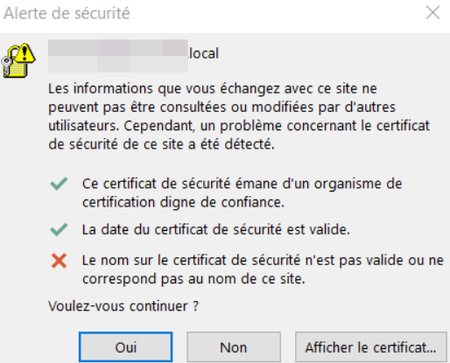
Hello guys, I plan to migrate my users on Exchange 2019, currently, i have 2 Exchange 2013 servers. As soon as i installed the exchange Server 2019, I changed all the virtual directories and i also runned the command to make sure the users doesn't connect on the new server. But now every users who uses Microsoft Outlook from the environment have a pop up that says that the certificate is not valid, and its normal because I can't apply the services SMTP and IIS on my wildcard certificate. Indeed, when i enable the services SMTP and IIS on my new certificate, it doesn't apply. I tried to enable from the ECP, it says "Are you sure you want to replace the existing certificate", when i say yes, it doesn't change anything, the smtp service is still unchecked. I also tried to stop IIS and restart IIS, restart the server but it doesn't changed anything, and I also tried to enable the services directly with the powershell command with the correct thumbprint of the wildcard certificate as it is said on the event viewer : "Enable-ExchangeCertificate -Server "EX01-2019" -Thumbprint A6BC992FDD... -Services SMTP,IMAP,IIS -Force" But it still don't work, when i check the certificate, only the service IIS is active. I had to uninstall completely the exchange server, because users were complaining about the pop up. Have anyone faced this problem before? Thank you very much for your advices guysNeymarFeb 13, 2026Copper Contributor133Views0likes3Comments


Tags
- exchange online2,599 Topics
- Exchange Server2,368 Topics
- office 3651,258 Topics
- hybrid915 Topics
- outlook782 Topics
- 2016762 Topics
- admin693 Topics
- 2013281 Topics
- 2010161 Topics
- 201982 Topics