

Forum Widgets
Latest Discussions

Unwanted Formular in Excel i need to get rid of Please.
Hello, i had had someone apply the below formular on a spreadsheet i maintain which i am not clear about. apparently this formular is used to append row numbers to the rows in my large excel sheet rather than the manual row number entry. I now don't want this formular and would like to revert back to manual row number entry but don't know what to do. if i delete the formular it also deletes the existing row number and i may loose the ability to match the row numbers to the actual content of the spreadsheet. Is there a way i can convert my rows back to manual please? This formula (="D_4" & TEXT(ROW() - ROW(Table5[[#Headers],[Defect Ref]]) - 400, "0;-0")) generates a custom defect reference code for each row in the “Defect Ref” column of Table5 in the “Defect_Log” sheet. It starts with the text "D_4". ROW() returns the row number of the current cell. ROW(Table5[[#Headers],[Defect Ref]]) returns the row number of the header row for the “Defect Ref” column in Table5 (which is row 3). Subtracts 400 from the difference between the current row and the header row, so for row 4: 4 - 3 - 400 = -399. TEXT(..., "0;-0") formats the result as a number, showing negative values with a minus sign. The formula concatenates "D_4" with theTeeprimeFeb 11, 2026Copper Contributor16Views0likes1Comment
No stocks button/option
I have an active Microsoft 365 subscription through my Apple ID. But the Stocks button is completely missing from the Data tab. This issue occurs in both the Excel for Mac app (version 16.105.3) and Excel Online. My privacy settings for "Connected Experiences" are all enabled. I've already run the Office License Removal Tool and logged in again, but to no avail. Since the feature is also missing in the web version, it appears to be an issue with my Microsoft account configuration itself. Microsoft support can't see my settings and refers me to this forum. Does anyone have any ideas?VVermeulenFeb 11, 2026Occasional Reader28Views0likes2CommentsCopying formulas between spreadsheets without referencing the original spreadsheet
how do i copy a formula from 1 spreadsheet to another, and keep the formulas from referencing the original spreadsheet? I want the formulas to work in my new spreadsheet, instead of referencing the spreadsheet i copied them from. when i copy =SUM(Jan!U44) it turns into =SUM('[MORSUM 2017.xls]Jan'!U44) excel is adding the "morsum2017.xls" which is the source file name.Solvedbob_sipesFeb 10, 2026Copper Contributor77KViews0likes14CommentsChart updates inconsistently when dynamic array resizes
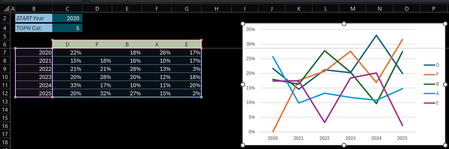
Hi (Excel 365 v2601 b19628.20132 Current Channel / Windows 11 25H2) Initial post edited (& cross posted here on Jan 29, 2026) after further investigations In B6 below an array that dynamically resizes according to the 'START Year' & 'TOPN Cat' variables. The Chart is setup as follow: Select an empty cell > Insert 2-D Line chart Right-click > Select Data… > Chart data range > Select the Serie names & Values (C6:G12) Click Edit under Horizontal (Category) Axis Labels > Select the range with the Years (B7:B12) Check of the Chart data range: Changing 'START Year' works no problem: the Chart data range & Horizonal Axis Label range are properly updated Changing 'TOPN Cat' (the array resizes horizontally) screws up the chart: The Chart data range is properly updated but the Series & Axis Label ranges don't update accordingly Q: Am I doing something wrong, facing a limitation or is this something else? Tried to attach the sample file 3 times... it's available at: Dynamic_Chart_Challenge.xlsx Thanks & any question let me know Lz.LorenzoFeb 10, 2026Silver Contributor430Views1like8Comments
INDEX MATCH with VLOOKUP
This is my first time posting here, as I hit a roadblock that I'm sure is simple enough. I am using the following formula, but the source data ('FY26 Income Statement Data'!$A$4:$A$2158) has several rows with the same criteria on 'Cash Flow'!$A7. I think I need to include a VLOOKUP formula but I don't know how to do this. Any help will be appreciated. =INDEX('FY26 Income Statement Data'!$A$4:$AB$2158,MATCH('Cash Flow'!$A7,'FY26 Income Statement Data'!$A$4:$A$2158,0),MATCH('Cash Flow'!C$1,'FY26 Income Statement Data'!$A$4:$AB$4,0))SolvedWendyJVFeb 10, 2026Copper Contributor143Views0likes5CommentsCANNOT OPEN THE SPECIFIED FILE with tel:-hyperlink
Hi, I have several "tel:" hyperlinks in a Excel sheet (xlsm). Yesterday, they sended the phone numbers to whatsapp. But today i become the errer:"CANNOT OPEN THE SPECIFIED FILE". I saved yesterday a xlsx file as xlsm, after the conversion, the links were still working. What goes wrong?ray1977Feb 10, 2026Copper Contributor855Views3likes9Comments
Excel sheets that populate a drop down menu
Hello Is there a way to have a drop-down list of all the sheets in a workbook in a selected cell and the selected sheet from the list's data populates other cells in the first sheet? My goal : To easily see what machines are connected to a list of RJ45 wall points. In the workbook, there is 1 sheet that has a list of wall points . Each machine has its own sheet. Each machine sheet has lots of corresponding data that is not pertinent to the RJ45 wall point sheet. My goal is to select a cell next to a given wall point row in the RJ45 wall point sheet, that drops down a list of machines (that are all the machine sheets in the workbook). The selected dropdown list machine, will populate pre-defined adjacent cells with corresponding data from the selected machine sheet. Each cell in the MACHINE NAME column has a drop down list of the sheet names to select from. Once a machine is selected, the hardware names and model columns that are on the same row are populated with the corresponding data on the machine sheet. I have asked ChatGTP and Gemini AI to help ... without any success. Is this possible to do? Thank youlowdencaftFeb 10, 2026Copper Contributor117Views0likes3CommentsDate/Data referencing
I am building a spreadsheet for work. My first sheet is an overview and my second sheet is my user input data. The idea is for me to input data everyday into the sheet (each day has a different row) and it automatically references that data in the overview page. I have made it reference the data for day 1 but I would like to be able to change the date on the overview page and have it automatically reference the date for that corresponding date on the input sheet.jdauzatFeb 10, 2026Copper Contributor100Views0likes3Comments



Resources
Tags
- excel43,587 Topics
- Formulas and Functions25,258 Topics
- Macros and VBA6,542 Topics
- office 3656,271 Topics
- Excel on Mac2,715 Topics
- BI & Data Analysis2,467 Topics
- Excel for web1,995 Topics
- Formulas & Functions1,716 Topics
- Need Help1,703 Topics
- Charting1,687 Topics