formulas and functions
25436 Topics
Formatting depending upon results form a vstack
I have a dynamic VSTACK being displayed. I want to format an adjacent cell in each line of the VSTACK with a boarder that appears or disappears according to changing number of rows in the VSTACK. I would appreciate any help in achieving this.117Views0likes5Comments
Vlookup to multiple columns
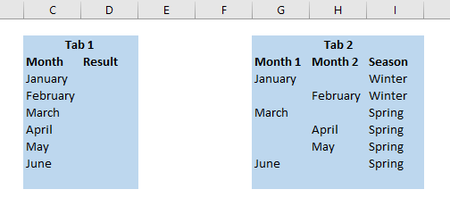
Hello! I was wondering if there was a formula to do a vlookup referencing 2 different columns? In the below example I have 2 tabs of data; on tab 1 I want to do a vlookup based off of column C however on Tab 2 the "month" can be found in either column G or H. Is there a formula that says vlookup column c and look to column G and H and return the result of I? Thank you!56KViews0likes5Comments
HYPERLINK function returns "Cannot open specified file"
I am trying to use the HYPERLINK function but to no avail. I have exhausted all the standard help available on this, but I cannot figure out what is wrong, Here is an example of the syntax I am trying to use to hyperlink to a cell on the same tab of a spreadsheet: =HYPERLINK($U$14,"Table 20-09"). When I use the Insert Hyperlink functionality, it works fine. However, I have to use the HYPERLINK() function because it needs to work dynamically (with a passed cell reference). The sheet is not protected (at this point). Using Office 365. A solution to this problem will be greatly appreciated.Solved122KViews0likes25Comments
Excel Nested Arrays: Find the Nesting Depth of Uniform and Ragged Arrays ARRDEPTH() & ISRAGGED()
Hey everyone! I’ve been diving deep into Excel’s new nested arrays features lately, and I absolutely love the flexibility they bring to data structuring. However, managing them can get a bit tricky, so I figured I’d build some specialized tools to handle them seamlessly. Public Interfaces & Arguments =ISRAGGED(array) Argument Description Default Behavior array Target nested structure to validate. Required =ARRDEPTH(array, [is_ragged]) Argument Description Default Behavior array Target nested structure to measure. Required [is_ragged] TRUE: Scans all branches for the deepest path. FALSE: Speed test on the first path only. FALSE (Omitted) TL;DR (What makes it tick): Function Name Type What It Does ARRDEPTH Public UI Returns nesting depth. Supports deep checking or fast linear testing. ISRAGGED Public UI Structural validator. Returns TRUE if array branches have uneven nesting. ANALYZE_NESTING Hidden Core Engine Multi-process recursive parser that tracks tree structure geometries. LINEARDEPTH Hidden Utility High-speed depth checker that evaluates the first element path exclusively. You can get both functions from my GitHub Gist: https://gist.github.com/Medohh2120/9cdf939036942c9672c57ccd6de696d3333Views1like6Comments#ref error using If and Vlookup
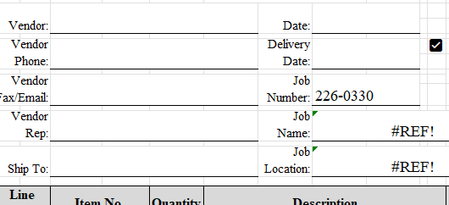
I'm trying to use this formula with the IF and Vlookup =IF(H13>=@'[Job Status.xlsx]Sheet1'!$A$2:$A$1048576, VLOOKUP(H13,'[Job Status.xlsx]Sheet1'!$A$2:$A$1048576,2,),"") The idea is, if I put in the job number in H13 and it looks up the job in the other sheet that has all the jobs listed, it will return the name of the job and the location of the job. I've used this formula to connect other sheets to this 'job status' workbook and it works fine. I don't understand why it is not working here. If I remove the @ symbol from the beginning of the formula, it makes it a #spill! error. In my other workbooks where this formula works, I didn't have to put the @ sign in. Thank You.212Views0likes2CommentsWelcome to the Excel Community
The Excel Community is a place we've built for all of you. You can learn more about how to do something with Excel, discuss your work, and connect with experts that build and use the product. With over half a billion Excel customers, we want to engage with you in fundamentally different ways and the community is a starting point for that. Our community helps answer your product questions with responses from other knowledgeable community members. We love hearing feedback and feature requests from you which helps us build the best version of Excel ever. If you have found an outage or a bug please post at our Answers forum. We look forward to getting to know you! Sangeeta Mudnal & Olaf Hubel on behalf of the Excel Team69KViews30likes109CommentsReplace item AUTO if not match in invoice No
Hi All, i am working on a sheet on two set of data bases. first is main data and second is invoice data. both are extract from different system software for analysis. main data is perfect and compare into invoice data and check all items are OK or not OK. similar i have a long invoices data where i have to compare with main data. first check invoice then match all item if there is presidency on there then replace to each other. you can see my attached file. i am using formula but failed. =IF(MATCH(A3,$F$3:$F$21,0)>0,A3,REPLACE(A3,1,11,F3)) Thanks.3KViews0likes11CommentsDynamic table
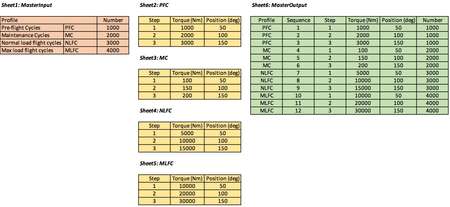
Hello, I want to create a dynamic table as shown in "sheet6". Sheet1 is the major overview with different load spectrums and number of occurrences. Sheet2-5 is specific load details for each spectrum, showing different load steps. Sheet6 take the table from sheet1 and add steps from sheet2-5. The column "number" in Sheet6 could be between profile and sequence. Order is not that important, just to show example. If anyone could help me to solve this, I would be very grateful! If possible, without using any code, just normal Excel functions. I'm thinking like a "lookup", where "Profile" in Sheet6 go to "Profile" in Sheet1, if match, extract complete table from sheet2-5 (depending of match). See overview below. Regards, Albin265Views0likes6CommentsExcel formula not pulling correct data
In my cell# CN I have formula =IFERROR(IF(XLOOKUP($D25,GSS!$A:$A,GSS!$AP:$AP)=0,"-",XLOOKUP($D25,GSS!$A:$A,GSS!$AP:$AP)),"-") and my result should be CFS or FCL. Then in another cell I have formula =IF(CN25="CFS",(CP25),(CO25)), but my result doesn't change based in cell CN. Please help!183Views0likes2CommentsPivotTable regression in Version 2609. Duration fields formatted [h]:mm:ss no longer allow Sum.
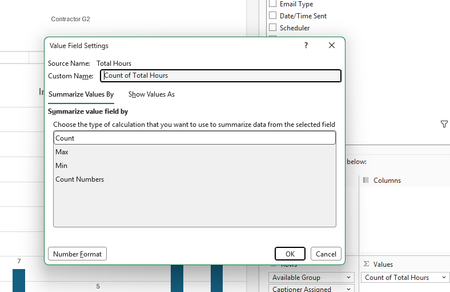
Excel 365 Version 2609 (Build 16.0.20430.20032) appears to have changed PivotTable handling of duration fields formatted as mm:ss. New PivotTables default to Count of Total Hours and Value Field Settings only shows Count, Max, Min, and Count Numbers; Sum is missing. Existing PivotTables using Sum of Total Hours still calculate correctly, even after refresh, but Sum no longer appears in their settings. Numeric helper field =[@[Total Hours]]*24 restores Sum functionality. Appears to be a regression affecting duration fields. I have verified that Excel is treating the data formatted as [h]:mm:ss as numeric and yet still will not allow sums as before.176Views0likes1Comment