Forum Widgets
Latest Discussions
Block Microsoft from running experiments in the Microsoft Edge browser
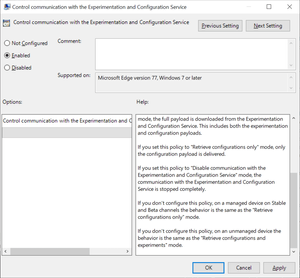
Browsers like Firefox, Chrome or Microsoft Edge come with built-in functionality to run experiments. Browser makers like Mozilla or Google may enable or disable features or changes in select browsers; this is often used to A-B test features or get early feedback on new implementations. While most users may not even notice that experiments are running in their browsers, it happened in the past that experiments caused issues. The latest case was revealed in November when administrators from around the world reported that a Chrome experiment would crash browsers in organizations worldwide. Negative side-effects of experiments are a problem for home users and business users alike, and it is often desirable to disable or block experiments from being downloaded and run. Microsoft distinguishes between controlled feature rollouts and experiments in the company's new Chromium-based Microsoft Edge web browser. Both are made available to part of the user base when they start to roll out but similarities end here. Microsoft notes: Microsoft Edge builds have features and functionality that are still in development or are experimental. Experiments are like CFR, but the size of the user group is much smaller for testing the new concept. These features are hidden by default until the feature's rolled out or the experiment's finished. Experiment flags are used to enable and disable these features. System administrators may use the "Control communication with the Experimentation and Configuration Service" on pro and Enterprise editions of Windows 7, 8.1 or 10 to prevent experiments in the browser. Here is what is needed for that: Get the latest Microsoft Edge policy file from the Microsoft Edge Insider website. It is likely that the policies will become available natively eventually when Edge is released and integrated in Windows. Extract the file (first a cab, then a zip). Open Windows > Admx. Copy the two .admx template files to C:\Windows\PolicyDefinitions\. Open the language folder that matches the system language and copy the .adml files to the corresponding language folder of C:\Windows\PolicyDefinitions\ Open Start, type gpedit.msc and hit the Enter-key to open the Group Policy Editor. Consult this Docs page on the Microsoft website for additional scenarios, e.g. when domain controllers are used. Open Computer Configuration > Administrative Templates > Microsoft Edge. Open the policy "Control communication with the Experimentation and Configuration Service" policy. Set the policy to Enabled. Set it to either "Retrieve configurations only" or "Disable communication with the Experimentation and Configuration Service". Retrieve will download configuration payloads only, disable won't download or enable them. The behavior of not configuring the policy differs depending on whether it is a managed or unmanaged device. Managed devices will download the configuration only while unmanaged devices will retrieve configurations and experiments. Source8.5KViews0likes3Comments
Workspaces and Back buttons overlay at the toolbar if home button is shown too.
All said in the title. It doesn't happen in all my profiles, but this one is frustrating. Here you have a screenshot with this issue and all appearance settings:Sistemes_MassoniDec 30, 2025Copper Contributor585Views2likes5Comments
Edge Facebook OWA starts greyed out with Close Button
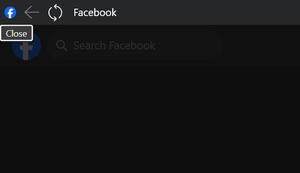
I have setup Facebook as an Edge desktop OWA and when I click to start it loads greyed out with a CLOSE button in the top left (see screen snip below). If I click on close, everything works OK. How can I stop this from happening and avoid having to click close everytime?AlbyzzDec 29, 2025Copper Contributor120Views0likes5Comments
Edge pdf text addition = massive file size increase
As of today, when I add just a small amount of text (20-30 characters) to a pdf and save, the file size increases from 66KB to 55,000KB ... never happened before. I've reported to Microsoft but they have no solutions. Any ideas to get around? Saving as a separate file has same result. ThanksAJM3897Dec 27, 2025Brass Contributor4.9KViews20likes31Comments
can't access NBC Sports live stream
For some strange reason, every time I try to watch a live event at stream.nbcsports.com I just see a spinning wheel. This issue only happens with Microsoft Edge 90.0.818.46. I can access the stream using chrome and safari on my mac perfectly fine (even with uBlock Origin enabled). Why is this happening? I've tried to find a way to sign out of NBCSPORTS.com but it doesn't appear to be any way to sign out of my provider.patdiddyDec 25, 2025Copper Contributor1.9KViews0likes3CommentsCast button in toolbar doesn't work anymore
I'm on a Windows 10 tablet and since a few weeks in all my 3 installations (Stable, Dev 141.0.3500.1 , Canary 141.0.3518.0) the cast button in the toolbar doesn't work anymore. Only option I have now to initiate casting is with: Menu-Button => More Tools => Cast Media, which is quite annoying. Could someone from the developer team please take a look into that? Thanks in advance!Neon01Dec 23, 2025Iron Contributor867Views8likes14CommentsAccounts limit in Edge for iOS and iPadOS
I am a heavy user of the account feature, as it is perfect when you are working from a lot of different Office 365 admin logins. In Edge Chromium for Windows 10 and MacOS there don’t seem to be a limit on the number of accounts, but on my iPhone and iPad I can create only one Microsoft account (primary) and one Work account. Is this going to change?SolvedOle ThomsenDec 23, 2025Copper Contributor14KViews8likes13CommentsHow to remove autofill email from 'choose an account' part of Profile page in Microsoft Edge?
I'm trying to setup a new Profile in Microsoft Edge, one without an email. Every time I click on the Profile button and bring up the Profile page, there is a little 'Choose an Account' section that autofills an old email that I don't use. I cannot find a way to remove this email.JFriendlyDec 22, 2025Copper Contributor16KViews1like10CommentsAllow multiple picture in picture windows
Currently if you click another video to go into picture in picture mode it overrides the current one. It would be nice to allow multiple PIP windows at once (like Firefox), so you can follow along with two different streams (say if you want a live feed plus commentary feeds of the same event).cupcakezealotDec 22, 2025Brass Contributor20KViews6likes7Comments




Resources
Tags
- edge654 Topics
- canary222 Topics
- feature196 Topics
- Feedback185 Topics
- suggestion178 Topics
- BUG134 Topics
- macos105 Topics
- mac102 Topics
- request101 Topics
- suggestions101 Topics