Forum Discussion

AB21805
Nov 10, 2020Bronze Contributor
insights tab - how to get this showing up for all teams through admin
Hi all, Was wondering if someone can help, this morning I added the insight app into the global policy for all to get the insight tab: They don't seem to have it? Is it a case of wa...
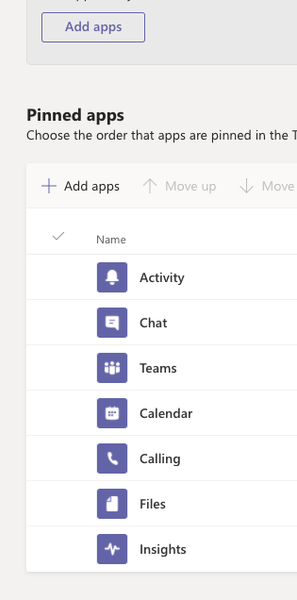
- Nov 10, 2020Hi AB21805
It can take up to 24 hours. I would periodically check back by logging in and out to the Teams Desktop App. In my own personal experience, most turn up 4-8 hours after adding it to an app setup policy and then it is a case of logging out and back in. You may also want to check periodically in the web app at teams.microsoft.com
Hope that answers your question
Best, Chris

Nov 10, 2020
Hi AB21805
It can take up to 24 hours. I would periodically check back by logging in and out to the Teams Desktop App. In my own personal experience, most turn up 4-8 hours after adding it to an app setup policy and then it is a case of logging out and back in. You may also want to check periodically in the web app at teams.microsoft.com
Hope that answers your question
Best, Chris
It can take up to 24 hours. I would periodically check back by logging in and out to the Teams Desktop App. In my own personal experience, most turn up 4-8 hours after adding it to an app setup policy and then it is a case of logging out and back in. You may also want to check periodically in the web app at teams.microsoft.com
Hope that answers your question
Best, Chris

AB21805
Nov 10, 2020Bronze Contributor
Im also getting this error on my staff test account when accessing the insight app on the left panel
Any ideas? Sorry for all the questions!
- Nov 10, 2020Hi AB21805
Yeah, app setup policies in the Teams admin centre add the app to the app bar on the left hand rail and is typically used for personal apps.
I would have said you could look to use the new teams template functionality for adding the tab automatically to newly created teams: however looks like you are using an Education Tenant and templates aren't supported in EDU just yet. Looks like on this one you'll need to go and manually add it as a tab to the teams at this current time 😞
Best, Chris Shahvaiz_KhanJun 02, 2021Copper Contributor
ChrisHoardMVP
Hi Chris I have read ur replies and they are informative.My issue is that when I search insights in apps or in tabs I am not getting this feature like the insights feature is not even showing up. Can you please help me? Attached is the photo.
- Jun 29, 2021Shahvaiz_Khan
Reach out to your IT administrator and ensure that the Insights App in the Teams Admin Centre is
a.) Enabled in Manage Apps
b.) Permitted within your Apps Permission Polcy
If it is enabled and permitted it will show up
Best, Chris
- AB21805Nov 10, 2020Bronze Contributor