Forum Widgets
Latest Discussions
How do I move Recovery Partition Windows Server?
I'm facing a challenge with my Windows Server setup and could really use some guidance. I need to move the recovery partition to a different location on my hard drive, but I'm unsure of the best approach to do this without compromising the system's integrity. I've tried a few methods, but they haven't worked as expected, and I'm concerned about the potential impact on boot processes and system recovery options. Could anyone provide insights or step-by-step instructions on how to safely relocate the recovery partition?SolvedMandaoyOct 17, 2024Tin Contributor939Views0likes3CommentsDid expediting the 2024-08 Quality Updates fail for anyone else?
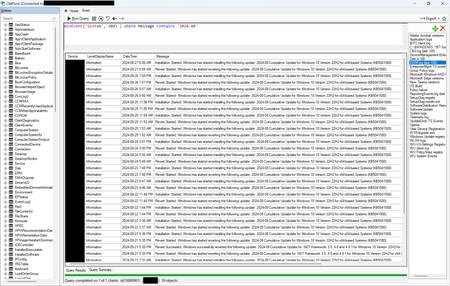
Due to the CVE-2024-38063 vulnerability, we attempted to use the Expedited Quality Updates feature to enforce the immediate installation of the 2024-08 security updates. Unfortunately, the feature simply did not work. Even a couple weeks after deploying the expedited update profile, we had about 25% of our Windows endpoints still in "Pending" status, most of which were powered on 24/7. We still have ConfigMgr in our environment, so I used CMPivot to run a query for events in the System log with "2024-08" in the message. This showed me that rather than installing the update and forcing a restart one day later as configured, the update was being installed, then reverted about ten hours later, then immediately re-installed again, over and over: If I manually initiated a restart on any of the affected machines, the update was successfully finalized, so the issue wasn't a failure to install the update. I've opened a case with Microsoft Support, but it is progressing slowly. If nobody else is seeing the issue, I will throw in the towel, but if it's more widespread, I think it is worth fighting to get this fixed (assuming that Microsoft isn't already aware and has simply chosen not to publicize it — for example, in the Windows release health blade in the MIcrosoft 365 Admin Center).SolvedRyanSteele-CoVSep 04, 2024Steel Contributor1.1KViews0likes8Comments
Update schedule for Windows' OpenSSH
Hello everyone! I was looking at Windows OpenSSH that can be installed in Settings under System -> Optional Features -> OpenSSH. The version of SSH that is installed by Windows this way is 8.6p1 (which was released just under 3 years ago). The latest OpenSSH for Windows available on the GitHub repository is 9.5p1. I was wondering what the update schedule is for OpenSSH for Windows via Windows Update. I have the following questions specifically: On what schedule does Microsoft update this feature? Is it ever updated? Are security fixes released in the past 3 years included in the OpenSSH that is installed by Windows? Based purely on the version numbers described above, it seems like this OpenSSH distribution has not been updated in the past 3 years: from a security perspective, this seems problematic. I would be grateful for any information you may have! Thanks!Solvedmbs9-May 18, 2024Copper Contributor1.5KViews0likes1CommentHosting WIndows 10 Feature on Demand [FOD] Content
As per this guide FOD (Feature on demand) can not longer be delivered via WSUS after Windows 10 1709. We know have a group policy option that allows you to pint the system at the internet service Windows update or a local file share. We need to install things like the RSTA tooling but do not want to open up our Windows 10 machines to the internet. As such, should we be looking to hosts the FOS ISO for Windows 2004+ as per here? We are running Windows 21 H2.SolvedshockoJul 02, 2022Steel Contributor2.6KViews0likes2Comments
Recovering from a bad Quality Update, when its fix is released "Out of Band", using Intune?
Originally posted on Twitter, June 3rd, https://twitter.com/Treestryder/status/1533173600575954944 To Pernille-Eskebo @Windows @WindowsUpdate @windowsinsider @MSWindowsITPro A thread/rant, after being unable to deploy functional PCs since May 10th, when Quality Update KB5013942 broke the @MicrosoftStore . Being fully sold on the "Autopilot + Azure AD Joined + @MSIntune" dream, we expect updates (and drivers) to be published through Windows Update and applications to be in the Microsoft Store. Most applications our company requires are not yet in the Store (including Microsoft's). So, we have to re-package them for installation through the Company Portal app. The Company Portal app is installed by the Microsoft Store… that broke May 10th. I filed a bug report right away using Feedback Hub. https://aka.ms/AAgx0nw Last I looked, there were no updates from Microsoft. Just tried to check and (ironically) Feedback Hub is broken, "We're having trouble connecting." We have waited patiently for the update to the update (19044.1706 to 19044.1708) listed on the Windows 10 Release History Page. However, I just found our wait was in vain. Reading the Known Issues section of KB5013942, it says something to the effect, "No big deal. Just install it manually. Or use WSUS. Or use MEMCM". What about those using Windows Update for Business (WUfB) on thousands of PCs, drop-shipping PCs to remote locations? Many on my team believe Microsoft is not committed to Autopilot + Intune management. As proof, they point to incidents like this, applications not in the Store (including Microsoft's), and major hardware vendors (including Microsoft) not releasing drivers through Windows Update. Are my expectations unreasonable? @WindowsUpdate , when the fix to a bad update is "Out of Band", using Intune and Windows Update for Business to manage thousands of PCs, what are we to do? Wait till the next Patch Tuesday and hope for the best?SolvedNathanHartleyJun 15, 2022Tin Contributor2.5KViews2likes5Comments
Why do Windows 10 hybrid AD clients with GP disabling Windows Update still get updates?
I have a large fleet of Windows 10 Enterprise clients which are Hybrid-joined to our on-premise AD and also connected to Intune for cloud-based management. These devices are purpose-built -- not quite suitable for LTSC but enough to require manual control of update deployment. They're also customer-facing so reboots and other servicing tasks need to be carefully scheduled. For a variety of reasons, we're not using WSUS or MECM to approve updates; we're pushing patch packages to the devices because of the need for control of bandwidth, customer experience, etc. Previously, I was able to set up a Group Policy setting that blocks Windows Update, and that would be enough to prevent the machine from reaching out to the Internet to download updates from Microsoft. Recently, my machines (Windows 10 21H2) have been reaching out to WU and installing updates out of our normal cycle. This has led to issues with custom software and VPN clients failing to work properly. 1. What is causing the machine to reach out to WU even though the GPO blocks it? I've already checked the following -- the "Configure Automatic Updates --> Disabled" GPO does apply to the machine, the "MDM wins over GPO" setting is not set, and the machine is not in any Intune update rings, nor do any CSPs pertaining to updates apply. 2. Where's a good place to start troubleshooting this? The Windows Update log on the client is quite verbose so it would help to have a guide on what I'd be looking for.SolvedEricTorbensonMay 13, 2022Copper Contributor1.3KViews0likes1CommentCelebrating the anniversary of Microsoft 365 admin center!
A little over a year ago, Windows release heath and Windows message center content were integrated into the Health section of the Microsoft 365 admin center. And the experience keeps evolving. In case you missed it, here are two recent improvements: Message center posts about Windows are now returned via the Service Comms Graph API. Now, just like with other Microsoft 365 products and services, you can enable custom workflows for administrators to review, assign, and triage communications about Windows from the message center. Your organization's apps can access the Windows communications data on behalf of a signed-in user, or without any signed-in user in the tenant, if you set up the appropriate delegated or application permissions. For more information on access tokens, app registration, and delegated and application permissions, see Authentication and authorization basics. For additional reference: How to get the best of Windows on the Microsoft 365 admin center - Microsoft Tech CommunitySolvedkchavezMay 03, 2022Former Employee1.4KViews6likes5CommentsWUfB - Update Baseline / Best Practise
We use WUfb about more than one year. Now we want to work with "Deadline" But there are a lot (?) of unknow unsure... We found this "https://www.microsoft.com/en-us/download/details.aspx?id=101056" with a lot of settings (Update from: 16.09.2020) and the article from AriaUpdated --> here What we want: - Do not Auto-restart during the Work hours (08:00 - 17:00) - a lot of User Notification (annoy the user to restart his device) - do not Auto-restart without inform the user in the attachmend is our Policy (censored) What is the "best practise" for our use case? Thank for your Help! 🙂SolvedKevin SchmidMar 28, 2022Tin Contributor3.1KViews0likes7Comments
SCCM / MEMCM support CAU "Cluster Aware Updating" Feature of Failover Cluster Feature
Please build a plugin for CAU Tool to work with SCCM Agent to install the updates from SCCM Agent UpdateDeploymentAgent. In the CAU Tool is only a WindowsUpdateAgent and Hotfix plugin, this plugins dont support SCCM. i need a solution to make CAU and SCCM work together.SolvedUwe_BrueningFeb 17, 2022Copper Contributor3.8KViews0likes3CommentsBest Practice for targeting Configuration Policies in MEM
Moving our Windows client platform to Modern Management, we are looking at configuring more settings with MEM and moving away from Group Policies. Note: we are hybrid Joined + Co-Managed for all our clients. What are the Best Practices (technical efficiency) to target Configuration Policies to Devices in MEM? - Static AAD groups - Dynamic AAD groups ? - Filters etc. ... and in what order should they be used (for example, first use a Dynalic group, the refine using filter)SolvedVanakenJFeb 17, 2022Brass Contributor712Views1like1Comment




Tags
- windows 1032 Topics
- wufb23 Topics
- Office Hours19 Topics
- Windows Update18 Topics
- Update management13 Topics
- microsoft intune10 Topics
- configuration manager9 Topics
- Windows Updates9 Topics
- Servicing9 Topics
- WSUS7 Topics