windows update
17 TopicsCrowdStrike Secure Boot Lifecycle Management Content Pack
CrowdStrike has recently released the Secure Boot Lifecycle Management Content Pack. This new feature helps Falcon for IT module users manage Windows Secure Boot certificate updates ahead of these certificates’ expiration beginning in late June 2026. The dashboard provides an at‑a‑glance view of Secure Boot–enabled devices, showing which systems are already compliant with the updated 2023 Secure Boot certificate, which are in progress, and which are blocked or require opt‑in to a managed rollout. It also highlights certificate update failures that may require investigation. In addition, overall readiness is summarized through a compliance gauge, while a 30‑day trend shows how pass and fail counts change as remediation progresses. Filters by operating system, server edition, hostname, and update status help administrators quickly identify devices that need action to help ensure systems remain secure after the certificates expire. The feature also provides management options to opt devices into Microsoft's managed rollout for gradual, tested deployment, and to block updates on hardware with known compatibility issues to prevent boot failures. Note that this feature is available as part of CrowdStrike's Falcon for IT module. CrowdStrike Endpoint Detection and Response (EDR) customers who are not licensed for this module can enable a free trial from the CrowdStrike Store. To learn more about this feature, please see the content pack tutorial video.106Views1like1CommentThe New Activation Portal Is Partly Broken But It Is a MAJOR Inconvenience For Me & Others.
I Run Windows 7 Ultimate x64 And I need to Activate Windows, I am used to the new aka.ms/aoh replacing the phone line. But I Have Activated Windows XP & Vista Without Any Problems Multiple Times, I Tested It Too, Tried 7, Starter, Home, Pro, Ultimate, Even x32 & x64. Though, No matter what, everything BUT Windows 7 Works. This Is Clearly a Server Sided Issue And I've Had This problem for the past months maybe even about a year. (The Product Key I Am Using Is Not Public on The Internet So It's Not Blocked/Used Publicly By Everyone, it is the same product key that came with the CD) And I Can Say For Certain This is a Server Sided Issue. Please Help. And Thank You For Your Time.44Views0likes0Comments
Proposal: Dedicated Windows “Repair Companion” Device for Automatic Deep System Recovery
I’d like to propose a new hardware‑assisted recovery solution for Windows that would dramatically improve system reliability and reduce catastrophic failures caused by deep OS corruption. Today, Windows can repair many issues on its own, but certain types of corruption — such as servicing stack failures, broken WinSxS manifests, failed migrations, or damaged bootloaders — require offline repair or manual intervention. These situations often force users into time‑consuming troubleshooting or full reinstallations. My proposal is a dedicated, consumer‑friendly “Windows Repair Companion” device that connects to a home network and provides a trusted, isolated environment for deep system repair. This would be similar in concept to enterprise out‑of‑band management, but simplified and designed for everyday users. Key Features: • A small hardware device (similar in size to a Surface Dock or streaming box) that plugs into a router or PC. • Contains a hardened, read‑only repair OS and clean Windows recovery images. • Supports automatic network boot (PXE/UEFI) when a PC detects severe corruption or cannot boot normally. • Performs offline repairs: DISM, SFC, CHKDSK, servicing stack rebuilds, WinSxS restoration, bootloader repair, and update rollback. • Provides a true “push‑button restore” experience without requiring user technical knowledge. • Could leverage existing Surface recovery technology, secure boot chains, and cloud restore infrastructure. • Offers a new potential revenue stream for Microsoft while significantly improving Windows reliability. Benefits: • Makes Windows effectively unbrickable for most users. • Eliminates many catastrophic update failures and servicing issues. • Reduces support costs and frustration for consumers and small businesses. • Provides a clean, consistent recovery path across all OEM hardware. • Bridges the gap between consumer Windows and enterprise‑grade resilience. This device would give users peace of mind and provide Microsoft with a modern, hardware‑assisted recovery model that aligns with the direction of Surface and Windows Core OS technologies. Thank you for considering this idea — I believe it could meaningfully improve the Windows experience for millions of users.26Views0likes0Comments[On demand] AMA: Managing Windows updates
Tune in to Tech Community Live on demand. Get tips on how to easily manage updates for your Windows devices. And, don’t worry if you missed the live stream. Q&A is open through Friday (12/5) at 12:00 p.m. PST so keep those questions coming! Go to https://aka.ms/AMA/WindowsUpdate to post your questions.83Views1like0CommentsWindows update in settings not showing up (something went wrong. Try open settings later)
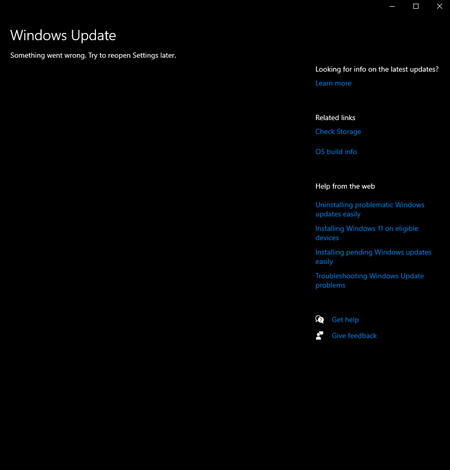
i've had this problem a while now but didnt think much of it until i needed newer versions of windows to run apps. tried many ways like resetting settings to refresh. tried pc health check, troubleshoots which gave results that the problem was no identifiable. im not sure what i should do. i am trying to update to the lastest win 10 version as my pc does not support win 11.95Views0likes1Comment
Estimating Upload Bandwidth in Delivery Optimization
There is a policy(such as DOMaxBackgroundDownloadBandwidth) to control "download" bandwidth in Delivery Optimization (DO), but currently, there is no policy to control "upload" bandwidth. However, according to Microsoft's doc, the cacheable content that an uploading device can peer is limited to four slots. If four peer downloads occur simultaneously and the download bandwidth is limited to 1 Mbps, the upload bandwidth is expected to range from a minimum of 1 Mbps to a maximum of 4 Mbps. Is my understanding correct?275Views0likes2CommentsDefine Patch Approvals in WSUS but pull patches from Windows Update (Internet)
We currently use WSUS to distribute Microsoft patches and also use Solarwinds Patch Manager to push 3rd party patches into WSUS. This allows us to fully patch an endpoint with all MS and 3rd party software patches via Windows Update Agent/WSUS. We now have a fleet of laptops connected back to our Datacenter via a VPN and they are consuming a lot of bandwith during patching cycles. We have the following challanges: We do use some throttling on BITS/Delivery opitmization but have had mixed results We have MECM but don't use Cloud Management gatway as was deemed too expensive. we have not moved patching to MECM yet. If we use Windows Update for Business we cannot patch 3rd party updates and loose some control around pilot groups and reporting in our estimation Q: So is there a way for us to continue to define the approved patches/metadata via WSUS but have the system pull the patches files from the internet (Windows Update) source? Perhaps this is possible with MECM?483Views0likes2CommentsThrottle Downstream WSUS Update Pull from upstream
Is it possible to throttle the download of updates on a downstream WSUS server i.e. when it is pulling it's updates from an upstream WSUS server? We have some downstream WSUS servers on low bandwidth links and whilst we generally schedule the pull of updates during an out-of-hours window this is problematic for us for several reasons. I'd rather they pull during the day but with throttling. I’m aware the WSUS clients can do this in Windows 10 BITS etc. but wondering can the WSUS server do this on the synchronisation cycles.225Views0likes0Comments
Azure Update Management for Intune and "feature upgrades"
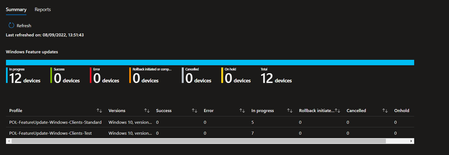
Scenario: W10 Clients, 21H2 (by enablement package) Hybrid-joined to Intune MDM and on-prem AD DS. No SCCM / Co-Management Previously managed by WSUS policies All Intune Rings & Feature Update / Expedite Policies follow MS guidance. AD based GPO are successfully overide by Intune Policy All in all, Intune policies work as expected. The story: Implemented Intune management with hybrid join and policies and bells and whistles to leverage Update Compliance dashboard - also following the guidelines of Aria and the MS Mechanic team. The results are mixed. For some reasons I do not have section for quality updates only, just feature updates or expedited quality updates. Furthermore devices report "in-progress" for a feature upgrade to Windows 21H2, while they are already on Windows 10 21H2 (19043) and the compliance policies confirming this as well. Endpoint Manager Reports - Windows Updates Update Dashboard The issue: It seems like devices running on 21H2 by enablement package are recognized wrongly by the each of the dashboards. Reporting as if a feature upgrade would be missing. In addition I have not seen any Intune settings / nor settings catalog to prefer enablement packages over full upgrades either. Any ideas? cc AriaUpdated thanks for help in advance!1.5KViews0likes1Comment