Recent Discussions

SQL Server FCI CSV storage flips multiple times into Online (No Access) state and eventually fails
Dear Team, I'm encountering an issue with our SQL Server multi‑instance failover cluster after applying the OS security patches and restarting the second node. Once the second node comes back online, the Cluster Shared Volume (CSV) briefly flips multiple times into Online (No Access) state and eventually fails.(we can make it online manually, but again flips and failed after sometime). To make the SQL cluster available, we either need to shut down the VM or revert the patch. Before the patching, all cluster roles and SQL instances were moved off the node, and the cluster appeared healthy. The issue only occurs after the reboot of the second node. (first node patched and restarted and everything working fine) OS : Windows Server 2025 Standard Patch tried: KB5075899 (February,2026 ) KB5078740 (March,2026) KB5082063 (April 2026 ) KB5087539 (May 2026) Could you please advise if there are any specific checks or steps we should follow during OS patching to prevent CSV access loss? Is it an issue with the patch or something else? Any insights or recommended actions would be really helpful to perform the security OS patch in the server Thanks you!49Views0likes0Comments
Kerberos double hop delegation on SQL Linked Server fails on AG listener after RC4 disablement
Environment 3 Node- SQL Server 2022 with Availability Group Windows Server 2022 - Linked Server configured with Kerberos delegation (double-hop scenario) - RC4 encryption recently disabled via GPO The Problem After disabling RC4 in the domain (not sure of this root cause), Kerberos delegation through a Linked Server stopped working — but only when connecting via the **AG listener name**. Connecting via the **node name** works fine. I try to migrate my service account to gMSA and I've recreate all SPN and all delegation for the new account, but the issue is the same: Authentication works if the linked server us the node name, if it use the Listener AG name the connection fail with ------------------------------ Login failed for user 'NT AUTHORITY\ANONYMOUS LOGON'. (Microsoft SQL Server, Error: 18456) Connection Id 6d654295-0538-4837-b900-ff65c9e86ee9 at 2026-04-29 11:59:25Z I Confirmed via Kerberos event logging (Event ID 4769 on DC)** On a healthy request (node name), ticket encryption type is `0x12` (AES256). - Confirmed SPN registration with `setspn -L` - Verified Kerberos events on the DC (4768/4769) - Confirmed forwardable flag (`0x40000000`) is present in ticket options — delegation is active - Confirmed pre-auth and session encryption are both `0x12` (AES256) for the working path set `msDS-SupportedEncryptionTypes = AES128+AES256` on the SQL service account and resetting its password rotete kdc key Are there any additional steps needed on the Linked Server or constrained delegation configuration side after the service account change? Any guidance appreciated. Thanks.142Views0likes0CommentsHow does GitHub Copilot in SSMS 22 handle database context collection before generating a response?
Hello, I am trying to better understand the internal workflow of GitHub Copilot in SSMS 22, especially for database-specific questions. From the product descriptions, it seems that Copilot can use the context of the currently connected database, such as schema, tables, columns, and possibly other metadata, when answering questions or generating T-SQL. However, I could not find clear official documentation about the actual sequence of operations. My main questions are: Before generating a response, does Copilot first collect database context/metadata from the active connection and then send that context to the LLM as grounding information? Or does it first use the LLM to interpret the user’s request, decide what information is needed, and then retrieve database metadata before generating the final answer? In some explanations, I have seen the phrase "Core SQL Copilot Infrastructure", but I cannot find any official documentation for that term. Is this an official component name? If so, what does it specifically refer to in the SSMS Copilot architecture? When Copilot answers schema-related or data-related questions, what information is retrieved automatically from the connected database, and is any SQL executed as part of that process? Is there any official architectural documentation that explains: context collection, prompt grounding, LLM invocation order, and whether query execution can occur before the final response is generated? I am asking because I want to understand the feature from both an architecture and data governance/security perspective. Any clarification from the product team or documentation links would be greatly appreciated. Thank you.56Views1like0CommentsUnable to install SQL Server 2022 Express (installer glitch + SSMS error)
Hi, I recently purchased a new Lenovo laptop, and I am trying to install Microsoft SQL Server 2022 Express along with SSMS. SSMS installed successfully, but SQL Server installation fails, and sometimes the installer UI glitches or does not load properly. Because of this, I am getting connection errors in SSMS like "server not found" and "error 40". I am not very familiar with technical troubleshooting. Can someone guide me step-by-step in a simple way to install SQL Server correctly? Thank you.153Views0likes0Comments
Migrate SQL 2016 to SQL 2022 - Detail Work Breadown Structre (WBS)
Hi, We’ve started a project to migrate from SQL Server 2016 to SQL Server 2022, and I’m currently preparing a detailed Work Breakdown Structure (WBS). Has anyone in this community gone through a similar migration and been willing to share their project WBS, either in .mpp or Excel format? Regards, Subhasish Roy53Views0likes0Comments
Best Practices for Connecting Internal SQL Server Financial Systems to Online Payment Platforms
I currently have an internal enterprise system used for purchasing, payments, and finance operations. The system runs on an on-premises database using Microsoft SQL Server and stores all financial transactions and internal workflow data. We now have a new requirement to enable online payment services for customers. These services will be exposed externally (likely in the cloud) and must interact with the same financial system so that transactions are reflected in our internal database. My main concerns are related to architecture, security, and data synchronization. Key points about the current setup: The core system and database are hosted internally (on-premises). The database contains sensitive finance and payment data. Internal processes depend on the current database structure and workflows. The new requirements: Develop an online payment service accessible over the internet. Ensure transactions from the online service update the internal system. Maintain data integrity and security. Avoid performance issues for the internal system. I’m evaluating a few possible approaches but I’m unsure which is best practice: Allow the cloud payment service to connect directly to the internal SQL Server database through secure networking. Maintain a replicated or read/write copy of the database in the cloud. Use SQL Server replication (transactional or snapshot) between on-prem and cloud. Introduce an API or middleware layer that handles all transactions and updates the internal database. Maintain separate databases and synchronize transactions asynchronously. My main questions: Is it recommended to expose the internal SQL Server database directly to cloud services? Should I use replication, a secondary database, or a service/API layer? What architecture pattern is commonly used for integrating on-prem financial systems with online payment platforms? How can we ensure consistency between internal transactions and online payments? Are there recommended SQL Server features or patterns for this scenario (replication, service broker, CDC, etc.)? Any advice on best practices, architecture patterns, or real-world implementations would be greatly appreciated.111Views0likes0Comments
Best architecture to integrate internal SQL Server system with cloud-based online payment services
I currently have an internal enterprise ERP system also need to be integrated with online payments, and finance operations. The system runs on an on-premises database using Microsoft SQL Server 2022 and stores all financial transactions and internal workflow data. We now have a new requirement to enable online payment services for customers. These services will be exposed externally (likely in the cloud) and must interact with the same financial system so that transactions are reflected in our internal database. My main concerns are related to architecture, security, and data synchronization. Key points about the current setup: The core system and database are hosted internally (on-premises). The database contains sensitive finance and payment data. Internal processes depend on the current database structure and workflows. The new requirements: Develop an online payment service accessible over the internet. Ensure transactions from the online service update the internal system. Maintain data integrity and security. Avoid performance issues for the internal system. I’m evaluating a few possible approaches but I’m unsure which is best practice: Allow the cloud payment service to connect directly to the internal SQL Server database through secure networking. Maintain a replicated or read/write copy of the database in the cloud. Use SQL Server replication (transactional or snapshot) between on-prem and cloud. Introduce an API or middleware layer that handles all transactions and updates the internal database. Maintain separate databases and synchronize transactions asynchronously. My main questions: Is it recommended to expose the internal SQL Server database directly to cloud services? Should I use replication, a secondary database, or a service/API layer? What architecture pattern is commonly used for integrating on-prem financial systems with online payment platforms? How can we ensure consistency between internal transactions and online payments? Are there recommended SQL Server features or patterns for this scenario (replication, service broker, CDC, etc.)? Any advice on best practices, architecture patterns, or real-world implementations would be greatly appreciated.50Views0likes0Comments
SQL Server issue but don't know what - please help!
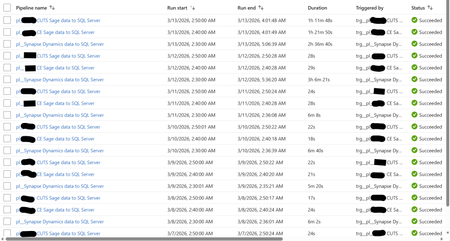
Hi, I'm facing a SQL Server focused issue that I don't understand why it's occurring and would like your help to identify and resolve, please. I will provide an in-depth breakdown of the scenario. Two years ago, I created a Azure Data Factory (ADF) Pipeline to take data from Azure Synapse to Azure SQL Server, and two other Pipelines to take data from an On-Premises Sage server to the same Azure SQL Server. These Pipelines were working perfectly up until two days ago (11/03/26) when the Pipelines still always complete successfully but the duration have increased greatly. The below screenshot shows the log of these three Pipeline for the past week. Note how prior to the 12/03/26 the Synapse Pipeline took about 6 minutes to complete and the two Sage Pipelines took around 25 seconds. Also note how on the 12/03/26 the Synapse Pipeline took over 3 hours but the two Sage Pipelines continued with their normal 25 seconds. Notice today (13/03/26) the Synapse Pipeline was still slow but now the two Sage Pipelines are taking over an hour. I'll note here that the Pipelines still complete successfully (so the config must be correct as it has been for two years). Each Pipeline contains a single (for Sage) or several (for Synapse) 'Copy data' objects. The objects have their source configuration to simply extract from the source (so either Synapse or Sage) and then the sink configuration has a 'Pre-Copy script' which simply Truncates the target SQL Server table, before loading to the SQL Server table. The screenshot below is one example - each Pre-Copy script is populated the same but just with the tables being different. When I look at the log for the Pipelines, I see a common theme for each and that is the 'Pre-Copy script' (the Truncate) is consuming 99% of the time. The screenshot below shows this common theme. So at this point, I ask the question why, after two years of all working well and completing very quickly, are the Pipelines taking so long to complete? This also seems to be an intermittent problem as I have performed several manual executions which will take a long while, then revert back to the quick several minutes again (so good), then revert once more to taking a long while again. It is intermittent. See the screenshot below. Notice how the same Pipeline have different durations. It's intermittent. The reason why I think it is a SQL Server focused issue for the following reasons: 1) Synapse - Performing simple commands (Select Top) returns data within seconds. 2) SQL Server - Performing simple commands (Select Top) usually takes seconds but during the past two days is often taking half hour. 3) SQL Server - When amending a SQL View it would take a split second to complete. During the past two days, it goes over ten minutes and still doesn't complete (I was amending the View for testing purposes). 4) SQL Server - When looking at the Views node under a database, during the past two days, it intermittently doesn't show the View. Sometimes, it will work if I log out and then back into SQL Server. 5) Power BI - Refreshing a Power BI report, whether from the Power BI Service or Desktop, call SQL Server Views. These SQL Server Views read from several SQL Server tables. These report refreshes are failing due to an IDbCommand interface error. These Power BI report data refreshes simply read from a SQL Server table via a SQL View. They don't reference or consider at all the any ADF Pipelines. The Pipelines execute between 2am and 3am each morning. The Power BI report refresh their data around 12pm to 5pm. As SQL Server seems to be problematic at the point of the 'Pre-Copy script', which is one of the end to end process, and then problematic at the very other end where Power BI reports consumes SQL Views - leads me to believe the issue is with SQL Server. I am a report developer and not an ADF expert. I've built the ADF process on the side. I haven't changed any development/configuration/etc... between this all working and failing. Our I.T. department have advised they have made no changes to contribute to this issue. Please can someone advise on what's happening here and why this issue has arose when for two years all was fine? Thanks.88Views0likes0Comments
Cannot connect Azure OpenAI Embeddings model to SQL Server 2025
On SQL Server 2025, I am trying to vectorize a table. To set up the ability for SQL Server 2025 to communicate with Azure OpenAI embeddings model, I first created a master key for encryption. CREATE MASTER KEY ENCRYPTION BY PASSWORD = 'Secret'; GO Then I set up a database scoped credential. CREATE DATABASE SCOPED CREDENTIAL [MyAzureOpenAICredential] WITH IDENTITY = 'HTTPEndpointHeaders', SECRET = '{"api-key":"secret"}'; Then I created an external model. CREATE EXTERNAL MODEL AzureOpenAIEmbeddingsModel WITH ( LOCATION = 'https://{secret}-eastus2.cognitiveservices.azure.com/openai/deployments/text-embedding-3-small/embeddings?api-version=2023-05-15', API_FORMAT = 'Azure OpenAI', MODEL_TYPE = EMBEDDINGS, MODEL = 'text-embedding-3-small', CREDENTIAL = [MyAzureOpenAICredential] ); However, when I run this simple script: DECLARE @text NVARCHAR(MAX) = N'SQL Server 2025 enables AI-powered applications'; DECLARE @embedding VECTOR(1536) = AI_GENERATE_EMBEDDINGS(@text USE MODEL AzureOpenAIEmbeddingsModel); I get this error. The database scoped credential 'MyAzureOpenAICredential' cannot be used to invoke an external rest endpoint. I have read through https://learn.microsoft.com/en-us/training/modules/build-ai-solutions-sql-server/4-integrate-ai-models pertaining to this task. As well as SQL Server 2025 docs for creating a model. I have also read SQL Server 2025 docs for creating https://learn.microsoft.com/en-us/sql/t-sql/statements/create-database-scoped-credential-transact-sql?view=sql-server-ver17. I have not found any answers.94Views0likes0CommentsPolybase - Enforce TCP/IP Protocol
Hello, We know Polybase service in SQL server by default makes use of shared memory protocol to connect SQL server (local). I would like to know if there is any way we can change or force the connections to make use of TCP / IP protocol. Any help would be appreciated.60Views0likes0CommentsService Broker on Ubuntu 20.04 (Docker) cryptography error
Hi, Has anyone successfully created a multi‑instance / multi‑host SQL Server Service Broker implementation on Linux, specifically on distributions using OpenSSL 3? I have a fully working Service Broker environment on SQL Server 2017, running in Docker on Ubuntu 18.04 (OpenSSL 1.1.1). My environment has 6 containers, arranged to simulate two datacenters: DC1: Primary AG replica + synchronous replica + async replica DC2: Same setup 7 databases in the Availability Group Service Broker dialogs between databases on the same SQL instance work perfectly. This confirms: Database‑level dialog security works Certificate‑based authentication between database principals is correct DMKs are auto-opened and protected by SMK All dialogs use BEGIN DIALOG with certificates valid and present Cross-instance messages work correctly. I have: Broker endpoints using certificate‑based endpoint authentication Proper certificate exchange (private key on owning instance, public key on the peer) Routes defined correctly Remote Service Bindings used to force dialog security Certificates created dynamically with correct validity date ranges DMKs created, opened, and re-encrypted with SMK at runtime Scripts that fully automate certificate creation, export, import, user creation, RSB creation, etc. Everything here works fine as long as I stay on Ubuntu 18.04 (OpenSSL 1.1.1). The problem: If I switch only the base Linux image—to Ubuntu 20.04, Ubuntu 22.04, or RHEL 8—and change nothing else, then all cross‑instance Service Broker dialogs fail with: An exception occurred while enqueueing a message in the target queue. Error: 9641, State: 122. A cryptographic operation failed. This error indicates a serious problem with SQL Server. This happens on SQL Server 2019 and 2022, both CU up-to-date, both using OpenSSL 3. Key points: Intra‑instance dialog security still works Endpoint transport security still works (i.e., endpoints authenticate and connect) The failure occurs only when creating session keys for cross‑instance dialog security The failure happens even when using: encryption = off fresh DMKs fresh certificates certificates stored in master or user DB key length 2048 or 3072 different validity periods So far I have: Confirmed DMKs exist on both instances Confirmed DMKs are encrypted by SMK Confirmed DMKs auto-open (is_master_key_encrypted_by_server = 1) Manually opened DMKs before creating certificates Recreated SMK/DMK on clean containers Everything behaves as expected. Repeatedly rebuilt all of the following: Endpoint authentication certificates Dialog security certificates Remote Service Bindings Database principals Routes Service Broker services, queues, and message types I’ve verified: All certificate subjects match All public keys export/import correctly Private keys exist where they should exist Thumbprints match across both sides No old certificates remain in master or user DBs Modified the OpenSSL behaviour to legacy (1.1.1) behaviour, e.g. [openssl_init] providers = provider_sect ssl_conf = ssl_sect alg_section = evp_properties [evp_properties] rh-allow-sha1-signatures = yes fips_mode = no [provider_sect] default = default_sect legacy = legacy_sect [default_sect] activate = 1 [legacy_sect] activate = 1 [ssl_sect] system_default = system_default_sect [all_policy] rsa_pkcs1_padding_check = 0 [system_default_sect] # Lowest policy to allow legacy algorithms (including SHA-1, 1024-bit RSA) CipherString = DEFAULT:@SECLEVEL=0 To rule out network/transport issues, I validated: Endpoints authenticate each other Connections appear in sys.dm_broker_connections STATE = OPEN Transport security appears to be working on OpenSSL 3. I confirmed: Messages flow when RSB is removed and encryption=off is used Messages fail only when RSB is enabled, which requires certificate‑based dialog security The target instance claims “private key missing” even though it is present and readable Has anyone successfully created a multi‑instance / multi‑host SQL Server Service Broker implementation on Linux, specifically on distributions using OpenSSL 3? If so, any guidance on how to resolve the issues i am facing? Many thanks, Andrew55Views0likes0CommentsCompat level 90: XML string-to-datetime UDF
Hello, I’m testing a behavior described in SQL Server documentation for **database compatibility level 90**. The docs state that a user-defined function that converts an XML constant string value to a SQL Server date/time type is marked as **deterministic**. On **SQL Server 2005**, I’m seeing the opposite: the function is marked as **non-deterministic** (`IsDeterministic = 0`). I’m trying to understand whether I’m missing a requirement/constraint or whether this is a doc mismatch / version-specific behavior. ### Environment - Product: **Microsoft SQL Server 2005** - Database compatibility level: **90** --- ## ✅ Repro script ```sql IF OBJECT_ID('dbo.fn_ParamXmlToDatetime', 'FN') IS NOT NULL DROP FUNCTION dbo.fn_ParamXmlToDatetime; GO CREATE FUNCTION dbo.fn_ParamXmlToDatetime (@xml XML) RETURNS DATETIME WITH SCHEMABINDING AS BEGIN DECLARE @y DATETIME; -- Convert an XML value to DATETIME SET @y = CONVERT(DATETIME, @xml.value('(/r)[1]', 'datetime')); RETURN @y; END GO SELECT OBJECTPROPERTY(OBJECT_ID('dbo.fn_ParamXmlToDatetime'), 'IsDeterministic') AS IsDeterministic, OBJECTPROPERTY(OBJECT_ID('dbo.fn_ParamXmlToDatetime'), 'IsPrecise') AS IsPrecise; GO ``` ### Actual result `IsDeterministic = 0` (non-deterministic) ### Expected result (based on docs) `IsDeterministic = 1` (deterministic) for this pattern under compat level 90. --- ## Questions 1. Are there additional conditions required for SQL Server to mark this UDF as deterministic (for example, specific XQuery usage, avoiding `CONVERT`, using `CAST`, using `datetime2` doesn’t exist in 2005, etc.)? 2. Does the determinism rule apply only when converting from an **XML literal constant** inside the function, rather than an XML parameter value? 3. Is this behavior different for **typed XML** (XML schema collections) vs **untyped XML**? 4. Is this a known difference/bug in SQL Server 2005 where the UDF is functionally deterministic but still reported as non-deterministic by `OBJECTPROPERTY`? Thank you for any clarification. ---59Views0likes0CommentsHow Can a Company Receive Support from Microsoft for SQL Server Enterprise with Software Assurance?
Hello, I’m currently managing SQL Server under the following licensing agreement: SQL Server Enterprise Core Single Language License & Software Assurance Open Value | 2 Licenses | No Level | 1 Year | Acquired Year 1 | AP I’ve been informed that Software Assurance (SA) no longer includes technical support for SQL Server. Could you please confirm if this is correct? If our organization needs technical support from Microsoft for SQL Server, I would like to clarify the following: Is it mandatory to have a Unified Support contract or to purchase incidents via the Microsoft Services Hub in order to receive support? Regarding Services Hub, I’ve heard that support incidents must be purchased using a personal Microsoft account (MSA). If this is true, can this method be used to receive support for corporate environments? Thank you in advance.55Views0likes0CommentsSQL Server 2017 – CLR was loaded in an unsupported manner (All SSIS jobs failed)
Hi, We are facing a critical issue in our SQL Server 2017 instance. When trying to use a built-in CLR function or running SSIS-related jobs, we are getting the below error: The Common Language Runtime (CLR) was loaded in an unsupported manner. This can occur if an extended stored procedure or OLE Automation object running in SQL Server calls into managed code before the CLR integration runtime host loads the CLR. You need to restart SQL Server to use CLR integration features. Steps tried so far: Restarted SQL Server service Restarted the entire Windows Server Verified .NET Framework version (4.7.03062 installed) Confirmed CLR integration is enabled (sp_configure 'clr enabled', 1) All SSIS jobs are failing due to this issue. Any suggestions, please?164Views0likes0Comments
Problem with differential backups, after a problem with a full backup
I have a database in Microsoft SQL server 2008 R2, in which I have configured the maintenance plan for backups (a full back on Tuesdays, Thursdays and Saturdays at 00, three transactional logs at 4, 5 and 6 am, and then at 7 am a differential, and so on, finishing with a differential backup at 11 PM). At the beginning of July, there was a problem with a full backup that was not done, because of lack of space (this problem was July 5th), then the differentials began to increase in size, up to 10 GB, when the full was done, the differentials decreased in size to 1 GB (before this, the differentials had a maximum size of 800 MB), the problem is that every day it increases in size, until today, when each differential weighs 6 GB, the full backup's size is about 96 GB because the database is too old. and I've seen some strange behavior, when the plan gets to the differentials, at 7:46 (for example), the file is finished creating, and it weighs 500mb, but then, 1 minute later, it's like the differential is overwritten, and there it increases in size up to 3GB. What could be causing the error? Maybe it's due to something with the TRUNCATE of the full backup? How can I solve this? I've already tried doing a new manual full backup (on a day that it's not done, at 00 am), and at the moment that it finished being done, a new manual differential, but that didn't solve it. The queries that I run: FULL BACKUP: BACKUP DATABASE [xxx] TO DISK = N'\xxx\SQLServerDatabases\Backups\full_reset.bak' WITH INIT, NAME = N'Full_Reset', SKIP, STATS = 10; DIFFERENTIAL BACKUP: BACKUP DATABASE [xxx] TO DISK = N'\xxx\SQLServerDatabases\Backups\diff_reset.dif' WITH DIFFERENTIAL, INIT, NAME = N'Diff_Reset', SKIP, STATS = 10;63Views0likes0Commentsexecution SP via linked server from SQL Job
Hello colleagues, we have next environment: 1. SQL Server standard edition 2022 16.0.4185.3. 2. SQL Server Job service running under domain managed service account. Category type is Data collector. 3. Job owned by [sa] 4. Job execute stored procedure using next command exec RemoteServer.[DB].[dbo].Load_RTL 0 5. Linked server RemoteServer is MS OLEDB Provider and configured to use (Be made using this security context). Login is a SQL Login with provided password. When job is started, it trying to execute remote SP using SQL Server Agent account, but not linked account which I indicated above in line №5. Why and how to change this so remote SP executed using linked server account? Thank you.73Views0likes0Commentslink server error after switching from SQL authentication to Active directory service account
Hi All, I am trying to switch from using a SQL account to use active directory service acccount selecting impersonate option on a link server. When i try do this i get below errror. any ideas how to fix? ------------------------------------------------------------------------------------------------------------------------------------------------------------------------------------ TITLE: Microsoft SQL Server Management Studio ------------------------------ The linked server has been updated but failed a connection test. Do you want to edit the linked server properties? ------------------------------ ADDITIONAL INFORMATION: An exception occurred while executing a Transact-SQL statement or batch. (Microsoft.SqlServer.ConnectionInfo) ------------------------------ Access to the remote server is denied because no login-mapping exists. (Microsoft SQL Server, Error: 7416) For help, click: https://docs.microsoft.com/sql/relational-databases/errors-events/mssqlserver-7416-database-engine-error ------------------------------ BUTTONS: &Yes &No ------------------------------------------------------------------------------------------------------------------------------------------------------------------------------------78Views0likes0Comments



Events
Recent Blogs
- 3 MIN READThis release is about removing friction in real production paths. It fixes transaction handling in with blocks, restores clean-machine imports on Apple Silicon, improves NULL binary parameter binding...Jul 10, 202657Views0likes0Comments
- 2 MIN READWe have released mssql-python 1.10.0 with improvements focused on authentication flexibility, cross-platform text reliability, and bulk load stability. Highlights 1) Bulk Copy now supports Active...Jun 26, 2026160Views0likes0Comments