sql server
111 Topics
CI/CD for On-Premises SQL Server using GitHub Actions
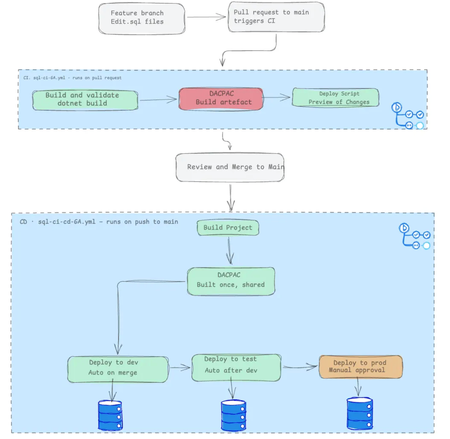
Unlike cloud-managed databases, implementing CI/CD for on-premises SQL Server is notoriously tricky, and there are few tutorials that provide an end-to-end guide. I recently built a complete three-environment pipeline (dev → test → prod) using GitHub Actions, DACPACs, and self-hosted runners, and I've documented the entire journey. The Core Challenge: Manual deployments are error-prone. Wrong connection strings, stale artifacts, skipped validation, or deploying to the wrong environment. Every step is a failure point. The Solution: A declarative SQL database project model where every table, view, and stored procedure lives in version-controlled .sql files. The tooling calculates what's changed and generates a DACPAC—a compiled schema artifact that's built once and deployed identically across all environments. The Pipeline: CI (Pull Request): Build validates syntax and references and generates a deployment script for human review so you have an understanding of what has changed. CD (Merge to Main): Build the DACPAC once, then deploy automatically through dev and test, with a manual approval gate protecting the production environment. The article walks through every step from manual deployment to a fully automated pipeline so you understand not just the what, but the why. Read the full story here184Views0likes0Comments
How does GitHub Copilot in SSMS 22 handle database context collection before generating a response?
Hello, I am trying to better understand the internal workflow of GitHub Copilot in SSMS 22, especially for database-specific questions. From the product descriptions, it seems that Copilot can use the context of the currently connected database, such as schema, tables, columns, and possibly other metadata, when answering questions or generating T-SQL. However, I could not find clear official documentation about the actual sequence of operations. My main questions are: Before generating a response, does Copilot first collect database context/metadata from the active connection and then send that context to the LLM as grounding information? Or does it first use the LLM to interpret the user’s request, decide what information is needed, and then retrieve database metadata before generating the final answer? In some explanations, I have seen the phrase "Core SQL Copilot Infrastructure", but I cannot find any official documentation for that term. Is this an official component name? If so, what does it specifically refer to in the SSMS Copilot architecture? When Copilot answers schema-related or data-related questions, what information is retrieved automatically from the connected database, and is any SQL executed as part of that process? Is there any official architectural documentation that explains: context collection, prompt grounding, LLM invocation order, and whether query execution can occur before the final response is generated? I am asking because I want to understand the feature from both an architecture and data governance/security perspective. Any clarification from the product team or documentation links would be greatly appreciated. Thank you.354Views2likes2CommentsUnable to install SQL Server 2022 Express (installer glitch + SSMS error)
Hi, I recently purchased a new Lenovo laptop, and I am trying to install Microsoft SQL Server 2022 Express along with SSMS. SSMS installed successfully, but SQL Server installation fails, and sometimes the installer UI glitches or does not load properly. Because of this, I am getting connection errors in SSMS like "server not found" and "error 40". I am not very familiar with technical troubleshooting. Can someone guide me step-by-step in a simple way to install SQL Server correctly? Thank you.528Views0likes1Comment
Cannot connect Azure OpenAI Embeddings model to SQL Server 2025
On SQL Server 2025, I am trying to vectorize a table. To set up the ability for SQL Server 2025 to communicate with Azure OpenAI embeddings model, I first created a master key for encryption. CREATE MASTER KEY ENCRYPTION BY PASSWORD = 'Secret'; GO Then I set up a database scoped credential. CREATE DATABASE SCOPED CREDENTIAL [MyAzureOpenAICredential] WITH IDENTITY = 'HTTPEndpointHeaders', SECRET = '{"api-key":"secret"}'; Then I created an external model. CREATE EXTERNAL MODEL AzureOpenAIEmbeddingsModel WITH ( LOCATION = 'https://{secret}-eastus2.cognitiveservices.azure.com/openai/deployments/text-embedding-3-small/embeddings?api-version=2023-05-15', API_FORMAT = 'Azure OpenAI', MODEL_TYPE = EMBEDDINGS, MODEL = 'text-embedding-3-small', CREDENTIAL = [MyAzureOpenAICredential] ); However, when I run this simple script: DECLARE @text NVARCHAR(MAX) = N'SQL Server 2025 enables AI-powered applications'; DECLARE @embedding VECTOR(1536) = AI_GENERATE_EMBEDDINGS(@text USE MODEL AzureOpenAIEmbeddingsModel); I get this error. The database scoped credential 'MyAzureOpenAICredential' cannot be used to invoke an external rest endpoint. I have read through https://learn.microsoft.com/en-us/training/modules/build-ai-solutions-sql-server/4-integrate-ai-models pertaining to this task. As well as SQL Server 2025 docs for creating a model. I have also read SQL Server 2025 docs for creating https://learn.microsoft.com/en-us/sql/t-sql/statements/create-database-scoped-credential-transact-sql?view=sql-server-ver17. I have not found any answers.342Views0likes1Comment
Feature Proposal: Ability to Exclude a column/subset of Columns in Select.
Summary I would like to propose a new T-SQL feature that allows developers to select all columns from a table while explicitly excluding a small subset of columns. Currently, when a table contains many columns and only one or two need to be omitted, developers are forced to mention every remaining column manually in the "Select" SQL. This leads to verbose queries, reduced maintainability, and a higher chance of mistakes when the schema evolves. Motivation Consider a table with 20 or more columns. Current approach, SELECT EmployeeId, FirstName, LastName, Department, Designation, Email, PhoneNumber, DateOfBirth, Address, City, State, Country, PostalCode, ManagerId, JoiningDate, LastModifiedDate, Status, IsActive, CreatedDate FROM Employees; If the intention is simply to exclude a single sensitive column such as Salary, the query becomes unnecessarily long. A more concise alternative could be: SELECT * FROM Employees EXCLUDE (Salary); The engine would expand * internally and remove the specified columns before execution. Benefits 1. Reduces boilerplate code. 2. Improves readability for wide tables. 3. Makes queries easier to maintain as schemas evolve. 4. Reduces the likelihood of accidentally omitting newly added columns. 5. Makes it simpler to exclude sensitive or internal-use columns from result sets. Expected Behavior Single column exclusion SELECT * FROM Employees EXCLUDE (Salary); Returns all columns except Salary. Multiple column exclusion SELECT * FROM Employees EXCLUDE (Salary, PasswordHash); Returns all columns except Salary and PasswordHash. Suggested Validation Rules 1. Every excluded column must exist in the projected result set. If an excluded column does not exist, compilation should fail with an appropriate error. 2. Duplicate column names in the exclusion list should either: be ignored, or produce a validation error. 3. If the exclusion list removes every projected column, the statement should fail. Example: SELECT * FROM Employees EXCLUDE (Employee, Name, Salary); If these are the only columns in the table, an error could be raised such as: The EXCLUDE clause cannot eliminate all columns from the SELECT list. Returning a zero-column result set would likely be confusing and less useful. Additional Considerations This syntax could also be valuable when selecting from joins, views, or derived tables, where developers frequently want "everything except a few fields." Closing Thoughts I believe this would be a practical quality-of-life enhancement for T-SQL that addresses a common developer pain point while remaining simple to understand and implement. It would reduce repetitive code and improve maintainability without affecting existing queries.314Views0likes1Comment
Windows server 2025 SQL patching cluster problem.
Dear Team, I have a problem when I am patching upgrade windows server 2025 with KB5091157. After patching is the clustering is not able to join back; it shows the error with credentials. The log error is "Cannot connect sqlxxxxxxx." you do not have administrative privileges on the cluster. Contact your network administrator to request access. Note: The server is not in a different VLAN network.355Views0likes1CommentSome Questions About `log_send_rate`, `log_send_queue_size`, `redo_queue_size`, and `redo_rate`.
Hello, I've recently been trying to monitor the latency of the Available Group. Regarding logsend latency and redo latency, I hope to monitor them using the `log_send_queue_size` / `log_send_rate` and `redo_queue_size` / `redo_rate` metrics in the `dm_hadr_database_replica_states` DMV. However, in the process, I noticed that even in busy systems, `log_send_queue_size` and `log_send_rate` are often 0, whereas in idle systems, `redo_rate` is never 0. Could you please explain the specific definitions of `log_send_rate` and `redo_rate`? Why is `redo_rate` not zero when no data synchronization is taking place? In a system where data synchronization is occurring, `log_send_rate` and `log_send_queue_size` may be zero. My understanding is that log sends occur very quickly, while the monitoring granularity is not fine-grained enough—is that correct? Hope someone from the community comment on this.302Views0likes2CommentsSQL Server FCI CSV storage flips multiple times into Online (No Access) state and eventually fails
Dear Team, I'm encountering an issue with our SQL Server multi‑instance failover cluster after applying the OS security patches and restarting the second node. Once the second node comes back online, the Cluster Shared Volume (CSV) briefly flips multiple times into Online (No Access) state and eventually fails.(we can make it online manually, but again flips and failed after sometime). To make the SQL cluster available, we either need to shut down the VM or revert the patch. Before the patching, all cluster roles and SQL instances were moved off the node, and the cluster appeared healthy. The issue only occurs after the reboot of the second node. (first node patched and restarted and everything working fine) OS : Windows Server 2025 Standard Patch tried: KB5075899 (February,2026 ) KB5078740 (March,2026) KB5082063 (April 2026 ) KB5087539 (May 2026) Could you please advise if there are any specific checks or steps we should follow during OS patching to prevent CSV access loss? Is it an issue with the patch or something else? Any insights or recommended actions would be really helpful to perform the security OS patch in the server Thanks you!149Views0likes0CommentsDocumentation contradictory
Hi, ALL, Page https://learn.microsoft.com/en-us/sql/t-sql/statements/create-database-transact-sql?view=sql-server-ver17&tabs=sqlpool states [quote] SIZE, MAXSIZE, and FILEGROWTH parameters can be set when a UNC path is specified for the file. [/quote] However later on that same page it states [quote] SIZE can't be specified when the os_file_name is specified as a UNC path. [/quote] I think those 2 sentences contradicts each other.....133Views0likes1Comment
MS ODBC and OLE DB failed
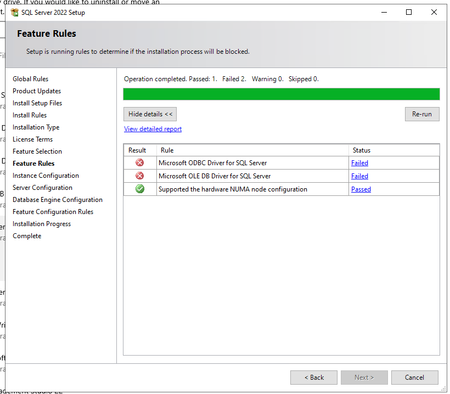
Hello, In SQL Server 2022 (16.0.4250.1) showed two fails and can´t continue (see screenshot) On system are installed those versions of ODBC and OLE DB System was previously working (not stopped on this window for fail). We did repair of both installation and restart pc, but not helpful. Whta and how to repair it, please? Thank you.144Views0likes1Comment