sqlserver
85 TopicsAnnouncing flexible provisioning for SQL Server on Linux Azure VMs (Public Preview)
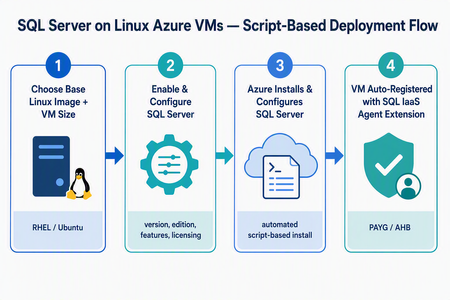
What’s changing We’re introducing a new script-based deployment experience for provisioning SQL Server on Linux Azure Virtual Machines (VMs). This experience replaces the earlier model that relied on pre-created SQL Server on Linux Marketplace images, which have been deprecated. Pre-created SQL Server on Linux Marketplace images are no longer available for new provisioning through the Azure portal, the Azure SQL hub, Azure CLI, or PowerShell. Instead, SQL Server is now installed and configured during VM provisioning using a flexible, automated, script-based workflow. The result is a more adaptable and supportable deployment model that keeps SQL Server on Linux Azure VMs fully supported, reduces image-maintenance overhead, and makes it easier to adopt the latest Linux distributions, VM families, and configuration options - all while giving you more control over your SQL Server setup. Why the new model matters Greater flexibility and control — choose your Linux distribution, SQL Server version, edition, and even bring your own mssql.conf to tailor the configuration. Faster access to innovation — new Linux versions and Azure capabilities are picked up automatically, without waiting for a new baked image to be published. Automatic registration built in — every VM is registered with the SQL IaaS Agent extension by default, unlocking licensing flexibility, compliance, and richer visibility. A dynamic, guided UI — the portal enables or disables options based on supported operating system, SQL Server, and licensing combinations, so you only see valid choices. Supported Linux distributions The script-based deployment experience supports the following distributions, and future versions are picked up automatically as they become supported — no manual intervention required: Distribution Supported versions Red Hat Enterprise Linux (RHEL) RHEL 9, RHEL 10 (and future versions) Ubuntu Ubuntu 22.04, Ubuntu 24.04, Ubuntu 26.04 (and future versions) Automatic registration applies to both Red Hat Enterprise Linux and Ubuntu, across all their supported versions. Automatic registration with the SQL IaaS Agent extension SQL Server on Linux VMs deployed through this experience are automatically registered with the SQL Server IaaS Agent extension. Registration creates a SQL virtual machine resource in Azure (separate from the VM resource) and unlocks: Licensing flexibility — choose Pay-As-You-Go (PAYG) or Azure Hybrid Benefit (AHB), and switch between them anytime with no downtime. Compliance — a simplified way to meet Azure Hybrid Benefit product-term requirements without per-resource registration forms. Visibility and telemetry — clear license-type visibility, subscription-level tracking, and better operational insight from the Azure portal, CLI, or PowerShell. Note: Automatic registration is enabled by default during deployment. You can unregister or re-register a VM after deployment through the Azure portal, Azure CLI, or PowerShell. The end-to-end flow at a glance Experience: The “Create a virtual machine” tab Use this flow if you’re starting from the familiar VM creation experience in the Azure portal. In the Azure portal, go to Virtual machines (or Create a resource → Virtual machine) and select Create. On the Basics tab, select your project details (subscription, resource group), instance details, and a supported Linux base image — RHEL 9, RHEL 10, Ubuntu 22.04, or Ubuntu 24.04. Choose your VM size, authentication, and inbound ports as usual. Go to the Advanced tab and select the Install SQL Server checkbox. This enables SQL Server provisioning on the VM. A new SQL Server settings tab becomes available. Open it to configure your SQL Server deployment: SQL Server version — e.g., SQL Server 2025 or SQL Server 2022. Edition — Enterprise, Standard, Developer, Express, and Evaluation editions (options adjust to the selected version). Licensing model — Pay-As-You-Go (PAYG, default) or Azure Hybrid Benefit (AHB). Advanced configuration — Upload a custom mssql.conf file to set SQL connectivity, Azure Key Vault integration, and the tuned performance profile. Select Review + create, review the configuration summary, and select Create. Azure provisions the VM, then automatically installs and configures SQL Server and registers the VM with the SQL IaaS Agent extension. Managing licensing after deployment Because your VM is registered with the SQL IaaS Agent extension, you can change the licensing model anytime — with no downtime and no restart of the VM or SQL Server service. Azure portal: Go to the SQL virtual machine resource → Settings → SQL Server configuration → Manage. Azure CLI az sql vm update -n <VM_NAME> -g <RESOURCE_GROUP> --license-type AHUB Azure PowerShell: Set-AzSqlVM -Name <VM_NAME> -ResourceGroupName <RESOURCE_GROUP> -LicenseType AHUB Note: Switching between PAYG and AHB is immediate, incurs no additional cost, and does not restart the VM or the SQL Server service. Wrapping up The move to script-based deployment modernizes how you provision SQL Server on Linux Azure VMs. By replacing deprecated pre-created Marketplace images with a flexible, automated, script-based flow — and by registering every VM with the SQL IaaS Agent extension automatically — you get more choice, faster access to new Linux and SQL Server versions, and a cleaner path to licensing flexibility, compliance, and visibility. Whether you start from the Create a virtual machine tab or the Azure SQL hub, you get the same guided experience across RHEL 9, RHEL 10, Ubuntu 22.04, Ubuntu 24.04, and future versions. Ready to try it? Head to a Create a virtual machine option in the Azure portal. We’d love your feedback — let us know how the new experience works for your workloads in the comments.205Views1like0CommentsThe same connection string keywords now work across our SQL drivers
For years we've been treating every one of our Microsoft SQL drivers as a distinct entity. We've heard your feedback that we need to re-examine that approach. A team running applications written in multiple languages against one database should not have to juggle multiple connection strings. We are fixing that. What changed We added keyword aliases to SqlClient, JDBC, ODBC, OLE DB, and go-mssqldb, so the same spelling works across all of them. All five now accept Server Database UID App Encrypt TrustServerCertificate ApplicationIntent MultiSubnetFailover FailoverPartner We added also added the following aliases: Driver Now accepts Already worked as SqlClient ConnectTimeout FailoverPartner PacketSize WorkstationID columnEncryption Connect Timeout Failover Partner Packet Size Workstation ID / WSID Column Encryption Setting JDBC uid trusted_connection app connectTimeout columnEncryption quotedId user integratedSecurity applicationName loginTimeout columnEncryptionSetting quotedIdentifier ODBC ConnectTimeout MultipleActiveResultSets FailoverPartner WorkstationID no keyword MARS_Connection Failover_Partner WSID OLE DB ConnectTimeout MultipleActiveResultSets WorkstationID Timeout MarsConn WSID go-mssqldb Connect Timeout Failover Partner Application Intent Trust Server Certificate Multi Subnet Failover Host Name In Certificate Server SPN WSID App connection timeout failoverpartner applicationintent trustservercertificate multisubnetfailover hostnameincertificate serverspn workstation no keyword Nothing is deprecated. Connect Timeout still works in SqlClient, loginTimeout still works in JDBC, WSID still works in ODBC and OLE DB, MarsConn and Timeout still work in OLE DB. No public APIs changed. Move one app to the shared spellings and leave the rest alone. One string, four languages One string, assigned once: Server=<server>;Database=AdventureWorksLT;UID=<user>;PWD=<password>;Encrypt=no;TrustServerCertificate=yes We pass it unchanged to four clients. All four return the same five rows from SalesLT.Product. C# on Microsoft.Data.SqlClient. Takes it as-is. Go on go-mssqldb. Takes it as-is. Python on mssql-python. Takes it as-is. C++ on Microsoft ODBC Driver 18. We still use the same string, just with the driver name appended: ;Driver={ODBC Driver 18 for SQL Server} Will things ever be perfect? No. Some drivers have specific requirements, like the ODBC specification that requires a driver name, like we just saw. That said, remembering to add one tag sure beats having to start over from scratch. PHP and Django PHP connects through the ODBC driver, so it picks up the ODBC keywords. mssql-django runs on pyodbc by default. It can run on mssql-python per connection with OPTIONS = {"python_driver": "mssql_python"}. Either way it takes the server and database through Django settings and passes the rest through extra_params. On the mssql-python path it drops DRIVER, DSN, and SERVERNAME, because mssql-python bundles its own driver and rejects them. mssql-python also accepts spellings the ODBC driver does not, including Packet Size with a space and addr for the server, and normalizes them before connecting. This is just the first step You told us that when we say a keyword is supported it should mean the same thing in every language we ship. We aren't there yet. This is the first piece. A big one on our list is Microsoft Entra authentication, although it is more difficult. The drivers rely on per-language frameworks that we do not own. Each has different levels of support for Microsoft Entra authentication methods. Where to get the new keywords Driver Language Available in Microsoft.Data.SqlClient C# 7.1.0 go-mssqldb Go v1.11.2 mssql-python Python 1.15.0 Microsoft ODBC Driver 18 C++ 18.7.1.1 JDBC Java 13.6.0 OLEDB C++ Coming in October If a keyword you expect is still missing in a driver you use, open an issue on that driver's repo and tell us which one. We want to know what your priorities are.316Views1like0CommentsMicrosoft.Data.SqlClient 7.1.0 is now generally available
This release is about making everyday database workloads more predictable. It fixes a collection of issues that could appear under connection failures, retries, transactions, pooling, streaming, encryption, and newer SQL Server data types. If your application uses Microsoft.Data.SqlClient, upgrading to 7.1.0 gives you a provider with fewer sharp edges in the paths your application already depends on. Connections and transactions behave more reliably Connection pooling is one of those features that should disappear into the background. Your application opens a connection, does its work, returns the connection, and moves on. SqlClient 7.1.0 fixes several cases where that process could go wrong: A connection could return to the pool in a broken state after a TransactionScope rollback. Pool performance counters could become negative or drift upward after failed or broken connections. A connection factory timer could keep waking the process even when there were no pools to maintain. A race during connection opening could produce an InvalidCastException. Failover login paths could encounter invalid parser state. Several cancellation token sources could remain allocated longer than necessary. These fixes matter most in long-running services, applications that reconnect frequently, and workloads that depend heavily on pooling and transactions. Better behavior for modern SQL Server data SqlClient 7.1.0 also fixes issues that affect newer .NET and SQL Server scenarios. Applications using DateOnly with variants or table-valued parameters now send the correct SQL type. This avoids converting valid date values into datetime and prevents failures for dates outside the datetime range. Large decimal parameters with explicit precision and scale no longer cause an OverflowException. This is especially important for Always Encrypted applications, where precision and scale are commonly specified explicitly. Azure SQL applications using schema discovery can now see the json data type through: connection.GetSchema("DataTypes"); The release also corrects Always Encrypted metadata reads and fixes a SqlDataReader streaming issue where calling IsDBNull() before reading a streamed value could skip data. Easier diagnosis for libraries and tools SqlClient 7.1.0 adds an application identity to the TDS USERAGENT payload. Most application developers do not need to configure this. The feature is intended for libraries and tools built on top of SqlClient. For example, Entity Framework Core, SQL Server Management Studio, SqlPackage, and other tools can identify themselves to SQL Server. That gives database and service operators a clearer picture when investigating a workload. Instead of seeing only that many connections came from SqlClient, telemetry can show which client stack created them. A library or tool can register its identity before opening a connection: using Microsoft.Data.SqlClient; await using var connection = new SqlConnection(connectionString); connection.RegisteredApplication = RegisteredApplication.EntityFrameworkCore; await connection.OpenAsync(); This value is telemetry only. It must not be used for authorization or other security decisions. Moving away from Transparent Network IP Resolution TransparentNetworkIPResolution is now marked obsolete. There is no runtime behavior change in 7.1.0. Applications that use the property will receive a compile-time warning and can migrate when convenient. For new code, use MultiSubnetFailover, which works across supported target frameworks and is the recommended approach for availability group listeners. Upgrade to 7.1.0 Install the provider with NuGet: dotnet add package Microsoft.Data.SqlClient --version 7.1.0 The SqlClient extension packages continue to use aligned versions. If your application references them, update them to 7.1.0 too: Microsoft.Data.SqlClient.AlwaysEncrypted.AzureKeyVaultProvider Microsoft.Data.SqlClient.Extensions.Azure Microsoft.Data.SqlClient.Extensions.Abstractions Microsoft.Data.SqlClient.Internal.Logging Applications upgrading from 7.0.2, 7.0.3, or a 7.1 preview do not need new .NET Framework strong-name binding redirects. Read the complete 7.1.0 release notes and get the package from NuGet.1.2KViews2likes0Commentsmssql-django 2.0: Now with mssql-python
mssql-django 2.0 is on PyPI. This release adds Microsoft's new mssql-python driver as a second way to connect, moves the supported Python, Django, and SQL Server versions forward, and fixes several connection and query bugs that production teams hit. pip install --upgrade mssql-django Pick your driver, one database at a time Until now, mssql-django spoke to SQL Server through pyodbc and an ODBC driver you installed yourself. That still works, and it's still the default. Version 2.0 adds a second path: mssql-python, Microsoft's Python driver for SQL Server. You choose per database alias. Add one option to the alias you want to move: DATABASES = { "default": { "ENGINE": "mssql", "NAME": "appdb", "HOST": "contoso.database.windows.net", "PORT": "1433", "OPTIONS": { "python_driver": "mssql_python", "extra_params": "Encrypt=yes", }, }, "reporting": { # No python_driver, so this alias stays on pyodbc. "ENGINE": "mssql", "NAME": "reportdb", "HOST": "contoso.database.windows.net", "PORT": "1433", "OPTIONS": { "driver": "ODBC Driver 18 for SQL Server", }, }, } ENGINE doesn't change. Remove the option and the alias is back on pyodbc. That's the whole rollback plan, which is the point: you can try the new driver on one database, run your test suite, and leave everything else alone. The mssql-python path covers the day-to-day work: connections, pooling, retries, transactions and savepoints, datetimeoffset values, introspection, and Microsoft Entra ID authentication. One practical difference worth calling out. On the mssql-python path, pip also installs the mssql-python-odbc companion package, which supplies Microsoft ODBC Driver 18 for SQL Server. There's no separate driver install, which takes a step out of container images and App Service deployments. Know what changes before you switch The two drivers aren't identical, and the differences are the reason we made this per alias instead of a global switch. The mssql-python path ignores driver, dsn, host_is_server, and unicode_results. There's no ODBC Driver 17 fallback. It validates extra_params against an allowlist and rejects pyodbc-only keywords such as ColumnEncryption, APP, and Connect Timeout, so use the connection_timeout option instead of the last one. It also doesn't enable MARS, which means QuerySet.iterator() reads the full result into memory before yielding rows so a nested query can reuse the connection. On a large queryset, that memory is real. Budget for it. Stay on pyodbc if you depend on a named DSN, FreeTDS, MARS, Always Encrypted through ColumnEncryption, or an ODBC driver version you manage yourself. We cleaned up the version matrix This is something we've wanted to get to for a while. mssql-django 2.0 supports Python 3.10 through 3.14, Django 5.2 through 6.1, and SQL Server 2017 through 2025, plus Azure SQL Database, Azure SQL Managed Instance, and SQL database in Microsoft Fabric. Django 6.0 and 6.1 need Python 3.12 or later. Python 3.8 and 3.9 and Django 3.2 through 5.1 are no longer supported. The compatibility code is still in the tree, so nothing breaks the moment you upgrade, but those combinations aren't tested or listed. Fixes MARS settings are honored. If you set MARS_Connection=no in extra_params, the backend used to overwrite it with the Windows default and the connection failed. That's the bug frederiksoftware reported when connecting an on-premises Django app to a Microsoft Fabric Warehouse. The explicit value now wins, case-insensitively, so those connections work. To be clear about scope: this fixes the connection, it doesn't add full Warehouse support for migrations or other SQL Server features. Bracket wildcards are escaped in F() expression lookups. A pattern lookup comparing two fields, such as filter(name__contains=F("code")), didn't escape the SQL Server [ wildcard, so bracket characters in your data were treated as wildcard syntax and matched the wrong rows. Thanks to @Khan3K for the fix. Quotes are escaped in inspectdb schema names. inspectdb --schema produced malformed T-SQL for a schema name containing a single quote. An empty HOST connects to localhost on the mssql-python path. Omitting HOST in Django settings leaves it as an empty string, which mssql-python rejected. It now resolves to localhost, matching the pyodbc behavior for local instances. pytz is gone Time zone handling moved to the standard library zoneinfo module, with the tzdata package supplying the IANA database where the operating system doesn't ship one: Windows, and minimal container images. This fixes offsets for zones with negative daylight saving offsets, and it drops a dependency. Before you upgrade mssql-python is a required dependency in 2.0 even when every alias uses pyodbc. That means mssql-django 2.0 installs only on platforms that have a compatible mssql-python distribution: Windows x64, Windows ARM64 with Python 3.11 and later, macOS 15 and later on Intel or Apple silicon, and Linux x64 or ARM64 with glibc 2.28 or later or musl 1.2 or later. SUSE Linux on ARM64 isn't supported. If you're outside that list, stay on 1.8.0. Upgrade now pip install --upgrade mssql-django Release notes Documentation Report an issue Thanks to @Khan3K and @frederiksoftware for the contributions in this release.258Views0likes0CommentsMicrosoft ODBC Driver 18.7.1: smaller vectors, easier configuration, and better cloud routing
Microsoft ODBC Driver 18.7.1 for SQL Server is now generally available. This release continues the work we started in 18.6 to support modern application patterns while making the driver easier to deploy and operate. It adds float16 vector support, brings familiar connection-string names to ODBC, improves routing for Azure SQL Database Hyperscale, expands platform coverage, and removes a Windows installation dependency. It also includes a substantial set of reliability, security, and diagnostic fixes. Many of those changes happen below the application layer. More compact vector workloads ODBC Driver 18.6.1 introduced support for the SQL Server vector data type using 32-bit floating-point values. Version 18.7.1 adds support for float16 vectors. A float16 element uses two bytes instead of the four bytes required by float32. For applications working with large embedding collections, that can reduce the amount of vector data stored and moved between the application and the database. The right precision depends on the model and workload, but applications that can use half-precision vectors now have that choice through ODBC. This matters because vector support is becoming part of the normal database application stack. You should not need a separate connectivity path just because an application combines relational data, business data, and embeddings. Adding float16 support brings ODBC forward with the vector capabilities being added across SQL Server and Azure SQL. Connection strings that travel more easily ODBC has accumulated its own connection-string vocabulary over many years. Some settings use different names in ODBC, JDBC, OLE DB, and SqlClient even when they configure the same behavior. Version 18.7.1 accepts four additional connection-string keywords: MultipleActiveResultSets FailoverPartner WorkstationID ConnectTimeout The first three are aliases for existing ODBC settings. For example, MultipleActiveResultSets maps to MARS_Connection, while WorkstationID maps to WSID. Existing connection strings continue to work. ConnectTimeout maps to the ODBC login timeout. It supports the same behavior as the underlying ODBC setting, including zero for an infinite timeout and a default of 15 seconds. These additions reduce the small but persistent differences you encounter when moving configuration between Microsoft SQL drivers. Shared configuration systems, deployment templates, and migration tools can use more consistent names instead of maintaining driver-specific translations for common settings. We also spent some time on details that tend to cause production surprises: case-insensitive matching, precedence when an alias and canonical name both appear, invalid values, timeout limits, and DSN interaction. Better routing for Hyperscale read workloads Azure SQL Database Hyperscale named replicas provide independent read scale for applications with large or isolated read workloads. ODBC Driver 18.7.1 adds load-balanced routing for named-replica reader endpoints. Applications can connect through the reader endpoint and allow the service and driver to handle routing across the available read capacity. That makes the endpoint more useful for workloads such as reporting, analytics, and read-heavy application services without requiring applications to manage individual replica destinations themselves. The driver already sits at the point where connection intent becomes a physical connection. Supporting this routing behavior there keeps replica topology out of application code. Less setup on Windows The Windows package no longer requires the Microsoft Visual C++ Runtime to be installed separately. That removes a prerequisite from new machines, container images, automated build agents, and managed desktop deployments. It also reduces one of the common differences between a machine where an application was built and a clean machine where it is installed. The change is small from an application-code perspective. For deployment owners, it means fewer moving parts and one less prerequisite to diagnose. More Linux distributions Version 18.7.1 adds support for: Alpine Linux 3.23 SUSE Linux Enterprise Server 16 Ubuntu 26.04 Platform support is more than producing an RPM, DEB, or APK. The driver must install cleanly, connect successfully, upgrade from prior versions where packages are available, and coexist with ODBC Driver 17 on supported configurations. The installer automation used for this release covers AMD64 and ARM64 variants across RHEL, Azure Linux, Ubuntu, Debian, Alpine, and supported SUSE environments. Windows coverage includes Windows 11 and Windows Server 2019, 2022, and 2025, with fresh installation, upgrade, coexistence, and MSI repair scenarios where applicable. Ubuntu 26.04 currently receives fresh-install validation because previous packages are not yet available from the Ubuntu 26.04 Microsoft package repository. The test pipeline records that distinction instead of treating unsupported upgrade combinations as covered. Reliability work below the application Database drivers operate on untrusted network input, coordinate asynchronous operations, manage native memory, and translate between platform APIs and the Tabular Data Stream protocol. Small mistakes in those paths can produce failures far away from the code that caused them. The 18.7.1 release addresses several of those cases: Protocol parsing is more defensive when processing malformed LOGINACK and ENVCHANGE tokens. Memory corruption issues were corrected in the SQL Server Network Interface packet pool and on Linux ARM64 and macOS ARM64. Multiple Active Result Sets connections now clean up memory correctly when a connection ends abruptly. Asynchronous timeout handling was corrected for zero-length partially length-prefixed data and data-classification tokens. OpenSSL errors left on a calling thread are handled correctly. XA distributed transactions recover more reliably from SQL Server connectivity failures. Always Encrypted performs less redundant logging while acquiring Azure Key Vault tokens. Tabular Data Stream packet tracing reports the correct byte count for overlapped named-pipe writes. Most applications will never encounter the exact failure conditions behind these fixes. That is the goal. A malformed server response should produce a controlled error. A dropped connection should release its memory. A timeout should behave consistently even when it arrives in the middle of an unusual protocol sequence. Get ODBC Driver 18.7.1 Microsoft ODBC Driver 18.7.1 for SQL Server is available now for Windows, Linux, and macOS. Download Microsoft ODBC Driver for SQL Server Read the ODBC Driver release notes Learn about the vector data type in ODBC If your application uses vectors, Azure SQL Database Hyperscale named replicas, shared connection configuration, or newer Linux distributions, 18.7.1 contains changes you can use immediately. For other applications, the deployment, protocol, memory-management, and diagnostic fixes provide a strong reason to include this release in your normal driver update cycle.617Views0likes1CommentSQL Server 2016 Extended Security Updates: Stay Protected While You Modernize
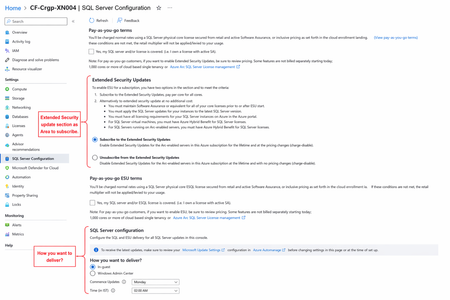
SQL Server 2016 reaches the end of extended support on July 14, 2026. After that date, instances that remain on SQL Server 2016 no longer receive regular security updates unless they are covered through Extended Security Updates (ESUs)). ESUs provide a time-bound security bridge for customers who need to maintain existing workloads while they upgrade to a supported SQL Server release or modernize to Azure SQL. SQL Server 2016 Extended Security Updates can be managed across multiple deployment models, including SQL Server enabled by Azure Arc for on-premises and other clouds, and SQL Server on Azure Virtual Machines. This provides a consistent protection path while customers assess modernization options and operational readiness. Today, we are making the Extended Security Updates subscription experience available in Azure so customers can enroll ahead of SQL Server 2016 reaching end of support, and be ready to receive Extended Security Updates when they are released. Why this matters now SQL Server follows a fixed lifecycle policy with mainstream support followed by extended support. Once SQL Server 2016 exits extended support, Extended Security Updates become the only for continued security coverage on that version. Extended Security Updates are intended as a temporary option for risk reduction, not as a long-term alternative to upgrade or modernization. For many production environments, the constraint is not awareness of the deadline but the complexity of the upgrade path. Application dependencies, validation requirements, change windows, and compliance controls sometimes make immediate migration impractical. Extended Security Updates help teams maintain security coverage during that transition period while they sequence remediation, testing, and platform changes. How SQL Server 2016 Extended Security Updates work Support window: SQL Server 2016 exits extended support on July 14, 2026. Extended Security Updates are available for up to three additional years, with coverage periods defined by the SQL Server 2016 lifecycle schedule through July 17, 2029. Supported scope and update model Eligible versions: SQL Server 2016. Extended Security Updates are also available for SQL Server 2014 until July 12, 2027. Eligible editions: Standard and Enterprise Update content: Extended Security Updates deliver critical security updates when applicable. They do not include new features, non-security bug fixes, non-critical security updates, or design changes. Operational note: SQL Server ESUs are not published on a fixed monthly cadence. They are released when qualifying vulnerabilities require a release. For Azure Arc-connected environments, Extended Security Updates subscriptions can be aligned to the deployment model, including virtual cores for VM-based deployments and physical cores for host-based scenarios. This gives organizations flexibility to match ESU coverage to how SQL Server is deployed and managed. How to acquire Extended Security Updates coverage Customers can acquire SQL Server ESU coverage in different ways depending on where SQL Server is running and how they prefer to purchase. For on-premises, edge, and other cloud environments, SQL Server enabled by Azure Arc provides the control plane to onboard instances, manage eligibility, and apply ESU subscription settings. For workloads already running on Azure Virtual Machines, customers can subscribe to ESU coverage through Azure-based controls. Customers can purchase that coverage as pay-as-you-go through Azure or through Volume Licensing on an annual basis for eligible licenses with active Software Assurance. When customers choose Volume Licensing, Azure Arc registration is still required to activate access to ESUs. SQL Server enabled by Azure Arc: Use Azure Arc to onboard eligible SQL Server instances outside Azure, manage Extended Security Updates subscription settings, and support both connected and qualifying disconnected scenarios. SQL Server on Azure Virtual Machines: Use Azure-based controls to subscribe to Extended Security Updates coverage for workloads running on Azure Virtual Machines. For SQL Server 2016, this now requires a paid ESU subscription rather than the previous no-additional-cost experience. Supported regions: Subscribing to Extended Security Updates for SQL Server on Azure VMs is only available in the supported regions listed. To subscribe to ESUs in an unsupported region, contact Microsoft Support to determine the appropriate ESU acquisition path. Volume Licensing: If you cannot subscribe to Extended Security Updates via Azure Arc, you can purchase through the Volume Licensing channel on an annual basis for eligible licenses with active Software Assurance. Talk to your Microsoft seller for more information. Azure Arc registration is still required to activate access to ESUs. Migrate to Azure SQL: Customers that are ready to modernize further can move to Azure SQL Database or Azure SQL Managed Instance, which removes Extended Security Updates dependency by moving to fully supported, cloud-managed SQL services. The following diagram summarizes how customers can obtain SQL Server 2016 Extended Security Updates coverage through Azure Arc and Azure Virtual Machines. What to do next Organizations still running SQL Server 2016 should use the remaining support window to assess estate readiness, determine the right Extended Security Updates subscription model, and define the target modernization path for each workload. For some environments, that means upgrading in place to a supported SQL Server version. For others, it means migrating and upgrading to Azure Virtual Machines or Azure SQL to simplify long-term operations. The important step is to make the transition plan executable before support ends. Learn more SQL Server end of support options SQL Server Extended Security Updates enabled by Azure Arc SQL Server enabled by Azure Arc Extend support for SQL Server with Azure VM SQL Server on Azure VM overview Migrate to Azure SQL4.3KViews0likes7CommentsMicrosoft JDBC Driver 13.6 for SQL Server is now available
Microsoft JDBC Driver 13.6 for SQL Server is now available. This release helps Java applications get more work from the same infrastructure, diagnose latency with better context, strengthen critical connection paths, and adopt the latest capabilities in SQL Server and Azure SQL. Version 13.6 includes everything you saw in the 13.5 preview cycle and the final compatibility, security, performance, and quality work completed for general availability. Existing applications keep the established JDBC programming model, while teams can opt into new capabilities. What you get in 13.6 If you run... You get... Large, wide, or numeric-heavy queries Less allocation and garbage collection work in the ResultSet read path High-concurrency parameterized workloads New parameter length hints that can reduce oversized SQL Server memory grants Always Encrypted with secure enclaves Cached Column Encryption Key lookups that reduce remote key-store calls Production performance telemetry Nanosecond timing and SQL, statement, application, and pool context Azure SQL Hyperscale reader endpoints Automatic routing to named read replicas with the correct database context Vector, JDK 26, or cross-driver migration projects Stronger vector validation, JDK 26 support, and more portable connection strings Spend less time and memory moving data Data access performance matters at application scale because small costs in a hot path repeat for every value in every row. Driver 13.6 reduces allocations and unnecessary work across several frequently used paths: ResultSet processing uses faster paths for common synchronous reads. DECIMAL, NUMERIC, MONEY, and SMALLMONEY decoding creates fewer temporary objects. Common string and BigDecimal operations avoid intermediate allocations. Driver API entry and exit logging avoids work when detailed logging isn't enabled. These changes are automatic. Applications don't need a new connection property or code change to benefit. Workloads that read large, wide, or numeric-heavy result sets should see lower garbage collection pressure and more consistent throughput. Always Encrypted with secure enclaves also gets a targeted performance improvement. Enclave queries now reuse Column Encryption Keys through the driver's existing symmetric key cache instead of returning to the key store for the same key on every execution. For deployments backed by Azure Key Vault or another remote key store, this reduces network round trips, lowers query latency, and helps avoid key-store throttling under load. Give SQL Server better parameter size information Prepared statements can be efficient on the client and still request more server memory than the query needs. When the driver doesn't know the expected length of a varchar, nvarchar, char, nchar, varbinary, or binary parameter, it can send a much larger type definition than the application typically uses. SQL Server then uses that declared width when estimating row size and memory grants. Driver 13.6 lets applications provide parameter length hints through: SQLServerPreparedStatement.defineParameterType(int parameterIndex, int sqlType, int maxLength) Existing setObject overloads that accept scaleOrLength Accurate length information can reduce oversized memory grants, leave more workspace memory available for concurrent queries, and improve throughput when many parameterized statements run at the same time. The two APIs serve different needs. defineParameterType sets an enforced parameter definition when the application knows the contract. The setObject length value is an advisory hint for supported character and binary types. If a value is larger than the hint, the driver widens the definition rather than truncating data. Applications that don't provide a hint keep the existing behavior. Connect performance events to the work that produced them The performance logging callback now provides more of the context needed to investigate latency in production: Optional nanosecond timing for fine-grained measurements The current SQL text The current statement type The connection's applicationName The callback still uses millisecond timing by default, and the new methods preserve compatibility with existing callback implementations. This additional context helps telemetry systems answer practical questions: Which pool or application emitted the event? Was the operation a prepared statement or another statement type? Which SQL text was executing when time accumulated in authentication, network I/O, request construction, or server response? Strengthen security without changing application behavior Security hardening spans authentication, encryption, XML processing, class loading, Java Naming and Directory Interface (JNDI), Bulk Copy, and dependencies. Driver 13.6: Strengthens Always Encrypted secure enclave attestation validation. Omits sensitive connection properties when a SQLServerDataSource creates a JNDI Reference. Applies secure-processing, document type definition, and external-entity protections across SQLXML parser paths. Validates configured Java binary class names before reflective class loading. Escapes multipart destination identifiers before adding them to Bulk Copy and useBulkCopyForBatchInsert SQL. Hardens the ActiveDirectoryInteractive authentication callback flow. Updates optional Bouncy Castle, Azure Identity, Azure Key Vault, and Netty dependencies to pick up security and reliability fixes. These changes reduce exposure in common enterprise integration points while preserving existing configuration semantics for valid applications. Scale reads on Azure SQL Hyperscale Driver 13.6 supports enhanced routing for Azure SQL Hyperscale reader endpoints. The driver can negotiate the enhanced routing capability, follow routing information to a named read replica, and preserve the correct database context when it reconnects. Applications can use reader endpoints for read scale-out without adding replica-specific routing logic. The server can distribute new connections across named replicas, while the driver handles the network target and database name required for the routed connection. Servers that don't support enhanced routing continue to use the existing connection behavior. Managed Identity connections are also more resilient. If a cached Managed Identity or default credential fails to acquire a token, the driver evicts that failed credential. A later connection attempt can create a fresh credential and recover without an application or Java virtual machine restart. Build AI applications with stronger vector validation SQL Server and Azure SQL vector support continues to expand in Driver 13.6. The release adds negotiated version validation when applications send vector columns through table-valued parameters. The driver checks the server's negotiated vector capability before writing vector metadata or data to the wire. Unsupported vector versions and unsupported FLOAT16 values fail early with a clear driver error. Applications get more predictable behavior for embeddings, vector search, and retrieval-augmented generation workloads, especially when they move between environments with different vector capabilities. Move configurations between Microsoft data drivers Teams often share configuration across tools, languages, or application frameworks. Driver 13.6 recognizes additional case-insensitive connection string aliases used by other Microsoft data drivers: Alias JDBC property uid user trusted_connection integratedSecurity app applicationName connectTimeout loginTimeout columnEncryption columnEncryptionSetting quotedId quotedIdentifier Existing JDBC property names continue to work. The aliases reduce configuration changes when applications migrate to JDBC or share settings across Microsoft's SQL connectivity stack. Keep existing applications compatible We preserved the established microsoft.sql.DateTimeOffset type and keeps the existing getDateTimeOffset, setDateTimeOffset, and updateDateTimeOffset APIs free of deprecation annotations. Standard JDBC getObject(..., OffsetDateTime.class) support remains available. The release also improves compatibility and diagnostics in several application-visible areas: getGeneratedKeys() returns an empty ResultSet when an insert produces no generated key, rather than a row containing NULL. Calling parameter-related methods on a closed prepared or callable statement returns the standard closed-statement SQLServerException instead of a NullPointerException. Repeated metadata discovery avoids an unnecessary failed sp_columns_170 call on servers that don't support that procedure. Socket, I/O, and custom access-token callback errors retain their original cause chains. Android applications using Conscrypt no longer hang in the affected TLS login path. Driver 13.6 also adds JDK 26 build and test support. The jre11 artifact supports Java 11 and later versions, including JDK 26. Java 8 applications can continue to use the jre8 artifact. Get Driver 13.6 For Java 11 and later versions, add the following dependency: <dependency> <groupId>com.microsoft.sqlserver</groupId> <artifactId>mssql-jdbc</artifactId> <version>13.6.0.jre11</version> </dependency> For Java 8, use version 13.6.0.jre8. Download the release and review the complete change list: Microsoft JDBC Driver 13.6 on GitHub Microsoft JDBC Driver on Maven Central Download the Microsoft JDBC Driver for SQL Server JDBC Driver documentation JDBC API reference Download Driver 13.6 and test it with your application's most important data access paths.410Views0likes0Commentsmssql-python 1.15.0: Faster, More Reliable, and Built for Your Applications
I am excited to share the release of mssql-python 1.15.0, our 15th release since General Availability. We build mssql-python for Python developers connecting their applications to SQL Server, Azure SQL, and Azure Synapse. Every release is an opportunity to make that experience faster, simpler, and more dependable. Version 1.15.0 delivers improvements across all three. Faster parameterized execution setinputsizes() parameter handling now runs through the native C++ execution pipeline. If your application uses wide statements, batches, or frequently executed parameterized queries, it will spend less time processing parameters in Python. This work moves more of the execution path into the native driver, where it can be handled more efficiently. We also made decimal parameter binding more consistent. Python Decimal values are now bound as SQL_NUMERIC regardless of their runtime value, so parameter types remain stable across queries and batches. The driver now uses current ODBC 3.x parameter type identifiers in place of obsolete ODBC 2.x identifiers. This brings parameter binding in line with the current ODBC standard and avoids mismatches caused by legacy type definitions. Better support for Python data Binary() now accepts memoryview objects directly. Applications using buffer-protocol data sources and zero-copy views no longer need to convert a memoryview to bytes before sending binary data. You can pass the value you already have. SQL Server-specific type constants are also available directly from the mssql_python module. This makes them easier to discover and use when working with parameter declarations or SQL Server type metadata. More reliable production behavior Several fixes in this release address failures that can be difficult to diagnose because they occur under concurrency, during deployment, or while a process is shutting down. We corrected GIL and mutex lock ordering in the native logging path. Multithreaded applications can now use driver logging without risking a deadlock when multiple threads log concurrently. We also corrected native cleanup ordering for connections containing cursors in different lifecycle states. Applications that create multiple cursors and leave some cleanup to process shutdown will no longer encounter the native crash addressed by this fix. On Windows, bundled driver and authentication DLLs are now loaded from directories inside the installed package. Applications no longer have to depend on process-wide DLL search path configuration for those components to resolve correctly. Windows ARM64 wheels now include the matching ARM64 Rust core used by bulk copy. This gives Windows ARM64 applications architecture-compatible native components and working bulk-copy support from the installed wheel. Finally, Connection.getinfo(SQL_DATABASE_NAME) now decodes the returned value correctly, so applications inspecting the active database receive a Python string as expected. Thank you Thank you to everyone who reported an issue, tested a fix, contributed code, or told us where the driver was getting in your way. We are building this driver for you, and your feedback continues to shape what we improve next. Install or upgrade today: pip install --upgrade mssql-python Read the mssql-python 1.15.0 release notes, visit the package on PyPI, or explore the mssql-python repository.438Views1like0CommentsMicrosoft Drivers for PHP for SQL Server 5.13.3: PIE support on every platform
Version 5.13.3 of the Microsoft Drivers for PHP for SQL Server is now available on PIE, the PHP Installer for Extensions, the official replacement for the deprecated PECL installer. You can now install SQLSRV and PDO_SQLSRV on Linux, macOS, and Windows through the same Composer-style tooling you already use for your PHP dependencies. This release completes the PIE rollout that started in 5.13.2. That release also carried two PDO_SQLSRV security fixes, so we recommend upgrading regardless of how you install. Install with PIE After installing PIE, install either or both drivers with their Packagist package names: pie install microsoft/sqlsrv pie install microsoft/pdo_sqlsrv The drivers require PHP 8.3 or later and the Microsoft ODBC Driver 17 or 18 for SQL Server. PDO_SQLSRV also requires the PDO extension, which is included with PHP by default. PIE itself needs PHP 8.1 or later to run, and it can target any other PHP version you have installed. On Linux and macOS, PIE builds the extension from source and will offer to install any missing build tools first. On Windows, PIE downloads a prebuilt DLL matching your PHP version, thread-safety mode, and architecture, so no build toolchain is needed. Windows support arrived in 5.13.3. If you tried pie install on Windows with 5.13.2 and hit This extension does not support the "windows" operating system family, upgrading resolves it. PECL still works You don't have to switch today. Version 5.13.3 is published to PECL as usual, alongside the downloadable release archives, so pecl install sqlsrv and pecl install pdo_sqlsrv continue to work. PIE is where we recommend new installations start. Security updates Version 5.13.2 included two PDO_SQLSRV security fixes, both carried forward in 5.13.3: PDO::lastInsertId($name) now uses a parameterized query when looking up a sequence name. This prevents the supplied name from changing the query and also fixes lookups for sequence names containing non-ASCII characters. Binary parameters containing embedded NUL (0x00) bytes are no longer silently truncated when PDO emulated prepares are used with PDO::SQLSRV_ENCODING_BINARY. If your application uses PDO_SQLSRV and you are on 5.13.1 or earlier, upgrade. Additional fixes 5.13.2 also: Fixes a Windows thread-safe shared-build linker failure. Clears stale unixODBC INI cache data when the module shuts down on Linux and macOS. Fixes an AddressSanitizer One Definition Rule violation when SQLSRV and PDO_SQLSRV are loaded together. Addresses CodeQL static-analysis findings. Get version 5.13.3 Install SQLSRV from Packagist with PIE. Install PDO_SQLSRV from Packagist with PIE. Download the 5.13.3 release packages. Review the full changelog. Read the Microsoft Drivers for PHP for SQL Server documentation. Please report issues and share feedback in the msphpsql GitHub repository.233Views0likes0Comments