analytics
26 Topics
MECM Licensing Use Rights
I need confirmation on the following : Is SQL Server tech rights are included for use with MECM site database and is a separate SQL server license is required solely for the MECM database? Whether the SQL Server use rights provided with MECM support the implementation of HA configuration for the MECM enviroment?246Views0likes1Comment
SQL Server issue but don't know what - please help!
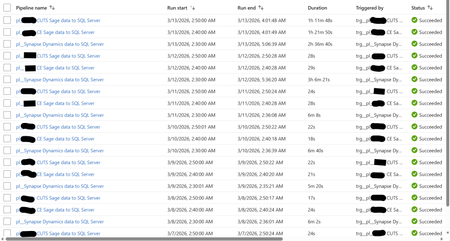
Hi, I'm facing a SQL Server focused issue that I don't understand why it's occurring and would like your help to identify and resolve, please. I will provide an in-depth breakdown of the scenario. Two years ago, I created a Azure Data Factory (ADF) Pipeline to take data from Azure Synapse to Azure SQL Server, and two other Pipelines to take data from an On-Premises Sage server to the same Azure SQL Server. These Pipelines were working perfectly up until two days ago (11/03/26) when the Pipelines still always complete successfully but the duration have increased greatly. The below screenshot shows the log of these three Pipeline for the past week. Note how prior to the 12/03/26 the Synapse Pipeline took about 6 minutes to complete and the two Sage Pipelines took around 25 seconds. Also note how on the 12/03/26 the Synapse Pipeline took over 3 hours but the two Sage Pipelines continued with their normal 25 seconds. Notice today (13/03/26) the Synapse Pipeline was still slow but now the two Sage Pipelines are taking over an hour. I'll note here that the Pipelines still complete successfully (so the config must be correct as it has been for two years). Each Pipeline contains a single (for Sage) or several (for Synapse) 'Copy data' objects. The objects have their source configuration to simply extract from the source (so either Synapse or Sage) and then the sink configuration has a 'Pre-Copy script' which simply Truncates the target SQL Server table, before loading to the SQL Server table. The screenshot below is one example - each Pre-Copy script is populated the same but just with the tables being different. When I look at the log for the Pipelines, I see a common theme for each and that is the 'Pre-Copy script' (the Truncate) is consuming 99% of the time. The screenshot below shows this common theme. So at this point, I ask the question why, after two years of all working well and completing very quickly, are the Pipelines taking so long to complete? This also seems to be an intermittent problem as I have performed several manual executions which will take a long while, then revert back to the quick several minutes again (so good), then revert once more to taking a long while again. It is intermittent. See the screenshot below. Notice how the same Pipeline have different durations. It's intermittent. The reason why I think it is a SQL Server focused issue for the following reasons: 1) Synapse - Performing simple commands (Select Top) returns data within seconds. 2) SQL Server - Performing simple commands (Select Top) usually takes seconds but during the past two days is often taking half hour. 3) SQL Server - When amending a SQL View it would take a split second to complete. During the past two days, it goes over ten minutes and still doesn't complete (I was amending the View for testing purposes). 4) SQL Server - When looking at the Views node under a database, during the past two days, it intermittently doesn't show the View. Sometimes, it will work if I log out and then back into SQL Server. 5) Power BI - Refreshing a Power BI report, whether from the Power BI Service or Desktop, call SQL Server Views. These SQL Server Views read from several SQL Server tables. These report refreshes are failing due to an IDbCommand interface error. These Power BI report data refreshes simply read from a SQL Server table via a SQL View. They don't reference or consider at all the any ADF Pipelines. The Pipelines execute between 2am and 3am each morning. The Power BI report refresh their data around 12pm to 5pm. As SQL Server seems to be problematic at the point of the 'Pre-Copy script', which is one of the end to end process, and then problematic at the very other end where Power BI reports consumes SQL Views - leads me to believe the issue is with SQL Server. I am a report developer and not an ADF expert. I've built the ADF process on the side. I haven't changed any development/configuration/etc... between this all working and failing. Our I.T. department have advised they have made no changes to contribute to this issue. Please can someone advise on what's happening here and why this issue has arose when for two years all was fine? Thanks.136Views0likes0CommentsSQL Timestamp Incremental Load Issue
An incremental load is implemented based on timestamp, using a view to update a fact table. • The fact table contains multiple KPIs coming from different source tables. • Two main KPI tables are included directly in the view and drive the incremental logic (their timestamps change). • Additional KPIs come from other source tables, which are LEFT JOINed to the view. During an incremental run: • Main source tables are updated → timestamp changes • Other source tables are NOT updated → timestamp unchanged • Because of the LEFT JOIN, missing values from these tables are returned as NULL • These NULLs overwrite existing values in the fact table Example Fact table (before load) id app_number score 1 333 5 Source tables • source1, source2 → timestamps updated (drive incremental load) • source3 → timestamp unchanged Stored procedure logic MERGE fact_table tgt USING ( SELECT app_number, ISNULL(score, 0) AS score FROM vw_main_kpis v LEFT JOIN source3 s3 ON v.app_number = s3.app_number ) src ON tgt.app_number = src.app_number WHEN MATCHED THEN UPDATE SET tgt.score = src.score; Result (incorrect) id app_number score 1 333 0 Existing data is lost.426Views0likes2Comments
Pet project on SQL Server 2022 platform
Hello, world! I would like to share my pet project on SQL Server 2022 platform. I have created a DWH solution that includes many MS's best practices and interesting features such us: ETL process with data cleansing and MDM that easy expand Documentation CI/CD Functional ETL test Ready analytical templates Time intelligence New & returning customers Cluster customers based on spending volume Product ABC classification Basket analysis Events in progress https://dev.azure.com/zinykov/NorthwindBI Unfortunately in SQL Server 2025 will be no DQS & MDS...150Views0likes0Comments
SQL Query
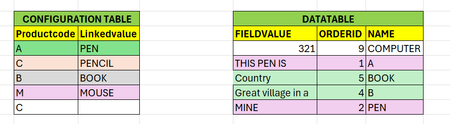
Hi All, I have 2 tables ConfigurationTable and Data table. I require combine value like below output Source tables: Target Output: Sql Scripts: CREATE TABLE CONFIGTABLE(Productcode VARCHAR(10), Linkedvalue VARCHAR(10)) INSERT INTO CONFIGTABLE VALUES ('A', 'PEN') ,('C', 'PENCIL') ,('B', 'BOOK') ,('M', 'MOUSE') CREATE TABLE DATATABLE (FIELDVALUE VARCHAR(50), ORDERID INT,NAME VARCHAR(20)) INSERT INTO DATATABLE VALUES ('321', 9, 'COMPUTER') ,('THIS PEN IS', 1, 'A') ,('Country', 5, 'BOOK') ,('Great village in a', 4, 'B') ,('MINE', 2, 'PEN')Solved332Views0likes2Comments
Difference SQL Server 2022 vs 2017 Bind table
Hi, I'm Beginner SQL Server Engineer. I got some Question to SQL Server 2022, 2017 Bind table. During SQL Server practice, I heard that the bind table does not know statistical information, so there should be no IO reduction due to the index, but in the 2022 version, it seems that the index in the bind table refers to statistical information. something change between 2017 and 2022 Bind table?Solved287Views0likes2CommentsHow can I optimize this query for better performance
Hi , I have this query and it is taking a long time. If there are more than 10k rows, it takes more than 5 minutes. Is there another way to speed up the process? SELECT ROW_NUMBER() OVER (ORDER BY CreationDate DESC) AS RowId, Id [Id], transactionsId [TransactionsId], amount [Amount], AccountId [AccountId], dbo.Account_FirstBalance(CreationDate, AccountId, 161, CompanyId) [FirstBalance] FROM p_Ledger WHERE CreationDate >= '2024-11-01' AND CreationDate <= '2025-02-11' AND CompanyId = 117 AND branchId = 161 ALTER FUNCTION [dbo].[Account_FirstBalance]( @TransactionsDate DATETIME, @AccountId BIGINT, @BranchId INT, @CompanyId BIGINT ) RETURNS FLOAT AS BEGIN DECLARE @credit FLOAT; SELECT @credit = SUM(CASE WHEN T.transactionStatusId = 1 THEN T.amount ELSE -T.amount END) FROM dbo.Transactions T WHERE T.Approval = 1 AND T.CompanyId = @CompanyId AND T.AccountsId = @AccountId AND T.IsDeleted = 0 AND T.transactionsDate < @TransactionsDate AND (@BranchId = 0 OR T.branchId = @BranchId); RETURN ROUND(COALESCE(@credit, 0), 2); END;387Views0likes2Comments
Help in Query to calculate the % from last two timelines
I want to compare the FAmt from last recent two lines and if difference is more than 80% then it should be in the result. The group/index keys are A,B,C,D, Edate. Create table #AR (A int, B char(10), C char(10), D char(10), Edate datetime, FAmt decimal (6,2), G char(2)) Insert into #AR values ('AA','CCC','1','E', '2022-01-01',12.60,'2') Insert into #AR values ('AA','CCC','1','E', '2023-01-01',15.80,'2') Insert into #AR values ('AA','CCC','1','E', '2024-01-01',18.60,'2') Insert into #AR values ('BB','DCC','1','E', '2022-01-01',11.40,'2') Insert into #AR values ('BB','DCC','1','E', '2024-01-01',15.60,'2') Insert into #AR values ('CC','DCC','1','E', '2021-01-01',12.60,'2') Insert into #AR values ('CC','GCC','2','E', '2022-01-01',15.60,'2') Insert into #AR values ('CC','GCC','2','E', '2023-04-01',18.60,'2') Insert into #AR values ('CC','GCC','2','E', '2024-04-01',34.80,'2') --Note: This FAmt is more than 80% from last timeline and it should be in the expected result Expected result: A B C D Edate FAmt G Comments CC GCC 2 E 2024-04-01 34.80 2 Current Amount is > 80% from last timelineSolved403Views0likes6CommentsHow to create view joining two table of similar records without duplicating.
Hi All, Hope all are doing great. I have a small query regarding the Join function to create view. I have two table in which table 1 is having 40k records and table 2 is having 40k records. But when i am joining the both to create view, it is showing 47k records. Please note that i am combining table using two common column in both, one is "Calendar_Date" and one is "Personal_ID". In some cases few Personal ID has duplicate records for each month. So while creating the view the, these duplicate records gets multiplied . Hence the total records exceeds 47k. How to make it same 40k records which i am having in each table. Any help would be highly appreciated. Regards, SagarSolved990Views0likes4Comments